
 我要评论
我要评论封装一个类似微信通讯录带有字母检索功能的vue组件
这里我们直接使用scrollintoview方法
该方法将调用它的元素滚动到浏览器窗口的可见区域
语法
element.scrollintoview(); // 等同于element.scrollintoview(true)
element.scrollintoview(aligntotop); //布尔参数
element.scrollintoview(scrollintoviewoptions); //对象参数
组件
分析一下功能就知道很简单了。
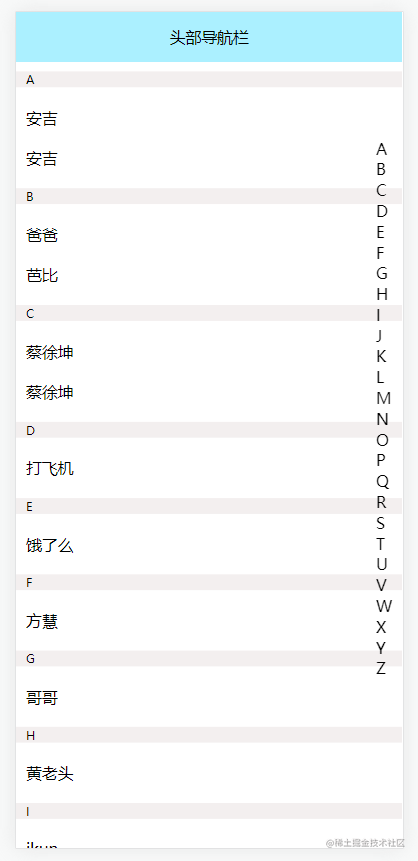
首先需要一个通讯录列表,其次是字母列表。
字母列表很简单。
第一种方法
直接用fromcharcode,for循环遍历拿到26个英文字母。
// 获取26个英文字母大写
    for (var i = 0; i < 26; i++) {
      this.letter.push(string.fromcharcode(65 + i))
    }
但是这样的做法,有一个坏处就是,如果通讯录没有这么多呢?
换句话说,如果通讯录只有abcdefg这几个首字母的联系人,你把26个都弄上去有点不太合适。
第二种方法
也是相对简单的,直接从通讯录列表拿到字母。当然,这种方法需要后端给你对应的数据结构。并且得让他给你按首字母排序好,毕竟能少一事少一事。什么?他不干?打一顿他就听话了。
当然,我给出的数据结构你可以参考:
const peoarray = [
        {
          key: "a",
          list: [
            {
              name: "安吉",
            },
            {
              name: "安吉",
            },
          ],
        },
        {
          key: "b",
          list: [
            {
              name: "爸爸",
            },
            {
              name: "芭比",
            },
          ],
        },
        {
          key: "c",
          list: [
            {
              name: "蔡徐坤",
            },
            {
              name: "蔡徐坤",
            },
          ],
        },
 ]
直接上代码
<template>
  <div id="letterpeo">
    <!-- 导航栏 -->
    <nav class="navbar" v-if="navbar" :style="{ height: navbarheight }">头部导航栏</nav>
    <!-- 字母检索 -->
    <div class="letter">
      <div v-for="(item, index) in letter" :key="index" @click="scrollon(item, index)">
        {{ item }}
      </div>
    </div>

    <!-- 通讯录列表 -->
    <div class="peobox">
      <div class="peo" ref="box">
        <div
          v-for="(item, index) in peoarray"
          :key="index"
          @click="onselect(item, index)"
        >
          <p class="peokey" :id="'peo' + item.key">{{ item.key }}</p>
          <p class="peolist" v-for="(ele, e) in item.list" :key="e">{{ ele.name }}</p>
        </div>
      </div>
    </div>
  </div>
</template>

<script>
export default {
  data() {
    return {
      navbar: true, //是否开启头部导航
      navbarheight: "50px", //导航栏高度
      letter: [], //字母检索列表
      peoarray: [],//通讯录列表
    };
  },
  computed: {},
  mounted() {
    // 获取26个英文字母大写
    // for (var i = 0; i < 26; i++) {
    //   this.letter.push(string.fromcharcode(65 + i))
    // }

    // 只获取通讯录字母
    this.peoarray.foreach((ele) => {
      this.letter.push(ele.key);
    });

    //因为有导航栏的原因,默认距离顶部一个导航栏的高度
    if (this.navbar) this.$refs.box.style.margintop = this.navbarheight;
  },
  methods: {
    // 字母检索
    scrollon(item) {
      if (this.navbar) this.$refs.box.style.margintop = 0; // 开启导航后,上边距默认清零

      let target = document.getelementbyid("peo" + item); //获取每个字母通讯录对象
      if (target)
        target.scrollintoview({
          behavior: "smooth", // 定义动画过渡效果, "auto"或 "smooth" 之一。默认为 "auto"
        });

      if (this.navbar) this.$refs.box.style.margintop = this.navbarheight; //因为有导航栏的原因,所以上边距应该为导航栏的高度
    },
    // 点击通讯录
    onselect(item, index) {
      console.log(item, index);
    },
  },
};
</script>

<style scoped>
#letterpeo {
  width: 100%;
}
/* 导航栏 */
.navbar {
  width: 100%;
  position: fixed;
  text-align: center;
  line-height: 50px;
  background: #abf0ff;
  z-index: 3;
}
/* 字母 */
.letter {
  position: fixed;
  right: 10px;
  top: 15%;
  z-index: 2;
}
/* 通讯录 */
.peobox {
  position: relative;
}

.peo {
  width: 100%;
  overflow-y: scroll;
  position: absolute;
}
.peo p{
    padding: 0 10px;
}
.peo .peokey {
  margin: 10px 0;
  font-size: 12px;
  background-color: #f3efef;
}
.peolist {
  margin: 20px 0;
}
</style>
完整数据
[
        {
          key: "a",
          list: [
            {
              name: "安吉",
            },
            {
              name: "安吉",
            },
          ],
        },
        {
          key: "b",
          list: [
            {
              name: "爸爸",
            },
            {
              name: "芭比",
            },
          ],
        },
        {
          key: "c",
          list: [
            {
              name: "蔡徐坤",
            },
            {
              name: "蔡徐坤",
            },
          ],
        },
        {
          key: "d",
          list: [
            {
              name: "打飞机",
            },
          ],
        },
        {
          key: "e",
          list: [
            {
              name: "饿了么",
            },
          ],
        },
        {
          key: "f",
          list: [
            {
              name: "方慧",
            },
          ],
        },
        {
          key: "g",
          list: [
            {
              name: "哥哥",
            },
          ],
        },
        {
          key: "h",
          list: [
            {
              name: "黄老头",
            },
          ],
        },
        {
          key: "i",
          list: [
            {
              name: "ikun",
            },
          ],
        },
        {
          key: "j",
          list: [
            {
              name: "接化发",
            },
          ],
        },
        {
          key: "k",
          list: [
            {
              name: "kfc",
            },
          ],
        },
        {
          key: "l",
          list: [
            {
              name: "刘老根",
            },
          ],
        },
        {
          key: "m",
          list: [
            {
              name: "没读书",
            },
          ],
        },
        {
          key: "n",
          list: [
            {
              name: "牛头人",
            },
          ],
        },
        {
          key: "o",
          list: [
            {
              name: "o泡果奶",
            },
          ],
        },
        {
          key: "p",
          list: [
            {
              name: "嫖老头",
            },
          ],
        },
        {
          key: "q",
          list: [
            {
              name: "秦三儿",
            },
          ],
        },
        {
          key: "r",
          list: [
            {
              name: "日",
            },
          ],
        },
        {
          key: "s",
          list: [
            {
              name: "塞班",
            },
          ],
        },
        {
          key: "t",
          list: [
            {
              name: "糖糖",
            },
          ],
        },
        {
          key: "u",
          list: [
            {
              name: "u哈哈哈哈",
            },
          ],
        },
        {
          key: "v",
          list: [
            {
              name: "v me 50",
            },
          ],
        },
        {
          key: "w",
          list: [
            {
              name: "王富贵",
            },
          ],
        },
        {
          key: "x",
          list: [
            {
              name: "喜羊羊",
            },
          ],
        },
        {
          key: "y",
          list: [
            {
              name: "阳顶天",
            },
          ],
        },
        {
          key: "z",
          list: [
            {
              name: "赵一曼",
            },
          ],
        },
      ],
总结
以上为个人经验,希望能给大家一个参考,也希望大家多多支持代码网。


发表评论