
 我要评论
我要评论因最近工作中遇到了无分页情景下页面因大数据量卡顿的问题,在分别考虑并尝试了懒加载、虚拟滚动、分批渲染等各个方法后,最后决定使用分批渲染来解决该问题。
代码实现
表格代码
<el-table
    :data="currtabledata"
    border
    style="width: 100%;"
    :max-height="getmaxheight()"
    :cell-style="cellstyle"
    @cell-click="handlecellclick"
>
    <!--姓名列-->
    <el-table-column
        style="background-color: #fff;"
        :align="'center'"
        prop="username"
        label="姓名"
        width="80"
        fixed/>
    <!--工号-->
    <el-table-column
        v-for="(item, index) in filteredcfgcolumns"
        :key="index"
        style="background-color: #fff;"
        :align="'center'"
        :prop="item.prop"
        :label="item.label"
    />

    <!--
        这一块牵扯到合并列及周期模式切换后的动态展示
        需要特殊处理,不要写死
    -->
    <el-table-column
        v-for="(date, index) in dateheaders"
        :key="index"
        :align="'center'"
        :class-name="isweekend(date)"
        :label-class-name="isweekend(date)"
        :width="getcolumnwidth()"
    >
        <!--星期几/日期-->
        <template #header>
            <div>{{ getweekday(date) }}</div>
            <div>{{ parsedate(date) }}</div>
        </template>

        <!--表格内容 -->
        <template #default="{row}">
            <div
                class="cell-content"
                v-if="row[date]"
                :data-cell-content="json.stringify(row[date])"
                :class="`${row[date].cellkey}`"
            >
                <!-- 第一行 -->
                <div v-if="pagesettinglist.includes('显示附加班')" class="row"
                    style="font-size: 8px;min-height: 12px; display: flex; align-items: center;">
                    <el-row style="width: 100%;">
                        <el-col :span="24" style="color: red;font-weight: 600;text-align: right;">
                            {{ row[date]?.attchdetail || '' }}
                        </el-col>
                    </el-row>
                </div>
                <!-- 第二行 -->
                <div class="row"
                    style="font-size: 10px;min-height: 20px; display: flex; align-items: center;white-space: nowrap;overflow: hidden;">
                    <el-row style="width: 100%;">
                        <el-col :span="24" style="font-weight: 600;text-align: center;">
                            <styledtext :colorandschedules="colorandschedules"
                                :styledtexts="row[date]?.maindetail || ''" />
                        </el-col>
                    </el-row>
                </div>
                <!-- 第三行 -->
                <div class="row"
                    style="font-size: 8px;min-height: 12px; display: flex; align-items: center;">
                    <el-row style="width: 100%;">
                        <el-col :span="6" v-if="pagesettinglist.includes('显示上期排班')"
                            style="display: block;text-align: left;font-weight: 600;color: green;">
                            {{ 'a1' }}
                        </el-col>
                        <el-col :span="12" v-if="pagesettinglist.includes('显示申请班')"
                            style="display: block;text-align: center;font-weight: 600;color: green;">
                            {{ row[date]?.applydetail || '' }}
                        </el-col>
                        <el-col :span="6"
                            style="display: block;text-align: left;font-weight: 600;color: green;">
                            <div class="tip-con">
                                <el-tooltip
                                style="position: absolute!important; right: 0;bottom: 0; color: red; font-size: 12px;"
                                placement="top"
                                v-if="isshowremark(row[date]?.remarkinfo)">
                                    <template #content>
                                        <el-table :data="row[date]?.remarkinfo" style="width: 100%">
                                            <el-table-column prop="shifts" label="班次名" width="180" />
                                            <el-table-column prop="remark" label="备注" width="180" />
                                            <el-table-column prop="type" label="班次类型" />
                                        </el-table>
                                    </template>
                                    <el-icon><infofilled /></el-icon>
                                </el-tooltip>
                            </div>
                        </el-col>
                    </el-row>
                </div>
            </div>
        </template>
    </el-table-column>
</el-table>
分批渲染逻辑代码
定义变量
 startindex: 0, //开始索引,用于分批渲染的
 batchsize: 6, // 一次性渲染的条数
分批渲染方法
const currtabledata = ref([])

const loadbatch = () => {
   if (state.startindex < props.tabledata.length) {
       const endindex = math.min(state.startindex + state.batchsize, props.tabledata.length);
       currtabledata.value = currtabledata.value.concat(props.tabledata.slice(state.startindex, endindex));
       state.startindex = endindex;
       requestanimationframe(loadbatch);
   }
}

watch(() => props.tabledata, newdata => {
   currtabledata.value = []; // 重置数据
   state.startindex = 0;
   loadbatch()
}, { immediate: true })
效果
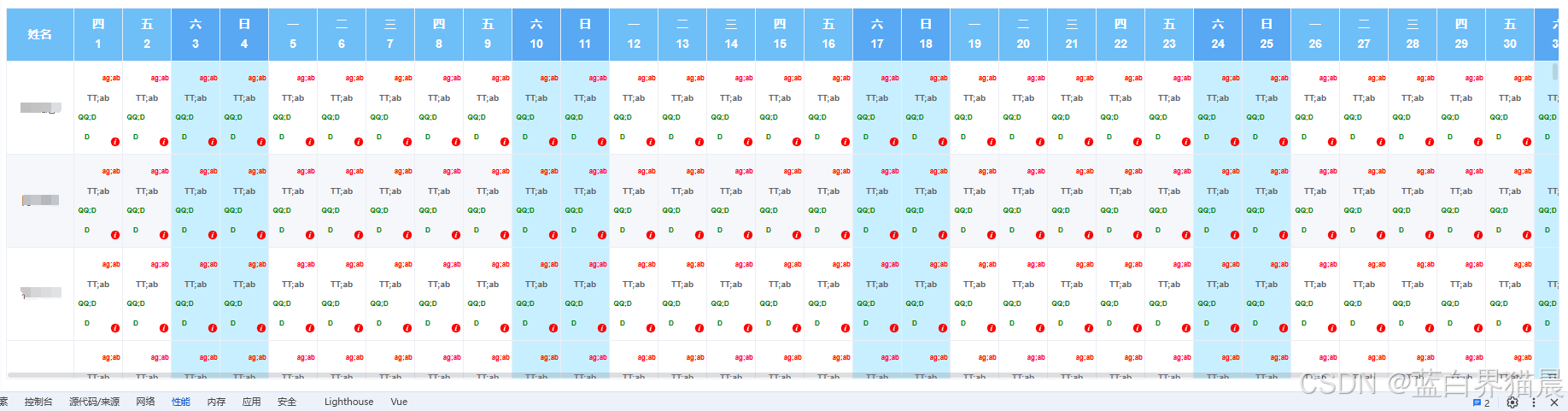
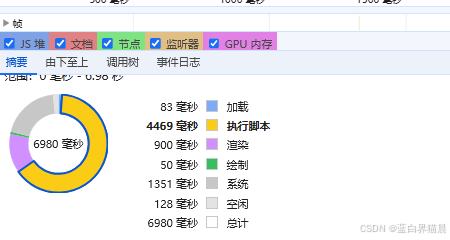
注
上面便是分批渲染表格的具体实现方式,可以看到这个表格是相当复杂的,哪怕是使用了分批渲染,第一次也用了6秒多的时间,可想而知如果一次性渲染几百行几千行,消耗的时间肯定会大大影响用户体验。当然,这种页面性能的优化不仅仅分批渲染一种手段,后面我会持续探索,如果有了新的手段,也会总结成文的。
到此这篇关于vue3实现el-table分批渲染表格的文章就介绍到这了,更多相关vue3 el-table分批渲染表格内容请搜索代码网以前的文章或继续浏览下面的相关文章希望大家以后多多支持代码网!




发表评论