
 我要评论
我要评论近年来,vue 项目中使用 tsx(typescript jsx)的写法逐渐增多,尤其在 typescript 项目中。
1. tsx 与 vue 的结合背景
1、vue 3 和 typescript
vue 3 从设计之初便更好地支持 typescript。vue 3 使用了 typescript 重写核心,增强了类型推断和类型安全的支持,使得 typescript 更适合与 vue 3 配合使用。
2、组合式 api
vue 3 推出组合式 api,使代码逻辑更加模块化,也更接近于函数式编程的风格,这让代码结构更贴近 tsx 的写法,方便在 typescript 和 jsx 中组织逻辑。
2. 简单的示例 🌰
下面结合几个具体的 🌰 详细说明在 vue 中使用 tsx 和传统 .vue 文件之间的差异。
2.1 基础组件
假设需要创建一个简单的用户卡片组件,用于显示用户的姓名和年龄。
1、使用 .vue 文件编写
.vue 文件的模板语法非常适合这种简单的展示性组件,因为结构清晰,模板代码直观。
<!-- usercard.vue -->
<template>
  <div class="user-card">
    <p>name: {{ name }}</p>
    <p>age: {{ age }}</p>
  </div>
</template>
<script setup lang="ts">
import { defineprops } from 'vue';
const props = defineprops<{
  name: string;
  age: number;
}>();
</script>
2、使用 tsx 编写
在 tsx 中写同样的组件,代码结构会略有不同,因为模板和逻辑是统一在一起的:
// usercard.tsx
import { definecomponent } from 'vue';
export default definecomponent({
  name: 'usercard',
  props: {
    name: string,
    age: number,
  },
  setup(props) {
    return () => (
      <div class="user-card">
        <p>name: {props.name}</p>
        <p>age: {props.age}</p>
      </div>
    );
  },
});
2.2 复杂组件:带插槽和事件处理
插槽和事件处理是 vue 中常见的功能,在 .vue 文件和 .tsx 文件中实现会略有不同。
1、使用 .vue 文件编写
<!-- modal.vue -->
<template>
  <div v-if="visible" class="modal">
    <div class="modal-content">
      <slot></slot>
      <button @click="close">close</button>
    </div>
  </div>
</template>
<script setup lang="ts">
import { defineprops, defineemits } from 'vue';
const props = defineprops<{ visible: boolean }>();
const emit = defineemits<{ (e: 'close'): void }>();
function close() {
  emit('close');
}
</script>
<style scoped>
.modal {
  position: fixed;
  top: 0;
  left: 0;
  right: 0;
  bottom: 0;
  background: rgba(0, 0, 0, 0.5);
  display: flex;
  justify-content: center;
  align-items: center;
}
.modal-content {
  background: white;
  padding: 1rem;
  margin: auto;
}
</style>
2、使用 .tsx 编写
tsx 中通过直接传递插槽内容来实现类似的功能。
// modal.tsx
import { definecomponent, ref } from 'vue';
export default definecomponent({
  name: 'modal',
  props: {
    visible: boolean,
  },
  emits: ['close'],
  setup(props, { emit, slots }) {
    const close = () => emit('close');
    return () => (
      props.visible && (
        <div class="modal" style={{
          position: 'fixed', top: 0, left: 0, right: 0, bottom: 0,
          background: 'rgba(0, 0, 0, 0.5)', display: 'flex', justifycontent: 'center', alignitems: 'center'
        }}>
          <div class="modal-content" style={{ background: 'white', padding: '1rem' }}>
            {slots.default && slots.default()}
            <button onclick={close}>close</button>
          </div>
        </div>
      )
    );
  },
});
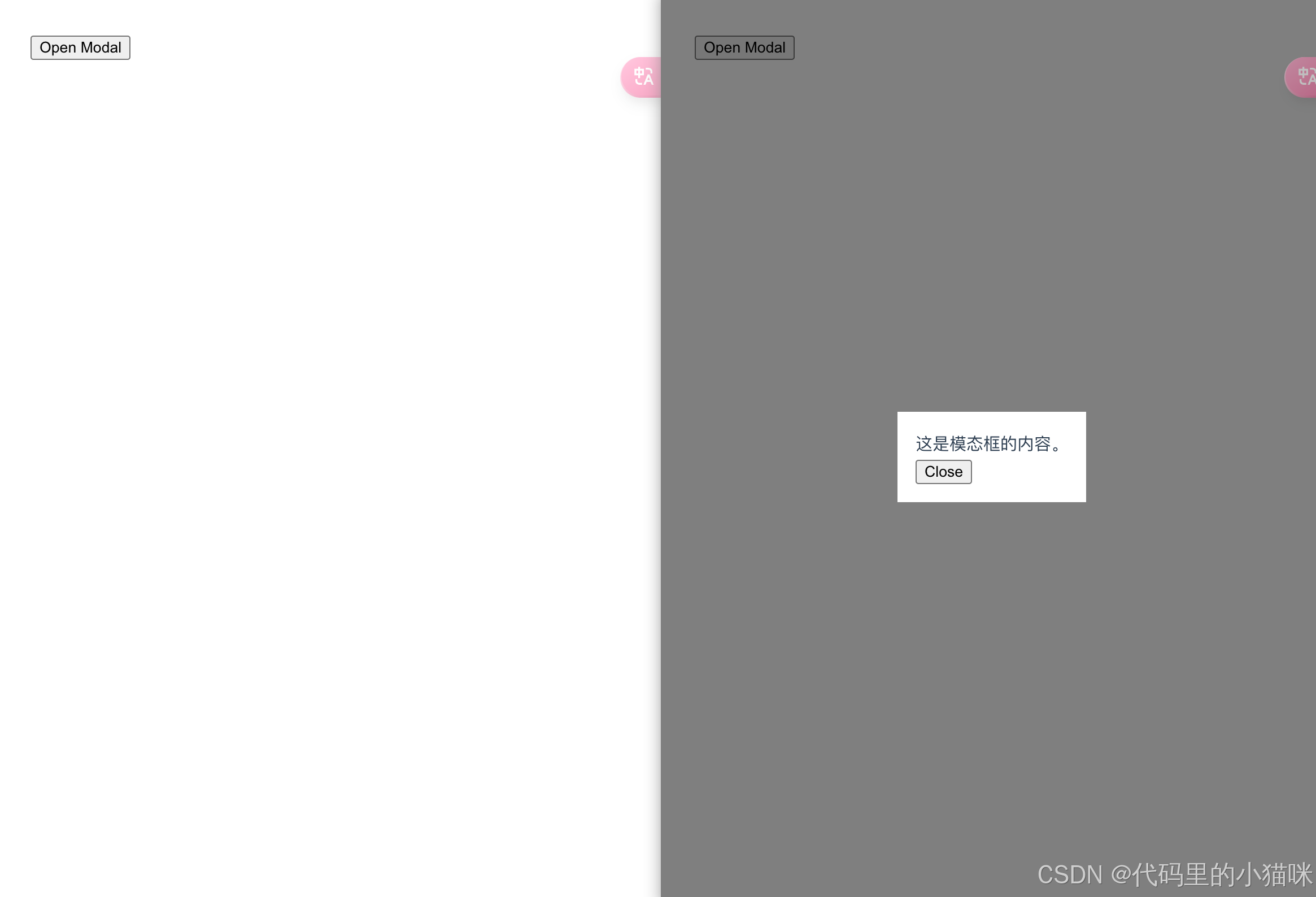
展示为:
2.3 使用组件
1、使用 .vue 文件
<template>
  <div>
    <usercard name="alice" :age="25" />
    <modal :visible="ismodalvisible" @close="togglemodal">
      <p>this is the modal content!</p>
    </modal>
    <button @click="togglemodal">toggle modal</button>
  </div>
</template>
<script setup>
import usercard from './components/usercard.vue';
import modal from './components/modal.vue';
import { ref } from 'vue';
const ismodalvisible = ref(false);
const togglemodal = () => (ismodalvisible.value = !ismodalvisible.value);
</script>
2、使用 .tsx 文件
import { definecomponent, ref } from 'vue';
import usercard from './components/usercard';
import modal from './components/modal';
export default definecomponent({
  name: 'app',
  setup() {
    const ismodalvisible = ref(false);
    const togglemodal = () => (ismodalvisible.value = !ismodalvisible.value);
    return () => (
      <div>
        <usercard name="alice" age={25} />
        <modal visible={ismodalvisible.value} onclose={togglemodal}>
          <p>this is the modal content!</p>
        </modal>
        <button onclick={togglemodal}>toggle modal</button>
      </div>
    );
  },
});
3、tsx 写法的优缺点
优点:
1、类型支持与代码提示:tsx 能够利用 typescript 的类型推断功能,减少开发中的类型错误。
2、灵活性与复用性:tsx 的写法更贴近 javascript 和函数式编程的范式,因此能更灵活地编写高阶组件和传递 props。许多复杂逻辑可以通过更纯粹的函数式写法实现。
3、易于集成第三方库:tsx 更符合主流 javascript 库(例如 react)的写法。
4、更好的代码组织:对于团队开发中的大型项目,tsx 组件更容易分离逻辑和样式管理,提升代码模块化水平。
缺点:
1、学习成本增加:tsx 更贴近 javascript 函数式写法,vue 开发者需要理解 jsx 语法。
2、可读性降低:tsx 将模板、逻辑和样式混合在一个文件中,尽管提升了灵活性,但可读性不如传统的 .vue 文件结构。
4. 趋势与发展方向
对于复杂的企业级应用,tsx 的灵活性、类型安全性更符合需求。虽然 vue 社区仍然以 .vue 文件为主流,但对于某些 ts 和 js 深度开发者来说,tsx 正成为常见选择。vue 团队未来可能会继续增强对 tsx 的支持,以适应不同的编程习惯。
到此这篇关于vue 项目中选择 tsx 而非传统 .vue 文件的原因分析的文章就介绍到这了,更多相关vue内容请搜索代码网以前的文章或继续浏览下面的相关文章希望大家以后多多支持代码网!



发表评论