
 我要评论
我要评论一、背景
原型上需要对两个字段动态合计,输出摘要信息
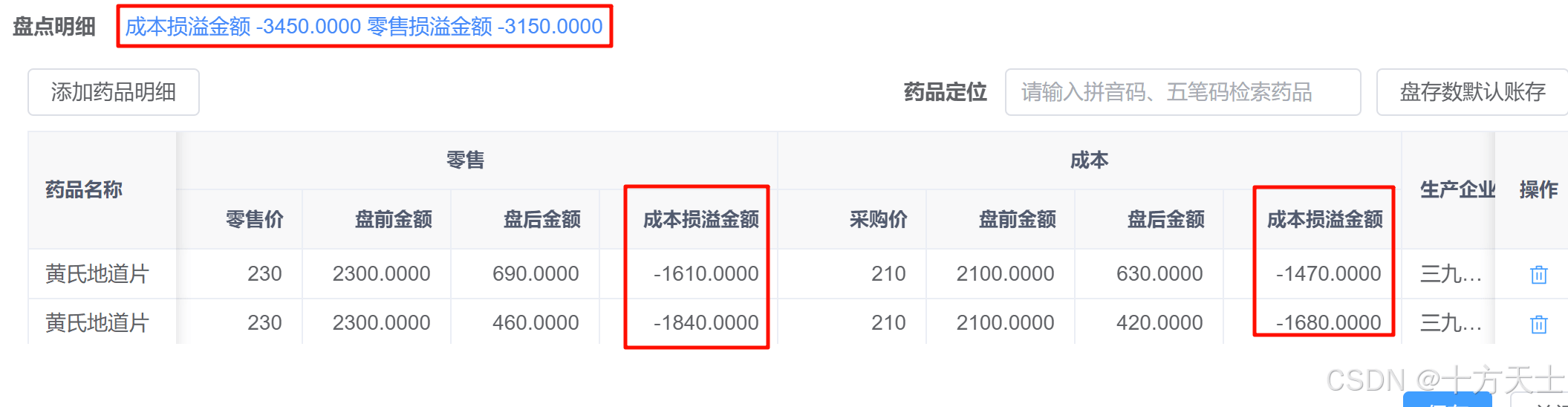
原先想到是的element的 :summary-method,发现不是动态,所以换监听来实现
二、vue代码
   <el-table v-model="loading" :data="itemlist">
          <el-table-column label="药品名称" prop="drugname" fixed min-width="100px" :show-overflow-tooltip="true"/>
          <el-table-column label="规格" prop="drugspec" :show-overflow-tooltip="true"/>
          <el-table-column label="批号" prop="batchno" :show-overflow-tooltip="true"/>
          <el-table-column label="账面数" prop="batchstockdesc" min-width="90px"/>
          <el-table-column label="盘存数" align="center">
            <el-table-column prop="stocktakeqty" min-width="150px">
              <template v-slot="scope">
                <el-input-number :disabled="!canedit"
                                 v-model="scope.row.stocktakeqty"
                                 :min="0"
                                 controls-position="right"
                                 size="small"/>
              </template>
            </el-table-column>
            <el-table-column label="单位" prop="unit" min-width="90px">
              <template #default="scope">
                <dict-tag :options="bd_plat_drug_unit" :value="scope.row.unit" :showvalue="false"/>
              </template>
            </el-table-column>
            <el-table-column prop="stocktaketinyqty" min-width="150px">
              <template v-slot="scope">
                <el-input-number :disabled="!canedit"
                                 v-model="scope.row.stocktaketinyqty"
                                 :min="0"
                                 controls-position="right"
                                 size="small"/>
              </template>
            </el-table-column>
            <el-table-column label="小单位" prop="tinyunit" min-width="90px">
              <template #default="scope">
                <dict-tag :options="bd_plat_drug_unit" :value="scope.row.tinyunit" :showvalue="false"/>
              </template>
            </el-table-column>
          </el-table-column>
          <el-table-column label="零售" align="center">
            <el-table-column label="零售价" prop="retailprice" min-width="100px" :show-overflow-tooltip="true"
                             align="right"/>
            <el-table-column label="盘前金额" prop="totalretail" min-width="100px" :show-overflow-tooltip="true"
                             align="right"/>
            <el-table-column label="盘后金额" prop="aftertotalretail" min-width="100px" :show-overflow-tooltip="true"
                             align="right">
              <template v-slot="scope">
                {{
                  scope.row.aftertotalretail = computetotalmoney(scope.row.stocktakeqty, scope.row.stocktaketinyqty, scope.row.packageqty, scope.row.retailprice)
                }}
              </template>
            </el-table-column>
            <el-table-column label="成本损溢金额" prop="totallossoverretail" min-width="120px" align="right">
              <template v-slot="scope">
                {{
                  scope.row.totallossoverretail = computedifferencemoney(scope.row.stocktakeqty, scope.row.stocktaketinyqty, scope.row.packageqty, scope.row.retailprice, scope.row.totalretail)
                }}
              </template>
            </el-table-column>
          </el-table-column>
          <el-table-column label="成本" align="center">
            <el-table-column label="采购价" prop="purchaseprice" min-width="100px" :show-overflow-tooltip="true"
                             align="right"/>
            <el-table-column label="盘前金额" prop="totalpurchase" min-width="100px" :show-overflow-tooltip="true"
                             align="right"/>
            <el-table-column label="盘后金额" prop="aftertotalpurchase" min-width="100px" :show-overflow-tooltip="true"
                             align="right">
              <template v-slot="scope">
                {{
                  scope.row.aftertotalpurchase = computetotalmoney(scope.row.stocktakeqty, scope.row.stocktaketinyqty, scope.row.packageqty, scope.row.purchaseprice)
                }}
              </template>
            </el-table-column>
            <el-table-column label="成本损溢金额" prop="totallossoverpurchase" min-width="120px"
                             :show-overflow-tooltip="true" align="right">
              <template v-slot="scope">
                {{
                  scope.row.totallossoverpurchase = computedifferencemoney(scope.row.stocktakeqty, scope.row.stocktaketinyqty, scope.row.packageqty, scope.row.purchaseprice, scope.row.totalpurchase)
                }}
              </template>
            </el-table-column>
          </el-table-column>
          <el-table-column label="生产企业" prop="firmname" min-width="80px" :show-overflow-tooltip="true"/>
          <el-table-column label="产地" prop="producername" min-width="80px" :show-overflow-tooltip="true"/>
          <el-table-column label="库位码" prop="locationcode" min-width="100px" :show-overflow-tooltip="true"/>
          <el-table-column label="操作" fixed="right" min-width="60px" align="center" v-if="canedit"
                           class-name="small-padding fixed-width">
            <template #default="scope">
              <el-button link type="primary" icon="delete" title="删除" @click="handledelete(scope.row)"/>
            </template>
          </el-table-column>
        </el-table>
其中代码,赋值给totallossoverretail 才能保证,后期监听时数据有发生变化
                {{
                  scope.row.totallossoverretail = computedifferencemoney(scope.row.stocktakeqty, scope.row.stocktaketinyqty, scope.row.packageqty, scope.row.retailprice, scope.row.totalretail)
                }}
三、方法代码
watch(itemlist, () => {
  console.log(itemlist.value, 'itemlist')
  let totallossoverretail = 0
  let totallossoverpurchase = 0
  itemlist.value.foreach(item => {
    totallossoverretail = number(totallossoverretail) + number(item.totallossoverretail);
    totallossoverpurchase = number(totallossoverpurchase) + number(item.totallossoverpurchase);
  })
  sumdescription.value = '成本损溢金额 ' + totallossoverpurchase + ' 零售损溢金额  ' + totallossoverretail
}, {deep: true});
其中开启深度监听
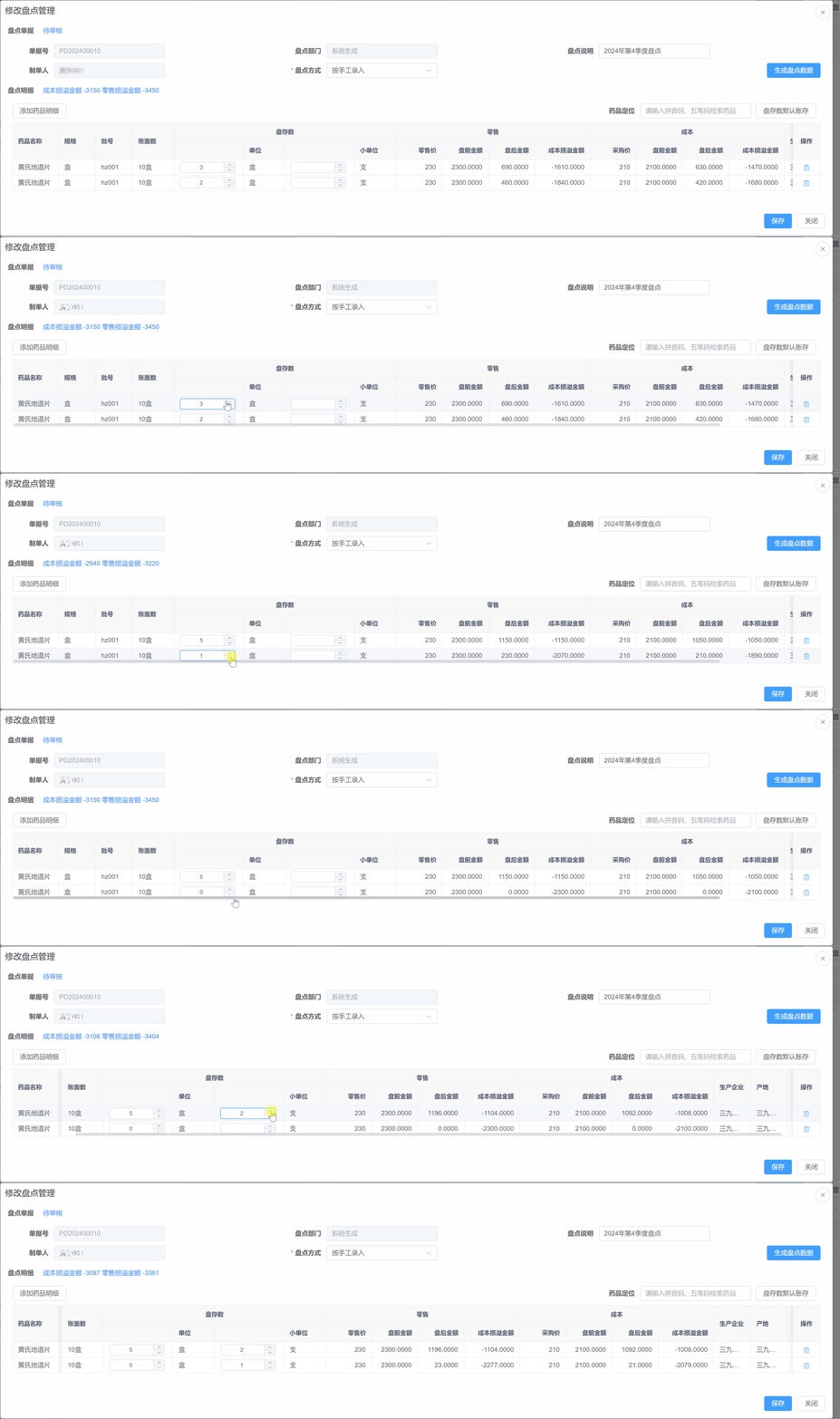
四、效果
到此这篇关于vue3中element table表头动态展示合计信息的文章就介绍到这了,更多相关vue3 element table动态表头内容请搜索代码网以前的文章或继续浏览下面的相关文章希望大家以后多多支持代码网!



发表评论