
 我要评论
我要评论java视频时长的计算以及视频封面图截取
本人使用的maven进行下载对应的jar包,其中代码适用window环境和linux环境,亲自测过,没问题。
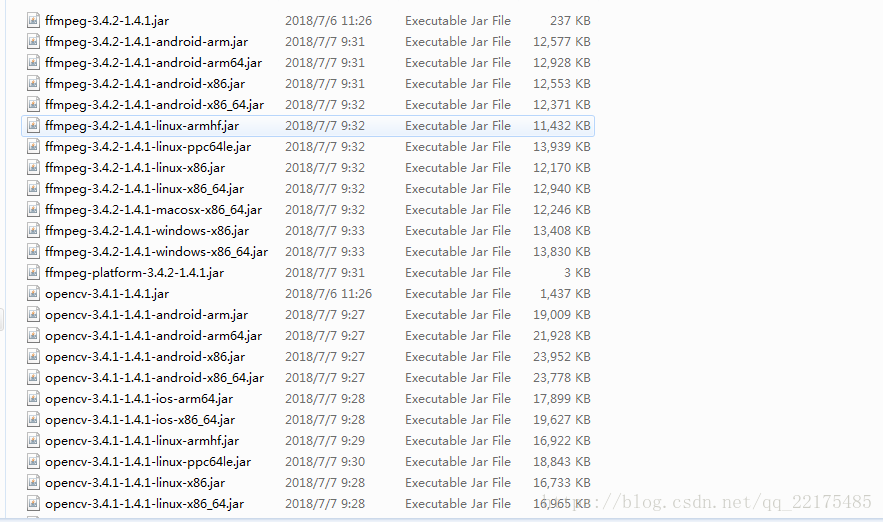

maven需要用到的groupid和artifactid以及版本,如下所示:
<dependency>
            <groupid>org.bytedeco</groupid>
            <artifactid>javacv</artifactid>
            <version>1.4.1</version>
        </dependency>
        <dependency>
            <groupid>org.bytedeco</groupid>
            <artifactid>javacpp</artifactid>
            <version>1.4.1</version>
        </dependency>
        <dependency>
            <groupid>org.bytedeco.javacpp-presets</groupid>
            <artifactid>opencv-platform</artifactid>
            <version>3.4.1-1.4.1</version>
        </dependency>
        <dependency>
            <groupid>org.bytedeco.javacpp-presets</groupid>
            <artifactid>ffmpeg-platform</artifactid>
            <version>3.4.2-1.4.1</version>
        </dependency>
java代码
import java.awt.image;
import java.awt.image.bufferedimage;
import java.io.file;
import javax.imageio.imageio;
import org.bytedeco.javacv.ffmpegframegrabber;
import org.bytedeco.javacv.frame;
import org.bytedeco.javacv.java2dframeconverter;

/**
 * 视频工具
 * @author
 *
 */
public class videoutil {
    /**
     * 获取指定视频的帧并保存为图片至指定目录
     * @param file  源视频文件
     * @param framefile  截取帧的图片存放路径
     * @throws exception
     */
    public static void fetchpic(file file, string framefile) throws exception{
        ffmpegframegrabber ff = new ffmpegframegrabber(file);
        ff.start();
        int lenght = ff.getlengthinframes();

        file targetfile = new file(framefile);
        int i = 0;
        frame frame = null;
        while (i < lenght) {
            // 过滤前5帧,避免出现全黑的图片,依自己情况而定
            frame = ff.grabframe();
            if ((i > 5) && (frame.image != null)) {
                break;
            }
            i++;
        }

        string imgsuffix = "jpg";
        if(framefile.indexof('.') != -1){
            string[] arr = framefile.split("\\.");
            if(arr.length>=2){
                imgsuffix = arr[1];
            }
        }

        java2dframeconverter converter =new java2dframeconverter();
        bufferedimage srcbi =converter.getbufferedimage(frame);
        int owidth = srcbi.getwidth();
        int oheight = srcbi.getheight();
        // 对截取的帧进行等比例缩放
        int width = 800;
        int height = (int) (((double) width / owidth) * oheight);
        bufferedimage bi = new bufferedimage(width, height, bufferedimage.type_3byte_bgr);
        bi.getgraphics().drawimage(srcbi.getscaledinstance(width, height, image.scale_smooth),0, 0, null);
        try {
            imageio.write(bi, imgsuffix, targetfile);
        }catch (exception e) {
            e.printstacktrace();
        }
        ff.stop();
    }

    /**
     * 获取视频时长,单位为秒
     * @param file
     * @return 时长(s)
     */
    public static long getvideotime(file file){
        long times = 0l;
        try {
            ffmpegframegrabber ff = new ffmpegframegrabber(file);
            ff.start();
            times = ff.getlengthintime()/(1000*1000);
            ff.stop();
        } catch (exception e) {
            e.printstacktrace();
        }
        return times;
    }
}
以上就是java获取视频的时长,以及视频获取其中封面截图。
除了上文的方法,小编还为大家整理了其他java获取视频时长(实测可行)的方法,希望对大家有所帮助
下面是完整代码
pom.xml
 <!-- mp3文件支持(如语音时长)-->
    <dependency>
      <groupid>org</groupid>
      <artifactid>jaudiotagger</artifactid>
      <version>2.0.1</version>
    </dependency>

    <!-- mp4文件支持(如语音时长)-->
    <dependency>
      <groupid>com.googlecode.mp4parser</groupid>
      <artifactid>isoparser</artifactid>
      <version>1.1.22</version>
    </dependency>
单元测试
package com.opensourceteams.modules.java.util.video;

import org.junit.test;

import java.io.ioexception;

import static org.junit.assert.*;

public class videoutiltest {

    @test
    public void getduration() throws ioexception {
        string path = "/users/liuwen/downloads/temp/语音测试文件/xiaoshizi.mp3" ;
      /*path 为本地地址 */

        long result = videoutil.getduration(path);
        system.out.println(result);
    }

}
工具类
package com.opensourceteams.modules.java.util.video;


import com.coremedia.iso.isofile;

import java.io.ioexception;


public class videoutil {


    /**
     * 获取视频文件的播放长度(mp4、mov格式)
     * @param videopath
     * @return 单位为毫秒
     */
    public static long getmp4duration(string videopath) throws ioexception {
        isofile isofile = new isofile(videopath);
        long lengthinseconds =
                isofile.getmoviebox().getmovieheaderbox().getduration() /
                isofile.getmoviebox().getmovieheaderbox().gettimescale();
        return lengthinseconds;
    }


    /**
     * 得到语音或视频文件时长,单位秒
     * @param filepath
     * @return
     * @throws ioexception
     */
    public static long getduration(string filepath) throws ioexception {
        string format = getvideoformat(filepath);
        long result = 0;
        if("wav".equals(format)){
            result = audioutil.getduration(filepath).intvalue();
        }else if("mp3".equals(format)){
            result = audioutil.getmp3duration(filepath).intvalue();
        }else if("m4a".equals(format)) {
            result = videoutil.getmp4duration(filepath);
        }else if("mov".equals(format)){
            result = videoutil.getmp4duration(filepath);
        }else if("mp4".equals(format)){
            result = videoutil.getmp4duration(filepath);
        }

        return result;
    }

    /**
     * 得到语音或视频文件时长,单位秒
     * @param filepath
     * @return
     * @throws ioexception
     */
    public static long getduration(string filepath,string format) throws ioexception {
        long result = 0;
        if("wav".equals(format)){
            result = audioutil.getduration(filepath).intvalue();
        }else if("mp3".equals(format)){
            result = audioutil.getmp3duration(filepath).intvalue();
        }else if("m4a".equals(format)) {
            result = videoutil.getmp4duration(filepath);
        }else if("mov".equals(format)){
            result = videoutil.getmp4duration(filepath);
        }else if("mp4".equals(format)){
            result = videoutil.getmp4duration(filepath);
        }

        return result;
    }


    /**
     * 得到文件格式
     * @param path
     * @return
     */
    public static string getvideoformat(string path){
        return  path.tolowercase().substring(path.tolowercase().lastindexof(".") + 1);
    }


}
package com.opensourceteams.modules.java.util.video;

import org.jaudiotagger.audio.audiofileio;
import org.jaudiotagger.audio.mp3.mp3audioheader;
import org.jaudiotagger.audio.mp3.mp3file;


import javax.sound.sampled.audioformat;
import javax.sound.sampled.audioinputstream;
import javax.sound.sampled.audiosystem;
import java.io.file;

public class audioutil {


    /**
     * 获取语音文件播放时长(秒) 支持wav 格式
     * @param filepath
     * @return
     */
    public static float getduration(string filepath){
        try{

            file destfile = new file(filepath);
            audioinputstream audioinputstream = audiosystem.getaudioinputstream(destfile);
            audioformat format = audioinputstream.getformat();
            long audiofilelength = destfile.length();
            int framesize = format.getframesize();
            float framerate = format.getframerate();
            float durationinseconds = (audiofilelength / (framesize * framerate));
            return durationinseconds;

        }catch (exception e){
            e.printstacktrace();
            return 0f;
        }

    }

    /**
     * 获取mp3语音文件播放时长(秒) mp3
     * @param filepath
     * @return
     */
    public static float getmp3duration(string filepath){

        try {
            file mp3file = new file(filepath);
            mp3file f = (mp3file) audiofileio.read(mp3file);
            mp3audioheader audioheader = (mp3audioheader)f.getaudioheader();
            return float.parsefloat(audioheader.gettracklength()+"");
        } catch(exception e) {
            e.printstacktrace();
            return 0f;
        }
    }


    /**
     * 获取mp3语音文件播放时长(秒)
     * @param mp3file
     * @return
     */
    public static float getmp3duration(file mp3file){

        try {
            //file mp3file = new file(filepath);
            mp3file f = (mp3file) audiofileio.read(mp3file);
            mp3audioheader audioheader = (mp3audioheader)f.getaudioheader();
            return float.parsefloat(audioheader.gettracklength()+"");
        } catch(exception e) {
            e.printstacktrace();
            return 0f;
        }
    }


    /**
     * 得到pcm文件的毫秒数
     *
     * pcm文件音频时长计算
     * 同图像bmp文件一样,pcm文件保存的是未压缩的音频信息。 16bits 编码是指,每次采样的音频信息用2个字节保存。可以对比下bmp文件用分别用2个字节保存rgb颜色的信息。 16000采样率 是指 1秒钟采样 16000次。常见的音频是44100hz,即一秒采样44100次。 单声道: 只有一个声道。
     *
     * 根据这些信息,我们可以计算: 1秒的16000采样率音频文件大小是 2*16000 = 32000字节 ,约为32k 1秒的8000采样率音频文件大小是 2*8000 = 16000字节 ,约为 16k
     *
     * 如果已知录音时长,可以根据文件的大小计算采样率是否正常。
     * @param filepath
     * @return
     */
    public static long getpcmdurationmillisecond(string filepath) {
        file file = new file(filepath);

        //得到多少秒
        long second = file.length() / 32000 ;

        long millisecond = math.round((file.length() % 32000)   / 32000.0  * 1000 ) ;

        return second * 1000 + millisecond;
    }
}
因为我们是根据在线url获取视频时长的
还需要再添加一步: 本地临时存储文件
 public void getduration() throws ioexception {
        file file = getfilebyurl("https://video-ecook.oss-cn-hangzhou.aliyuncs.com/76bd353630be47f0b5447ec06201ee56.mp4");
        string path = file.getcanonicalpath(); ;
        system.out.println(path);

        long result = videoutil.getduration(path);
        system.out.println(result + "s");
    }
 public static file getfilebyurl(string url) throws ioexception {
        file tmpfile = file.createtempfile("temp", ".mp4");//创建临时文件
        image2binary.tobdfile(url, tmpfile.getcanonicalpath());
        return tmpfile;
    }
到此这篇关于java获取视频时长和封面截图的文章就介绍到这了,更多相关java获取视频时长和封面内容请搜索代码网以前的文章或继续浏览下面的相关文章希望大家以后多多支持代码网!

发表评论