
 我要评论
我要评论背景
之前在学习oauth2时,我就有一个疑惑,oauth2中有太多的配置、服务类都标注了@deprecated,如下:
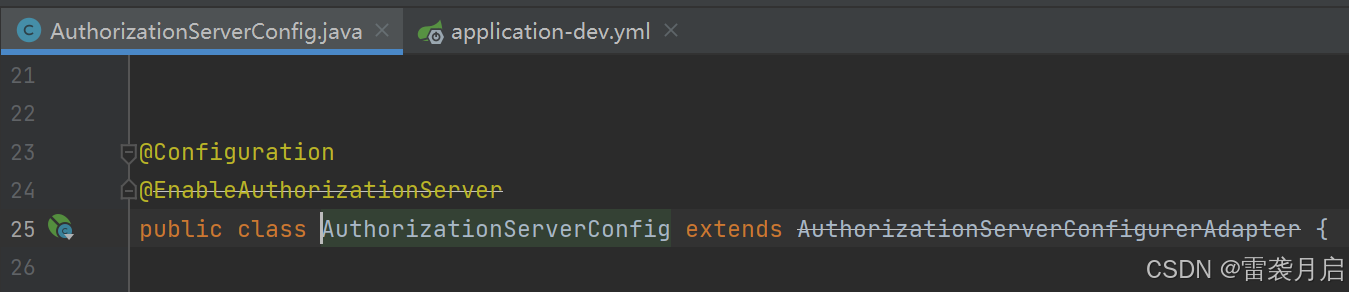
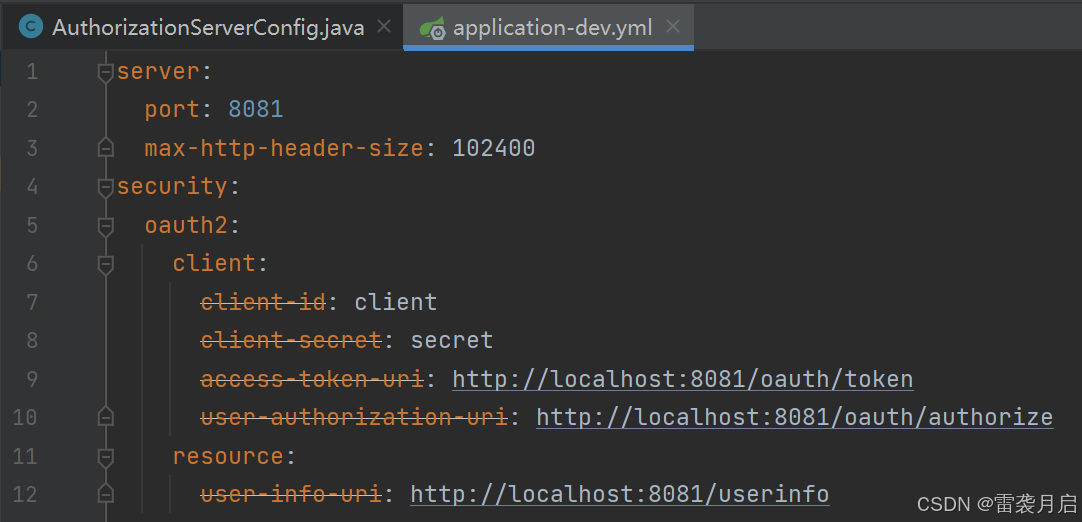
显然这些写法已经过时了,那么官方推荐的最新写法是什么样的呢?当时我没有深究这些,我以为我放过了它,它就能放过我,谁曾想不久之后,命运的大手不由分说的攥紧了我,让我不得不直面自己的困惑。
最近我接了个大活,对公司的java后端技术框架进行版本升级,将springboot的版本从2.x升到3.x,jdk从1.8升到17,在对框架的父工程中的依赖版本进行升级之后,接下来要做的就是对已有的公共服务/组件进行升级了,比如gateway, 流程引擎,基础平台,认证服务等。其他的服务升级都还算有惊无险,但是升级认证服务oauth时,不夸张的说,我真是被折腾得死去活来。
相比于springboot2.x,3.x对于oauth的配置几乎是进行了巅覆式的变更,很多之前我们熟知的配置方法,要么是换了形式,要么是换了位置,想要配得和2.x一样的效果太难了。好在经历了一番坎坷后,我终于把它给整理出来了,借着oauth升版的机会,我也终于弄明白了最版的配置是什么样的。
代码实践
伴随着jdk和springboot的版本升级,spring security也需要进行相应的升级,这直接导致了适用于springboot2.x的相关oauth配置变得不可用,甚至我们耳熟能详的配置类如authorizationserverconfigureradapter, websecurityconfigureradapter等都被删除了,下面就对比着springboot2.x,详细说下3.x中对于配置做了哪些变更。
一、依赖包的变化
在springboot2.x中要实现oauth服务,需要引入以下依赖:
        <dependency>
            <groupid>org.springframework.boot</groupid>
            <artifactid>spring-boot-starter-security</artifactid>
            <version>2.3.2.release</version>
        </dependency>
        <dependency>
            <groupid>org.springframework.cloud</groupid>
            <artifactid>spring-cloud-starter-oauth2</artifactid>
            <version>2.2.5.release</version>
        </dependency>
而在springboot3.x中,需要引入以下依赖包:
    <dependency>
      <groupid>org.springframework.boot</groupid>
      <artifactid>spring-boot-starter-security</artifactid>
    </dependency>
    <dependency>
      <groupid>org.springframework.security</groupid>
      <artifactid>spring-security-oauth2-authorization-server</artifactid>
      <version>1.0.0</version>
    </dependency>
    <dependency>
      <groupid>org.springframework.security</groupid>
      <artifactid>spring-security-oauth2-core</artifactid>
    </dependency>
二、支持模式的变化
新版的spring-security-oauth2-authorization-server依赖包中,仅实现了授权码模式,要想使用之前的用户名密码模式,客户端模式等,还需要手动扩展,扩展模式需要实现这三个接口:
authenticationconverter (用于将认证请求转换为标准的 authentication 对象)
authenticationprovider (用于定义如何验证用户的认证信息)
oauth2authorizationgrantauthenticationtoken(将认证对象转换为系统内部可识别的形式)
三、数据库表的变化
springboot2.x版本时,oauth存储客户信息的表结构如下:
create table oauth_client_details (
    client_id varchar(256) primary key,
	resource_ids varchar(256),
	client_secret varchar(256),
	scope varchar(256),
	authorized_grant_types varchar(256),
	web_server_redirect_uri varchar(256),
	authorities varchar(256),
	access_token_validity integer,
	refresh_token_validity integer,
	additional_information varchar(4096),
	autoapprove varchar(256)
);
升级为springboot3.x后,客户信息表结构如下:
create table oauth2_registered_client (
    id varchar(100) not null,
    client_id varchar(100) not null,
    client_id_issued_at timestamp default current_timestamp not null,
    client_secret varchar(200) default null,
    client_secret_expires_at timestamp default null,
    client_name varchar(200) not null,
    client_authentication_methods varchar(1000) not null,
    authorization_grant_types varchar(1000) not null,
    redirect_uris varchar(1000) default null,
    scopes varchar(1000) not null,
    client_settings varchar(2000) not null,
    token_settings varchar(2000) not null,
    primary key (id)
);
四、链接的变化
旧版本的oauth服务中,相关的认证接接口的url都是/oauth/*,如/oauth/token /oauth/authorize,而升级到新版后,所有接口的url都变成了/oauth2/*,在配置客户端时需要格外注意。
五、配置的变化
接下来就是重头戏:配置的变化,为了更直观的展示sprinboot在2.x和3.x对于配置的变化,我将把一套2.x的oauth配置以及它转换成3.x的配置都贴出来,配置中涉及认证自动审批、内存模式和数据库模式,token的过期时间,token的jwt转换,password的加密,自定义登陆页,客户端的授权方式等。
1、springboot2.x的配置
import org.springframework.context.annotation.bean;
import org.springframework.context.annotation.configuration;
import org.springframework.security.authentication.authenticationmanager;
import org.springframework.security.core.userdetails.userdetailsservice;
import org.springframework.security.oauth2.config.annotation.configurers.clientdetailsserviceconfigurer;
import org.springframework.security.oauth2.config.annotation.web.configuration.authorizationserverconfigureradapter;
import org.springframework.security.oauth2.config.annotation.web.configuration.enableauthorizationserver;
import org.springframework.security.oauth2.config.annotation.web.configurers.authorizationserverendpointsconfigurer;
import org.springframework.security.oauth2.config.annotation.web.configurers.authorizationserversecurityconfigurer;
import org.springframework.security.oauth2.provider.token.authorizationservertokenservices;
import org.springframework.security.oauth2.provider.token.defaultaccesstokenconverter;
import org.springframework.security.oauth2.provider.token.defaulttokenservices;
import org.springframework.security.oauth2.provider.token.tokenenhancerchain;
import org.springframework.security.oauth2.provider.token.tokenstore;
import org.springframework.security.oauth2.provider.token.store.jwtaccesstokenconverter;
import javax.annotation.resource;
import javax.sql.datasource;
import java.util.arrays;
/**
 *
 * @author leixiyueqi
 * @since 2023/12/3 22:00
 */
@enableauthorizationserver
@configuration
public class oauth2configuration extends authorizationserverconfigureradapter {
    @resource
    private authenticationmanager manager;
    private final md5passwordencoder encoder = new md5passwordencoder();
    @resource
    userdetailsservice service;
    @resource
    private datasource datasource;
    @resource
    tokenstore tokenstore;
    /**
     * 这个方法是对客户端进行配置,比如秘钥,唯一id,,一个验证服务器可以预设很多个客户端,
     * 之后这些指定的客户端就可以按照下面指定的方式进行验证
     * @param clients 客户端配置工具
     */
    @override
    public void configure(clientdetailsserviceconfigurer clients) throws exception {
        clients.jdbc(datasource);
    }
    /**
     * 以内存的方式设置客户端方法
     @override
     public void configure(clientdetailsserviceconfigurer clients) throws exception {
         clients
             .inmemory()   //这里我们直接硬编码创建,当然也可以像security那样自定义或是使用jdbc从数据库读取
             .withclient("client")   //客户端名称,随便起就行
             .secret(encoder.encode("123456"))      //只与客户端分享的secret,随便写,但是注意要加密
             .autoapprove(false)    //自动审批,这里关闭,要的就是一会体验那种感觉
             .scopes("read", "write")     //授权范围,这里我们使用全部all
             .autoapprove(true)    // 这个为true时,可以自动授权。
             .redirecturis("http://127.0.0.1:19210/leixi/login/oauth2/code/leixi-client",
             "http://127.0.0.1:8081/login/oauth2/code/client-id-1",
             "http://127.0.0.1:19210/leixi/callback")
             .authorizedgranttypes("client_credentials", "password", "implicit", "authorization_code", "refresh_token");
             //授权模式,一共支持5种,除了之前我们介绍的四种之外,还有一个刷新token的模式
     }
     */
    // 令牌端点的安全配置,比如/oauth/token对哪些开放
    @override
    public void configure(authorizationserversecurityconfigurer security) {
        security
                .passwordencoder(encoder)    //编码器设定为bcryptpasswordencoder
                .allowformauthenticationforclients()  //允许客户端使用表单验证,一会我们post请求中会携带表单信息
                .checktokenaccess("permitall()");     //允许所有的token查询请求
    }
    //令牌访问端点的配置
    @override
    public void configure(authorizationserverendpointsconfigurer endpoints) {
        endpoints
                .userdetailsservice(service)
                .authenticationmanager(manager)
                .tokenservices(tokenservices());
        //由于springsecurity新版本的一些底层改动,这里需要配置一下authenticationmanager,才能正常使用password模式
        endpoints.pathmapping("/oauth/confirm_access","/custom/confirm_access");
    }
    // 设置token的存储,过期时间,添加附加信息等
    @bean
    public authorizationservertokenservices tokenservices() {
        defaulttokenservices services = new defaulttokenservices();
        services.setreuserefreshtoken(true);
        services.settokenstore(tokenstore);
        services.setaccesstokenvalidityseconds(120);   // 设置令牌有效时间
        services.setrefreshtokenvalidityseconds(60*5);  //设计刷新令牌的有效时间
        tokenenhancerchain tokenenhancerchain = new tokenenhancerchain();
        tokenenhancerchain.settokenenhancers(arrays.aslist(new customtokenenhancer(), accesstokenconverter()));
        services.settokenenhancer(tokenenhancerchain);
        return services;
    }
    // 对token信息进行jwt加密
    @bean
    public jwtaccesstokenconverter accesstokenconverter() {
        // 将自定义的内容封装到access_token中
        defaultaccesstokenconverter defaultaccesstokenconverter = new defaultaccesstokenconverter();
        defaultaccesstokenconverter.setusertokenconverter(new customeruserauthenticationconverter());
        jwtaccesstokenconverter converter = new jwtaccesstokenconverter();
        converter.setaccesstokenconverter(defaultaccesstokenconverter);
        converter.setsigningkey("密钥");
        return converter;
    }
}
import com.leixi.auth2.service.userdetailserviceimpl;
import org.springframework.beans.factory.annotation.autowired;
import org.springframework.context.annotation.bean;
import org.springframework.context.annotation.configuration;
import org.springframework.data.redis.connection.redisconnectionfactory;
import org.springframework.security.authentication.authenticationmanager;
import org.springframework.security.config.annotation.authentication.builders.authenticationmanagerbuilder;
import org.springframework.security.config.annotation.web.builders.httpsecurity;
import org.springframework.security.config.annotation.web.configuration.websecurityconfigureradapter;
import org.springframework.security.oauth2.provider.token.tokenstore;
import org.springframework.security.oauth2.provider.token.store.redis.redistokenstore;
/**
 *
 * @author leixiyueqi
 * @since 2023/12/3 22:00
 */
@configuration
public class securityconfiguration extends websecurityconfigureradapter {
    private static final string loginurl = "/login";
    /**
     * 注意,当在内存中获取用户信息时,就不需要创建userdetailservice的实现类了
     *
     */
    @autowired
    private userdetailserviceimpl userservice;
    @autowired
    private redisconnectionfactory redisconnectionfactory;
    @bean
    public md5passwordencoder passwordencoder() {
        return new md5passwordencoder();
    }
    @override
    protected void configure(httpsecurity http) throws exception {
        http
                // http security 要拦截的url,这里这拦截,oauth2相关和登录登录相关的url,其他的交给资源服务处理
                .authorizerequests()
                .antmatchers( "/oauth/**","/**/*.css", "/**/*.ico", "/**/*.png", "/**/*.jpg", "/**/*.svg", "/login",
                        "/**/*.js", "/**/*.map",loginurl, "/user/*","/base-grant.html")
                .permitall()
                .anyrequest()
                .authenticated();
        // post请求要设置允许跨域,然后会报401
        http.csrf().ignoringantmatchers("/login", "/logout", "/unlock/apply");
        // 表单登录
        http.formlogin()
                // 登录页面
                .loginpage(loginurl)
                // 登录处理url
                .loginprocessingurl("/login");
        http.httpbasic();
    }
    @override
    protected void configure(authenticationmanagerbuilder auth) throws exception {
        auth.userdetailsservice(userservice).passwordencoder(passwordencoder());
    }
    /**
     *  以内存的方式载入用户信息
     @override
     protected void configure(authenticationmanagerbuilder auth) throws exception {
     bcryptpasswordencoder encoder = new bcryptpasswordencoder();
     auth.inmemoryauthentication()   //直接创建一个静态用户
     .passwordencoder(encoder)
     .withuser("leixi").password(encoder.encode("123456")).roles("user");
     }
     @bean
     @override
     public userdetailsservice userdetailsservicebean() throws exception {
        return super.userdetailsservicebean();
     }
     */
    @bean   //这里需要将authenticationmanager注册为bean,在oauth配置中使用
    @override
    public authenticationmanager authenticationmanagerbean() throws exception {
        return super.authenticationmanagerbean();
    }
    //通过redis存储token
    @bean
    public tokenstore tokenstore() {
        return new redistokenstore(redisconnectionfactory);
    }
}
import org.springframework.security.core.authentication;
import org.springframework.security.core.userdetails.userdetails;
import org.springframework.security.oauth2.provider.token.defaultuserauthenticationconverter;
import java.util.map;
public class customeruserauthenticationconverter extends defaultuserauthenticationconverter {
    @override
    public map<string, ?> convertuserauthentication(authentication authentication) {
        map mapresp = super.convertuserauthentication(authentication);
        try {
            userdetails user = (userdetails)authentication.getprincipal();
            if (user != null) {
                mapresp.put("loginname", user.getusername());
                mapresp.put("content", "测试在accesstoken中添加附加信息");
                mapresp.put("authorities","hahahaha");
            }
        } catch (exception e) {
            e.printstacktrace();
        }
        return mapresp;
    }
}
/**
 * 密码实现类,允许开发人员自由设置密码加密
 *
 * @author leixiyueqi
 * @since 2023/12/3 22:00
 */
public class md5passwordencoder implements passwordencoder {
    @override
    public string encode(charsequence rawpassword) {
        try {
            messagedigest md5 = messagedigest.getinstance("md5");
            byte[] digest = md5.digest(rawpassword.tostring().getbytes("utf-8"));
            string pass = new string(hex.encode(digest));
            return pass;
        } catch (exception e) {
            throw new runtimeexception("failed to encode password.", e);
        }
    }
    @override
    public boolean matches(charsequence rawpassword, string encodedpassword) {
        return encodedpassword.equals(encode(rawpassword));
    }
}
看得出来,springboot2.x中springsecurityconfig的配置与oauth2configuration的配置有种相辅相成的感觉,但对于初学者来说,会觉得很割裂,不知道哪些东西该配在哪个文件里。
2、springboot3.x的配置
package com.leixi.auth2.config;
import com.leixi.auth2.custom.oauth2passwordauthenticationconverter;
import com.leixi.auth2.custom.oauth2passwordauthenticationprovider;
import com.nimbusds.jose.jwk.jwkset;
import com.nimbusds.jose.jwk.rsakey;
import com.nimbusds.jose.jwk.source.immutablejwkset;
import com.nimbusds.jose.jwk.source.jwksource;
import com.nimbusds.jose.proc.securitycontext;
import jakarta.annotation.resource;
import org.springframework.beans.factory.annotation.autowired;
import org.springframework.context.annotation.bean;
import org.springframework.context.annotation.configuration;
import org.springframework.core.annotation.order;
import org.springframework.jdbc.core.jdbctemplate;
import org.springframework.security.authentication.dao.daoauthenticationprovider;
import org.springframework.security.config.customizer;
import org.springframework.security.config.annotation.web.builders.httpsecurity;
import org.springframework.security.config.annotation.web.configuration.enablewebsecurity;
import org.springframework.security.core.userdetails.userdetailsservice;
import org.springframework.security.oauth2.jwt.jwtdecoder;
import org.springframework.security.oauth2.jwt.jwtencoder;
import org.springframework.security.oauth2.jwt.nimbusjwtencoder;
import org.springframework.security.oauth2.server.authorization.client.jdbcregisteredclientrepository;
import org.springframework.security.oauth2.server.authorization.client.registeredclientrepository;
import org.springframework.security.oauth2.server.authorization.config.annotation.web.configuration.oauth2authorizationserverconfiguration;
import org.springframework.security.oauth2.server.authorization.config.annotation.web.configurers.oauth2authorizationserverconfigurer;
import org.springframework.security.oauth2.server.authorization.settings.authorizationserversettings;
import org.springframework.security.oauth2.server.authorization.token.delegatingoauth2tokengenerator;
import org.springframework.security.oauth2.server.authorization.token.jwtgenerator;
import org.springframework.security.oauth2.server.authorization.token.oauth2accesstokengenerator;
import org.springframework.security.oauth2.server.authorization.token.oauth2refreshtokengenerator;
import org.springframework.security.oauth2.server.authorization.token.oauth2tokengenerator;
import org.springframework.security.oauth2.server.authorization.web.authentication.delegatingauthenticationconverter;
import org.springframework.security.oauth2.server.authorization.web.authentication.oauth2authorizationcodeauthenticationconverter;
import org.springframework.security.oauth2.server.authorization.web.authentication.oauth2clientcredentialsauthenticationconverter;
import org.springframework.security.oauth2.server.authorization.web.authentication.oauth2refreshtokenauthenticationconverter;
import org.springframework.security.web.securityfilterchain;
import org.springframework.security.web.authentication.loginurlauthenticationentrypoint;
import java.security.keypair;
import java.security.keypairgenerator;
import java.security.interfaces.rsaprivatekey;
import java.security.interfaces.rsapublickey;
import java.util.arrays;
import java.util.uuid;
/**
 * oauth的配置
 *
 * @author leixiyueqi
 * @since 2024/9/28 22:00
 */
@configuration
@enablewebsecurity
public class oauth2jdbcconfiguration {
    @autowired
    private md5passwordencoder passwordencoder;
    @resource
    private userdetailsservice userdetailservice;
    @autowired
    private jdbctemplate jdbctemplate;
    @autowired
    private customtokenenhancer customtokenenhancer;
    private static final string loginurl = "/loginpage.html";
    @bean
    public registeredclientrepository registeredclientrepository() {
        jdbcregisteredclientrepository jdbcregisteredclientrepository = new jdbcregisteredclientrepository(jdbctemplate);
        return jdbcregisteredclientrepository;
    }
    /**
     * 在内存中获取用户信息的方式
     @bean
     public userdetailsservice userdetailsservice() {
         userdetails userdetails = user.builder()
             .username("leixi")
             .roles("user")
             .password(passwordencoder.encode("123456"))
             .build();
         return new inmemoryuserdetailsmanager(userdetails);
     }
     */
    /**
     * 在内存中获取客户端信息的方式,还可以用于客户端信息的入库
     *
     @bean
     public registeredclientrepository registeredclientrepository() {
         jdbcregisteredclientrepository jdbcregisteredclientrepository = new jdbcregisteredclientrepository(jdbctemplate);
         registeredclient registeredclient = registeredclient.withid(uuid.randomuuid().tostring())
             .clientid("client")
             .clientsecret(passwordencoder.encode( "123456"))
             .clientauthenticationmethod(clientauthenticationmethod.client_secret_post)
             .clientauthenticationmethod(clientauthenticationmethod.client_secret_basic)
             .authorizationgranttype(authorizationgranttype.authorization_code)
             .authorizationgranttype(authorizationgranttype.refresh_token)
             .authorizationgranttype(authorizationgranttype.client_credentials)
             .authorizationgranttype(authorizationgranttype.password)
             .redirecturi("http://127.0.0.1:19210/leixi/login/oauth2/code/leixi-client")
             .redirecturi("http://127.0.0.1:8081/login/oauth2/code/client-id-1")
             .redirecturi("http://127.0.0.1:19210/leixi/callback")
             .scope("read")
             .scope("write")
             // 登录成功后对scope进行确认授权
             .clientsettings(clientsettings.builder().requireauthorizationconsent(false).build())
             .tokensettings(tokensettings.builder().accesstokenformat(oauth2tokenformat.self_contained)
             .accesstokentimetolive(duration.ofhours(24))
             .refreshtokentimetolive(duration.ofhours(24)).build())
             .build();
         jdbcregisteredclientrepository.save(registeredclient);  //客户端信息入库
         return new inmemoryregisteredclientrepository(registeredclient);
     }
     */
    @bean
    public securityfilterchain defaultsecurityfilterchain(httpsecurity http) throws exception {
        http.authorizehttprequests((requests) -> requests
                .requestmatchers( "/oauth/*","/*/*.css", "/*/*.ico", "/*/*.png", "/*/*.jpg", "/*/*.svg", "/login",
                        "/*/*.js", "/*/*.map",loginurl, "/user/*","/base-grant.html").permitall() // 允许所有用户访问这些路径
                .anyrequest().authenticated()
        );
        http.csrf(csrf -> csrf.ignoringrequestmatchers("/login", "/logout", "/unlock/apply")); // 禁用csrf保护
        // 表单登录
        http.formlogin(formlogin -> formlogin
                        .loginpage(loginurl)
                        .loginprocessingurl("/login"))
                .httpbasic(httpbasic -> {})
                .authenticationprovider(daoauthenticationprovider());
        return http.build();
    }
    @bean
    public daoauthenticationprovider daoauthenticationprovider() {
        daoauthenticationprovider customerdaoauthenticationprovider = new daoauthenticationprovider();
        // 设置userdetailsservice
        customerdaoauthenticationprovider.setuserdetailsservice(userdetailservice);
        // 禁止隐藏用户未找到异常
        customerdaoauthenticationprovider.sethideusernotfoundexceptions(false);
        // 使用md5进行密码的加密
        customerdaoauthenticationprovider.setpasswordencoder(passwordencoder);
        return customerdaoauthenticationprovider;
    }
    @bean
    public authorizationserversettings authorizationserversettings() {
        return authorizationserversettings.builder()
                .build();
    }
    @bean
    @order(1)
    public securityfilterchain authorizationserversecurityfilterchain(httpsecurity http) throws exception {
        //应用了默认的安全配置,这些配置支持oauth2授权服务器的功能。
        oauth2authorizationserverconfiguration.applydefaultsecurity(http);
        http.getconfigurer(oauth2authorizationserverconfigurer.class)
                // 自定义用户名密码的授权方式
                .tokenendpoint((tokenendpoint) -> tokenendpoint
                        .accesstokenrequestconverter(new delegatingauthenticationconverter(arrays.aslist(
                                new oauth2authorizationcodeauthenticationconverter(),
                                new oauth2refreshtokenauthenticationconverter(),
                                new oauth2clientcredentialsauthenticationconverter(),
                                new oauth2passwordauthenticationconverter()   //添加密码模式的授权方式
                        ))).authenticationproviders((customproviders) -> {
                            // 自定义认证提供者
                            customproviders.add(new oauth2passwordauthenticationprovider(jwksource(), userdetailservice, passwordencoder));
                        })
                )
                //启用了openid connect 1.0,这是一种基于oauth2的身份验证协议。
                .oidc(customizer.withdefaults());	// enable openid connect 1.0
        //配置了当用户尝试访问受保护资源但未认证时的行为。设置了一个自定义的登录页面作为认证入口点。
        http.exceptionhandling((exceptions) -> exceptions
                        .authenticationentrypoint(
                                new loginurlauthenticationentrypoint(loginurl))
                )
                //配置了oauth2资源服务器,指定使用jwt(json web token)进行身份验证。
                .oauth2resourceserver(config -> config.jwt(customizer.withdefaults()));
        return http.build();
    }
    @bean
    public jwtencoder jwtencoder() {
        nimbusjwtencoder jwtencoder = new nimbusjwtencoder(jwksource());
        return jwtencoder;
    }
    @bean
    public jwtdecoder jwtdecoder() {
        return oauth2authorizationserverconfiguration.jwtdecoder(jwksource());
    }
    @bean
    public oauth2tokengenerator<?> tokengenerator() {
        jwtgenerator jwtgenerator = new jwtgenerator(jwtencoder());
        jwtgenerator.setjwtcustomizer(customtokenenhancer);
        oauth2accesstokengenerator accesstokengenerator = new oauth2accesstokengenerator();
        oauth2refreshtokengenerator refreshtokengenerator = new oauth2refreshtokengenerator();
        return new delegatingoauth2tokengenerator(
                jwtgenerator, accesstokengenerator, refreshtokengenerator);
    }
    @bean
    public jwksource<securitycontext> jwksource() {
        keypair keypair = generatersakey();
        rsapublickey publickey = (rsapublickey) keypair.getpublic();
        rsaprivatekey privatekey = (rsaprivatekey) keypair.getprivate();
        rsakey rsakey = new rsakey.builder(publickey)
                .privatekey(privatekey)
                .keyid(uuid.randomuuid().tostring())
                .build();
        jwkset jwkset = new jwkset(rsakey);
        return new immutablejwkset<>(jwkset);
    }
    // 升版之后,采用rsa的方式加密token,与之前的版本有些差异,之前是采用hmac加密
    private static keypair generatersakey() {
        keypair keypair;
        try {
            keypairgenerator keypairgenerator = keypairgenerator.getinstance("rsa");
            keypairgenerator.initialize(2048);
            keypair = keypairgenerator.generatekeypair();
        }
        catch (exception ex) {
            throw new illegalstateexception(ex);
        }
        return keypair;
    }
}
@service
public class customtokenenhancer implements oauth2tokencustomizer<jwtencodingcontext> {
    @resource
    private userdetailsservice userdetailservice;
    @override
    public void customize(jwtencodingcontext context) {
        userdetails user = userdetailservice.loaduserbyusername(context.getprincipal().getname());
        if (user != null) {
            context.getclaims().claims(claims -> {
                claims.put("loginname", user.getusername());
                claims.put("name", user.getusername());
                claims.put("content", "在accesstoken中封装自定义信息");
                claims.put("authorities", "hahahaha");
            });
        }
    }
}
/**
 * jwt工具类
 *
 * @author leixiyueqi
 * @since 2024/9/28 22:00
 */
public final class jwtutils {
    private jwtutils() {
    }
    public static jwsheader.builder headers() {
        return jwsheader.with(signaturealgorithm.rs256);
    }
    public static jwtclaimsset.builder accesstokenclaims(registeredclient registeredclient,
                                                         string issuer, string subject,
                                                         set<string> authorizedscopes) {
        instant issuedat = instant.now();
        instant expiresat = issuedat
                .plus(registeredclient.gettokensettings().getaccesstokentimetolive());
        /**
         * iss (issuer):签发人/发行人
         * sub (subject):主题
         * aud (audience):用户
         * exp (expiration time):过期时间
         * nbf (not before):生效时间,在此之前是无效的
         * iat (issued at):签发时间
         * jti (jwt id):用于标识该 jwt
         */
        // @formatter:off
        jwtclaimsset.builder claimsbuilder = jwtclaimsset.builder();
        if (stringutils.hastext(issuer)) {
            claimsbuilder.issuer(issuer);
        }
        claimsbuilder
                .subject(subject)
                .audience(collections.singletonlist(registeredclient.getclientid()))
                .issuedat(issuedat)
                .expiresat(expiresat)
                .notbefore(issuedat);
        if (!collectionutils.isempty(authorizedscopes)) {
            claimsbuilder.claim(oauth2parameternames.scope, authorizedscopes);
            claimsbuilder.claim("wangcl", "aaa");
        }
        // @formatter:on
        return claimsbuilder;
    }
}
public class oauth2endpointutils {
    public static multivaluemap<string, string> getparameters(httpservletrequest request) {
        map<string, string[]> parametermap = request.getparametermap();
        multivaluemap<string, string> parameters = new linkedmultivaluemap(parametermap.size());
        parametermap.foreach((key, values) -> {
            if (values.length > 0) {
                string[] var3 = values;
                int var4 = values.length;
                for(int var5 = 0; var5 < var4; ++var5) {
                    string value = var3[var5];
                    parameters.add(key, value);
                }
            }
        });
        return parameters;
    }
    public static void throwerror(string errorcode, string parametername, string erroruri) {
        oauth2error error = new oauth2error(errorcode, "oauth 2.0 parameter: " + parametername, erroruri);
        throw new oauth2authenticationexception(error);
    }
}
// 注意,以下三个类是新版oauth的密码模式的实现,不需要的可以不加
/**
 *
 * @author leixiyueqi
 * @since 2024/9/28 22:00
 */
import jakarta.servlet.http.httpservletrequest;
import org.springframework.security.core.authentication;
import org.springframework.security.core.context.securitycontextholder;
import org.springframework.security.oauth2.core.authorizationgranttype;
import org.springframework.security.oauth2.core.oauth2errorcodes;
import org.springframework.security.oauth2.core.endpoint.oauth2parameternames;
import org.springframework.security.web.authentication.authenticationconverter;
import org.springframework.util.multivaluemap;
import org.springframework.util.stringutils;
import java.util.hashmap;
import java.util.map;
/**
 * 从httpservletrequest中提取username与password,传递给oauth2passwordauthenticationtoken
 */
public class oauth2passwordauthenticationconverter implements authenticationconverter {
    @override
    public authentication convert(httpservletrequest request) {
        string granttype = request.getparameter(oauth2parameternames.grant_type);
        if (!authorizationgranttype.password.getvalue().equals(granttype)) {
            return null;
        }
        authentication clientprincipal = securitycontextholder.getcontext().getauthentication();
        multivaluemap<string, string> parameters = oauth2endpointutils.getparameters(request);
        string username = parameters.getfirst(oauth2parameternames.username);
        if (!stringutils.hastext(username) ||
                parameters.get(oauth2parameternames.username).size() != 1) {
            oauth2endpointutils.throwerror(
                    oauth2errorcodes.invalid_request,
                    oauth2parameternames.username,"");
        }
        string password = parameters.getfirst(oauth2parameternames.password);
        map<string, object> additionalparameters = new hashmap<>();
        parameters.foreach((key, value) -> {
            if (!key.equals(oauth2parameternames.grant_type) &&
                    !key.equals(oauth2parameternames.client_id) &&
                    !key.equals(oauth2parameternames.username) &&
                    !key.equals(oauth2parameternames.password)) {
                additionalparameters.put(key, value.get(0));
            }
        });
        return new oauth2passwordauthenticationtoken(username,password,clientprincipal,additionalparameters);
    }
}
/**
 *
 * @author leixiyueqi
 * @since 2024/9/28 22:00
 */
import com.leixi.auth2.config.md5passwordencoder;
import com.nimbusds.jose.jwk.source.jwksource;
import org.springframework.beans.factory.annotation.autowired;
import org.springframework.security.authentication.authenticationprovider;
import org.springframework.security.authentication.usernamepasswordauthenticationtoken;
import org.springframework.security.core.authentication;
import org.springframework.security.core.authenticationexception;
import org.springframework.security.core.userdetails.user;
import org.springframework.security.core.userdetails.userdetails;
import org.springframework.security.core.userdetails.userdetailsservice;
import org.springframework.security.crypto.keygen.base64stringkeygenerator;
import org.springframework.security.crypto.keygen.stringkeygenerator;
import org.springframework.security.oauth2.core.authorizationgranttype;
import org.springframework.security.oauth2.core.oauth2accesstoken;
import org.springframework.security.oauth2.core.oauth2authenticationexception;
import org.springframework.security.oauth2.core.oauth2errorcodes;
import org.springframework.security.oauth2.jwt.jwsheader;
import org.springframework.security.oauth2.jwt.jwt;
import org.springframework.security.oauth2.jwt.jwtclaimsset;
import org.springframework.security.oauth2.jwt.jwtencoderparameters;
import org.springframework.security.oauth2.jwt.nimbusjwtencoder;
import org.springframework.security.oauth2.server.authorization.oauth2authorization;
import org.springframework.security.oauth2.server.authorization.oauth2tokentype;
import org.springframework.security.oauth2.server.authorization.authentication.oauth2accesstokenauthenticationtoken;
import org.springframework.security.oauth2.server.authorization.authentication.oauth2clientauthenticationtoken;
import org.springframework.security.oauth2.server.authorization.client.registeredclient;
import org.springframework.security.oauth2.server.authorization.settings.authorizationserversettings;
import org.springframework.security.oauth2.server.authorization.token.jwtencodingcontext;
import org.springframework.security.oauth2.server.authorization.token.oauth2tokencustomizer;
import org.springframework.stereotype.service;
import org.springframework.util.assert;
import org.springframework.util.stringutils;
import java.security.principal;
import java.util.base64;
import java.util.hashset;
import java.util.set;
import java.util.function.supplier;
/**
 * 从httpservletrequest中提取username与password,传递给oauth2passwordauthenticationtoken
 */
/**
 * 密码认证的核心逻辑
 */
public class oauth2passwordauthenticationprovider implements authenticationprovider {
    private static final stringkeygenerator default_refresh_token_generator =
            new base64stringkeygenerator(base64.geturlencoder().withoutpadding(), 96);
    private oauth2tokencustomizer<jwtencodingcontext> jwtcustomizer = (context) -> {};
    private supplier<string> refreshtokengenerator = default_refresh_token_generator::generatekey;
    private authorizationserversettings authorizationserversettings;
    public oauth2passwordauthenticationprovider(jwksource jwksource, userdetailsservice userdetailservice,
        md5passwordencoder passwordencoder) {
        this.jwksource = jwksource;
        this.userdetailservice = userdetailservice;
        this.passwordencoder = passwordencoder;
    }
    private final jwksource jwksource;
    private userdetailsservice userdetailservice;
    private md5passwordencoder passwordencoder;
    public oauth2passwordauthenticationprovider(jwksource jwksource){
        this.jwksource = jwksource;
    }
    public void setjwtcustomizer(oauth2tokencustomizer<jwtencodingcontext> jwtcustomizer) {
        assert.notnull(jwtcustomizer, "jwtcustomizer cannot be null");
        this.jwtcustomizer = jwtcustomizer;
    }
    public void setrefreshtokengenerator(supplier<string> refreshtokengenerator) {
        assert.notnull(refreshtokengenerator, "refreshtokengenerator cannot be null");
        this.refreshtokengenerator = refreshtokengenerator;
    }
    @autowired(required = false)
    void setauthorizationserversettings(authorizationserversettings authorizationserversettings) {
        this.authorizationserversettings = authorizationserversettings;
    }
    @override
    public authentication authenticate(authentication authentication) throws authenticationexception {
        oauth2passwordauthenticationtoken passwordauthentication =
                (oauth2passwordauthenticationtoken) authentication;
        oauth2clientauthenticationtoken clientprincipal =
                getauthenticatedclientelsethrowinvalidclient(passwordauthentication);
        registeredclient registeredclient = clientprincipal.getregisteredclient();
        // 校验账户
        string username = passwordauthentication.getusername();
        if (stringutils.isempty(username)){
            throw new oauth2authenticationexception("账户不能为空");
        }
        // 校验密码
        string password = passwordauthentication.getpassword();
        if (stringutils.isempty(password)){
            throw new oauth2authenticationexception("密码不能为空");
        }
        // 查询账户信息
        userdetails userdetails = userdetailservice.loaduserbyusername(username);
        if (userdetails ==null) {
            throw new oauth2authenticationexception("账户信息不存在,请联系管理员");
        }
        // 校验密码
        if (!passwordencoder.encode(password).equals(userdetails.getpassword())) {
            throw new oauth2authenticationexception("密码不正确");
        }
        // 构造认证信息
        authentication principal = new usernamepasswordauthenticationtoken(username, userdetails.getpassword(), userdetails.getauthorities());
        //region 直接构造一个oauth2authorization对象,实际场景中,应该去数据库进行校验
        oauth2authorization authorization = oauth2authorization.withregisteredclient(registeredclient)
                .principalname(principal.getname())
                .authorizationgranttype(authorizationgranttype.password)
                .attribute(principal.class.getname(), principal)
                .attribute("scopes", registeredclient.getscopes() )
                .build();
        //endregion
        string issuer = this.authorizationserversettings != null ? this.authorizationserversettings.getissuer() : null;
        set<string> authorizedscopes = authorization.getattribute("scopes");
        // 构造jwt token信息
        jwsheader.builder headersbuilder = jwtutils.headers();
        headersbuilder.header("client-id", registeredclient.getclientid());
        headersbuilder.header("authorization-grant-type", passwordauthentication.getgranttype().getvalue());
        jwtclaimsset.builder claimsbuilder = jwtutils.accesstokenclaims(registeredclient, issuer, authorization.getprincipalname(), authorizedscopes);
        // @formatter:off
        jwtencodingcontext context = jwtencodingcontext.with(headersbuilder, claimsbuilder)
                .registeredclient(registeredclient)
                .principal(authorization.getattribute(principal.class.getname()))
                .authorization(authorization)
                .authorizedscopes(authorizedscopes)
                .tokentype(oauth2tokentype.access_token)
                .authorizationgranttype(authorizationgranttype.password)
                .authorizationgrant(passwordauthentication)
                .build();
        // @formatter:on
        this.jwtcustomizer.customize(context);
        jwsheader headers = context.getjwsheader().build();
        jwtclaimsset claims = context.getclaims().build();
        jwtencoderparameters params = jwtencoderparameters.from(headers, claims);
        nimbusjwtencoder jwtencoder  = new nimbusjwtencoder(this.jwksource);
        jwt jwtaccesstoken = jwtencoder.encode(params);
        //jwt jwtaccesstoken = null;
        // 生成token
        oauth2accesstoken accesstoken = new oauth2accesstoken(oauth2accesstoken.tokentype.bearer,
                jwtaccesstoken.gettokenvalue(), jwtaccesstoken.getissuedat(),
                jwtaccesstoken.getexpiresat(), authorizedscopes);
        return new oauth2accesstokenauthenticationtoken(
                registeredclient, clientprincipal, accesstoken);
    }
    @override
    public boolean supports(class<?> authentication) {
        return oauth2passwordauthenticationtoken.class.isassignablefrom(authentication);
    }
    private oauth2clientauthenticationtoken getauthenticatedclientelsethrowinvalidclient(authentication authentication) {
        oauth2clientauthenticationtoken clientprincipal = null;
        if (oauth2clientauthenticationtoken.class.isassignablefrom(authentication.getprincipal().getclass())) {
            clientprincipal = (oauth2clientauthenticationtoken) authentication.getprincipal();
        }
        if (clientprincipal != null && clientprincipal.isauthenticated()) {
            return clientprincipal;
        }
        throw new oauth2authenticationexception(oauth2errorcodes.invalid_client);
    }
}
/**
 *
 * @author 雷袭月启
 * @since 2024/9/28 22:00
 */
import org.springframework.security.core.authentication;
import org.springframework.security.oauth2.core.authorizationgranttype;
import org.springframework.security.oauth2.server.authorization.authentication.oauth2authorizationgrantauthenticationtoken;
import java.util.map;
/**
 * 用于存放username与password
 */
public class oauth2passwordauthenticationtoken extends oauth2authorizationgrantauthenticationtoken {
    private static final long serialversionuid = -559176897708927684l;
    private final string username;
    private final string password;
    public oauth2passwordauthenticationtoken(string username, string password, authentication clientprincipal, map<string, object> additionalparameters) {
        super(authorizationgranttype.password, clientprincipal, additionalparameters);
        this.username = username;
        this.password = password;
    }
    public string getusername() {
        return this.username;
    }
    public string getpassword() {
        return this.password;
    }
}
如果不算上扩展的授权模式,springboot3针对oauth的配置要较之前精简了很多,而且一个配置文件就能搞定。从配置上也可以看出来,新版oauth具有很高的灵活性,允许用户根据自己的需要来定义授权模式,对于安全性方面也有所增强,因此有更广阔的使用空间。
功能测试
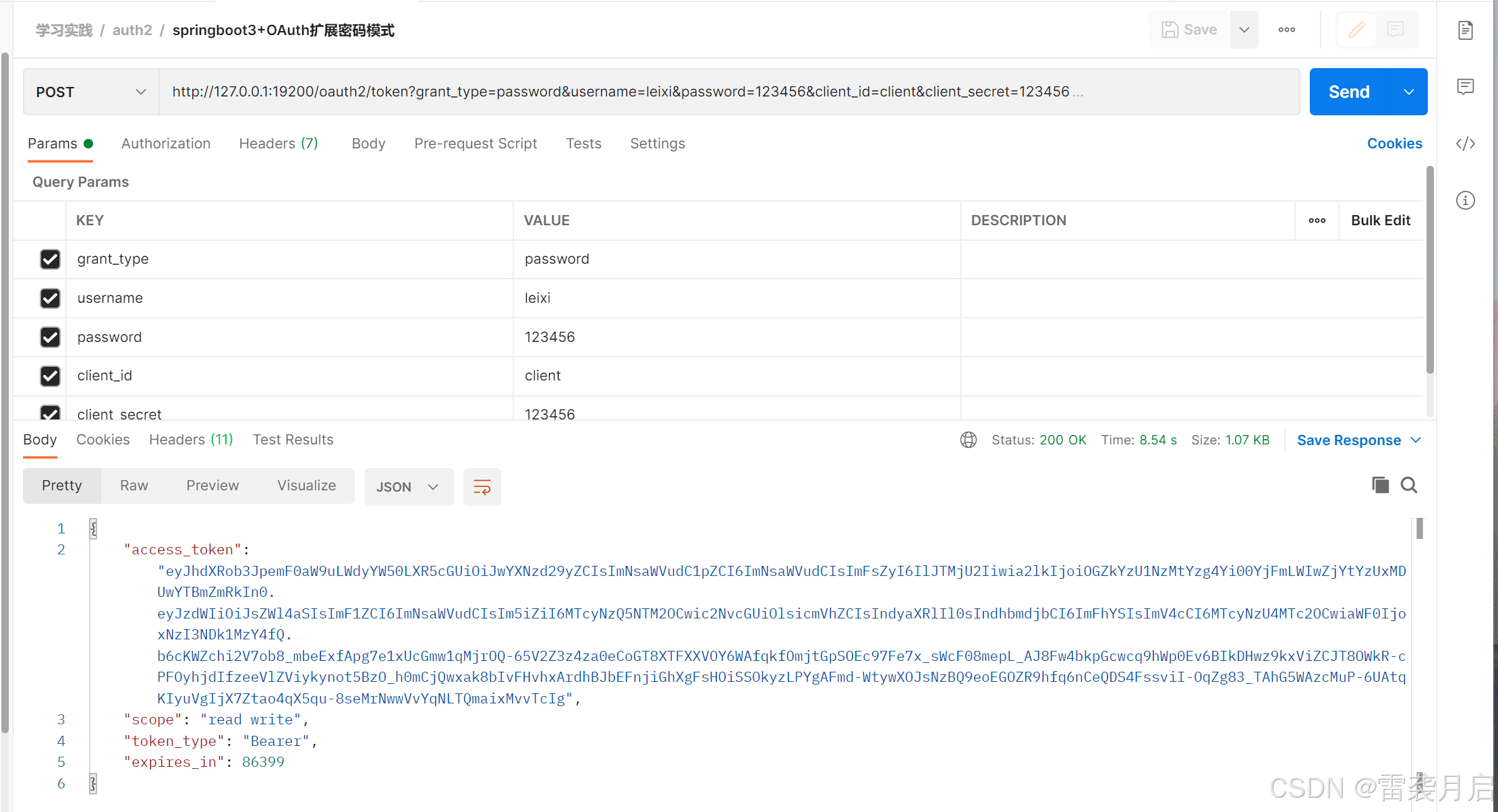
配置好oauth2后,验证配置的准确性方式就是成功启动oauth,且相关的授权模式可以跑通。咱们借用之前几篇博客里写的client,以及postman,对springboot3.x版的oauth2进行测试,测试成果如下:
1、扩展的用户名密码模式,成功
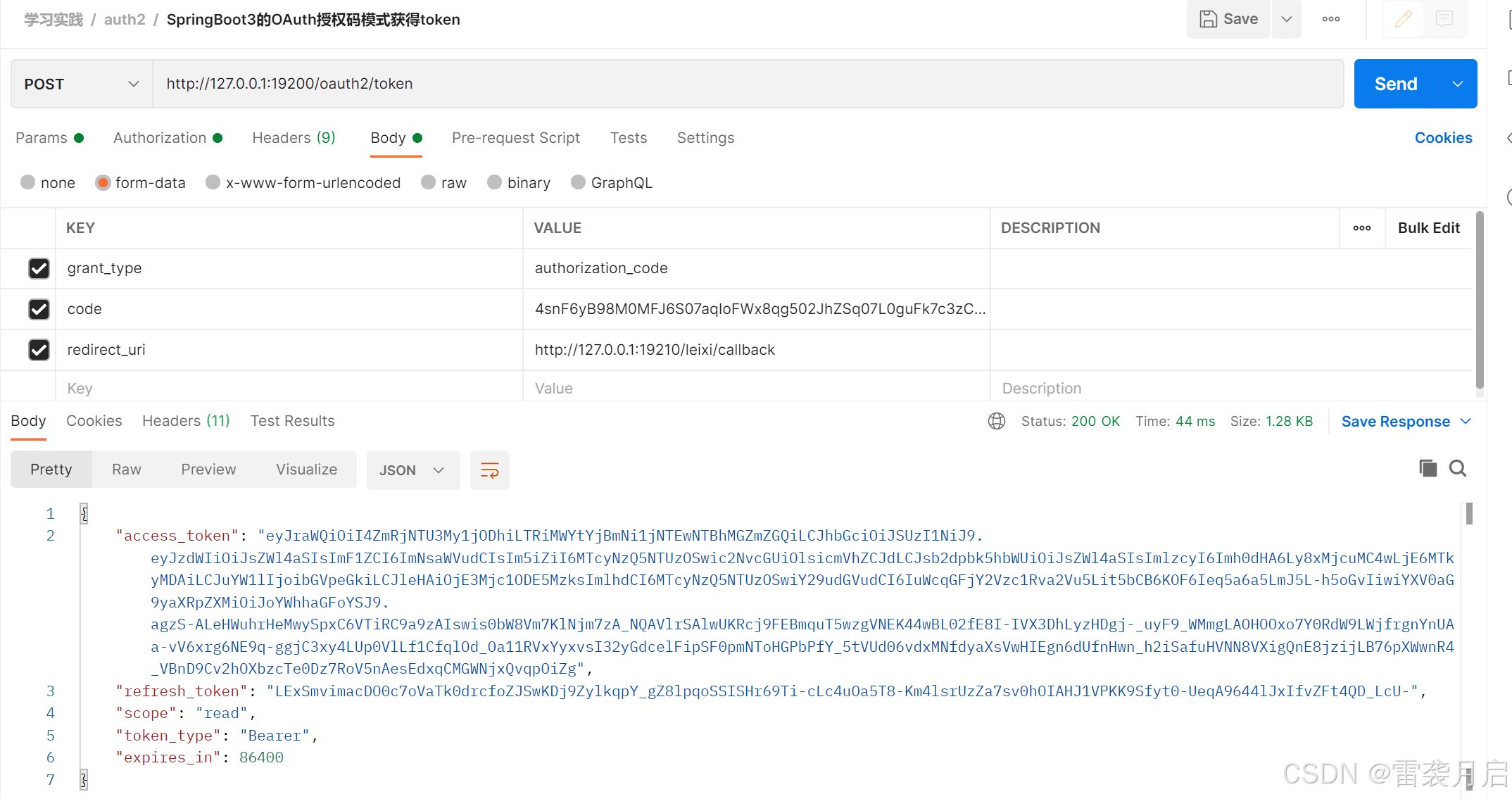
2、授权码模式,通过该问如下链接获取code http://127.0.0.1:19200/oauth2/authorize?response_type=code&client_id=client&scope=read&redirect_uri=http://127.0.0.1:19210/leixi/callback

再利用postman,通过code来获取token
接下来,咱们对token进行解析,检查封装在access_token里的信息是否存在,咱们通过之前写好的oauth-client对它进行解析,结果如下:
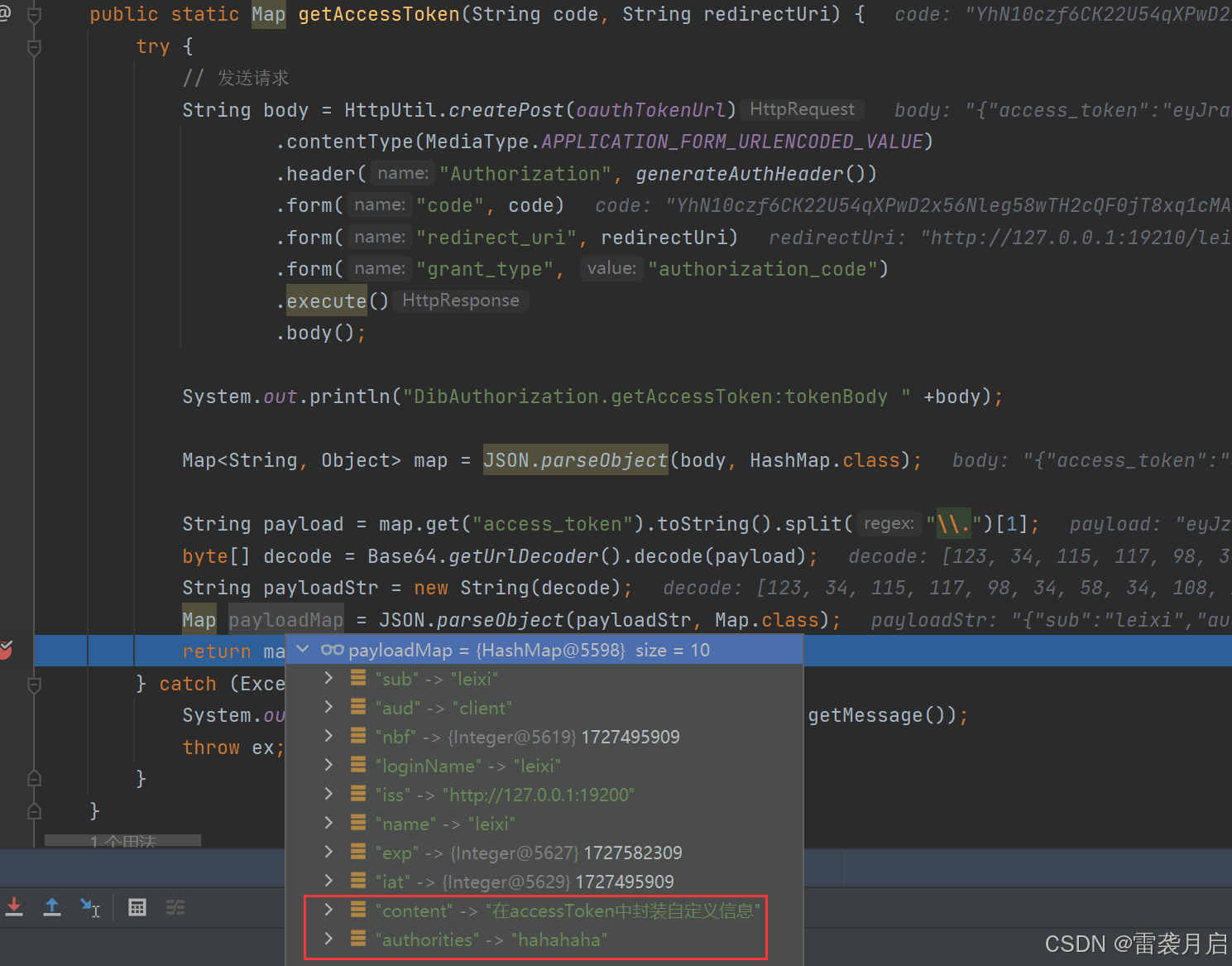
通过以上测试,可知新版的配置完全达到了我们的要求。
踩坑记录
1、也不算是坑吧,springboot3.x配置oauth的方式在网上的相关资料很少,而且很难搜到,所以搜索这部分内容的资料,关键字很重要,一个是“spring security2.7”,一个是“spring-security-oauth2-authorization-server 配置”,可以搜到很多有用的信息。
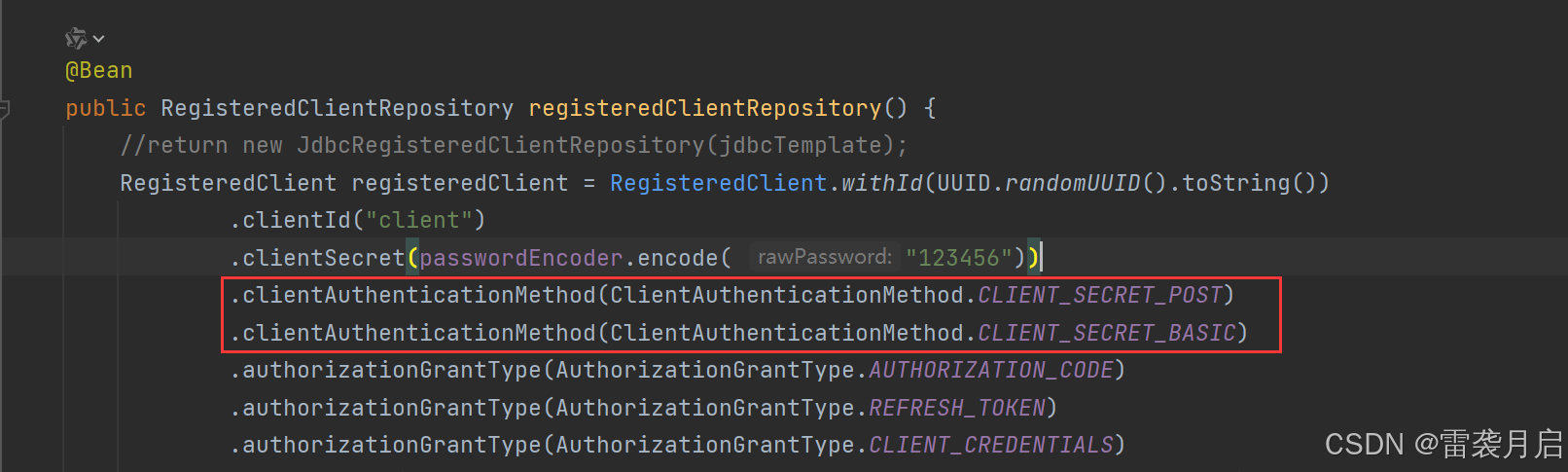
2、client的配置很关键,我之前在接口测试时,怎么都无法通过,结果打断点发现不同的client调用时支持不同的方法,而方法不对,就会报invalid_client,调用方法配置如下:
3、千万不要用http://localhost:8080这种方式调用oauth服务,但凡遇到localhost,都会报invalid_grant等bug。
4、通过http://ip:port/oauth2/authorize访问oauth时,链接中一定要带上client_id, scope,不然无法授权,且链接中如果有redirect_uri,则redirect_uri一定要在客户端配置的redirect_uri列表内,且通过/oauth2/authorize获得code后,通过code来获取token时,请求中要有redirect_uri,且要和初始链接一致。
5、同一个code只能用一次,之前我调试时,获取到了code,并根据code获得了token,结果在解析token时出了问题,我尝试再用那个code来获取token时就报错code过期,这算是一个常识吧,希望新上手的能吸取教训。
6、遇到解决不了的问题,还是debug吧,通过oauth2clientauthenticationfilter可以进入过滤器链,再打断点一步步的调试,耐心一点,总能找到原因的。
后记与致谢
最近一个月我都在死磕着oauth,也是想凭着一鼓作气,把它的运用给一次性琢磨透彻了,然而事与愿违,越钻研下去,越发觉得它的博大精深,感觉不能靠一天两天就完全掌握,还是需要持续的学习和积累。之前的博客里我有提到,学习oauth时感觉到一种深深的挫败感,因为我现在研究的东西,在17,18年已经被好多人研究透了。而这两天我又发现了一些变化,在springsecurity升级之后,很多大佬也整理了博客教新人如何使用spring-security-oauth2-authorization-server,这让我觉得前行的道路并不孤单,以下是我觉得对我帮助很大的博客,拜谢大佬,感激不尽!
参考资料
spring boot 最新版3.x 集成 oauth 2.0实现认证授权服务 (首推,我就是看他的博客才配好服务端客户端的。)
springsecurity最新学习,spring-security-oauth2-authorization-server
springboot2.7 oauth2 server使用jdbc存储registeredclient
到此这篇关于springboot3.x配置oauth的文章就介绍到这了,更多相关springboot3.x配置oauth内容请搜索代码网以前的文章或继续浏览下面的相关文章希望大家以后多多支持代码网!



发表评论