
 我要评论
我要评论一、下载部署deepseek
1.下载ollama
前往 ollama 主页。
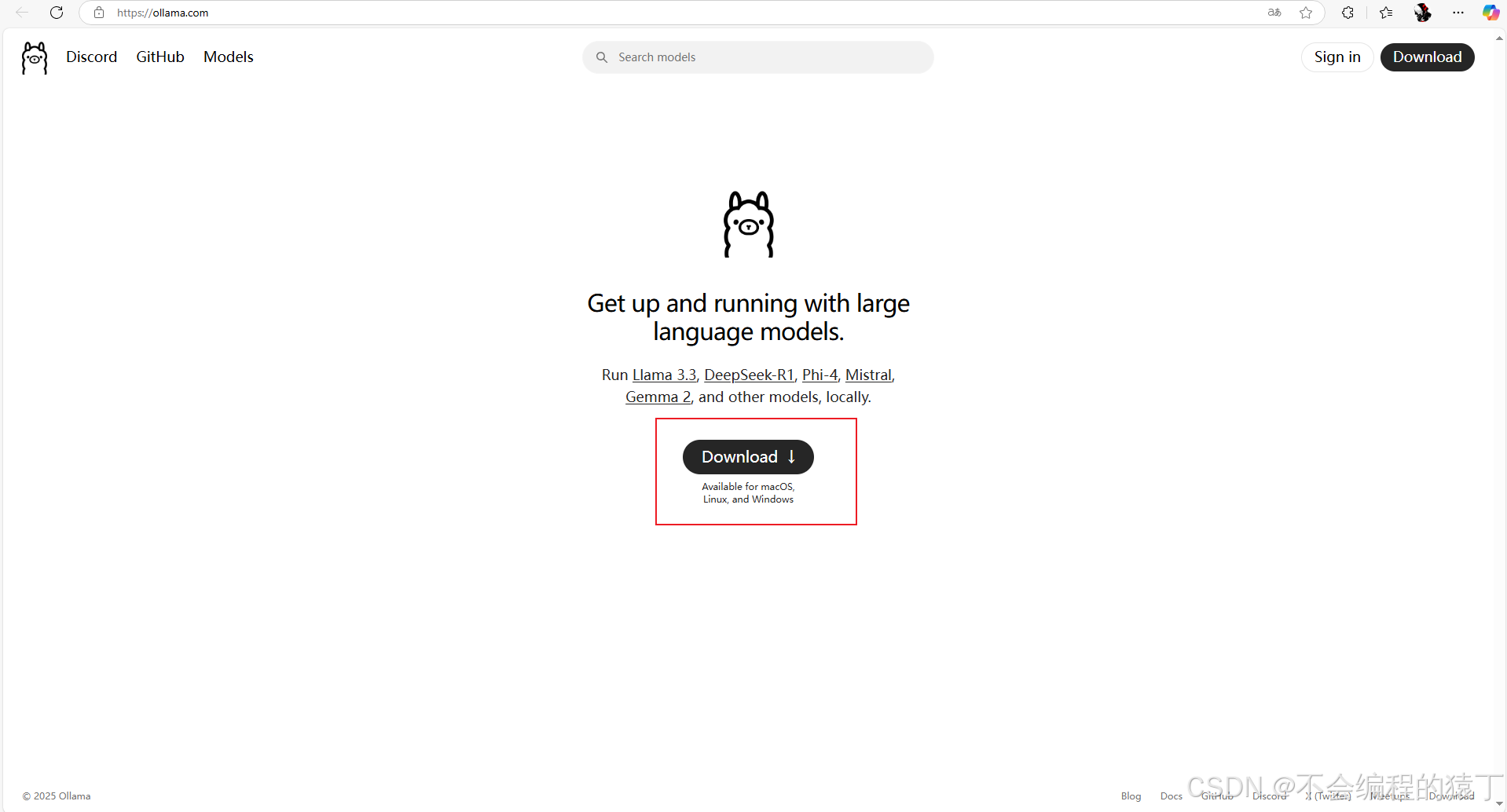
点击下载,选择对应操作系统,点击下载。
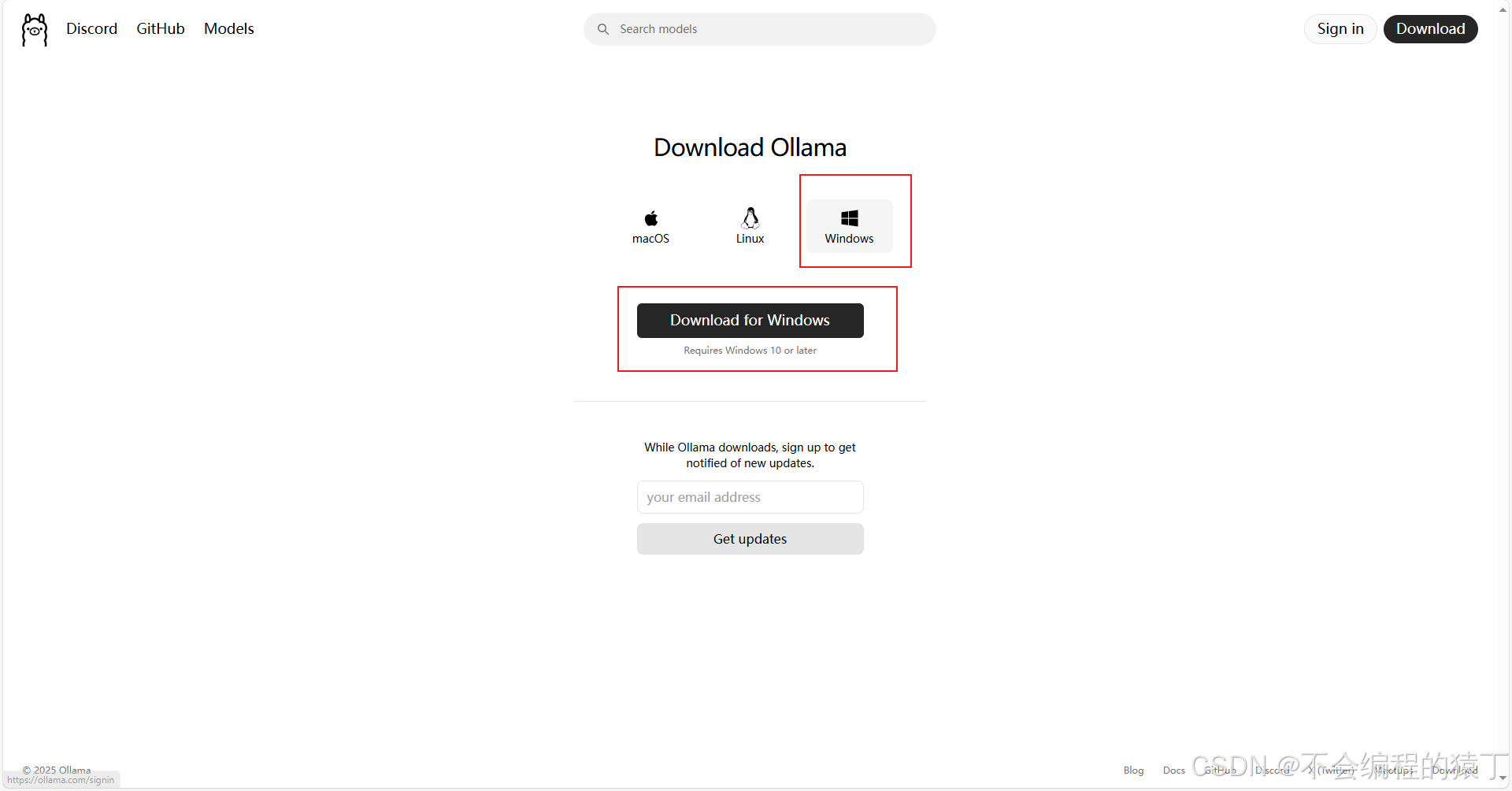
下载完成后打开直接无脑下一步就行。
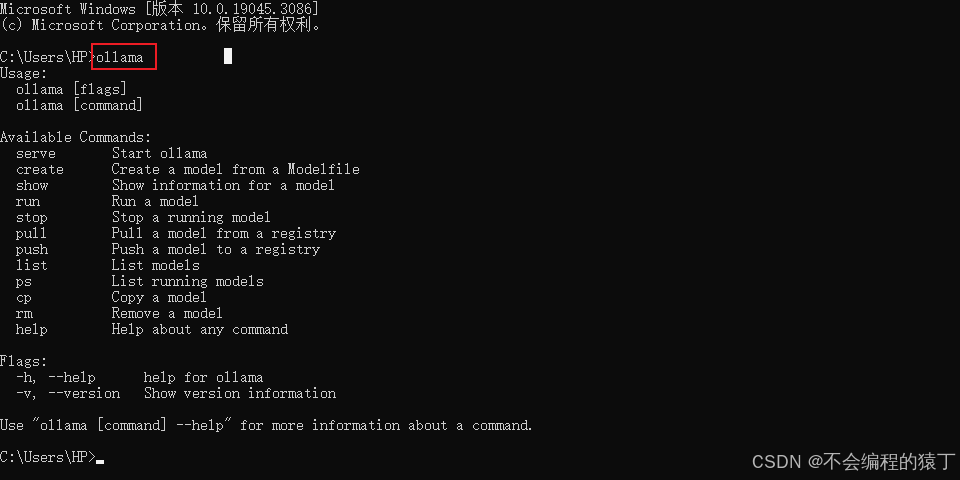
安装完成之后打开cmd页面,输入ollama,如果有输出就代表安装成功,如果显示"不是内部命令"就需要配置一下环境变量。
###配置环境变量以及更改ollama模型路径###
win10系统为例,右键此电脑>高级系统设置>高级>环境变量
ollama 默认会安装到 c:\users\xx\appdata\local\programs\ollama 下,将此文件全部移到其他盘。
选择系统变量path>编辑>新建>输入移动后的ollama地址
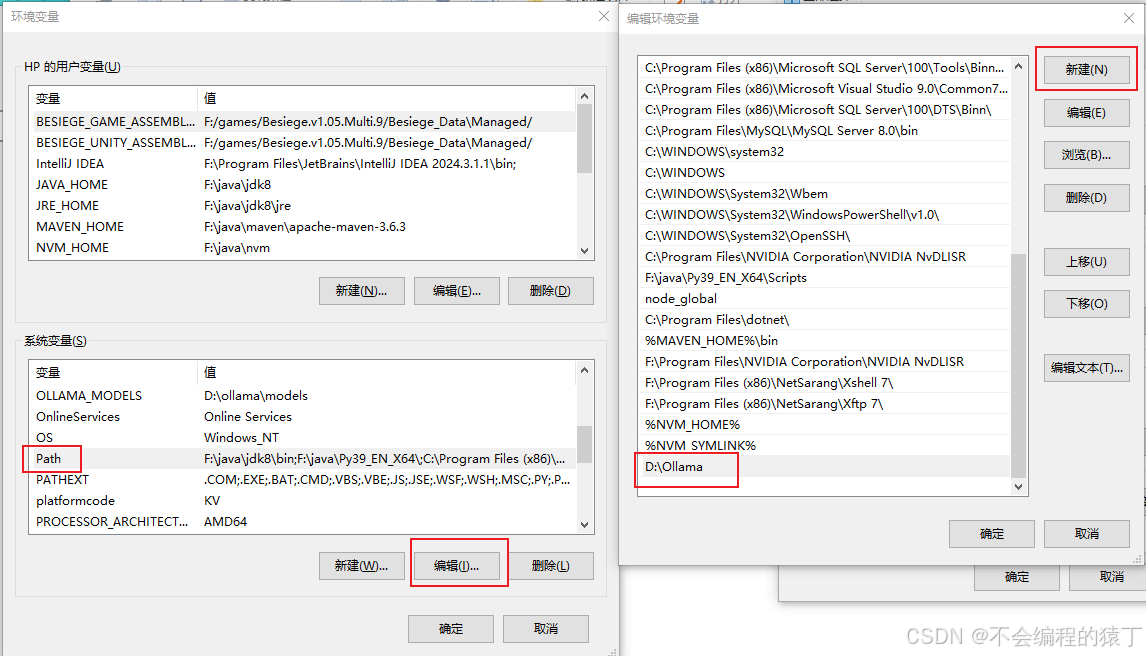
在系统变量中点击新建,输入变量名ollama_models,变量值d:\ollama\models(希望ollama模型放入哪个位置)
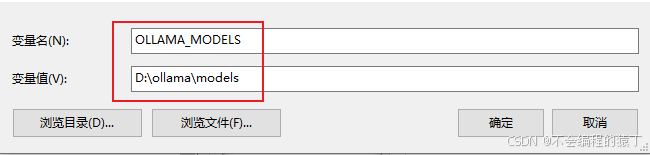
配置完成后重启电脑,打开cmd页面再次输入ollama,查看是否有输出
2.下载deepseek-r1模型并启动
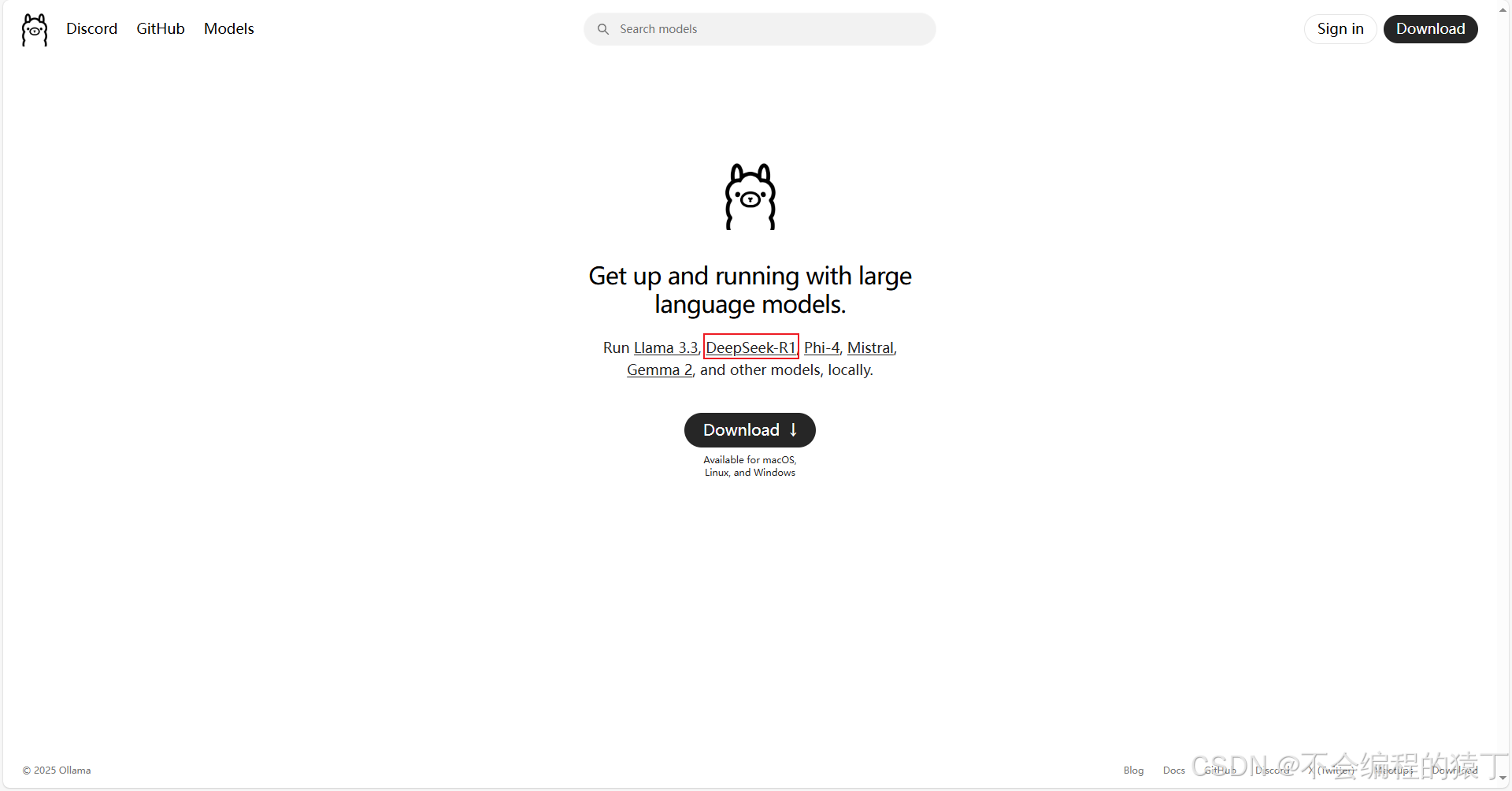
打开 ollama 首页,点击 deepseek-r1
在这里有模型各种参数大小
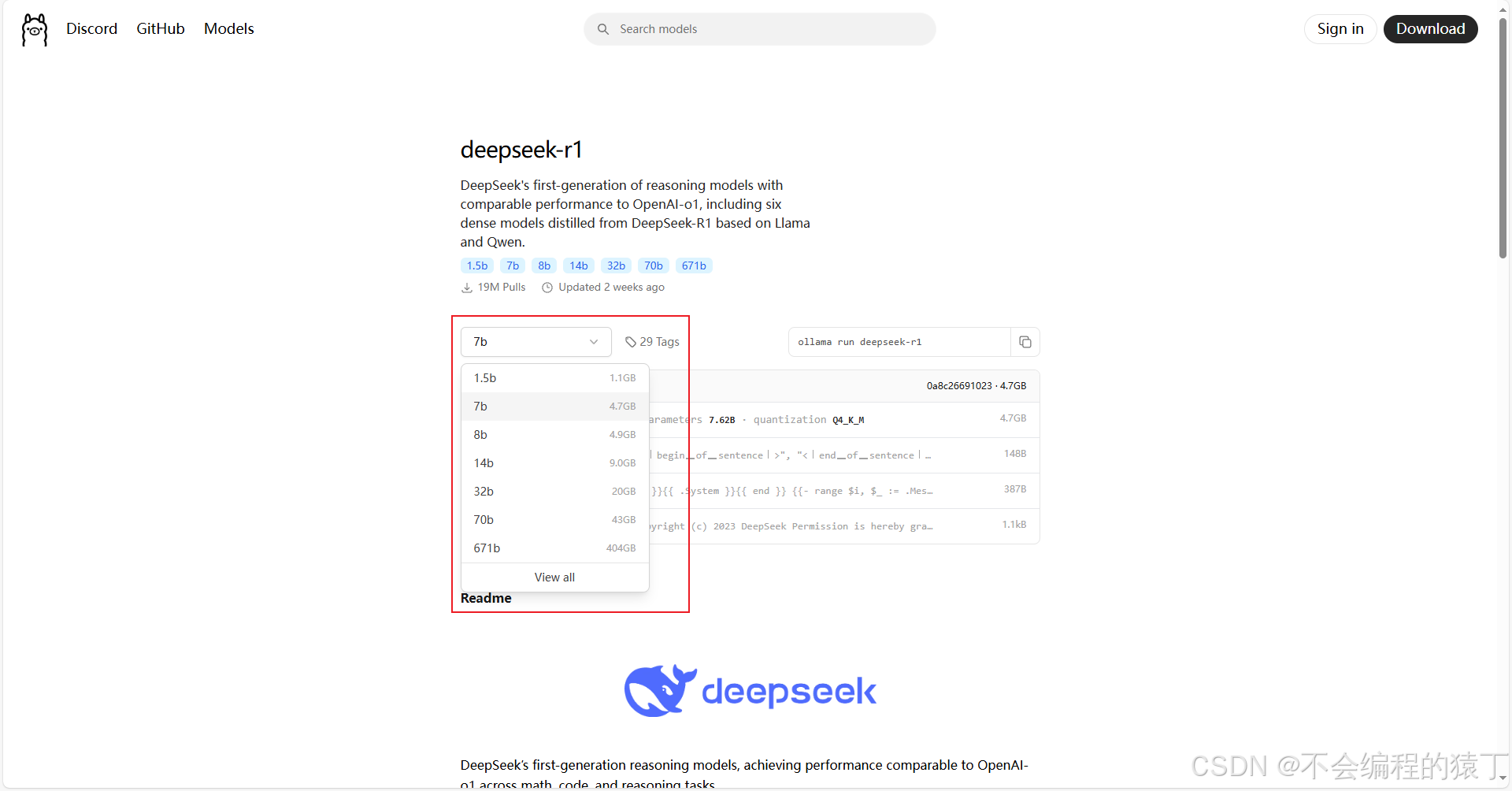
deepseek-r1模型有1.5b、7b、8b、14b、32b、70b和671b的参数量区别,b代表十亿的意思,1.5b代表15亿参数量的意思。671b是基础大模型,1.5b、7b、8b、14b、32b、70b是蒸馏后的小模型,它们的区别主要体现在参数规模、模型容量、性能表现、准确性、训练成本、推理成本和不同使用场景:
| deepseek模型版本 | 参数量 | 特点 | 适用场景 | 硬件配置 |
| deepseek-r1-1.5b | 1.5b | 轻量级模型,参数量少,模型规模小 | 适用于轻量级任务,如短文本生成、基础问答等 | 4核处理器、8g内存,无需显卡 |
| deepseek-r1-7b | 7b | 平衡型模型,性能较好,硬件需求适中 | 适合中等复杂度任务,如文案撰写、表格处理、统计分析等 | 8核处理器、16g内存,ryzen7或更高,rtx 3060(12gb)或更高 |
| deepseek-r1-8b | 8b | 性能略强于7b模型,适合更高精度需求 | 适合需要更高精度的轻量级任务,比如代码生成、逻辑推理等 | 8核处理器、16g内存,ryzen7或更高,rtx 3060(12gb)或4060 |
| deepseek-r1-14b | 14b | 高性能模型,擅长复杂的任务,如数学推理、代码生成 | 可处理复杂任务,如长文本生成、数据分析等 | i9-13900k或更高、32g内存,rtx 4090(24gb)或a5000 |
| deepseek-r1-32b | 32b | 专业级模型,性能强大,适合高精度任务 | 适合超大规模任务,如语言建模、大规模训练、金融预测等 | xeon 8核、128gb内存或更高,2-4张a100(80gb)或更高 |
| deepseek-r1-70b | 70b | 顶级模型,性能最强,适合大规模计算和高复杂任务 | 适合高精度专业领域任务,比如多模态任务预处理。这些任务对硬件要求非常高,需要高端的 cpu 和显卡,适合预算充足的企业或研究机构使用 | xeon 8核、128gb内存或更高,8张a100/h100(80gb)或更高 |
| deepseek-r1-671b | 671b | 超大规模模型,性能卓越,推理速度快,适合极高精度需求 | 适合国家级 / 超大规模 ai 研究,如气候建模、基因组分析等,以及通用人工智能探索 | 64核、512gb或更高,8张a100/h100 |
根据自己电脑的配置选择对应大小的模型,复制安装命令,在cmd中执行命令
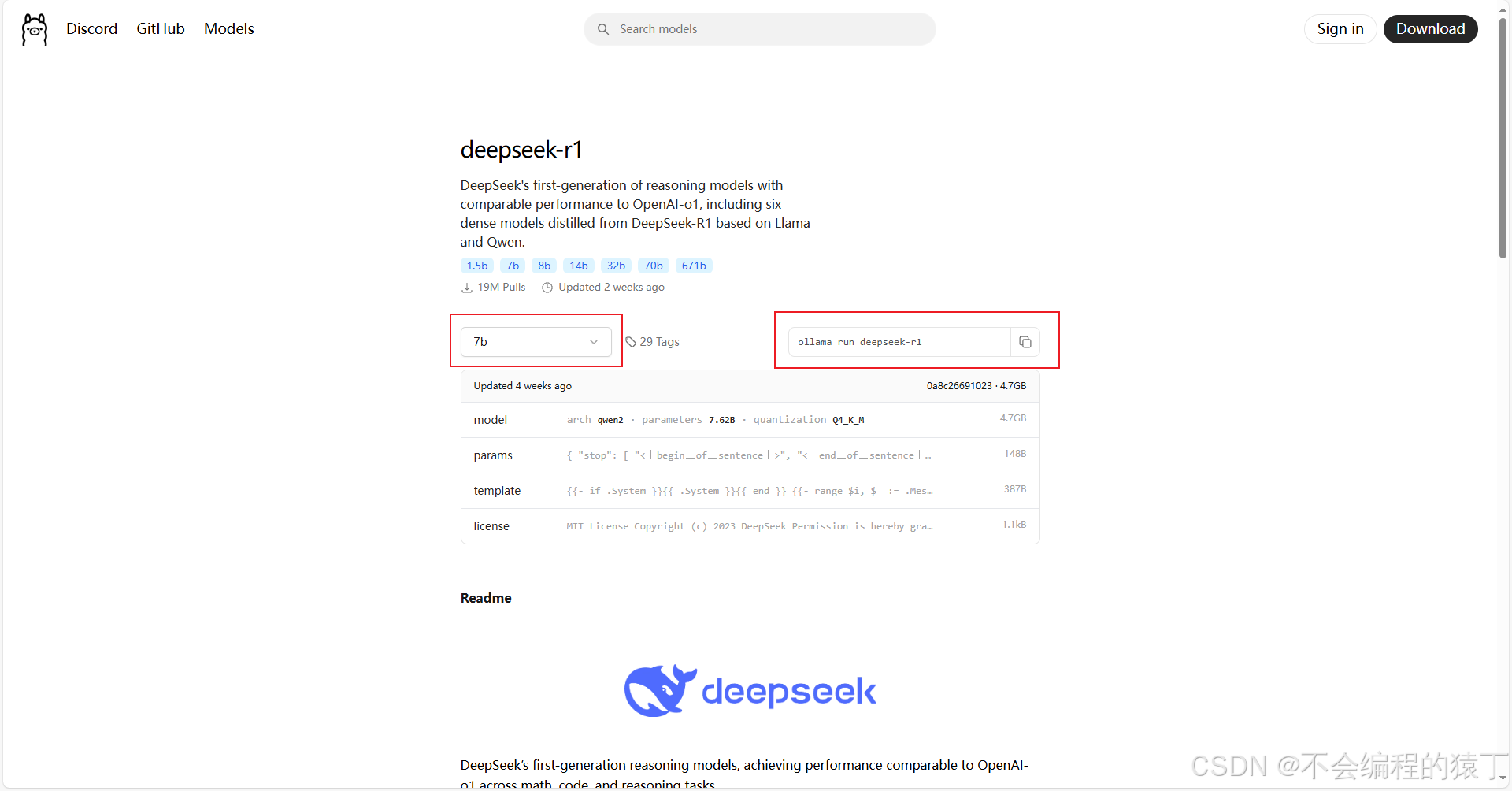
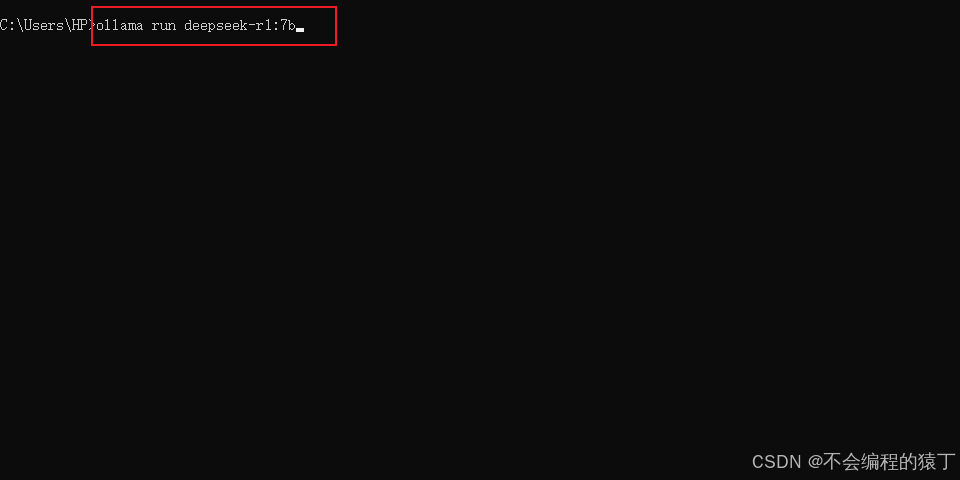
等待安装完成后会自己启动。
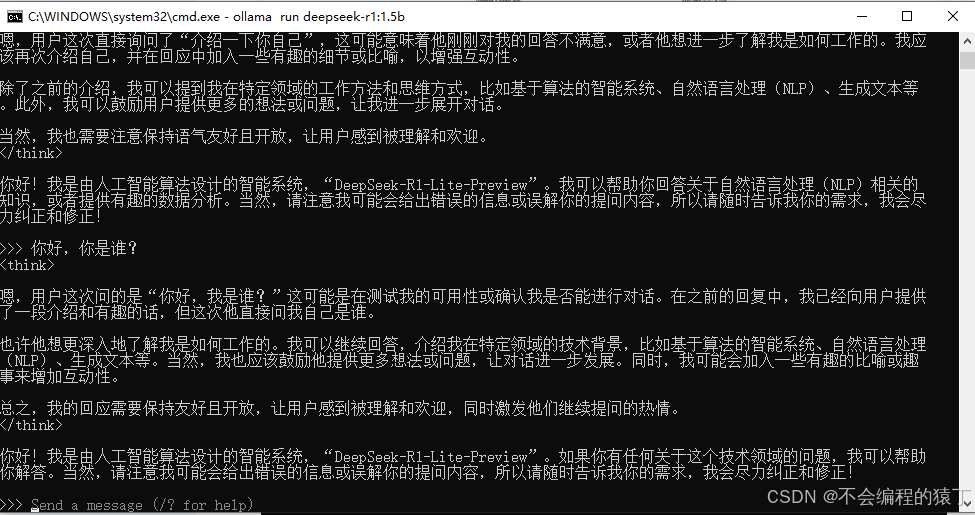
退出 deepseek 输入 /bye 或者 ctrl+d
ollama 常用命令
ollama list :查看已安装的模型
ollama ps:正在运行的模型
ollama run 模型名称:启动模型
ollama rm 模型名称:卸载模型
下次启动 deepseek 只需要先 ollama list 查看已安装的模型,ollama run 模型名称启动即可。
二、java项目接入deepseek
创建一个是 springboot 项目引入 okhttp,lombok 等依赖
        <dependency>
            <groupid>org.projectlombok</groupid>
            <artifactid>lombok</artifactid>
            <scope>provided</scope>
        </dependency>
        <dependency>
            <groupid>com.squareup.okhttp3</groupid>
            <artifactid>okhttp</artifactid>
            <version>4.10.0</version>
        </dependency>
配置文件中配置好本地 deepseek 的访问url,ollama启动的 deepseek 端口默认为 11434
deepseek:
  api:
    url: "http://127.0.0.1:11434/api/generate"
    model: "deepseek-r1:1.5b"
编写 deepseekcontroller
@restcontroller
@requestmapping("/deepseek")
public class deepseekcontroller {

    @autowired
    private deepseekservice deepseekservice;

    @getmapping
    @requestmapping("/chat")
    public string chat(string question) {
        try {
            return deepseekservice.chat(question);
        } catch (ioexception e) {
            return "服务器繁忙,请稍后重试!";
        }
    }
}
编写deepseekrequest实体类
@data
@builder
public class deepseekrequest {
    /**
     * 消息列表,包含对话中的消息对象
     */
    private string prompt;

    /**
     * 模型名称,指定要使用的模型
     */
    private string model;

}
请求参数有很多,只列举最主要的两个参数
编写deepseekresponse实体类
@data
@noargsconstructor
@allargsconstructor
@tablename("deepseek_response")
public class deepseekresponse {

    private string id;

    private string questionid;

    //模型名称
    private string model;

    //创建时间
    @jsonfield(name = "created_at")
    private string createdat;

    //响应内容
    private string response;

    //
    private boolean done;

    //
    @jsonfield(name = "done_reason")
    private string donereason;

    //
    @tablefield(typehandler = jacksontypehandler.class)
    private integer[] context;

    //
    @jsonfield(name = "total_duration")
    private long totalduration;

    //
    @jsonfield(name = "load_duration")
    private long loadduration;

    //
    @jsonfield(name = "prompt_eval_count")
    private long promptevalcount;

    //
    @jsonfield(name = "prompt_eval_duration")
    private long promptevalduration;

    //
    @jsonfield(name = "eval_count")
    private long evalcount;

    //
    @jsonfield(name = "eval_duration")
    private long evalduration;
}
编写deepseekservice
@service
public class deepseekservice {

    @value("${deepseek.api.url}")
    private string url;

    @value("${deepseek.api.model}")
    private string model;

    private final okhttpclient client = new okhttpclient.builder()
            .connecttimeout(30, timeunit.seconds)
            .readtimeout(60, timeunit.seconds)
            .build();

    public string chat(string question) throws ioexception {

        deepseekrequest requestbody = deepseekrequest.builder()
                .model(model)
                .prompt(question)
                .build();
        // 创建http请求
        request request = new request.builder()
                .url(url)
                .post(requestbody.create(json.tojsonstring(requestbody), mediatype.get("application/json")))
                .build();
        // 发送请求并处理响应
        try {
            response response = client.newcall(request).execute();
            if (!response.issuccessful()) {
                throw new ioexception("unexpected code " + response);
            }
            deepseekresponse deepseekresponse = json.parseobject(response.body().string(), deepseekresponse.class);
            return  deepseekresponse.getresponse();
        } catch (ioexception e) {
            e.printstacktrace();
        }
        return "服务器繁忙!";
    }
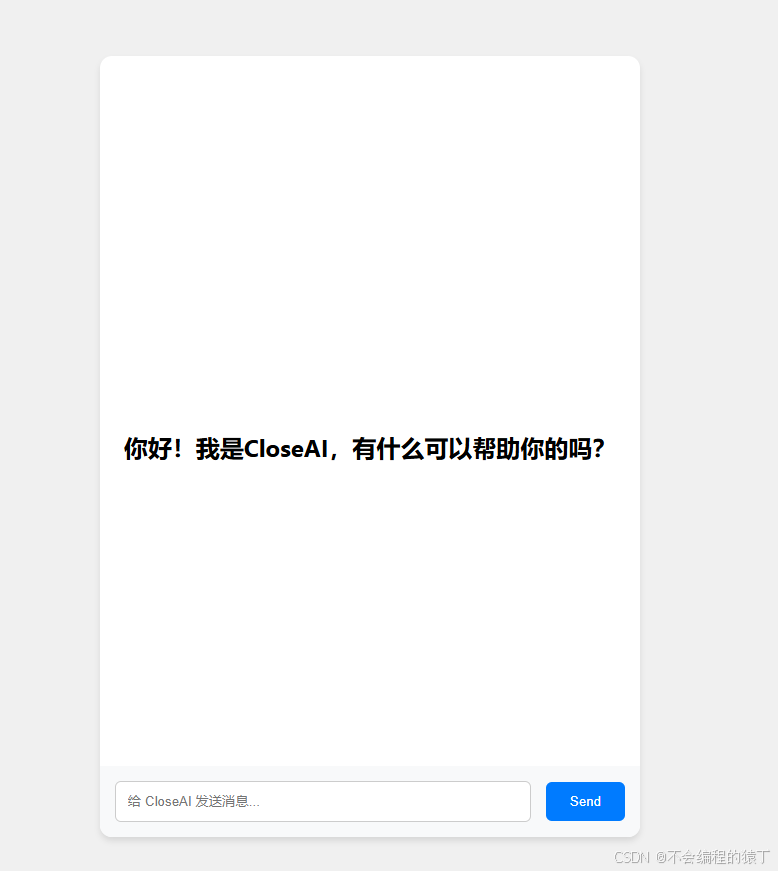
随便写一个前端页面使用axios访问刚才暴露出来的接口就可以啦
<!doctype html>
<html lang="en">
<head>
    <meta charset="utf-8">
    <meta http-equiv="x-ua-compatible" content="ie=edge">
    <meta name="viewport" content="width=device-width, initial-scale=1.0">
    <title>智能 ai</title>
    <link rel="stylesheet" href="https://unpkg.com/element-ui/lib/theme-chalk/index.css" rel="external nofollow" >
    <link rel="stylesheet" href="/css/self.css" rel="external nofollow" >
</head>
<body>
<div id="app">
    <div class="chat-container">
        <div v-if="showtitle" class="welcome-title">你好!我是closeai,有什么可以帮助你的吗?</div>
        <div class="chat-messages">
            <transition-group name="list">
                <div v-for="message in messages" :key="message.id" class="message-wrapper"
                     :class="{'user-message-wrapper': message.sender === 'user', 'ai-message-wrapper': message.sender === 'ai'}">
                    <img :src="message.sender === 'user' ? '/images/user.png' : '/images/ai.png'" class="avatar"/>
                    <div class="message"
                         :class="{'user-message': message.sender === 'user', 'ai-message': message.sender === 'ai'}">
                        <span v-if="message.sender === 'user'">{{ message.text }}</span>
                        <div v-else v-html="message.formattedtext || message.text"></div>
                        <div v-if="message.sender === 'ai' && message.isloading" class="loading-icon"></div>

                        <!-- 调整停止按钮容器位置 -->
                        <div v-if="(isthinking || animationframeid) && message.sender === 'ai' && message.isactive"
                             class="stop-container">
                            <button @click="stopthinking" class="stop-btn" title="停止响应">
                                <svg width="24" height="24" viewbox="0 0 24 24">
                                    <rect x="6" y="4" width="4" height="16" rx="1"/>
                                    <rect x="14" y="4" width="4" height="16" rx="1"/>
                                </svg>
                            </button>
                        </div>
                    </div>
                </div>
            </transition-group>
        </div>
        <div class="chat-input">
            <input type="text" v-model="userinput" @keyup.enter="sendmessage" placeholder="给 closeai 发送消息..."/>
            <button @click="sendmessage">send</button>
        </div>
    </div>
</div>
<script src="/js/vue.js"></script>
<script src="/js/axios.min.js"></script>
<script src="/js/method.js"></script>
<script src="https://cdn.jsdelivr.net/npm/marked/marked.min.js"></script>
<script src="https://cdnjs.cloudflare.com/ajax/libs/dompurify/3.0.5/purify.min.js"></script>
<script>
    function debounce(func, wait) {
        let timeout;
        return function (...args) {
            cleartimeout(timeout);
            timeout = settimeout(() => func.apply(this, args), wait);
        };
    }

    new vue({
        el: '#app',
        data: {
            userinput: '',
            messages: [],
            showtitle: true, // 添加一个新属性来控制标题的显示
            performanceconfig: {
                maxmessagelength: 1000,  // 超过该长度启用优化
                chunksize: window.innerwidth < 768 ? 3 : 5 // 响应式分段
            },
            // 新增控制变量
            isthinking: false,
            currentcontroller: null,  // 请求中止控制器
            animationframeid: null    // 动画帧id
        },
        methods: {
            sendmessage() {
                if (this.userinput.trim() !== '') {
                    this.showtitle = false; // 用户开始提问时隐藏标题
                    const usermessage = {
                        id: date.now(),
                        sender: 'user',
                        text: this.userinput
                    };
                    this.messages.push(usermessage);
                    this.userinput = '';

                    // 停用所有旧消息
                    this.messages.foreach(msg => {
                        if (msg.sender === 'ai') {
                            this.$set(msg, 'isactive', false);
                        }
                    });

                    const aimessage = {
                        id: date.now() + 1,
                        sender: 'ai',
                        text: '思考中 ',
                        isloading: true,
                        isthinking: true, // 新增状态字段
                        isactive: true  // 新增激活状态字段
                    };
                    this.messages.push(aimessage);

                    // 在请求前重置状态
                    this.isthinking = true;
                    // 使用 axios 的取消令牌
                    const controller = new abortcontroller();
                    this.currentcontroller = controller;

                    axios.get('/deepseek/chat?question=' + usermessage.text, {
                        signal: controller.signal
                    }).then(response => {
                        aimessage.isloading = false;
                        aimessage.text = ''
                        aimessage.rawcontent = response.data; // 新增原始内容存储

                        let index = 0;
                        let chunk = '';
                        const chunksize = this.performanceconfig.chunksize;
                        let lastupdate = 0;
                        let lastfullrender = 0;

                        const processchunk = () => {
                            // 分块处理逻辑
                            const remaining = response.data.length - index;
                            const step = remaining > chunksize * 5 ? chunksize * 5 : 1;
                            chunk += response.data.slice(index, index + step);
                            index += step;

                            // 增量更新文本
                            aimessage.text = chunk;
                            this.safeparsemarkdown(aimessage, true); // 实时解析
                            this.scrolltobottom();
                        };

                        const animate = (timestamp) => {
                            // 时间片控制逻辑
                            if (timestamp - lastupdate > 16) { // 约60fps
                                processchunk();
                                lastupdate = timestamp;
                            }
                            // 完整渲染控制(每100ms强制更新一次)
                            if (timestamp - lastfullrender > 100) {
                                this.$forceupdate();
                                lastfullrender = timestamp;
                            }

                            if (timestamp - lastupdate > 20) {
                                const remainingchars = response.data.length - index;
                                const step = remainingchars > chunksize ? chunksize : 1;

                                aimessage.text += response.data.substr(index, step);
                                index += step;

                                this.safeparsemarkdown(aimessage);
                                this.scrolltobottom();

                                lastupdate = timestamp;
                            }

                            if (index < response.data.length) {
                                this.animationframeid = requestanimationframe(animate);
                            } else {
                                this.$set(aimessage, 'isactive', false); // 关闭激活状态

                                this.$set(aimessage, 'formattedtext',
                                    dompurify.sanitize(marked.parse(aimessage.text))
                                );
                                this.animationframeid = null; // 新增重置
                                this.isthinking = false; // 在此处更新状态
                                this.finalizemessage(aimessage);
                            }
                        };
                        // 修改动画启动方式
                        this.animationframeid = requestanimationframe(animate);
                    }).catch(error => {
                        if (error.name !== 'cancelederror') {
                            console.error('error:', error);
                        }
                    }).finally(() => {
                        this.animationframeid = null;
                        // 新增消息状态更新
                        this.messages.foreach(msg => {
                            if (msg.sender === 'ai') {
                                msg.isloading = false;
                                msg.isthinking = false;
                            }
                        });
                    });
                }
            },
            // 新增滚动方法
            scrolltobottom() {
                const container = this.$el.queryselector('.chat-messages');
                container.scrolltop = container.scrollheight;
            },

            // 优化的markdown解析方法
            safeparsemarkdown: debounce(function (aimessage, immediate = false) {
                if (immediate) {
                    // // 快速解析基础格式(粗体、斜体等)
                    // const quickformatted = aimessage.text
                    //     .replace(/\*\*(.*?)\*\*/g, '<strong>$1</strong>')
                    //     .replace(/\*(.*?)\*/g, '<em>$1</em>');

                    // 完整markdown解析
                    this.$set(aimessage, 'formattedtext',
                        dompurify.sanitize(marked.parse(aimessage.text))
                    );
                } else {
                    // 完整markdown解析
                    this.$set(aimessage, 'formattedtext',
                        dompurify.sanitize(marked.parse(aimessage.text))
                    );
                }
            }, 50), // 完整解析保持50ms防抖

            stopthinking() {
                // 只停止当前活动消息
                const activemessage = this.messages.find(msg =>
                    msg.sender === 'ai' && msg.isactive
                );

                if (activemessage) {
                    // 更新消息状态
                    this.$set(activemessage, 'text', activemessage.text + '\n(响应已停止)');
                    this.$set(activemessage, 'isloading', false);
                    this.$set(activemessage, 'isactive', false);
                    this.safeparsemarkdown(activemessage);
                }

                // 取消网络请求
                if (this.currentcontroller) {
                    this.currentcontroller.abort()
                }

                // 停止打印渲染
                if (this.animationframeid) {
                    cancelanimationframe(this.animationframeid);
                    this.animationframeid = null;
                }

                // 更新所有相关消息状态
                this.messages.foreach(msg => {
                    if (msg.sender === 'ai' && (msg.isloading || msg.isthinking)) {
                        msg.text += '\n(响应已停止)';
                        msg.isloading = false;
                        msg.isthinking = false;
                        this.safeparsemarkdown(msg);
                    }
                });

                this.isthinking = false;
                this.animationframeid = null; // 确保重置
            },

            // 新增最终处理函数
            finalizemessage(aimessage) {
                this.$set(aimessage, 'formattedtext',
                    dompurify.sanitize(marked.parse(aimessage.text))
                );
                this.$set(aimessage, 'isactive', false);
                this.animationframeid = null;
                this.isthinking = false;
                this.$forceupdate();
            },
        }
    });
</script>
</body>
</html>
body {
    font-family: 'segoe ui', tahoma, geneva, verdana, sans-serif;
    margin: 0;
    padding: 0;
    display: flex;
    justify-content: center;
    align-items: center;
    height: 100vh;
    background-color: #f0f0f0;
}

.chat-container {
    width: 100%;
    /*max-width: 800px;*/
    background-color: #fff;
    border-radius: 12px;
    box-shadow: 0 4px 6px rgba(0, 0, 0, 0.1);
    overflow: hidden;
    display: flex;
    flex-direction: column;
}

.welcome-title {
    position: absolute;
    top: 50%;
    left: 50%;
    transform: translate(-50%, -50%);
    width: 100%;
    text-align: center;
    font-size: 24px;
    font-weight: bold;
}
/* 新增停止按钮样式 */
.stop-btn {
    background-color: #ff4d4f;
    color: white;
    margin-left: 8px;
    transition: all 0.3s;
}

.stop-btn:hover {
    background-color: #f5f7fa;
}
.avatar {
    width: 40px;
    height: 40px;
    border-radius: 50%;
    margin-right: 10px;
    vertical-align: middle;
}


.chat-messages {
    /*flex: 1;*/
    overflow-y: auto;
    padding: 20px;
    /*display: flex;*/
    flex-direction: column-reverse;
    height: 70vh;
    width: 500px;
    scrollbar-width: none;
    scroll-behavior: smooth; /* 平滑滚动效果 */
    contain: strict; /* 限制浏览器重排范围 */
    transform: translatez(0);
}

.message {
    margin-bottom: 15px;
    padding: 12px;
    border-radius: 12px;
    max-width: 70%;
    box-shadow: 0 2px 4px rgba(0, 0, 0, 0.1);
    transition: all 0.3s ease;
    /*align-self: flex-end; !* 默认消息靠右对齐 *!*/
    display: table;
}

.message-wrapper {
    display: flex;
    max-width: 80%;
    margin: 10px;
    align-items: flex-start;
    will-change: transform, opacity; /* 启用gpu加速 */
}

/*.user-message-wrapper {*/
/*    justify-content: flex-end;*/
/*}*/

.ai-message-wrapper {
    justify-content: flex-start;
    position: relative; /* 为绝对定位的停止按钮提供参考系 */
    margin-bottom: 50px; /* 给停止按钮留出空间 */
}

.avatar {
    width: 40px;
    height: 40px;
    border-radius: 50%;
    margin-right: 10px;
    vertical-align: middle;
}

.message {
    margin-bottom: 0;
}

.user-message {
    background-color: #007bff;
    color: #fff;
    margin-left: auto; /* 用户消息靠右对齐 */
}


.ai-message {
    background-color: #f0f2f5; /* ai消息背景色 */
    margin-right: auto; /* 消息内容靠左 */
    position: relative; /* 添加相对定位 */
    padding-bottom: 40px; /* 为按钮预留空间 */
}

/* 在self.css中添加 */
.user-message-wrapper {
    flex-direction: row-reverse; /* 反转排列方向 */
    margin-left: auto; /* 让用户消息靠右 */
}

.user-message-wrapper .avatar {
    margin: 0 0 0 15px; /* 调整头像右边距 */
}

.chat-input {
    display: flex;
    align-items: center;
    padding: 15px;
    background-color: #f8f9fa;
}

.chat-input input {
    flex: 1;
    padding: 12px;
    border: 1px solid #ccc;
    border-radius: 6px;
    margin-right: 15px;
    transition: border-color 0.3s ease;
}

.chat-input input:focus {
    border-color: #007bff;
}

.chat-input button {
    padding: 12px 24px;
    border: none;
    border-radius: 6px;
    background-color: #007bff;
    color: #fff;
    cursor: pointer;
    transition: background-color 0.3s ease;
}

.message {
    display: flex;
    align-items: center;
}

/* 调整停止按钮定位 */
.stop-container {
    position: absolute;
    bottom: 10px;
    right: 10px;
    z-index: 10;
}


.stop-btn {
    background: #ff4757;
    border: none;
    border-radius: 50%;
    width: 32px;
    height: 32px;
    display: flex;
    align-items: center;
    justify-content: center;
    cursor: pointer;
    box-shadow: 0 2px 5px rgba(0,0,0,0.2);
    transition: transform 0.2s;
}

.stop-btn:hover {
    transform: scale(1.1);
}

.stop-btn svg {
    fill: white;
    width: 16px;
    height: 16px;
}

.ai-message pre {
    background: #f5f7fa;
    padding: 15px;
    border-radius: 6px;
    overflow-x: auto;
}

.ai-message code {
    font-family: 'courier new', monospace;
    font-size: 14px;
}

.ai-message table {
    border-collapse: collapse;
    margin: 10px 0;
}

.ai-message td, .ai-message th {
    border: 1px solid #ddd;
    padding: 8px;
}

.loading-icon {
    width: 20px;
    height: 20px;
    border: 2px solid #ccc;
    border-top-color: #007bff;
    border-radius: 50%;
    /*animation: spin 1s linear infinite;*/
    margin-left: 10px;
    /* 替换为css动画实现的加载效果 */
    /*background: linear-gradient(90deg, #eee 25%, #ddd 50%, #eee 75%);*/
    animation: spin 1s infinite linear;
}

@keyframes spin {
    0% {
        transform: rotate(0deg);
    }
    100% {
        transform: rotate(360deg);
    }
}

.chat-input button:hover {
    background-color: #0056b3;
}

.list-enter-active, .list-leave-active {
    transition: all 0.5s ease;
}

.list-enter, .list-leave-to /* .list-leave-active in <2.1.8 */ {
    opacity: 0;
    transform: translatey(30px);
}
我的这个页面有bug,只供参考!!!
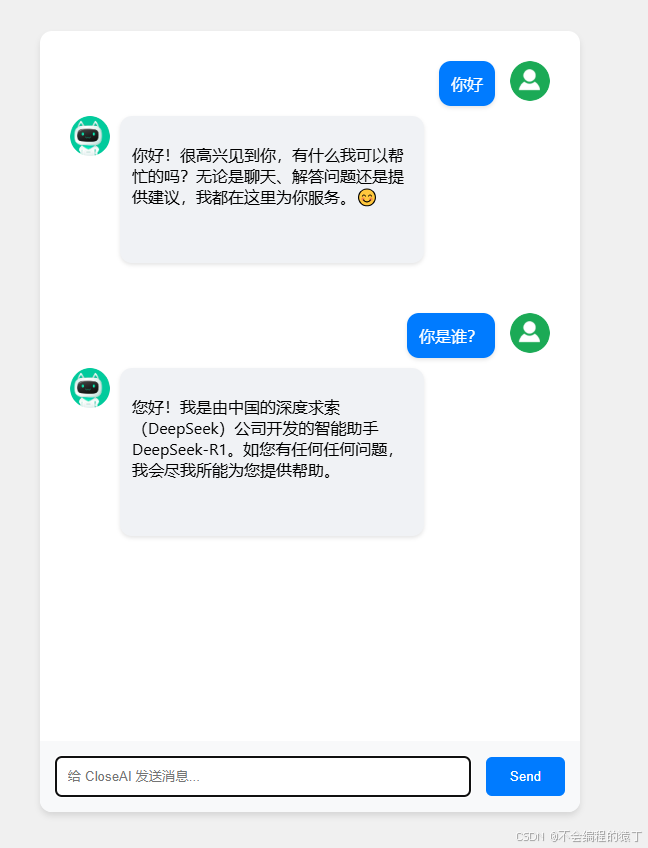
到此这篇关于java集成本地部署的deepseek的图文教程的文章就介绍到这了,更多相关java集成本地部署deepseek内容请搜索代码网以前的文章或继续浏览下面的相关文章希望大家以后多多支持代码网!




发表评论