
 我要评论
我要评论写在前边,二维数组可以拖拽,但是不可以编辑+拖拽,如果想要实现编辑+拖拽,还是需要转换成一维数组。原因是因为插件的官方规定,在拖拽过程中不可以编辑droppable层的props。
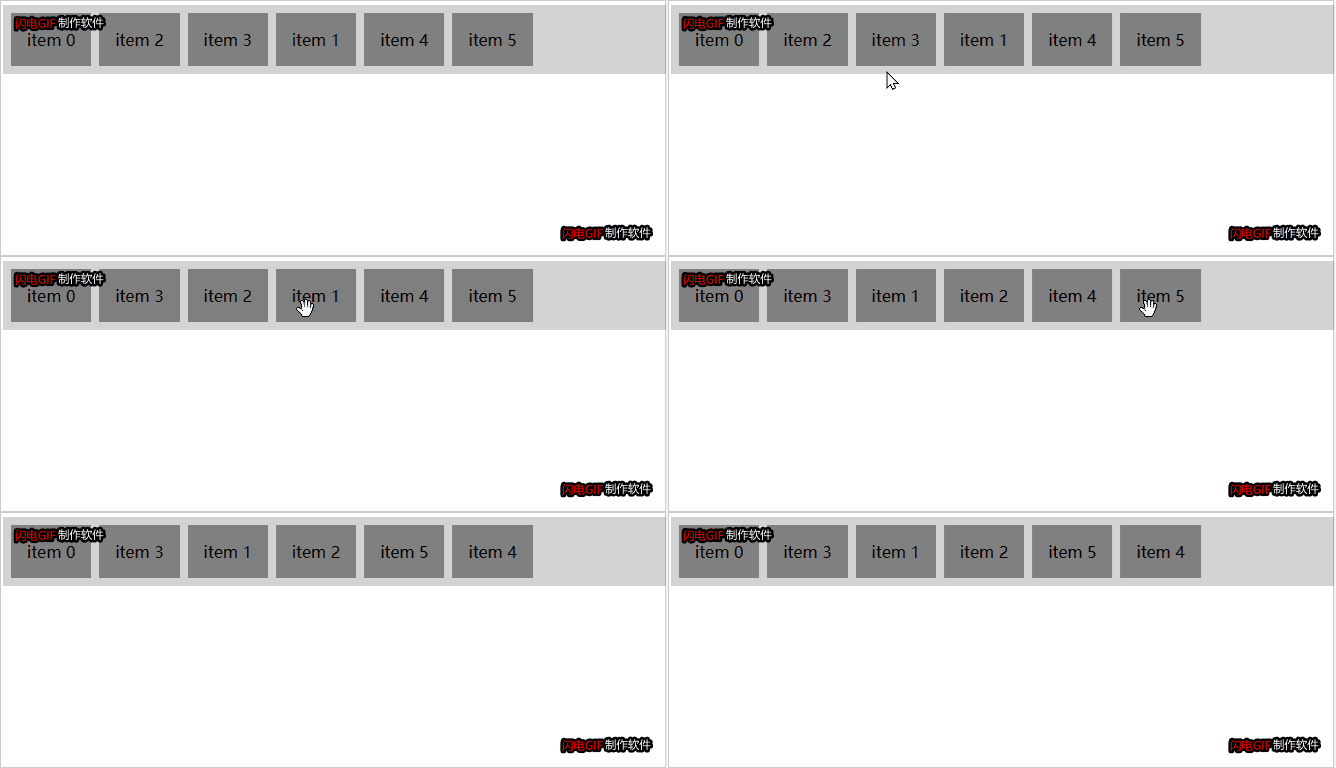
相关地址:
中文文档地址
react-beautiful-dnd - 《react-beautiful-dnd 中文文档帮助手册教程》 - 极客文档 (geekdaxue.co)
git源码
github - chinanf-boy/react-beautiful-dnd-zh: 🇨🇳翻译: react-beautiful-dnd 文档 ❤️ 更新 ✅
使用
安装
# yarn
yarn add react-beautiful-dnd
# npm
npm install react-beautiful-dnd --save
引入
import { dragdropcontext, droppable, draggable } from 'react-beautiful-dnd';引用
<draggablelist data={listdemo}></draggablelist>一维数组使用
传参data是一维数组
import react, { useeffect, usestate } from 'react';
import { dragdropcontext, draggable, droppable } from 'react-beautiful-dnd';
interface props {
  data: any[];
}
const draggablelist: react.fc<props> = ({ data }) => {
  const [sortlist, setsortlist] = usestate([]);
  const getitems = () => {
    const arr = array.from({ length: 10 }, (v, k) => k).map((k) => ({
      id: `item-${k}`,
      content: `item ${k}`,
    }));
    setsortlist(arr);
  };
  useeffect(() => {
    getitems();
  }, []);
  const grid = 8;
  const getitemstyle = (isdragging, draggablestyle) => ({
    // some basic styles to make the items look a bit nicer
    userselect: 'none',
    padding: grid * 2,
    margin: `0 ${grid}px 0 0`,
    // change background colour if dragging
    background: isdragging ? 'lightgreen' : 'grey',
    // styles we need to apply on draggables
    ...draggablestyle,
  });
  const getliststyle = (isdraggingover: any) => ({
    background: isdraggingover ? 'lightblue' : 'lightgrey',
    display: 'flex',
    padding: grid,
    overflow: 'auto',
  });
  const ondragend = (result) => {
    if (!result.destination) {
      return;
    }
    console.log('end', sortlist, result);
    const res = sortlist.filter((item) => item); // 更改引用地址
    console.log('移动前res', res);
    const [removed] = res.splice(result.source.index, 1);
    console.log('删除???', removed);
    res.splice(result.destination.index, 0, removed);
    console.log('添加后', res);
    setsortlist(res);
  };
  console.log('data', data);
  /**
   * draggable组件可以拖动并拖放到其droppables上. 一个draggable必须始终包含在一个droppable.
   * 它是 可能重新排序draggable在其droppable家中或移动到另一个droppable.
   * 一个draggable必须包含在一个droppable.
   * */
  return (
    <dragdropcontext ondragend={ondragend}>
      <droppable droppableid="droppable" direction="horizontal">
        {(provided, snapshot) => (
          <div ref={provided.innerref} style={getliststyle(snapshot.isdraggingover)} {...provided.droppableprops}>
            {sortlist.map((item, index) => (
              <draggable key={item.id} draggableid={item.id} index={index}>
                {(provided, snapshot) => (
                  <div
                    ref={provided.innerref}
                    {...provided.draggableprops}
                    {...provided.draghandleprops}
                    style={getitemstyle(snapshot.isdragging, provided.draggableprops.style)}
                  >
                    {item.content}
                  </div>
                )}
              </draggable>
            ))}
            {provided.placeholder}
          </div>
        )}
      </droppable>
    </dragdropcontext>
  );
};
export default draggablelist;
二维数组的使用
import react, { useeffect, usestate } from 'react';
import { dragdropcontext, draggable, droppable } from 'react-beautiful-dnd';
interface props {
  data: any[];
}
const draggablelist: react.fc<props> = ({ data = [] }) => {
  const [sortlist, setsortlist] = usestate(data);
  const grid = 8;
  const getitemstyle = (isdragging, draggablestyle) => ({
    // some basic styles to make the items look a bit nicer
    userselect: 'none',
    padding: grid * 2,
    margin: `0 ${grid}px 0 0`,
    // change background colour if dragging
    background: isdragging ? 'lightgreen' : 'grey',
    // styles we need to apply on draggables
    ...draggablestyle,
  });
  const getliststyle = (isdraggingover) => ({
    background: isdraggingover ? 'lightblue' : 'lightgrey',
    display: 'flex',
    padding: grid,
    overflow: 'auto',
  });
  const ondragend = (result) => {
    if (!result.destination) {
      return;
    }
    console.log('end', sortlist, result);
    const res = sortlist.filter((item) => item); //修改引用地址
    console.log('res', res);
    const [removed] = res.splice(result.source.index, 1);
    console.log('删除???', removed);
    res.splice(result.destination.index, 0, removed);
    console.log('添加后', res);
    setsortlist(res);
  };
  useeffect(() => {
    setsortlist(data);
  }, [data]);
  console.log('data', data);
  return (
    <dragdropcontext ondragend={ondragend}>
      {sortlist.map((item, index) => {
        return (
          <droppable droppableid={'droppable' + index} key={index} direction="vertical">
            {(provided, snapshot) => (
              <div ref={provided.innerref} style={getliststyle(snapshot.isdraggingover)} {...provided.droppableprops}>
                {/*{data.map((item, index) => (*/}
                <draggable key={item[0].value} draggableid={item[0].value} index={index}>
                  {(provided, snapshot) => (
                    <div
                      ref={provided.innerref}
                      {...provided.draggableprops}
                      {...provided.draghandleprops}
                      style={getitemstyle(snapshot.isdragging, provided.draggableprops.style)}
                    >
                      {66666 + item[0].label}
                    </div>
                  )}
                </draggable>
                {/*))}*/}
                {provided.placeholder}
              </div>
            )}
          </droppable>
        );
      })}
    </dragdropcontext>
  );
};
export default draggablelist;
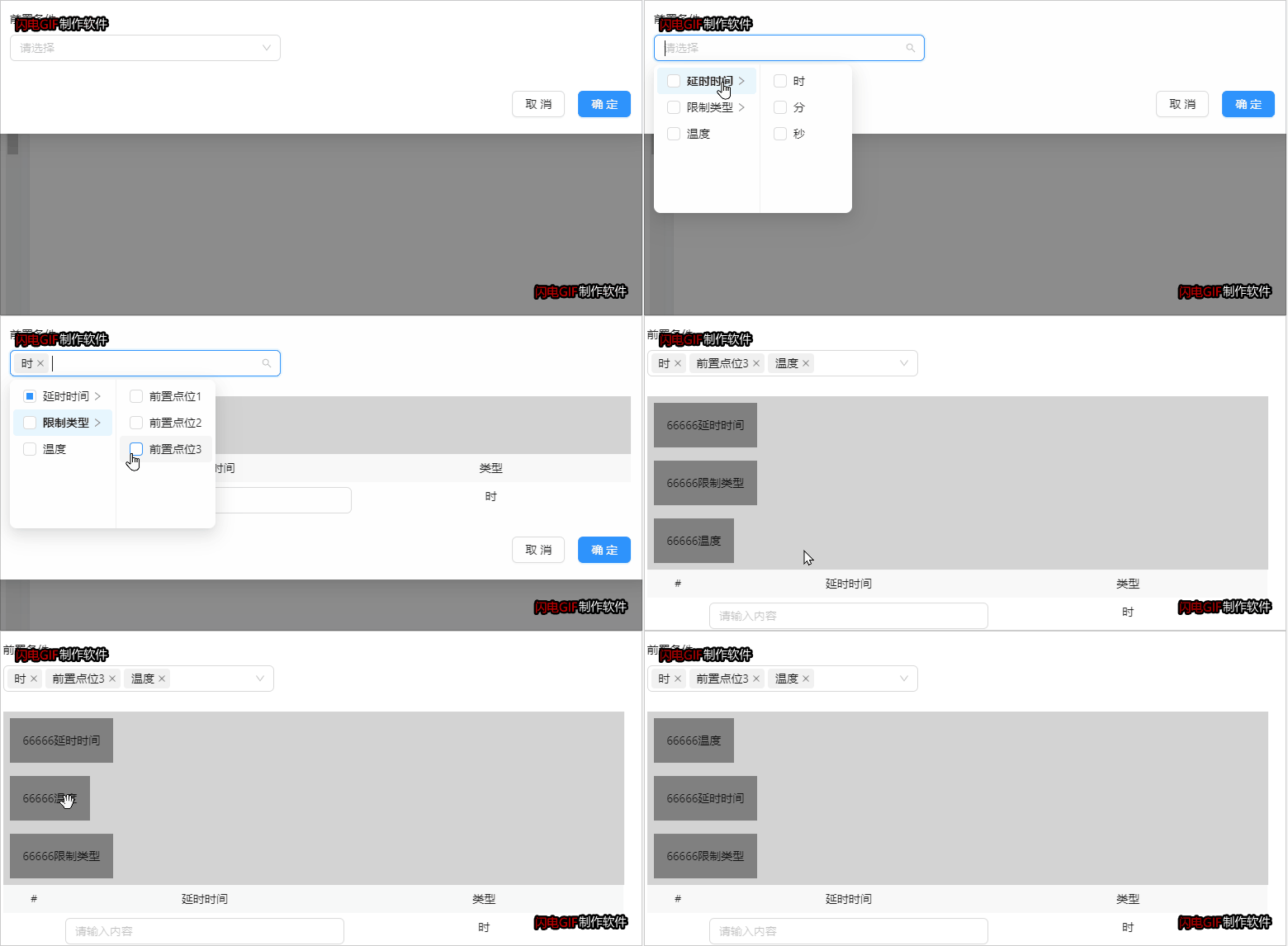
组件传值的数组内容
  const [options, setoptions] = usestate([
    {
      label: '延时时间',
      value: 'delaytime',
      children: [
        {
          label: '时',
          value: 'hour',
          disabled: false,
        },
        {
          label: '分',
          value: 'minute',
          disabled: false,
        },
        {
          label: '秒',
          value: 'second',
          disabled: false,
        },
      ],
    },
    {
      label: '限制类型',
      value: 'limittype',
      children: [
        {
          label: '前置点位1',
          value: '1',
          disabled: false,
        },
        {
          label: '前置点位2',
          value: '2',
          disabled: false,
        },
        {
          label: '前置点位3',
          value: '3',
          disabled: false,
        },
      ],
    },
    {
      label: '温度',
      value: 'templete',
    },
  ]);
案列
案例是通过级联的组件选择条件,新增条件时,前端重新定义数据格式,将二维的结构改成一维数组的结构。遍历填充内容时,是在droppable的下一级,所以可以修改内容。
  const ondispatchvalue = (res: any) => {
    dispatch({
      type: `${model_name}/save`,
      payload: {
        protypelist: res,
      },
    });
  };
// 新增、删除前置条件
  const [inputflag, setinputflag] = usestate(false);
  const [listdemo, setlistdemo] = usestate([]);
  const changecondition = (ids, option) => {
    let arr2 = [];
    // 第三层关系选中两个时的判断
    if (ids && ids.length > 1) {
      // 二维数组结构成一维数组,方便去重
      arr2 = ids.reduce((a, b) => {
        return a.concat(b);
      });
      const arr3 = array.from(new set(arr2));
      if (arr2.length !== arr3.length) {
        setrepeatflag(true);
        return message.warning('前置条件重复,请删除!');
      } else {
        setrepeatflag(false);
      }
    }
    // 没有子级或者全选的判断
    ids.map((item, index) => {
      if (item.length === 1 && option[index][0].value === item[0] && option[index][0]?.children?.length > 0) {
        setrepeatflag(true);
        return message.warning('前置条件重复,请删除!');
      } else {
        setrepeatflag(false);
      }
    });
    const arr = option.map((item) => {
      let obj = {
        typename: '', // 类型名称
        typevalue: '', // 类型id
        unitname: '', // 单位名称
        unitvalue: '', // 单位id
        value: '', // 值
      };
      item.map((i, index) => {
        if (item.length === 1) {
          obj.typename = i.label;
          obj.typevalue = i.value;
        }
        if (item.length === 2) {
          if (index === 1) {
            obj.unitname = i.label;
            obj.unitvalue = i.value;
          } else {
            obj.typename = i.label;
            obj.typevalue = i.value;
          }
        }
      });
      return obj;
    });
    setlistdemo(arr);
    // 保存定义好的数据,用于组件之间传值
    ondispatchvalue(arr);
  };
// 父组件引用
<draggablelist data={protypelist}></draggablelist>// 子组件
import { connectstate } from '@/typing/connect';
import { connect } from '@@/exports';
import { input } from 'antd';
import react, { useeffect, usestate } from 'react';
import { dragdropcontext, draggable, droppable } from 'react-beautiful-dnd';
import { dispatch } from 'umi';
interface props {
data: any[];
dispatch: dispatch;
}
const model_name = 'mainconfig';
const draggablelist: react.fc<props> = ({ data = [], dispatch }) => {
const [sortlist, setsortlist] = usestate(data);
// 拖拽时的样式
const getliststyle = () => ({
overflow: 'auto',
width: '100%',
});
// 拖拽后的样式
const getitemstyle = (isdragging, draggablestyle) => ({
// some basic styles to make the items look a bit nicer
width: '100%',
userselect: 'none',
...draggablestyle,
});
const ondragend = (result) => {
if (!result.destination) {
return;
}
const res = sortlist.filter((item) => item); //修改引用地址
const [removed] = res.splice(result.source.index, 1);
res.splice(result.destination.index, 0, removed);
// console.log('添加后', res);
setsortlist(res);
dispatch({
type: `${model_name}/save`,
payload: {
protypelist: res,
},
});
console.log('拖拽后', res);
};
// 校验输入框内容
const reginputvalue = (e: any, index: number) => {
// 输入框聚焦时
const arr = data.filter((item) => item);
arr[index].value = e.target.value;
console.log('arr', arr);
setsortlist(arr);
dispatch({
type: `${model_name}/save`,
payload: {
protypelist: arr,
},
});
};
useeffect(() => {
setsortlist(data);
}, [data]);
// console.log('弹窗起落data', data);
/**
* draggable组件可以拖动并拖放到其droppables上. 一个draggable必须始终包含在一个droppable.
* 它是 可能重新排序draggable在其droppable家中或移动到另一个droppable.
* 一个draggable必须包含在一个droppable.
* */
return (
<dragdropcontext ondragend={ondragend}>
<droppable droppableid="droppable" direction="horizontal">
{(provided, snapshot) => (
<div ref={provided.innerref} style={getliststyle(snapshot.isdraggingover)} {...provided.droppableprops}>
{data.map((item, index) => (
<draggable key={item.typevalue} draggableid={item.typevalue} index={index}>
{(provided, snapshot) => (
<div
ref={provided.innerref}
{...provided.draggableprops}
{...provided.draghandleprops}
style={getitemstyle(snapshot.isdragging, provided.draggableprops.style)}
>
<div style={{ width: '100%', display: 'flex', justifycontent: 'flex-start', textalign: 'center' }}>
<div style={{ width: '33%', backgroundcolor: '#f2f2f2', padding: '8px 0' }}>条件名称</div>
<div style={{ width: '33%', backgroundcolor: '#f2f2f2', padding: '8px 0' }}>条件值</div>
<div style={{ width: '33%', backgroundcolor: '#f2f2f2', padding: '8px 0' }}>单位名称</div>
</div>
<div
style={{
width: '100%',
display: 'flex',
justifycontent: 'flex-start',
padding: '6px',
textalign: 'center',
marginbottom: 16,
}}
>
<div style={{ width: '33%', padding: '8px 0' }}>{item.typename}</div>
<div style={{ width: '33%', padding: '8px 0' }}>
<input
placeholder="请输入内容"
onchange={(e) => {
reginputvalue(e, index);
}}
/>
</div>
<div style={{ width: '33%', padding: '8px 0' }}>{item.unitname}</div>
</div>
</div>
)}
</draggable>
))}
{provided.placeholder}
</div>
)}
</droppable>
</dragdropcontext>
);
};
export default connect(({ mainconfig }: connectstate) => ({
mainconfig ,
}))(draggablelist);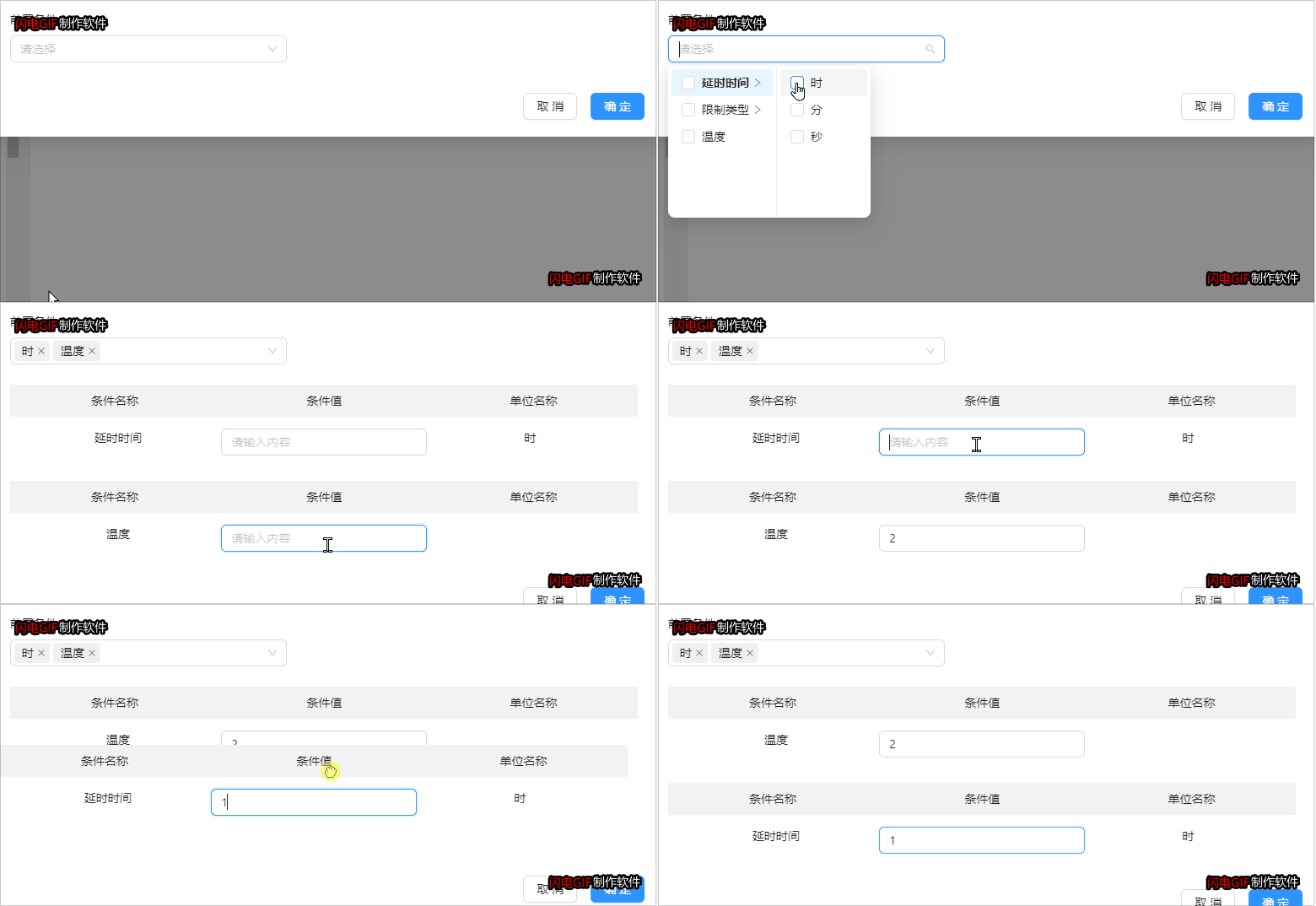
到此这篇关于react拖拽react-beautiful-dnd,一维数组,二维数组的文章就介绍到这了,更多相关react拖拽react-beautiful-dnd,一维数组,二维数组内容请搜索代码网以前的文章或继续浏览下面的相关文章希望大家以后多多支持代码网!



发表评论