
 我要评论
我要评论简介
本文将会基于react实现滚动菜单栏功能。
技术实现
实现效果
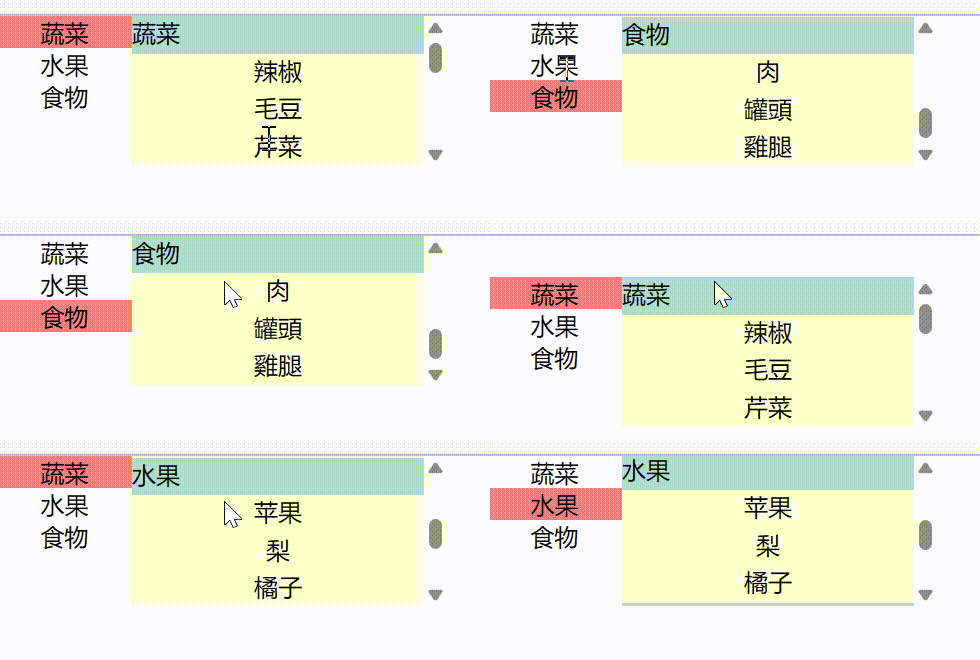
点击菜单,内容区域会自动滚动到对应卡片。内容区域滑动,指定菜单栏会被选中。
scrollmenu.js
import {useref, usestate} from "react";
import './scrollmenu.css';
export const scrollmenu = ({products}) => {
    // 获取 categoryproductmap
    const categoryproductmap = new map();
    products.foreach(product => {
        const category = product.category;
        let categoryproductlist = categoryproductmap.get(category);
        if (!categoryproductlist) {
            categoryproductlist = [];
        }
        categoryproductlist.push(product);
        categoryproductmap.set(category, categoryproductlist);
    });
    // 获取类别列表
    const categorylist = array.from(categoryproductmap.keys());
    // 菜单选中索引
    const [current, setcurrent] = usestate(0);
    /**
     * 内容引用
     */
    const contentref = useref();
    /**
     * 当左侧菜单点击时候
     */
    const onmenuclick = (idx) => {
        if (idx !== current) {
            // 内容自动滚动到对应菜单位置
            contentref.current.scrolltop = height.slice(0, idx).reduce((a, b) => a + b, 0);
            setcurrent(idx);
        }
    }
    /**
     *  计算右侧商品类别卡片高度
     */
    const height = [];
    const itemheight = 25;
    categorylist.foreach((category, index) => {
        var productcnt = categoryproductmap.get(category).length;
        height.push((productcnt + 1) * itemheight); // 0.8 是header高度
    });
    console.log(height)
    /**
     * 当右侧内容滚动时候
     */
    const oncontentscroll = () => {
        const scrolltop = contentref.current.scrolltop;
        if (current < height.length - 1){
            const nextidx = current + 1;
            // 计算下一个位置高度
            const nextheight = height.slice(0, nextidx).reduce((a, b) => a + b, 0);
            console.log('scrolltop', scrolltop, 'nextheight', nextheight, 'nextidx', nextidx)
            if (scrolltop >= nextheight) {
                contentref.current.scrolltop = nextheight;
                setcurrent(nextidx);
                return;
            }
        }
        if (current > 0) {
            const lastidx = current - 1;
            // 计算上一个位置高度
            const lastheight = height.slice(0, lastidx).reduce((a, b) => a + b, 0);
            console.log('scrolltop', scrolltop, 'lastheight', lastheight, 'lastidx', lastidx)
            if (scrolltop <= lastheight) {
                contentref.current.scrolltop = lastheight;
                setcurrent(lastidx);
                return;
            }
        }
    }
    return (
        <div classname='scroll-menu'>
            <div classname='menu'>
                {
                    // 菜单列表
                    categorylist.map((category, index) => {
                        return (
                            <div classname={"menu-item" + ((index === current )? '-active' : '')}
                                 key={`${index}`} id={`menu-item-${index}`}
                                 onclick={(event) => {
                                     onmenuclick(index)
                                 }}>
                                {category}
                            </div>
                        )
                    })
                }
            </div>
            <div classname='content' ref={contentref} onscroll={(event) => {
                oncontentscroll()
            }}>
                {
                    categorylist.map((category, index) => {
                        // 获取类别商品
                        const productlist = categoryproductmap.get(category);
                        return (
                            <div key={index}>
                                <div classname='content-item-header' key={`${index}`}
                                     id={`content-item-${index}`} style={{
                                    height: itemheight
                                }} >{category}</div>
                                {
                                    productlist.map((product,idx) => {
                                        return <div classname='content-item-product'style={{
                                            height: itemheight
                                        }}  key={`${index}-${idx}`} >{product.name}</div>
                                    })
                                }
                            </div>
                        )
                    })
                }
            </div>
        </div>
    )
}
scrollmenu.css
.scroll-menu {
    display: flex;
    flex-direction: row;
    width: 300px;
    height: 100px;
}
.menu{
    width: 90px;
    height: 100px;
    display: flex;
    flex-direction: column;
}
.menu-item {
    text-align: center;
    vertical-align: middle;
}
.menu-item-active {
    text-align: center;
    vertical-align: middle;
    background-color: lightcoral;
}
.content {
    width: 210px;
    overflow: auto;
}
.content-item-header{
    text-align: left;
    vertical-align: top;
    background-color: lightblue;
}
.content-item-product{
    text-align: center;
    vertical-align: center;
    background-color: lightyellow;
}
app.js
import './app.css';
import {scrollmenu} from "./component/scroll-menu/scrollmenu";
const app = ()=> {
    const products = [
        {
            category:'蔬菜',
            name:'辣椒'
        },
        {
            category:'蔬菜',
            name:'毛豆'
        },
        {
            category:'蔬菜',
            name:'芹菜'
        },
        {
            category:'蔬菜',
            name:'青菜'
        },
        {
            category:'水果',
            name:'苹果'
        },
        {
            category:'水果',
            name:'梨'
        },
        {
            category:'水果',
            name:'橘子'
        },   {
            category:'食物',
            name:'肉'
        },   {
            category:'食物',
            name:'罐頭'
        }
        ,   {
            category:'食物',
            name:'雞腿'
        }
    ];
    return (
        <scrollmenu products={products}/>
    )
}
export default app;
到此这篇关于react实现菜单栏滚动的文章就介绍到这了,更多相关react 菜单栏滚动内容请搜索代码网以前的文章或继续浏览下面的相关文章希望大家以后多多支持代码网!






发表评论