
 我要评论
我要评论这是通过原生html/css/javascript完成一个日期选择器(datepicker)组件,一个纯手搓的组件的开发。主要包括datepicker静态结构的编写、日历数据的计划获取、组件的渲染以及组件事件的处理。
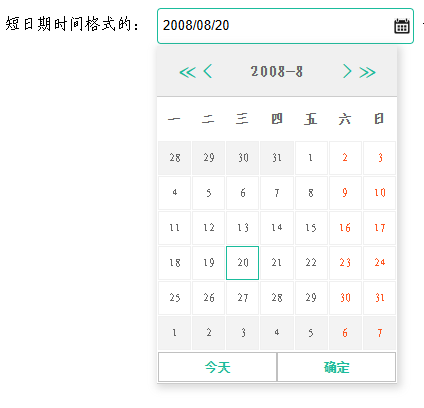
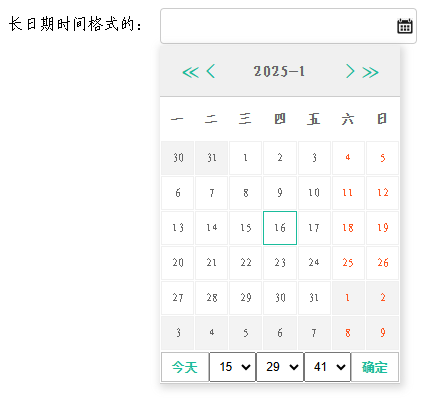
根据调用时的时间格式参数,可以控制短日期格式或长日期格式。
实现效果(短日期格式)
实现效果(长日期格式)
完整代码包含4个文件:
- javascript实现功能代码全部在 datepicker-v1.20250113.js 文件
- css实现样式渲染代码全部在 datepicker-v1.20250113.css 文件
- html实现一个调用demo 在 datepicker.html 文件
- 另外就是 输入框的小图标 calendar-icon.png
datepicker-v1.20250113.js 完整代码如下:
/*!
* datepicker library v1.0
*
* copyright 2025, xiongzaiqiren
* date: mon jan 13 2025 11:27:27 gmt+0800 (中国标准时间)
*/
; (function () {
var datepicker = {
paramsdate: function (inputelement, targetformat) {
this.inputelement = inputelement; // 当前输入框
this.targetformat = targetformat || 'yyyy/mm/dd hh:mm:ss'; // 目标日期时间格式
this.monthdata = {}; // 绘制日历组件的数据源
this.suretime = { year: 0, month: 0, date: 0, hour: -1, minute: -1, second: -1 }; // 确定的选中的日期时间,或者初始化到某个时刻,或者是初始化到当前时刻。这里时分秒必需初始化小于0,后米面才好判断是否要构建时分秒控件
},
getmonthdate: function (year, month) {
var ret = [];
if (!year || !month) {
var today = new date();
year = today.getfullyear();
month = today.getmonth() + 1;
}
var firstday = new date(year, month - 1, 1);//获取当月第一天
var firstdayweekday = firstday.getday();//获取星期几,才好判断排在第几列
if (0 === firstdayweekday) {//周日
firstdayweekday = 7;
}
year = firstday.getfullyear();
month = firstday.getmonth() + 1;
var lastdayoflastmonth = new date(year, month - 1, 0);//获取最后一天
var lastdateoflastmonth = lastdayoflastmonth.getdate();
var premonthdaycount = firstdayweekday - 1;
var lastday = new date(year, month, 0);
var lastdate = lastday.getdate();
for (var i = 0; i < 7 * 6; i++) {
var date = i + 1 - premonthdaycount;
var showdate = date;
var thismonth = month;
//上一月
if (0 >= date) {
thismonth = month - 1;
showdate = lastdateoflastmonth + date;
} else if (date > lastdate) {
//下一月
thismonth = month + 1;
showdate = showdate - lastdate;
}
if (0 === thismonth) {
thismonth = 12;
}
if (13 === thismonth) {
thismonth = 1;
}
ret.push({
month: thismonth,
date: date,
showdate: showdate
})
}
return {
year: year,
month: month,
days: ret
};
}
};
window.datepicker = datepicker;//该函数唯一暴露的对象
})();
/***** main.js *****/
(function () {
var datepicker = window.datepicker;
var $datepicker_wrapper;
//渲染函数,由于没有使用第三方插件或库,所以使用的是模板拼接的方法
datepicker.buildui = function (monthdata, suretime) {
// monthdata = datepicker.getmonthdate(year, month); // year, month, monthdata 是面板需要绘画的日期时间集合
var html = '<div class="ui-datepicker-header">' +
'<a href="javascript:void(0);" rel="external nofollow" rel="external nofollow" rel="external nofollow" rel="external nofollow" rel="external nofollow" rel="external nofollow" class="ui-datepicker-btn ui-datepicker-prevyear-btn">≪</a>' +
'<a href="javascript:void(0);" rel="external nofollow" rel="external nofollow" rel="external nofollow" rel="external nofollow" rel="external nofollow" rel="external nofollow" class="ui-datepicker-btn ui-datepicker-prev-btn"><</a>' +
'<a href="javascript:void(0);" rel="external nofollow" rel="external nofollow" rel="external nofollow" rel="external nofollow" rel="external nofollow" rel="external nofollow" class="ui-datepicker-btn ui-datepicker-nextyear-btn">≫</a>' +
'<a href="javascript:void(0);" rel="external nofollow" rel="external nofollow" rel="external nofollow" rel="external nofollow" rel="external nofollow" rel="external nofollow" class="ui-datepicker-btn ui-datepicker-next-btn">></a>' +
'<span class="datepicker-curr-month">' + monthdata.year + '-' + monthdata.month + '</span>' +
'</div>' +
'<div class="ui-datepicker-body">' +
'<table>' +
'<thead>' +
'<tr>' +
'<th>\u4e00</th>' +
'<th>\u4e8c</th>' +
'<th>\u4e09</th>' +
'<th>\u56db</th>' +
'<th>\u4e94</th>' +
'<th>\u516d</th>' +
'<th>\u65e5</th>' +
'</tr>' +
'</thead>' +
'<tbody>';
function coremonth(coremonth, month) {
return coremonth == month;
}
function istoday(year, month, date) {
const _today = new date().getfullyear() + '/' + (new date().getmonth() + 1) + '/' + new date().getdate();
return (year + '/' + month + '/' + date) == _today;
}
function suretimeistoday(year, month, date, suretime) {
return (!!suretime && (suretime.year === year && suretime.month === month && suretime.date === date));
}
for (var i = 0; i < monthdata.days.length; i++) {
var date = monthdata.days[i];
if (i % 7 === 0) {
html += '<tr>';
}
html += '<td class="' +
((i % 7 === 5 || i % 7 === 6) ? 'weekend' : '') +
(coremonth(monthdata.month, date.month) ? '' : ' notmonth') +
(istoday(monthdata.year, date.month, date.showdate) ? ' today' : '') +
(suretimeistoday(monthdata.year, date.month, date.showdate, suretime) ? ' active' : '') +
'" data-date="' + date.date + '">' + date.showdate + '</td>';
if (i % 7 === 6) {
html += '</tr>';
}
}
html += '</tbody>' +
'</table>' +
'</div>';
function buildtimeoptions(max) {
let _s = '';
for (i = 0; i <= max; i++) {
let _n = i < 10 ? ('0' + i) : i;
_s += '<option value="' + _n + '">' + _n + '</option>';
}
return _s;
}
html += '<div class="ui-datepicker-footer">' +
'<a href="javascript:void(0);" rel="external nofollow" rel="external nofollow" rel="external nofollow" rel="external nofollow" rel="external nofollow" rel="external nofollow" class="ui-datepicker-btn ui-datepicker-today-btn">\u4eca\u5929</a>';
if (!!suretime && (0 <= suretime.hour && 0 <= suretime.minute && 0 <= suretime.second)) {
html += '<select class="hour">' + buildtimeoptions(23) + '</select>' +
'<select class="minute">' + buildtimeoptions(59) + '</select>' +
'<select class="second">' + buildtimeoptions(59) + '</select>';
}
html += '<a href="javascript:void(0);" rel="external nofollow" rel="external nofollow" rel="external nofollow" rel="external nofollow" rel="external nofollow" rel="external nofollow" class="ui-datepicker-btn ui-datepicker-ok-btn">\u786e\u5b9a</a>' +
'</div>';
return html;
};
//日历渲染函数
datepicker.render = function (paramsdate, direction) {
var year, month;
if (!!paramsdate.monthdata && 0 < paramsdate.monthdata.year) {
year = paramsdate.monthdata.year;
month = paramsdate.monthdata.month;
}
else if (!!paramsdate.suretime && (0 < paramsdate.suretime.year && 0 < paramsdate.suretime.month)) {
// 根据输入框的值初始化确定日期
year = paramsdate.suretime.year;
month = paramsdate.suretime.month;
}
if ('prev' === direction) {
month--;
if (month < 1) {
year--;
month = 12;
}
}
else if ('next' === direction) {
month++;
}
else if ('prevyear' === direction) {
year--;
}
else if ('nextyear' === direction) {
year++;
}
else if ('today' === direction) {
let t = new date();
year = t.getfullyear();
month = t.getmonth() + 1;
paramsdate.suretime.year = year;
paramsdate.suretime.month = month;
paramsdate.suretime.date = t.getdate();
if (0 <= paramsdate.suretime.hour && 0 <= paramsdate.suretime.minute && 0 <= paramsdate.suretime.second) {
paramsdate.suretime.hour = t.gethours();
paramsdate.suretime.minute = t.getminutes();
paramsdate.suretime.second = t.getseconds();
}
}
paramsdate.monthdata = datepicker.getmonthdate(year, month); // year, month, monthdata 是面板需要绘画的日期时间集合
var html = datepicker.buildui(paramsdate.monthdata, paramsdate.suretime);
$datepicker_wrapper = document.queryselector('.ui-datepicker-wrapper');
if (!$datepicker_wrapper) {
$datepicker_wrapper = document.createelement('div');
$datepicker_wrapper.classname = 'ui-datepicker-wrapper';
}
$datepicker_wrapper.innerhtml = html;
document.body.appendchild($datepicker_wrapper);
// 绘画完了,初始化选中时间
if (!!paramsdate.suretime && (0 <= paramsdate.suretime.hour && 0 <= paramsdate.suretime.minute && 0 <= paramsdate.suretime.second)) {
setselectedbyvalue('.ui-datepicker-wrapper select.hour', paramsdate.suretime.hour);
setselectedbyvalue('.ui-datepicker-wrapper select.minute', paramsdate.suretime.minute);
setselectedbyvalue('.ui-datepicker-wrapper select.second', paramsdate.suretime.second);
}
};
//初始换函数
datepicker.main = function (paramsdate) {
var $targetformat = paramsdate.targetformat;
var $input = paramsdate.inputelement;
// 根据输入框的值初始化控件的值
let initinputdate = new date($input.value);
if (!!initinputdate && initinputdate.getfullyear() > 0) {
paramsdate.suretime.year = initinputdate.getfullyear();
paramsdate.suretime.month = initinputdate.getmonth() + 1;
paramsdate.suretime.date = initinputdate.getdate();
if (/([0-1]?[0-9]|2[0-3]):([0-5][0-9]):([0-5][0-9])/gi.test($input.value)) {
// 校验时分秒:格式:hh:mm:ss
paramsdate.suretime.hour = initinputdate.gethours();
paramsdate.suretime.minute = initinputdate.getminutes();
paramsdate.suretime.second = initinputdate.getseconds();
}
}
if (0 > paramsdate.suretime.hour || 0 > paramsdate.suretime.minute || 0 > paramsdate.suretime.second) {
if (!!$targetformat && ($targetformat.tolocalelowercase().includes('hh:mm:ss'))) {
// 将展示时分秒控件
paramsdate.suretime.hour = 0;
paramsdate.suretime.minute = 0;
paramsdate.suretime.second = 0;
}
else {
// 不展示时分秒控件
paramsdate.suretime.hour = -1;
paramsdate.suretime.minute = -1;
paramsdate.suretime.second = -1;
}
}
// 在初始化控件之前,清理掉以前的日期时间控件
const divstoremove = document.queryselectorall('.ui-datepicker-wrapper');
divstoremove.foreach(div => div.remove());
datepicker.render(paramsdate);
var isopen = false;
if (isopen) {
$datepicker_wrapper.classlist.remove('ui-datepicker-wrapper-show');
isopen = false;
} else {
$datepicker_wrapper.classlist.add('ui-datepicker-wrapper-show');
var left = $input.offsetleft;
var top = $input.offsettop;
var height = $input.offsetheight;
$datepicker_wrapper.style.top = top + height + 2 + 'px';
$datepicker_wrapper.style.left = left + 'px';
isopen = true;
}
//给按钮添加点击事件
datepicker.addeventlistener($datepicker_wrapper, 'click', function (e) {
var $target = e.target;
//上一月,下一月
if ($target.classlist.contains('ui-datepicker-prev-btn')) {
datepicker.render(paramsdate, 'prev');
} else if ($target.classlist.contains('ui-datepicker-next-btn')) {
datepicker.render(paramsdate, 'next');
}
//上一年,下一年
else if ($target.classlist.contains('ui-datepicker-prevyear-btn')) {
datepicker.render(paramsdate, 'prevyear');
} else if ($target.classlist.contains('ui-datepicker-nextyear-btn')) {
datepicker.render(paramsdate, 'nextyear');
}
//今天
else if ($target.classlist.contains('ui-datepicker-today-btn')) {
datepicker.render(paramsdate, 'today');
}
if ($target.tagname.tolocalelowercase() === 'td') {
// 移除其他日期选中状态
document.queryselectorall('.ui-datepicker-wrapper td').foreach(function (td) {
if (td.classlist.contains('active')) {
td.classlist.remove('active');
}
});
// 通过classname 设置选中日期
$target.classlist.add('active');
}
if (!$target.classlist.contains('ui-datepicker-ok-btn')) {
return true;
}
// 以下是点击“确定”之后的代码
var selected_date;
var selectedtd = document.queryselector('.ui-datepicker-wrapper td.active');
if (!!selectedtd) {
selected_date = selectedtd.dataset.date || 0;
}
if (3 === document.queryselectorall('.ui-datepicker-wrapper select').length) {
var selectelementhour = document.queryselector('.ui-datepicker-wrapper select.hour');
paramsdate.suretime.hour = selectelementhour.options[selectelementhour.selectedindex].value || 0;
var selectelementminute = document.queryselector('.ui-datepicker-wrapper select.minute');
paramsdate.suretime.minute = selectelementminute.options[selectelementminute.selectedindex].value || 0;
var selectelementsecond = document.queryselector('.ui-datepicker-wrapper select.second');
paramsdate.suretime.second = selectelementsecond.options[selectelementsecond.selectedindex].value || 0;
}
if (1 <= selected_date && selected_date <= 31) {
// 至少选中到天
let date;
if (0 <= paramsdate.suretime.hour) {
date = new date(paramsdate.monthdata.year, paramsdate.monthdata.month - 1, selected_date, paramsdate.suretime.hour, paramsdate.suretime.minute, paramsdate.suretime.second);
}
else {
date = new date(paramsdate.monthdata.year, paramsdate.monthdata.month - 1, selected_date);
}
$input.value = dateformat(date, $targetformat);
}
$datepicker_wrapper.classlist.remove('ui-datepicker-wrapper-show');
isopen = false;
}, false);
};
/* 定义一个函数,用于添加事件监听器,现代浏览器还是旧版ie浏览器。 */
datepicker.addeventlistener = function (el, eventname, callback, usecapture) {
if (el.addeventlistener) {
el.addeventlistener(eventname, callback, usecapture);
} else if (el.attachevent) {
el.attachevent('on' + eventname, callback);
}
};
// 给输入框绑定点击事件
datepicker.init = function (input, targetformat) {
this.addeventlistener(document.queryselector(input), 'click', function (e) {
let $paramsdate = new datepicker.paramsdate(e.target, targetformat);
datepicker.main($paramsdate);
});
};
// 通过value设置选中项
function setselectedbyvalue(selectors, value) {
var select = document.queryselector(selectors);
if (!!!select || !!!select.options) {
return false;
}
for (var i = 0; i < select.options.length; i++) {
if (parseint(select.options[i].value) == value) {
select.options[i].selected = true;
break;
}
}
};
/* 日期时间格式化·开始 */
date.prototype.format = function (fmt) {
if (!this || this.getfullyear() <= 1) return '';
var o = {
"m+": this.getmonth() + 1, //月份
"d+": this.getdate(), //日
"h+": this.gethours() == 0 ? 12 : this.gethours(), //小时
"h+": this.gethours(), //小时
"m+": this.getminutes(), //分
"s+": this.getseconds(), //秒
"q+": math.floor((this.getmonth() + 3) / 3), //季度
"f": this.getmilliseconds() //毫秒
};
var week = {
"0": "\u65e5",
"1": "\u4e00",
"2": "\u4e8c",
"3": "\u4e09",
"4": "\u56db",
"5": "\u4e94",
"6": "\u516d"
};
const reg_y = /(y+)/;
if (reg_y.test(fmt)) {
fmt = fmt.replace(reg_y.exec(fmt)[1], (this.getfullyear() + "").slice(4 - reg_y.exec(fmt)[1].length));
}
const reg_e = /(e+)/;
if (reg_e.test(fmt)) {
fmt = fmt.replace(reg_e.exec(fmt)[1], ((reg_e.exec(fmt)[1].length > 1) ? (reg_e.exec(fmt)[1].length > 2 ? "\u661f\u671f" : "\u5468") : "") + week[this.getday() + ""]);
}
for (var k in o) {
const reg_k = new regexp("(" + k + ")");
if (reg_k.test(fmt)) {
const t = reg_k.exec(fmt)[1];
fmt = fmt.replace(t, (t.length == 1) ? (o[k]) : (("00" + o[k]).slice(("" + o[k]).length)));
}
}
return fmt;
};
function dateformat(date, format) {
if (!date) return '';
if (!format) format = 'yyyy/mm/dd hh:mm:ss';
if ("object" == typeof (date)) return date.format(format);
else { return (new date(date)).format(format); }
};
/* 日期时间格式化·结束 */
})();datepicker-v1.20250113.css 完整代码如下:
.datepicker {
    width: 230px;
	padding: 5px;
	line-height: 24px;
    background: url(calendar-icon.png);
    background-repeat: no-repeat;
    background-position: right 3px center;
    padding-right: 20px;
	border: 1px solid #ccc;
	border-radius: 4px;
    -o-border-radius: 4px;
    -ms-border-radius: 4px;
    -moz-border-radius: 4px;
    -webkit-border-radius: 4px;
    -khtml-border-radius: 4px;
}
.datepicker:focus {
	outline: none;
	border: 1px solid #1abc9c;
}

/* 最外层区域 */
.ui-datepicker-wrapper {
	display: none; /*添加默认隐藏*/
    position: absolute; /*添加绝对定位*/
    width: 240px;
    font-size: 16px;
    color: #666666;
	background-color: #fff;
    box-shadow: 2px 2px 8px 2px rgba(128, 128, 128, 0.3);
}
/* 头部区域 */
.ui-datepicker-wrapper .ui-datepicker-header,.ui-datepicker-wrapper .ui-datepicker-footer {
    padding: 0 20px;
    height: 50px;
    line-height: 50px;
    text-align: center;
    background: #f0f0f0;
    border-bottom: 1px solid #cccccc;
    font-weight: bold;
}
/* 设置两个按钮 */
.ui-datepicker-wrapper .ui-datepicker-btn {
    font-family: serif;
    font-size: 20px;
    width: 20px;
    height: 50px;
    line-height: 50px;
    color: #1abc9c;
    text-align: center;
    cursor: pointer;
    text-decoration: none;
}
.ui-datepicker-wrapper .ui-datepicker-prev-btn,.ui-datepicker-wrapper .ui-datepicker-prevyear-btn {
    float: left;
}
.ui-datepicker-wrapper .ui-datepicker-next-btn,.ui-datepicker-wrapper .ui-datepicker-nextyear-btn {
    float: right;
}
.ui-datepicker-wrapper .ui-datepicker-footer{
    display: flex;
    line-height: 30px;
    height: 30px;
    padding: 1px 1px;
    background-color: #fff;
}
.ui-datepicker-wrapper .ui-datepicker-footer a,.ui-datepicker-wrapper select,.ui-datepicker-wrapper select option{
    flex: 1 1 auto;
    width: 100%;
    height: 30px;
    line-height: 30px;
    font-size: 12px;
    text-align: center;
    cursor: pointer;
}
.ui-datepicker-wrapper .ui-datepicker-footer .ui-datepicker-btn{
    height: 28px;
    line-height: 28px;
    border:1px solid #c0c0c0;
}
.ui-datepicker-wrapper .ui-datepicker-footer .ui-datepicker-btn:hover,.ui-datepicker-wrapper .ui-datepicker-footer .ui-datepicker-btn:active{
    border:1px solid #1abc9c;
}

/* body区域 */
.ui-datepicker-wrapper .ui-datepicker-body table {
    width: 100%;
	border-collapse: separate;
    border-spacing: 1px;
}
/* 表头和正文 */
.ui-datepicker-wrapper .ui-datepicker-body th,
.ui-datepicker-wrapper .ui-datepicker-body td {
    height: 30px;
    text-align: center;
}
.ui-datepicker-wrapper .ui-datepicker-body th {
    font-size: 14px;
    height: 40px;
    line-height: 40px;
}
/* 表格部分 */
.ui-datepicker-wrapper .ui-datepicker-body td {
    border: 1px solid #f0f0f0;
    font-size: 12px;
    width: 14%;
    cursor: pointer;
}
/* “周末”的日期 */
.ui-datepicker-wrapper .ui-datepicker-body td.weekend{
	color: #ff5722;
}
/* 非“当前展示月份”的日期 */
.ui-datepicker-wrapper .ui-datepicker-body td.notmonth{
	background-color: #f3f3f3;
}
/* “今天”的日期 */
.ui-datepicker-wrapper .ui-datepicker-body td.today {
    border-color:#7cffe5;
}
.ui-datepicker-wrapper .ui-datepicker-body td.today:hover,.ui-datepicker-wrapper .ui-datepicker-body td.today:active,
.ui-datepicker-wrapper .ui-datepicker-body td:hover,.ui-datepicker-wrapper .ui-datepicker-body td:focus {
    border-color: #c0c0c0;
}
/* 选中的日期 */
.ui-datepicker-wrapper .ui-datepicker-body td:active,.ui-datepicker-wrapper .ui-datepicker-body td.active {
    border-color: #1abc9c;
}

.ui-datepicker-wrapper-show {
    display: block;
}
datepicker.html 做的一个简易 demo 完整代码如下:
<!doctype html>
<html>
<head>
<meta charset="utf-8">
<meta http-equiv="content-type" content="text/html; charset=utf-8" />
<meta name="mobileoptimized" content="240">
<meta name="applicable-device" content="mobile">
<meta name="viewport" content="width=device-width, initial-scale=1.0, maximum-scale=1.0, minimum-scale=1.0">
<meta name="format-detection" content="telephone=no,email=no,adress=no">
<link href="datepicker-v1.20250113.css" rel="external nofollow" rel="external nofollow" rel="stylesheet" type="text/css">
<title>测试demo -datepicker </title>
<script src="datepicker-v1.20250113.js"></script>
</head>
<body>
支持两种格式的日期时间输入控件。短日期时间格式的:
<input type="text" class="datepicker" id="t1">
长日期时间格式的:
<input type="text" class="datepicker" id="t2">
<!-- js脚本 -->
<script>
// var monthdate = datepicker.getmonthdate(2019, 2);
// console.log(monthdate);
// datepicker.init(document.queryselector('.ui-datepicker-wrapper'))
document.queryselector('#t1').value = '2008/08/20';
datepicker.init('#t1', 'yyyy/mm/dd');
datepicker.init('#t2', 'yyyy/mm/dd hh:mm:ss');
</script>
调用示例:
<code>
<pre style="background-color: #eee;padding: 5px 3px;border: 1px solid #ccc;">
<!-- 引入 日期时间控件样式表文件 -->
<link href="datepicker-v1.20250113.css" rel="external nofollow" rel="external nofollow" rel="stylesheet" type="text/css">
<!-- 引入 日期时间控件 javascript文件 -->
<script src="datepicker-v1.20250113.js"></script>
支持两种格式的日期时间输入控件。短日期时间格式的:
<input type="text" class="datepicker" id="t1">
长日期时间格式的:
<input type="text" class="datepicker" id="t2">
<script>
document.queryselector('#t1').value = '2008/08/20';
datepicker.init('#t1', 'yyyy/mm/dd');
datepicker.init('#t2', 'yyyy/mm/dd hh:mm:ss');
</script>
</pre>
</code>
</body>
</html>最后是输入框里的小图标: 
以上就是使用原生js实现一个日期选择器(datepicker)组件的详细内容,更多关于js实现日期选择器的资料请关注代码网其它相关文章!






发表评论