
 我要评论
我要评论在日常的winform设计工作中,将控件中的数据导出到对应属性或者字段中,再进行保存是经常会用到的技巧;最简单的就是同时遍历控件和遍历属性字段进行名称对比(需要保证控件的名称要包含在字段属性中);
本篇文章主要是在简单的基础上优化整体逻辑,不仅仅是只遍历控件和属性进行名称对比(适合类),还包含一些筛选;
1.遍历控件和属性得到控件的值
在下面代码中,控件命名是以textbox_one的形式命名的
///类对象
class objectparm
    {
        public int one;
        public string two;
        public int three;
        public string four;
        public int five;
        public string six;
    }
private void save(objectparm objectparm, control controls, string textname = "textbox_", string comboboxname = "combobox_")
{
type type = objectparm.gettype();
//获取有关成员属性的信息以及提供对成员数据的访问
memberinfo[] memberinfos = type.getmembers();//获取所有公共成员
foreach (control control in controls.controls)
{
foreach (memberinfo item in memberinfos)
{
//这里字段属性均可以
if (item.membertype == membertypes.field)
{
if (control is combobox)
{
if (control.name == comboboxname + item.name)
{
string value = control.text;
//需要筛选对象属性的类型
setmembervalue(objectparm, item.name, value);
//---------------------------------注意----------------------------------
//setmembervalue函数是判断属性或者字段的类型,根据类型进行不同的赋值
}
}
else if (control is textbox)
{
if (control.name == textname + item.name)
{
string value = control.text;
//需要筛选对象属性的类型
setmembervalue(objectparm,item.name,value);
}
}
}
}
}
}2.利用fieldinfo的getset函数设置类对象数据
/// <summary>
        /// 设置类对象成员数据
        /// </summary>
        /// <param name="objectparm"></param>
        /// <param name="filename"></param>
        /// <param name="filevalue"></param>
//istype函数是对比类型是否一致
        private bool setmembervalue(objectparm objectparm, string filename, string filevalue)
        {
            type type = objectparm.gettype();
            //发现字段属性并提供访问
            fieldinfo fieldinfo = type.getfield(filename);//搜索字段
            bool converflag = true;
            //类型匹配
            if (istype(fieldinfo.fieldtype, "system.string"))
            {
                fieldinfo.setvalue(objectparm, filevalue);
            }
            if (istype(fieldinfo.fieldtype, "system.double"))
            {
                //判断是否可以进行转
                double result = 0;
                if (!double.tryparse(filevalue, out result)) converflag = false;
                fieldinfo.setvalue(objectparm, result);
            }
            if (istype(fieldinfo.fieldtype, "system.single"))
            {
                float result = 0;
                if (!float.tryparse(filename, out result))
                    converflag = false;
                fieldinfo.setvalue(objectparm, result);
            }
            if (istype(fieldinfo.fieldtype, "system.boolean"))
            {
                bool flag = false;
                if (!boolean.tryparse(filename, out flag))
                    converflag = false;
                fieldinfo.setvalue(objectparm, flag);
            }
            if (istype(fieldinfo.fieldtype, "system.uint32"))
            {
                uint value = 0;
                if (!uint.tryparse(filename, out value))
                    converflag = false;
                fieldinfo.setvalue(objectparm, value);
            }
            if (istype(fieldinfo.fieldtype, "system.uint16"))
            {
                uint16 value = 0;
                if (!uint16.tryparse(filename, out value))
                    converflag = false;
                fieldinfo.setvalue(objectparm, value);
            }
            if (istype(fieldinfo.fieldtype, "system.int32"))
            {
                int value = 0;
                if (!int32.tryparse(filename, out value))
                    converflag = false;
                fieldinfo.setvalue(objectparm, value);
            }
            if (istype(fieldinfo.fieldtype, "system.decimal"))
            {
                if (filevalue != "")
                    fieldinfo.setvalue(objectparm, decimal.parse(filevalue));
                else
                    fieldinfo.setvalue(objectparm, new decimal(0));
            }
            if (istype(fieldinfo.fieldtype, "system.nullable`1[system.datetime]"))
            {
                if (filevalue != "")
                {
                    try
                    {
                        fieldinfo.setvalue(objectparm, (datetime?)datetime.parseexact(filevalue, "yyyy-mm-dd hh:mm:ss", null));
                    }
                    catch
                    {
                        fieldinfo.setvalue(objectparm, (datetime?)datetime.parseexact(filevalue, "yyyy-mm-dd", null));
                    }
                }
                else
                    fieldinfo.setvalue(objectparm, null);
            }
            return converflag;
        }
private bool istype(type type, string typename)
{
if (type.tostring() == typename)
{ return true; }
if (type.tostring() == "system.object")
return false;
return istype(type.basetype, typename);
}3.ini简易类库编写
class iniclass
    {
        public static string inipath = directory.getcurrentdirectory() + "\\" + "systemset.ini";//这个地方实际没用到,在另外一个地方
        [system.runtime.interopservices.dllimport("kernel32")]
        public static extern long writeprivateprofilestring(string section, string key, string val, string filepath);
        [system.runtime.interopservices.dllimport("kernel32")]
        public static extern int getprivateprofilestring(string section, string key, string def, stringbuilder retval, int size, string filepath);
        public iniclass(string inipath_)
        {
            inipath = inipath_;
        }
        /// ﹤summary﹥   /// 写入ini文件   /// ﹤/summary﹥   /
        // ﹤param name="section"﹥项目名称(如 [typename] )﹤/param﹥
        /// ﹤param name="key"﹥键﹤/param﹥
        /// ﹤param name="value"﹥值﹤/param﹥
        public void iniwritevalue(string section, string key, string value)
        {
            writeprivateprofilestring(section, key, value, inipath);
        }
        /// ﹤summary﹥
        /// 读出ini文件
        /// ﹤/summary﹥
        /// ﹤param name="section"﹥项目名称(如 [typename] )﹤/param﹥
        /// ﹤param name="key"﹥键﹤/param﹥
        public string inireadvalue(string section, string key, string default_value = "")
        {
            stringbuilder temp = new stringbuilder(50000);
            int i = getprivateprofilestring(section, key, default_value, temp, 50000, inipath);
            return temp.tostring();
        }
4.存入对象转换为json存入ini
string path = @"e:\ymx\test\将部分controls数据导入对象\sys.ini";
        private void button1_click(object sender, eventargs e)
        {
            save(objectparm,panel1, "textbox_", "combobox_");
            string str = jsonconvert.serializeobject(objectparm);
            //存入ini
            iniclass iniclass = new iniclass(path);
            iniclass.iniwritevalue("parm", "trest", str);
         }
5.效果展示
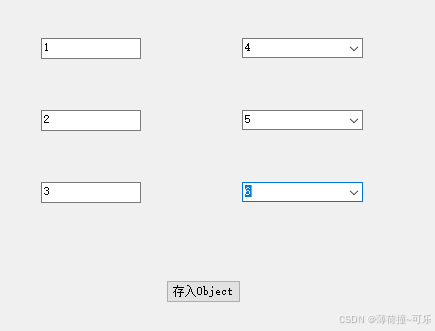

到此这篇关于c#将部分controls数据导入对象并存入ini中的文章就介绍到这了,更多相关c#controls数据存入ini中内容请搜索代码网以前的文章或继续浏览下面的相关文章希望大家以后多多支持代码网!


发表评论