
 我要评论
我要评论c#在调用winapi函数时,可能会看到如下的声明
[structlayout(layoutkind.sequential)]
         public struct rect
         {
             public int left;
             public int top;
             public int right;
             public int bottom;
         }
在类或者结构体前面带上了
[structlayout(layoutkind.sequential)]
structlayoutattribute特性的作用是允许你控制内存中类或结构的数据字段的物理布局。
平常我们在c#代码中使用类或者结构体时,不需要使用此特性。但在与非托管代码时交互,需要使用structlayoutattribute特性来控制类型的非托管布局。
structlayoutattribute常用构造函数是:
structlayoutattribute(system.runtime.interopservices.layoutkind)
system.runtime.interopservices.layoutkind是一个枚举类型,有三个取值。
layoutkind.sequential
强制按成员的显示顺序对其进行排列。对于blittable类型,在托管和非托管内存中控制布局。对于non-blittable类型,它会在将类或者结构体封送到非托管代码时控制布局(换言之,如果仅在c#中进行调用,不会做任何操作,在与非托管代码交互时,仅控制送入非托管代码的布局)
layoutkind.explicit
控制每个数据成员的精确位置,这会影响托管和非托管代码中的布局,不管是blittable类型还是non-blittable类型。,使用layoutkind.explicit时,需要使用fieldoffsetattribute特性指示类型中每个字段的位置。
默认情况下,编译器会将layoutkind.sequential应用到结构体,对于类,需要显式应用layoutkind.sequential值。
到这里也就明白了,以后在调用api函数时,如果使用的是结构体,就不再需要下面这句代码了。
[structlayout(layoutkind.sequential)]
下面用示例代码说明一下
这里以获取桌面窗体的宽高为例,需要用到的api函数是
hwnd getdesktopwindow();

bool getwindowrect(hwnd hwnd, lprect lprect );
其中lprect是指向rect结构体的指针,rect结构声明如下:
typedef struct tagrect {
   long left;
   long top;
   long right;
   long bottom;
 } rect, *prect, *nprect, *lprect;
使用结构体时,调用代码如下:
using system;
using system.runtime.interopservices;
 namespace consoleapp10
 {
     public struct rect
     {
         public int left;
         public int top;
         public int right;
         public int bottom;
     }

     class program
     {
         [dllimport("user32.dll")]
         private static extern intptr getdesktopwindow();

         [dllimport("user32.dll", setlasterror = true)]
         private static extern int getwindowrect(intptr hwnd, out rect rc);

         static void main(string[] args)
         {
             intptr hwnd = getdesktopwindow();
             rect rect;
             getwindowrect(hwnd, out rect);
             console.writeline($"left:{rect.left},top:{rect.top},right:{rect.right},bottom:{rect.bottom}");
         }
     }
 }
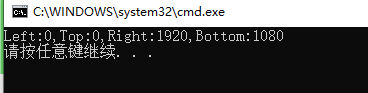
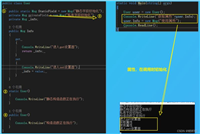
运行结果如下:
下面我们来看一下,把结构体换成类的情况
 using system;
 using system.runtime.interopservices;

 namespace consoleapp10
 {
     public class rect
     {
         public int left;
         public int top;
         public int right;
         public int bottom;
    }

     class program
     {
         [dllimport("user32.dll")]
         private static extern intptr getdesktopwindow();

         [dllimport("user32.dll", setlasterror = true)]
         private static extern int getwindowrect(intptr hwnd,rect rc);

         static void main(string[] args)
         {
             intptr hwnd = getdesktopwindow();
             rect rect = new rect();
             getwindowrect(hwnd, rect);
             console.writeline($"left:{rect.left},top:{rect.top},right:{rect.right},bottom:{rect.bottom}");
         }
     }
 }
运行结果如下:
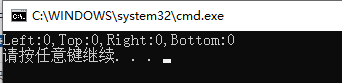
运行结果并不正常
把类修改一下,带上[structlayout(layoutkind.sequential)]
     [structlayout(layoutkind.sequential)]
     public class rect
     {
         public int left;
         public int top;
         public int right;
         public int bottom;
     }
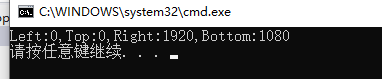
再次运行,发现结果正常了
最后再看看layoutkind.explicit的情况,调用代码如下
 using system;
 using system.runtime.interopservices;

 namespace consoleapp10
 {
     [structlayout(layoutkind.explicit)]
     public class rect
     {
         [fieldoffset(0)]public int left; //fieldoffset用于指示类或结构的非托管表示形式中字段的物理位置
         [fieldoffset(4)]public int top;
         [fieldoffset(8)]public int right;
         [fieldoffset(12)]public int bottom;
     }

     class program
     {
         [dllimport("user32.dll")]
         private static extern intptr getdesktopwindow();

         [dllimport("user32.dll", setlasterror = true)]
         private static extern int getwindowrect(intptr hwnd,[marshalas(unmanagedtype.lpstruct)]rect rc);

         static void main(string[] args)
         {
             intptr hwnd = getdesktopwindow();
             rect rect = new rect();
             getwindowrect(hwnd, rect);
             console.writeline($"left:{rect.left},top:{rect.top},right:{rect.right},bottom:{rect.bottom}");
         }
     }
 }
以上就是c#使用structlayout特性来控制内存结构的操作代码的详细内容,更多关于c# structlayout控制内存结构的资料请关注代码网其它相关文章!



发表评论