
 我要评论
我要评论封装dll
首先使用visual stdio 创建dll新项目,然后属性管理器导入自己的工程属性表(如果没有可以参考visual stdio 如何配置opencv等其他环境)
创建完成后 系统会自动生成一些文件,其中 pch.cpp 先不要修改,pch.h中先导入自己需要用到的库,下面是我的代码
pch.h
#pragma once
#include <opencv2/opencv.hpp>
#include <opencv2/dnn.hpp>
#include <iostream>
#include <string>
现在编写我们的接口代码,我封装的是resnet18的代码:
首先添加源文件resnetdll.cpp:
resnetdll.cpp
#include "pch.h"
#include "resnetdll.h"

// 全局变量,用于存储模型路径和图像路径
static std::string g_imagepath;
static std::string g_modelpath;

// 图像预处理函数
cv::mat transformimage(const std::string& imagepath) {
    cv::mat image = cv::imread(imagepath);
    if (image.empty()) {
        throw std::runtime_error("failed to load image.");
    }

    cv::mat resizedimage;
    cv::resize(image, resizedimage, cv::size(224, 224));

    cv::mat floatimage;
    resizedimage.convertto(floatimage, cv_32f, 1.0 / 255.0);

    cv::mat normalizedimage;
    cv::scalar mean(0.485, 0.456, 0.406);
    cv::scalar stddev(0.229, 0.224, 0.225);
    cv::subtract(floatimage, mean, normalizedimage);
    cv::divide(normalizedimage, stddev, normalizedimage);

    // 从 bgr 转换到 rgb
    cv::mat rgbimage;
    cv::cvtcolor(normalizedimage, rgbimage, cv::color_bgr2rgb);

    return rgbimage;
}

// 推理函数
const char* run_inference() {
    static std::string result;

    try {
        // 加载 onnx 模型
        cv::dnn::net net = cv::dnn::readnetfromonnx(g_modelpath);
        if (net.empty()) {
            result = "failed to load the model.";
            return result.c_str();
        }

        // 预处理图像
        cv::mat rgbimage = transformimage(g_imagepath);

        // 创建 blob 并设置为网络输入
        cv::mat blob = cv::dnn::blobfromimage(rgbimage, 1.0, cv::size(224, 224), cv::scalar(), true, false);
        net.setinput(blob);

        // 执行推理
        cv::mat output = net.forward();

        // 处理输出
        cv::mat prob = output.reshape(1, 1);  // 变换成 1d 张量
        cv::point classidpoint;
        double confidence;
        // 用来找到矩阵或图像中元素的最小值和最大值,以及它们所在的位置
        cv::minmaxloc(prob, 0, &confidence, 0, &classidpoint);
        int classid = classidpoint.x;

        // 根据预测结果返回相应的标签
        result = "predicted class id: " + std::to_string(classid) + " with confidence: " + std::to_string(confidence);
        return result.c_str();
    }
    catch (const std::exception& e) {
        result = "error occurred during inference: " + std::string(e.what());
        return result.c_str();
    }
}

// dll 暴露的函数,用于设置图像路径
extern "c" resnetdll_api void set_image_path(const char* imagepath) {
    g_imagepath = imagepath;
}

// dll 暴露的函数,用于设置模型路径
extern "c" resnetdll_api void set_model_path(const char* modelpath) {
    g_modelpath = modelpath;
}

// dll 暴露的函数,运行推理
extern "c" resnetdll_api const char* run_resnet() {
    return run_inference();
}
resnetdll.h:
#pragma once

#ifdef resnetdll_exports
#define resnetdll_api __declspec(dllexport)
#else
#define resnetdll_api __declspec(dllimport)
#endif

extern "c" {
    // 设置图像路径
    resnetdll_api void set_image_path(const char* imagepath);

    // 设置模型路径
    resnetdll_api void set_model_path(const char* modelpath);

    // 运行推理
    resnetdll_api const char* run_resnet();
}
点击生成dll,就封装成了windows动态库
制作demo
创建.net framework新项目,将之前生成的dll放在demo文件夹的bin ->debug或是 release中(看你自己用的什么模式),
新建nativemethods.cs 这个文件用于 导入 dll中的接口函数或类
我的代码如下
nativemethods.cs
using system;
using system.runtime.interopservices;

namespace resnetapp
{
    public static class nativemethods
    {
        // 导入 dll 中的 set_image_path 函数
        [dllimport("resnetdll.dll", callingconvention = callingconvention.cdecl)]
        public static extern void set_image_path(string imagepath);

        // 导入 dll 中的 set_model_path 函数
        [dllimport("resnetdll.dll", callingconvention = callingconvention.cdecl)]
        public static extern void set_model_path(string modelpath);

        // 导入 dll 中的 run_resnet 函数
        [dllimport("resnetdll.dll", callingconvention = callingconvention.cdecl)]
        public static extern intptr run_resnet();
    }
}
然后在窗口中拉入你想要的控件,这是我的窗口布局
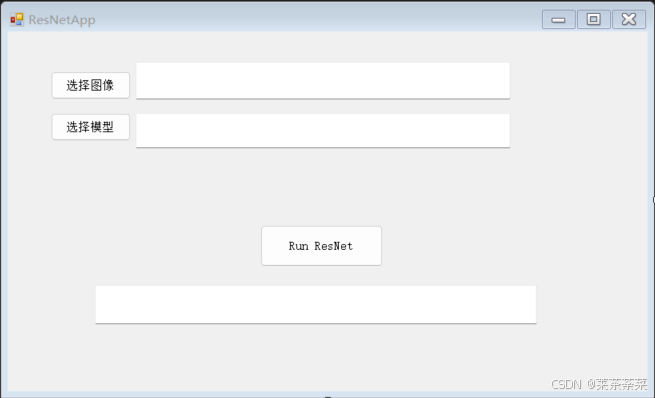
布局完了之后会自动生成form1.designer.cs 的窗口设计代码,点击控件按f4 还可以修改他们的属性
form1.cs
这个代码 编写你想要每个控件实现的功能:
using system;
using system.componentmodel;
using system.runtime.interopservices;
using system.windows.forms;

namespace resnetapp
{
    public partial class form1 : form
    {
        public form1()
        {
            initializecomponent();
        }

        private void buttonselectimage_click(object sender, eventargs e)
        {
            openfiledialog openfiledialog = new openfiledialog();
            openfiledialog.filter = "图像文件|*.bmp;*.jpg;*.jpeg;*.png";
            if (openfiledialog.showdialog() == dialogresult.ok)
            {
                textboximagepath.text = openfiledialog.filename; // 显示选择的图像路径
            }
        }

        private void buttonselectmodel_click(object sender, eventargs e)
        {
            openfiledialog openfiledialog = new openfiledialog();
            openfiledialog.filter = "onnx 模型文件|*.onnx";
            if (openfiledialog.showdialog() == dialogresult.ok)
            {
                textboxmodelpath.text = openfiledialog.filename; // 显示选择的模型路径
            }
        }

        private void button1_click(object sender, eventargs e)
        {
            try
            {
                string imagepath = textboximagepath.text;
                string modelpath = textboxmodelpath.text;

                if (string.isnullorempty(imagepath) || string.isnullorempty(modelpath))
                {
                    textbox1.text = "请选择图像和模型路径。";
                    return;
                }

                textbox1.text = "开始运行 resnet ...";

                // 设置图像路径和模型路径
                nativemethods.set_image_path(imagepath);
                nativemethods.set_model_path(modelpath);

                // 调用 dll 执行推理
                intptr resultptr = nativemethods.run_resnet();

                // 将返回的指针转换为字符串
                string result = marshal.ptrtostringansi(resultptr);

                // 显示结果
                textbox1.text = result;
            }
            catch (exception ex)
            {
                textbox1.text = "错误: " + ex.message;
            }
        }

    }
}
program.cs
我们还需要一个入口主程序
using system;
using system.collections.generic;
using system.linq;
using system.threading.tasks;
using system.windows.forms;

namespace resnetapp
{
    static class program
    {
        /// <summary>
        /// 应用程序的主入口点。
        /// </summary>
        [stathread]
        static void main()
        {
            application.enablevisualstyles();
            application.setcompatibletextrenderingdefault(false);
            application.run(new form1());
        }
    }
}
完成之后点击生成 就可以在bin中出现的你的.exe文件咯,是不是很简单呀~[狗头]
总结
到此这篇关于用c#制作一个小型桌面程序的文章就介绍到这了,更多相关c#制作小型桌面程序内容请搜索代码网以前的文章或继续浏览下面的相关文章希望大家以后多多支持代码网!




发表评论