
 我要评论
我要评论微信小程序实现的数字滑块拼图
【注】本文章只是记录下实现的过程,个人喜好,无技术指导倾向,感兴趣的小伙伴可以继续往下看下实现过程,
总体实现效果如下图,第一个界面是拼图初始界面,第二个是拼图过程界面
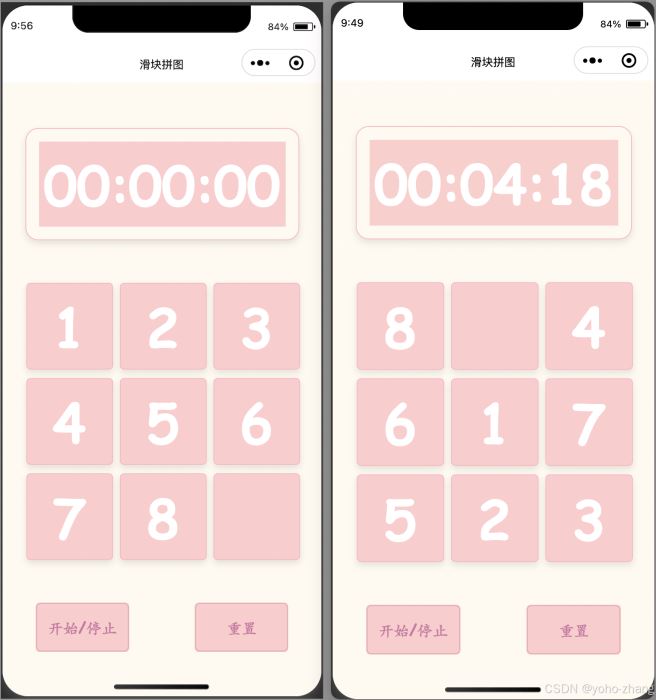
游戏玩法介绍:
滑块拼图(slider puzzle)是一种经典的智力游戏,通常由一个3x3或更大的格子组成,其中一个格子为空,玩家通过滑动拼图块来达到特定的图案或顺序。
按钮介绍
“开始/暂停” 按钮
初次进入页面,需要点击开始按钮,才能进行游戏,第一次点击后,屏幕上面的计时器会开始计时,再次点击暂停按钮,计时停止,游戏界面锁定
“重置”按钮
将正在进行中的游戏进行还原初始化,重新开始
代码实现
代码整体目录结构如下:
├── app.js
├── app.json
├── app.wxss
├── pages
│   ├── index
│   │   ├── index.js
│   │   ├── index.json
│   │   ├── index.wxml
│   │   └── index.wxss
├── project.config.json
├── project.private.config.json
├── sitemap.json
└── utils
    └── util.js
感兴趣的小伙伴可以下载看下
源码下载:https://gitee.com/zyhhyz/slider_puzzles
app.json
该文件仅仅是定义了一个导航条名称为 滑块拼图
{
  "pages": [
    "pages/index/index"
  ],
  "window": {
    "backgroundtextstyle": "light",
    "navigationbarbackgroundcolor": "#fff",
    "navigationbartitletext": "滑块拼图",
    "navigationbartextstyle": "black"
  }
}
page
page文件夹 只包含 一个index页面
index页面
index.wxml
代码如下
<view class="container">
  <!-- 计时器  -->
  <view class="timer-row">
        <view class="timer-text timer-text-m">{{ timerm }}</view>
        <view class="timer-sp timer-text-sp">:</view>
        <view class="timer-text timer-text-s">{{ timers }}</view>
        <view class="timer-sp timer-text-sp">:</view>
        <view class="timer-text timer-text-ms">{{ timerms }}</view>
    </view>
   <!-- 滑块  -->
   <view class="puzzle-container">
     <block wx:for="{{tiles}}" wx:key="*this">
       <view class="puzzle-tile" bind:tap="onclickevent" bindtouchstart="touchstart" bindtouchmove="touchmove" bindtouchend="touchend" data-index="{{index}}">
         {{item}}
       </view>
     </block>
   </view>
   <!-- 按钮区  -->
   <view class="button-container">
          <button class="start-button" bindtap="toggletimer">开始/停止</button>
          <button class="restart-button" bindtap="restartpuzzle">重置</button>
     </view>
</view>
index.js
page({
  data: {
    successtiles: [1, 2, 3, 4, 5, 6, 7, 8, ''],
    tiles: [1, 2, 3, 4, 5, 6, 7, 8, ''],
    emptyindex: 8,
    selector: {
      x: 0,
      y: 0,
      index: 0
    },
    isgameing: false,
    timer: '00:00:00',
    timerm: '00',
    timers: '00',
    timerms: '00',
    timerrunning: false,
    timerinterval: null
  },
  onload: function () {
  },
  touchstart: function (e) {
    // console.log("移动开始", e.currenttarget.dataset)
    if(!this.data.timerrunning){
      console.log("请点击 开始按钮")
      return
    }
    const touch = e.touches[0];
    let index = e.currenttarget.dataset.index;
    let xy = this.getxy(index, 3)
    // console.log(xy)
    this.setdata({
      startx: touch.clientx,
      starty: touch.clienty,
      selector: xy
    });
  },
  touchmove: function (e) {
    // console.log("移动进行中", e)
    const touch = e.touches[0];
    this.setdata({
      movex: touch.clientx,
      movey: touch.clienty,
    });
  },
  touchend: function (e) {
    // console.log("移动结束", e)
    const endx = this.data.movex;
    const endy = this.data.movey;
    const startx = this.data.startx;
    const starty = this.data.starty;
    const deltax = endx - startx;
    const deltay = endy - starty;
    // console.log("deltax ", deltax," deltay ", deltay)
    if (math.abs(deltax) > math.abs(deltay)) {
      // 水平滑动
      if (deltax > 30) {
        // 向右滑动
        // console.log("→")
        this.slidetiles('right');
      } else if (deltax < -30) {
        // 向左滑动
        // console.log("←")
        this.slidetiles('left');
      }
    } else {
      // 垂直滑动
      if (deltay > 30) {
        // 向下滑动
        // console.log("↓")
        this.slidetiles('down');
      } else if (deltay < -30) {
        // 向上滑动
        // console.log("↑")
        this.slidetiles('up');
      }
    }
  },
  slidetiles: function (direction) {
    // 根据方向交换空白块和相邻块
    // 这里需要添加实际的交换逻辑,确保空白块可以移动
    // 例如,你可以在这里交换两个块的位置,但要确保空白块可以移动
    // 以下是一个简单的示例,实际逻辑会更复杂
    let newtiles = this.data.tiles.slice();
    let emptyindex = this.data.emptyindex;
    let selector = this.data.selector;
    emptyindex = selector.index
    console.log(selector, direction)
    switch (direction) {
      case 'right':
        if (emptyindex % 3 < 2) {
          // 判断相邻的要移动的是否为空白块
          if (newtiles[emptyindex + 1] != '') {
            console.log("不能移动", direction)
            return
          }
          [newtiles[emptyindex], newtiles[emptyindex + 1]] = [newtiles[emptyindex + 1], newtiles[emptyindex]];
          this.setdata({
            tiles: newtiles,
            emptyindex: emptyindex + 1
          });
        }
        break;
      case 'left':
        if (emptyindex % 3 > 0) {
          if (newtiles[emptyindex - 1] != '') {
            console.log("不能移动", direction)
            return
          }
          [newtiles[emptyindex], newtiles[emptyindex - 1]] = [newtiles[emptyindex - 1], newtiles[emptyindex]];
          this.setdata({
            tiles: newtiles,
            emptyindex: emptyindex - 1
          });
        }
        break;
      case 'up':
        if (emptyindex >= 3) {
          if (newtiles[emptyindex - 3] != '') {
            console.log("不能移动", direction)
            return
          }
          [newtiles[emptyindex], newtiles[emptyindex - 3]] = [newtiles[emptyindex - 3], newtiles[emptyindex]];
          this.setdata({
            tiles: newtiles,
            emptyindex: emptyindex - 3
          });
        }
        break;
      case 'down':
        if (emptyindex < 6) {
          if (newtiles[emptyindex + 3] != '') {
            console.log("不能移动", direction)
            return
          }
          [newtiles[emptyindex], newtiles[emptyindex + 3]] = [newtiles[emptyindex + 3], newtiles[emptyindex]];
          this.setdata({
            tiles: newtiles,
            emptyindex: emptyindex + 3
          });
        }
        break;
    }
    this.issuccess()
  },
  issuccess: function () {
    let ti = this.data.tiles
    let su = this.data.successtiles
    console.log(su == ti)
    let ti_str = ti.join(',')
    let su_str = su.join(',')
    // console.log(ti_str == su_str)
    // console.log("issuccess", ti, ti_str, su_str)
    if (ti_str == su_str) {
      this.stoptimer();
      wx.showtoast({
        title: '操作成功',
        icon: 'success',
        duration: 2000
      });
    }
  },
  shufflearray: function (array) {
    for (let i = array.length - 1; i > 0; i--) {
      // 生成一个随机索引从 0 到 i
      const j = math.floor(math.random() * (i + 1));
      // 交换元素
      [array[i], array[j]] = [array[j], array[i]];
    }
    return array;
  },
  onclickevent: function (e) {
    if(!this.data.isgameing){
      console.log("请点击 开始按钮")
      return
    }
    let index = e.currenttarget.dataset.index;
    let newtiles = this.data.tiles.slice();
    let tiles = this.data.tiles
    let currenttile = tiles[index]
    if (currenttile == "") {
      // console.log("不能移动")
      return
    }
    let upindex, downindex, leftindex, rightindex = null;
    // 查询 上下左右的索引
    let xy = this.getxy(index, 3)
    let selector = this.data.selector;
    let emptyindex = selector.index
    // 可以向右移动
    if (emptyindex % 3 < 2) {
      if (newtiles[emptyindex + 1] == '') {
        [newtiles[emptyindex], newtiles[emptyindex + 1]] = [newtiles[emptyindex + 1], newtiles[emptyindex]];
        this.setdata({
          tiles: newtiles,
          emptyindex: emptyindex + 1
        });
      }
    }
    // 可以向左运动
    if (emptyindex % 3 > 0) {
      if (newtiles[emptyindex - 1] == '') {
        [newtiles[emptyindex], newtiles[emptyindex - 1]] = [newtiles[emptyindex - 1], newtiles[emptyindex]];
        this.setdata({
          tiles: newtiles,
          emptyindex: emptyindex - 1
        });
      }
    }
    // 可以向上运动
    if (emptyindex >= 3) {
      if (newtiles[emptyindex - 3] == '') {
        [newtiles[emptyindex], newtiles[emptyindex - 3]] = [newtiles[emptyindex - 3], newtiles[emptyindex]];
        this.setdata({
          tiles: newtiles,
          emptyindex: emptyindex - 3
        });
      }
    }
    // 向下运动
    if (emptyindex < 6) {
      if (newtiles[emptyindex + 3] == '') {
        [newtiles[emptyindex], newtiles[emptyindex + 3]] = [newtiles[emptyindex + 3], newtiles[emptyindex]];
        this.setdata({
          tiles: newtiles,
          emptyindex: emptyindex + 3
        });
      }
    }
    console.log("点击事件", xy, )
  },
  getxy: function (index, num) {
    let x = math.floor(index / num) + 1
    let y = index % num + 1
    return {
      x,
      y,
      index
    }
  },
  starttimer: function () {
    if (!this.data.timerrunning) {
      let tiles = this.data.tiles
      let isgameing = this.data.isgameing
      if (!this.data.isgameing) {
        // 游戏未开始 ,打乱顺序
        tiles = this.shufflearray(tiles)
        isgameing = true
      }
      this.setdata({
        tiles: tiles,
        timerrunning: true,
        isgameing: isgameing
      });
      this.data.timerinterval = setinterval(() => {
        let timers = this.data.timer.split(":")
        let m = number(timers[0])
        let s = number(timers[1])
        let ms = number(timers[2])
        if (ms < 99) {
          ms += 1
        } else {
          ms = 0
          if (s < 59) {
            s = s + 1
          } else {
            s = 0
            m += 1
          }
        }
        let timestr = `${this.formatnumber(m,2)}:${this.formatnumber(s,2)}:${this.formatnumber(ms,2)}`
        console.log("--------", timers, timestr)
        this.setdata({
          timer: timestr,
          timerm:this.formatnumber(m,2),
          timers:this.formatnumber(s,2),
          timerms:this.formatnumber(ms,2)
        });
      }, 10);
    }
  },
  stoptimer: function () {
    if (this.data.timerrunning) {
      this.setdata({
        timerrunning: false
      });
      clearinterval(this.data.timerinterval);
    }
  },
  toggletimer: function () {
    if (this.data.timerrunning) {
      this.stoptimer();
    } else {
      this.starttimer();
    }
  },
  restartpuzzle:function(){
    // let tiles = this.data.tiles
    // tiles = this.shufflearray(tiles)
    this.stoptimer()
    this.setdata({
      successtiles: [1, 2, 3, 4, 5, 6, 7, 8, ''],
      tiles: [1, 2, 3, 4, 5, 6, 7, 8, ''],
      emptyindex: 8,
      selector: {
        x: 0,
        y: 0,
        index: 0
      },
      isgameing: false,
      timer: '00:00:00',
      timerm: '00',
      timers: '00',
      timerms: '00',
      timerrunning: false,
      timerinterval: null
    })
// this.starttimer()
  },
  formatnumber: function (num, length) {
    return num.tostring().padstart(length, '0');
  },
});
index.wxss
.container {
  display: flex;
  flex-direction: column;
  justify-content: center;
  align-items: center;
  height: 100vh;
  background-color: #fffaf0;
  font-family: 'comic sans ms', cursive, sans-serif;
}
.timer-row {
  display: flex;
  align-items: center;
  margin-bottom: 100px;
  animation: blink 2s infinite;
  box-shadow: 0 4px 8px rgba(0, 0, 0, 0.1);
  border: 1px solid #ffb6c1;
  border-radius: 15px;
  padding: 15px;
}
.timer-text {
  width: 90px;
  height: 100px;
  background-color: #ffcccc;
  display: flex;
  justify-content: center;
  align-items: center;
  font-size: 64px; /* 增大字体大小 */
  font-weight: bold; /* 加粗字体 */
  cursor: pointer;
  position: relative;
  overflow: hidden;
  transition: transform 0.3s ease;
  /* border-radius: 5px; */
  color: #ffffff; /* 粉色调字体 */
}
.timer-sp {
  width: 10px;
  height: 100px;
  background-color: #ffcccc;
  display: flex;
  justify-content: center;
  align-items: center;
  font-size: 64px; /* 增大字体大小 */
  font-weight: bold; /* 加粗字体 */
  position: relative;
  color: #ffffff; /* 粉色调字体 */
}
@keyframes blink {
  0% { opacity: 1; }
  50% { opacity: 0.5; }
  100% { opacity: 1; }
}
/*  */
.button-container {
  display: flex;
  justify-content: space-between; /* 使按钮分布在容器的两端 */
  width: 100%; /* 容器宽度为100% */
  margin-top: 50px; /* 与拼图块之间添加一些间距 */
}
.start-button {
  background-color: hsl(0, 100%, 90%);
  color: #cf77a3;
  width: 110px;
  border: 1px solid #ffb6c1;
  padding: 5px 10px;
  border-radius: 5px;
  font-size: 18px;
  font-weight: bolder;
  cursor: pointer;
}
.restart-button {
  background-color: #ffcccc;
  color: #cf77a3;
  border: 1px solid #ffb6c1;
  padding: 5px 10px;
  width: 110px;
  border-radius: 5px;
  font-size: 18px;
  font-weight: bold;
  cursor: pointer;
}
/* 滑块样式 */
.puzzle-container {
  margin-top: -50px;
  display: grid;
  grid-template-columns: repeat(3, 100px);
  grid-gap: 10px;
  perspective: 1000px;
}
.puzzle-tile {
  width: 100px;
  height: 100px;
  background-color: #ffcccc;
  display: flex;
  justify-content: center;
  align-items: center;
  font-size: 32px;
  font-weight: bold;
  cursor: pointer;
  position: relative;
  overflow: hidden;
  border: 1px solid #ffb6c1;
  transition: transform 0.3s ease;
  box-shadow: 0 4px 8px rgba(0, 0, 0, 0.1);
  border-radius: 5px;
  color: #ff69b4;
}
.puzzle-tile {
  width: 100px;
  height: 100px;
  background-color: #ffcccc;
  display: flex;
  justify-content: center;
  align-items: center;
  font-size: 64px; /* 增大字体大小 */
  font-weight: bold; /* 加粗字体 */
  cursor: pointer;
  position: relative;
  overflow: hidden;
  border: 1px solid #ffb6c1;
  transition: transform 0.3s ease;
  box-shadow: 0 4px 8px rgba(0, 0, 0, 0.1);
  border-radius: 5px;
  color: #ffffff; /* 粉色调字体 */
}
/* 当拼图块被点击时,添加一些动画效果 */
.puzzle-tile:active {
  transform: scale(0.5);
}
到此这篇关于微信小程序实现的数字滑块拼图的文章就介绍到这了,更多相关微信小程序数字滑块内容请搜索代码网以前的文章或继续浏览下面的相关文章希望大家以后多多支持代码网!






发表评论