
 我要评论
我要评论一、示例图:
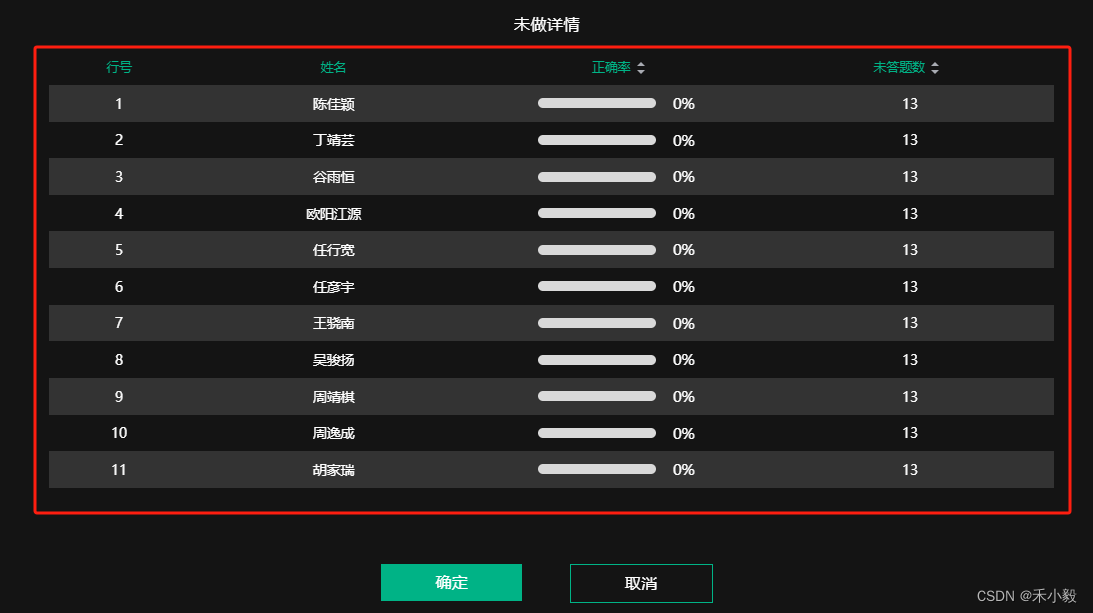
二、组件
<template>
  <div class="sn-table" :class="props.colortype === 1 ? '' : 'bg-scroll'">
    <el-table :data="tabledata" :row-class-name="tablerowclassname" height="500" style="width: 100%;"
      :default-sort="[{ prop: '正确率', order: 'descending' },{ prop: '未答题数', order: 'descending' }]"
      :class="props.colortype === 1 ? '' : 'bg-scroll'">
      <el-table-column align="center" :prop="item.keyname"
        :sortable="item.keyname==='正确率'&&props.isexistselect||item.keyname==='未答题数'&&props.isexistselect?true:false"
        :label="item.keyname" v-for="item in columns"
        :width="item.width ? item.width + 'px' : ''">
        <template #default="scope">
          <div v-if="item.keyname==='正确率'&&props.isexistselect" class="tag-list">
            <el-progress :percentage="scope.row[item.keyname]" color="#00b386" :stroke-width="10" :text-inside="false"/>
          </div>
        </template>
      </el-table-column>
    </el-table>
  </div>
</template>
<script lang='ts' setup>
type tprops = {
  tabledata: any[]
  columns: any[],
  colortype: number, // 颜色类型
  isexistselect: boolean // 是否存在筛选项
}
const props = withdefaults(defineprops<tprops>(), {})
const tablerowclassname = ({ rowindex }: { rowindex: number }) => {
  if (rowindex % 2 === 1) {
    return props.colortype === 1 ? 'odd-row' : 'class-odd-row'
  } else {
    return props.colortype === 1 ? 'even-row' : 'class-even-row'
  }
}
</script>
<style lang='scss' scoped>
.bg-scroll {
  border-radius: 10px;
  height: 96%;
  overflow-y: scroll;
  &::-webkit-scrollbar {
    width: 5px;
    height: 0 !important;
  }
  &::-webkit-scrollbar-thumb {
    border-radius: 10px;
    background: #eeeeee;
  }
}
.sn-table {
  padding: 0 10px 0 20px;
  :deep(.el-table) {
    color: #ffffff !important;
    tr {
      td {
        border: none;
        padding: 16px 0;
        font-size: 15px;
      }
    }
    th.el-table__cell {
      background: #141414 !important;
      border: none;
      color: #00b386;
      font-size: 14px;
      font-weight: 400;
    }
    .even-row {
      background-color: #333 !important;
    }
    .odd-row {
      background-color: #141414 !important;
    }
    .class-even-row {
      background-color: #333 !important;
    }
    .class-odd-row {
      background-color: #00b386 !important;
    }
  }
  :deep(.el-scrollbar__wrap--hidden-default) {
    background: #141414 !important;
  }
  :deep(.el-table--enable-row-hover) {
    .el-table__body {
      tr:hover>td.el-table__cell {
        color: #8c8c8c;
        background: #333 !important;
      }
    }
  }
  :deep(.el-table__inner-wrapper) {
    &::before {
      background-color: transparent;
    }
  }
  :deep(.el-table .ascending .sort-caret.ascending){
    border-bottom-color:#00b386 !important;
  }
  :deep(.el-table .descending .sort-caret.descending){
    border-top-color:#00b386 !important;
  }
  .ok-text{
    font-size: 35px;
    font-weight: 300;
  }
  .tag-list{
    width: 100%;
    padding: 2px 0;
    .tag-btn{
      border-radius: 5px;
      border: 1px solid #ef8714;
      color: #ef8714;
      padding: 1px 10px;
      margin-right: 15px;
      &:last-child{
        margin-right: 0;
      }
    }
  }
}
:deep(.el-progress){
  width: 185px;
  margin: 0 auto;
}
:deep(.el-progress__text){
  span{
    font-size: 16px;
  }
}
:deep(.el-progress-bar__outer){
  background: #d9d9d9;
}
</style>
三、页面调用
<details-table :tabledata="knowinfo" :columns="knowcolumns" :isexistselect="false" :colortype="1"/>
<script setup lang="ts">
import { onmounted, ref } from 'vue'
import canvasvideo from "@/components/canvasvideo.vue"
const knowinfo = ref<any[]>([])
const knowcolumns = ref<any[]>([])
onmounted(()=>{
    init()
})
//数据处理
const init = () => {
    const datas = ref([
        {studentname:'陈佳颖',correctrate:0,noanswercount:13},
        {studentname:'丁靖芸',correctrate:0,noanswercount:13},
        {studentname:'谷雨恒',correctrate:0,noanswercount:13},
        {studentname:'欧阳江源',correctrate:0,noanswercount:13},
        {studentname:'任行宽',correctrate:0,noanswercount:13},
        {studentname:'任彦宇',correctrate:0,noanswercount:13},
        {studentname:'王骁南',correctrate:0,noanswercount:13},
        {studentname:'吴骏扬',correctrate:0,noanswercount:13}
    ])
    if (datas && datas.length > 0) {
        datas.foreach((it: any, index:number) => {
            knowinfo.value.push({
                '行号': index+1,
                '姓名': it.studentname,
                '正确率': it.correctrate,
                '未答题数': it.noanswercount
            })
        })
        for (const key in knowinfo.value[0]) {
            knowcolumns.value.push({
                keyname: key,
                width: key === '行号' ? 140 : null
            })
        }
    }
}
</script>
四、其他
(1)自定义标题
<el-table :data="datas" style="width: 100%;">
    <el-table-column label="" prop="name" align="center">
        <template #header>
           姓名
        </template>
    </el-table-column>
</el-table>
(2)自定义下标
<el-table :data="datas" style="width: 100%;">
    <el-table-column label="行号" align="center">
        <template #default="{$index}">
            {{$index+1}}
        </template>
    </el-table-column>
</el-table>
(3)自定义内容
<el-table :data="datas" style="width: 100%;">
    <el-table-column label="姓名" prop="name" align="center">
        <template #default="scope">
            <div>{{scope.row.name}}s</div>
        </template>
    </el-table-column>
</el-table>
(4)添加排序(升序、降序)
<el-table :data="datas" style="width: 100%;"
   :default-sort="[{ prop: 'rank', order: 'descending' },{ prop: 'time', order: 'descending' }]">
    <el-table-column label="排名" prop="rank" sortable align="center"/>
    <el-table-column label="时长" prop="time" sortable align="center"/>
</el-table>
(5)多选与单选
1. 单选
<el-table :data="datas" style="width: 100%;"
   row-key="id" ref="multipletable" highlight-current-row @row-click="rowselect" @selection-change="selectgroupchange">
    <el-table-column type="selection" width="55" />
    <el-table-column label="排名" prop="rank" align="center"/>
    <el-table-column label="时长" prop="time" align="center"/>
</el-table>
<script setup lang="ts">
import { ref } from "vue"
const multipletable = ref()
const handlelist = ref([])
// 设置单选||显示高亮
const rowselect = (row:any) => {
  multipletable.value.togglerowselection(row)
}
// 选择多个单选框,只取最后选中的那一个
const selectgroupchange = (row:any) => {
  if (row.length > 1) {
    multipletable.value.clearselection()
    multipletable.value.togglerowselection(row.pop())
    return
  }
  if (row.length == 1) {
    handlelist.value = row
  } else {
    handlelist.value = []
  }
}
</script>
<style lang='scss' scoped>
// 隐藏表头选择框
:deep(.el-table__header){
  .el-checkbox{
    display: none;
  }
}
</style>
2. 多选
<el-table :data="datas" style="width: 100%;"
   row-key="id" @select="handleselectionchange" @select-all="handleallchange">
    <el-table-column type="selection" width="55" />
    <el-table-column label="排名" prop="rank" align="center"/>
    <el-table-column label="时长" prop="time" align="center"/>
</el-table>
<script setup lang="ts">
// 选择多个选择框
const handleselectionchange = (selecteds: any, row: any) => {}
// 全选
const handleallchange= (row:any) => {}
</script>
五、实例(实现树形数据与懒加载)
示例图:通过点击当前节点,调用接口展示下一节点,实现列表的增删改查
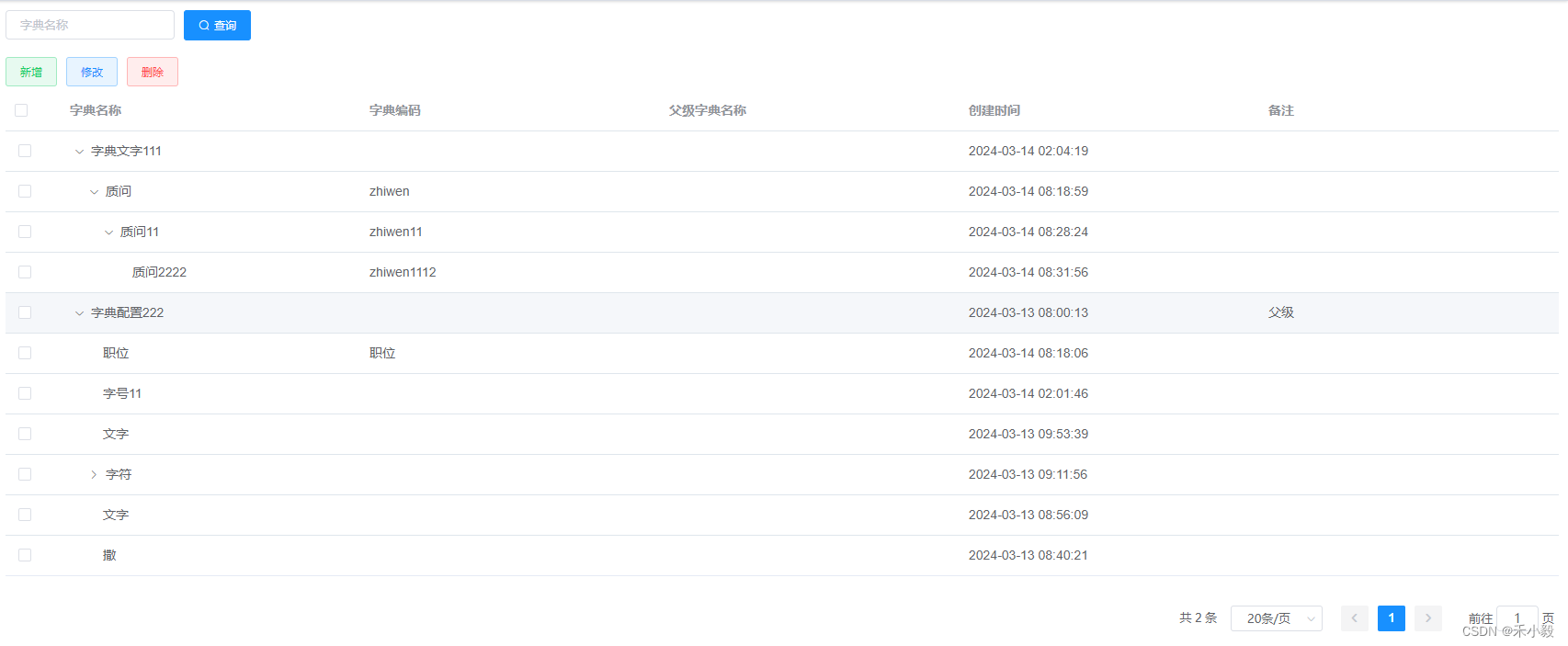
1、添加修改组件 editform.vue
<template>
  <div>
    <el-form
      ref="menueditform"
      :model="form"
      :label-width="formlabelwidth"
      :size="size"
      :rules="rules"
      clearable
    >
      <el-row>
        <el-col :span="12">
          <el-form-item label="父级字典:" prop="parentid">
            <el-cascader ref="mycascader" v-model="form.parentid" :props="{ checkstrictly: true,emitpath:false,expandtrigger:'hover' }" :options="menutree" :show-all-levels="false" placeholder="请选择父级字典" clearable />
          </el-form-item>
        </el-col>
        <el-col :span="12">
          <el-form-item label="字典名称:" :rules="rules.required" prop="dictionaryname">
            <el-input
              v-model="form.dictionaryname"
              autocomplete="off"
              :show-word-limit="true"
              placeholder="请输入字典名称"
            />
          </el-form-item>
        </el-col>
      </el-row>
      <el-row v-if="title==='添加字典'">
        <el-col :span="24">
          <el-form-item label="字典编码:" :rules="rules.required" prop="dictionarycode">
            <el-input
              v-model="form.dictionarycode"
              autocomplete="off"
              :show-word-limit="true"
              placeholder="请输入字典编码"
            />
          </el-form-item>
        </el-col>
      </el-row>
      <el-form-item
        label="备注:"
        prop="remark"
      >
        <el-input
          v-model="form.remark"
          type="textarea"
          maxlength="200"
          :show-word-limit="true"
          autocomplete="off"
        />
      </el-form-item>
    </el-form>
  </div>
</template>
<script>
import { getchildrens, getdictionaryinfo, editdictionary } from '@/api/dictionary'
import rules from '@/utils/rules'
export default {
  props: {
    id: {
      type: number,
      default: 0
    },
    title: {
      type: string,
      default: ''
    }
  },
  data() {
    return {
      menutree: [], // 字典树
      rules: rules,
      formlabelwidth: '120px',
      size: 'small',
      loading: false,
      form: {
        id: this.id,
        parentid: 0,
        parentdictionaryname: '',
        dictionarycode: '',
        dictionaryname: '',
        remark: '',
        deletestate: true
      }
    }
  },
  created() {
    this.fetchinitdata()
  },
  methods: {
    handlepagedcallback() {
      this.$emit('handlepagedcallback')
    },
    handlesubmitform() {
      this.$refs['menueditform'].validate((valid) => {
        if (valid) {
          this.loading = true
          editdictionary(this.form).then((res) => {
            this.loading = false
            if (res.code === 200) {
              if (res.data) {
                this.$message.success('操作成功')
                this.handlepagedcallback()
              } else {
                this.$message.error('操作失败')
              }
            } else {
              this.$message.error(res.message)
            }
          })
        }
      })
    },
    handleresetform() {
      if (this.$refs['menueditform']) {
        this.$refs['menueditform'].resetfields()
      }
    },
    fetchinitdata() {
      getchildrens().then((res) => {
        if (res.code === 200) {
          this.menutree = json.parse(json.stringify(res.data).replace(/id/g, 'value').replace(/dictionaryname/g, 'label'))
          this.fetchformdata()
        }
      })
    },
    fetchformdata() {
      this.handleresetform()
      if (this.id !== 0) {
        const id = { id: this.id }
        getdictionaryinfo(id).then((res) => {
          if (res.code === 200) {
            this.form = object.assign(this.form, res.data)
          }
        })
      }
    }
  }
}
</script>
2、主页面 index.vue
<template>
  <div class="app-container">
    <div class="search-container">
      <!-- 搜索项目 -->
      <el-form :inline="true" :model="search" size="small">
        <el-form-item>
          <el-input v-model="search.keyword" placeholder="字典名称" />
        </el-form-item>
        <el-form-item>
          <el-button
            v-rolebtn="'btn-zdgl-查询'"
            type="primary"
            icon="el-icon-search"
            @click="handlereloadpaged"
          >查询</el-button>
        </el-form-item>
      </el-form>
    </div>
    <div class="toolbar-container">
      <!-- 按钮组 -->
      <el-button
        v-rolebtn="'btn-zdgl-新增字典'"
        type="success"
        size="small"
        plain
        @click="adddialog"
      >新增</el-button>
      <el-button
        v-rolebtn="'btn-zdgl-编辑字典'"
        type="primary"
        size="small"
        plain
        @click="editdialog"
      >修改</el-button>
      <el-button
        v-rolebtn="'btn-zdgl-删除字典'"
        type="danger"
        size="small"
        plain
        @click="handledelete"
      >删除</el-button>
    </div>
    <el-table
      ref="mytable"
      :data="table.data"
      :border="table.border"
      style="width: 100%"
      empty-text="暂无数据"
      row-key="id"
      lazy
      :load="lazyload"
      :default-expand-all="false"
      :tree-props="{children: 'children', haschildren: 'haschildren'}"
      @selection-change="handleselectionchange"
    >
      <el-table-column type="selection" width="60" />
      <el-table-column prop="dictionaryname" label="字典名称" />
      <el-table-column prop="dictionarycode" label="字典编码" />
      <el-table-column prop="parentdictionaryname" label="父级字典名称" />
      <el-table-column prop="createtime" label="创建时间" />
      <el-table-column prop="remark" label="备注" />
    </el-table>
    <pagination
      :total="pagination.total"
      :current="pagination.index"
      :page-size="pagination.size"
      @handlepaginationchange="handlepaginationchange"
      @handlesizechange="handlepaginationchange"
    />
    <div class="dialog-container">
      <el-dialog
        v-if="dialog.edit.visible"
        ref="menueditdialog"
        :title="dialog.edit.title"
        :visible.sync="dialog.edit.visible"
        :width="dialog.edit.width"
        :close-on-click-modal="dialog.close"
        :close-on-press-escape="dialog.close"
      >
        <editform
          :id="dialog.edit.id"
          ref="submit"
          :title="dialog.edit.title"
          @handlepagedcallback="handleeditcallback"
        />
        <span slot="footer" class="dialog-footer">
          <el-button @click="dialog.edit.visible = false">取 消</el-button>
          <el-button type="primary" @click="submit">确 定</el-button>
        </span>
      </el-dialog>
    </div>
  </div>
</template>
<script>
import pagination from '@/components/pagination'
import editform from './editform'
import { getdictionarynext, getdictionaryroute, deletedictionaryroute } from '@/api/dictionary'
export default {
  components: { pagination, editform },
  data() {
    return {
      search: {
        keyword: ''
      },
      searchid: 0,
      // 表格数据
      table: {
        data: [],
        selectrows: [],
        border: false
      },
      currchildren: [],
      // 分页数据
      pagination: {
        index: 1,
        size: 20,
        total: 0
      },
      // 弹出层
      dialog: {
        close: false, // 是否关闭
        edit: {
          id: 0,
          title: '修改字典', // 弹出层title
          visible: false, // 弹出层是否显示
          width: '800px' // 弹出层宽度
        }
      },
      layznode: null,
      layztreenode: null,
      layzresolve: null
    }
  },
  created() {
    this.getdictionarylist()
  },
  methods: {
    lazyload(tree, treenode, resolve) {
      if (tree) {
        var data = {
          id: tree.id
        }
        getdictionarynext(data).then((res) => {
          if (res.code === 200) {
            this.layznode = tree
            this.layztreenode = treenode
            this.layzresolve = resolve
            resolve(res.data)
          }
        })
      }
    },
    submit() {
      this.$refs.submit.handlesubmitform()
    },
    // 勾选
    handleselectionchange(selection) {
      this.table.selectrows = selection
    },
    // 新增
    adddialog() {
      this.dialog.edit.id = 0
      this.dialog.edit.title = '添加字典'
      this.dialog.edit.visible = true
    },
    // 修改
    editdialog() {
      if (this.table.selectrows.length !== 1) {
        this.$message.warning('请选择要修改的字典')
      } else {
        this.dialog.edit.id = this.table.selectrows[0].id
        this.dialog.edit.title = '修改字典'
        this.dialog.edit.visible = true
      }
    },
    // 修改成功回调
    handleeditcallback() {
      this.dialog.edit.visible = false
      this.dialog.edit.id = 0
      this.$nexttick(() => {
        this.$set(this.$refs.mytable.store.states.lazytreenodemap, this.layznode.id, [])
        this.lazyload(this.layznode, this.layztreenode, this.layzresolve)
        this.getdictionarylist()
      })
    },
    // 删除
    handledelete() {
      if (this.table.selectrows.length === 0) {
        this.$message.warning('未勾选记录')
        return
      }
      const ids = []
      this.table.selectrows.foreach((it) => {
        ids.push(it.id)
      })
      this.$confirm('此操作将永久删除勾选记录, 是否继续?').then(() => {
        deletedictionaryroute(ids).then((res) => {
          if (res.code === 200) {
            if (res.data) {
              this.$nexttick(() => {
                this.getdictionarylist()
                this.$set(this.$refs.mytable.store.states.lazytreenodemap, this.layznode.id, [])
                this.lazyload(this.layznode, this.layztreenode, this.layzresolve)
              })
              this.$message.success('操作成功')
            } else {
              this.$message.error('操作失败')
            }
          } else {
            this.$message.error(res.message)
          }
        })
      })
    },
    // 列表接口
    getdictionarylist() {
      var data = {
        searchname: this.search.keyword,
        searchid: this.searchid,
        pageindex: this.pagination.index,
        pagesize: this.pagination.size
      }
      getdictionaryroute(data).then((res) => {
        if (res.code === 200) {
          this.pagination.total = res.data.total
          this.table.data = res.data.data
        }
      })
    },
    // 重载表格
    handlereloadpaged() {
      this.pagination.index = 1
      this.getdictionarylist()
    },
    // 分页变更
    handlepaginationchange(data) {
      this.pagination.index = data.current
      this.pagination.size = data.pagesize
      this.getdictionarylist()
    }
  }
}
</script>
希望我的愚见能够帮助你哦~,若有不足之处,还望指出,你们有更好的解决方法,欢迎大家在评论区下方留言支持,大家一起相互学习参考呀~
到此这篇关于vue3 实现关于 el-table 表格组件的封装以及调用的文章就介绍到这了,更多相关vue3 el-table 表格组件封装内容请搜索代码网以前的文章或继续浏览下面的相关文章希望大家以后多多支持代码网!





发表评论