
 我要评论
我要评论uni-app实现页面通信eventchannel
之前使用了eventbus的方法实现不同页面组件之间的一个通信,在uni-app中,我们也可以使用uni-app api —— uni.navigateto来实现页面间的通信。注:2.8.9+ 支持页面间事件通信通道。
1. 向被打开页面传送数据
// index.vue
<script setup>
	uni.navigateto({
		url: '/pages/tender/detail', // 跳转详情页面
	    success:function(res){
	      // 通过eventchannel向被打开页面传送数据
	      res.eventchannel.emit('todetailemits', { data: 'index to detail' })
	    }
	});
</script>
// detail.vue
import { onload } from '@dcloudio/uni-app';
import { ref, getcurrentinstance} from 'vue';
const instance = getcurrentinstance().proxy
<script setup>
onload(()=>{
const eventchannel = instance.getopenereventchannel();
eventchannel.on('todetailemits',(data)=>{
console.log(data,'data') // 输出结果如下
})
})
</script>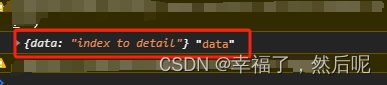
2. 如果需要获取被打开页面传送到当前页面的数据
// index.vue
<script setup>
	uni.navigateto({
		url: '/pages/tender/detail', // 跳转详情页面
	    events:{
	      // 为指定事件添加一个监听器,获取被打开页面传送到当前页面的数据
	      updataemits:function(data){
	        console.log(data,'data index')  // 输出结果如下
	        // 可以在当前页做一些操作....
	      }
	    },
	    success:function(res){
	      // 通过eventchannel向被打开页面传送数据
	      res.eventchannel.emit('todetailemits', { data: 'index to detail' })
	    }
	});
</script>
// detail.vue
import { onload } from '@dcloudio/uni-app';
import { ref, getcurrentinstance} from 'vue';
const instance = getcurrentinstance().proxy
<script setup>
// 如点击某一按钮
const cancle = () => {
const eventchannel = instance.getopenereventchannel();
eventchannel.emit('updataemits',{data:'detail to index'})
uni.navigateback()
}
onload(()=>{
const eventchannel = instance.getopenereventchannel();
eventchannel.on('todetailemits',(data)=>{
console.log(data,'data')
})
})
</script>
到此这篇关于uni-app实现页面通信eventchannel的操作方法的文章就介绍到这了,更多相关uni-app页面通信eventchannel内容请搜索代码网以前的文章或继续浏览下面的相关文章希望大家以后多多支持代码网!


发表评论