
 我要评论
我要评论效果
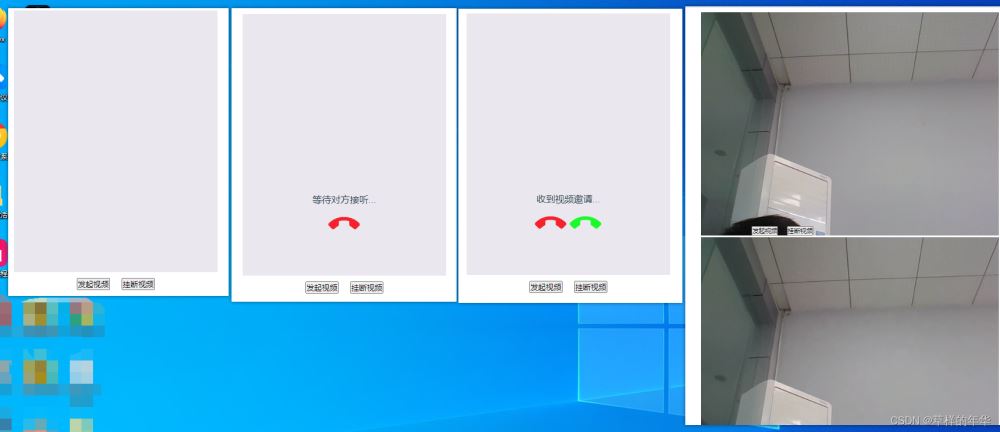
前端代码
<template>
  <div class="flex items-center flex-col text-center p-12 h-screen">
    <div class="relative h-full mb-4 fbox">
      <video id="localvideo"></video>
      <video id="remotevideo"></video>
      <div v-if="caller && calling">
        <p class="mb-4 text-white">等待对方接听...</p>
        <img style="width: 60px;" @click="hangup" src="@/assets/guaduang.png" alt="">
      </div>
      <div v-if="called && calling">
        <p>收到视频邀请...</p>
        <div class="flex">
          <img style="width: 60px" @click="hangup" src="@/assets/guaduang.png" alt="">
          <img style="width: 60px" @click="acceptcall" src="@/assets/jieting.png" alt="">
        </div>
      </div>
    </div>
    <div>
      <button @click="callremote" style="margin-right: 10px">发起视频</button>
      <button @click="hangup" style="margin-left: 10px">挂断视频</button>
    </div>
  </div>
</template>
<script>
import { io, socket } from "socket.io-client";
let roomid = '001';
export default {
name: 'helloworld',
props: {
msg: string
},
data(){
return{
wssocket:null,//实例
called:false,// 是否是接收方
caller:false,// 是否是发起方
calling:false,// 呼叫中
communicating:false,// 视频通话中
localvideo:null,// video标签实例,播放本人的视频
remotevideo:null,// video标签实例,播放对方的视频
peer:null,
localstream:null,
}
},
methods:{
// 发起方发起视频请求
async callremote(){
let that = this;
console.log('发起视频');
that.caller = true;
that.calling = true;
// await getlocalstream()
// 向信令服务器发送发起请求的事件
await that.getlocalstream();
that.wssocket.emit('callremote', roomid)
},
// 接收方同意视频请求
acceptcall(){
console.log('同意视频邀请');
this.wssocket.emit('acceptcall', roomid)
},
// 挂断视频
hangup(){
this.wssocket.emit('hangup', roomid)
},
reset(){
this.called = false;
this.caller = false;
this.calling = false;
this.communicating = false;
this.peer = null;
this.localvideo.srcobject = null;
this.remotevideo.srcobject = null;
this.localstream = undefined;
console.log('挂断结束视频-------')
},
// 获取本地音视频流
async getlocalstream(){
let that = this;
let obj = { audio: true, video: true };
const stream = await navigator.mediadevices.getusermedia(obj); // 获取音视频流
that.localvideo.srcobject = stream;
that.localvideo.play();
that.localstream = stream;
return stream;
}
},
mounted() {
let that = this;
that.$nexttick(()=>{
that.localvideo = document.getelementbyid('localvideo');
that.remotevideo = document.getelementbyid('remotevideo');
})
let sock = io('localhost:3000'); // 对应服务的端口
// 连接成功
sock.on('connectionsuccess', (sock) => {
console.log('连接成功:');
});
sock.emit('joinroom', roomid) // 前端发送加入房间事件
sock.on('callremote', (sock) => {
// 如果是发送方自己收到这个事件就不用管
if (!that.caller){ // 不是发送方(用户a)
that.called = true; // 接听方
that.calling = true; // 视频通话中
}
});
sock.on('acceptcall',async ()=>{
if (that.caller){
// 用户a收到用户b同意视频的请求
that.peer = new rtcpeerconnection();
// 添加本地音视频流
that.peer.addstream && that.peer.addstream(that.localstream);
// 通过监听onicecandidate事件获取candidate信息
that.peer.onicecandidate = (event) => {
if (event.candidate) {
console.log('用户a获取candidate信息', event.candidate);
// 通过信令服务器发送candidate信息给用户b
sock.emit('sendcandidate', {roomid, candidate: event.candidate})
}
}
// 接下来用户a和用户b就可以进行p2p通信流
// 监听onaddstream来获取对方的音视频流
that.peer.onaddstream = (event) => {
console.log('用户a收到用户b的stream',event.stream);
that.calling = false;
that.communicating = true;
that.remotevideo.srcobject = event.stream;
that.remotevideo.play();
}
// 生成offer
let offer = await that.peer.createoffer({
offertoreceiveaudio: 1,
offertoreceivevideo: 1
})
console.log('offer', offer);
// 设置本地描述的offer
await that.peer.setlocaldescription(offer);
// 通过信令服务器将offer发送给用户b
sock.emit('sendoffer', { offer, roomid })
}
})
// 收到offer
sock.on('sendoffer',async (offer) => {
if (that.called){ // 接收方 - 用户b
console.log('收到offer',offer);
// 创建自己的rtcpeerconnection
that.peer = new rtcpeerconnection();
// 添加本地音视频流
const stream = await that.getlocalstream();
that.peer.addstream && that.peer.addstream(stream);
// 通过监听onicecandidate事件获取candidate信息
that.peer.onicecandidate = (event) => {
if (event.candidate) {
console.log('用户b获取candidate信息', event.candidate);
// 通过信令服务器发送candidate信息给用户a
sock.emit('sendcandidate', {roomid, candidate: event.candidate})
}
}
// 接下来用户a和用户b就可以进行p2p通信流
// 监听onaddstream来获取对方的音视频流
that.peer.onaddstream = (event) => {
console.log('用户b收到用户a的stream',event.stream);
that.calling = false;
that.communicating = true;
that.remotevideo.srcobject = event.stream;
that.remotevideo.play();
}
// 设置远端描述信息
await that.peer.setremotedescription(offer);
let answer = await that.peer.createanswer();
console.log('用户b生成answer',answer);
await that.peer.setlocaldescription(answer);
// 发送answer给信令服务器
sock.emit('sendanswer', { answer, roomid })
}
})
// 用户a收到answer
sock.on('sendanswer',async (answer) => {
if (that.caller){ // 接收方 - 用户a 判断是否是发送方
// console.log('用户a收到answer',answer);
await that.peer.setremotedescription(answer);
}
})
// 收到candidate信息
sock.on('sendcandidate',async (candidate) => {
console.log('收到candidate信息',candidate);
// await that.peer.addicecandidate(candidate) // 用户a和用户b分别收到candidate后,都添加到自己的peer对象上
// await that.peer.addcandidate(candidate)
await that.peer.addicecandidate(candidate)
})
// 挂断
sock.on('hangup',()=>{
that.reset()
})
that.wssocket = sock;
}
}
</script>服务端代码
const socket = require('socket.io');
const http = require('http');
const server = http.createserver()
const io = socket(server, {
    cors: {
        origin: '*' // 配置跨域
    }
});
io.on('connection', sock => {
    console.log('连接成功...')
    // 向客户端发送连接成功的消息
    sock.emit('connectionsuccess');
    sock.on('joinroom',(roomid)=>{
        sock.join(roomid);
        console.log('joinroom-房间id:'+roomid);
    })
    // 广播有人加入到房间
    sock.on('callremote',(roomid)=>{
        io.to(roomid).emit('callremote')
    })
    // 广播同意接听视频
    sock.on('acceptcall',(roomid)=>{
        io.to(roomid).emit('acceptcall')
    })
    // 接收offer
    sock.on('sendoffer',({offer,roomid})=>{
        io.to(roomid).emit('sendoffer',offer)
    })
    // 接收answer
    sock.on('sendanswer',({answer,roomid})=>{
        io.to(roomid).emit('sendanswer',answer)
    })
    // 收到candidate
    sock.on('sendcandidate',({candidate,roomid})=>{
        io.to(roomid).emit('sendcandidate',candidate)
    })
    // 挂断结束视频
    sock.on('hangup',(roomid)=>{
        io.to(roomid).emit('hangup')
    })
})
server.listen(3000, () => {
    console.log('服务器启动成功');
});
完整代码gitee地址: https://gitee.com/wade-nian/wdn-webrtc.git
参考文章:基于webrtc实现音视频通话_npm create vite@latest webrtc-client
要是在拨打电话过程中,无法打开摄像头或者麦克风,浏览器也没有弹出获取摄像头及麦克风的权限运行,这是需要进行浏览器安全源的设置,步骤如下:
1、在 chrome 中 输入 chrome://flags/#unsafely-treat-insecure-origin-as-secure
2、找到insecure origins treated as secure
3、添加你服务器的地址 例如:http://192.168.1.10:8080
4、选择enabled属性
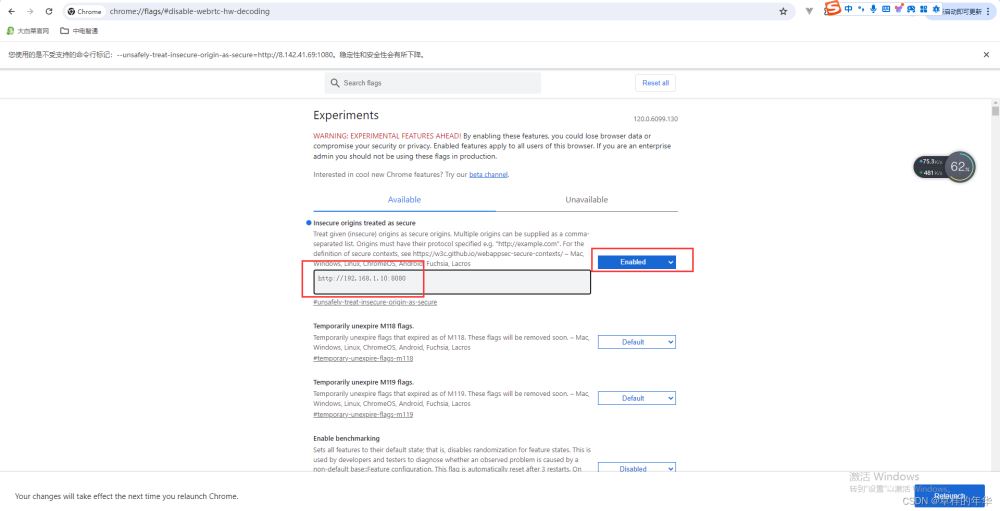
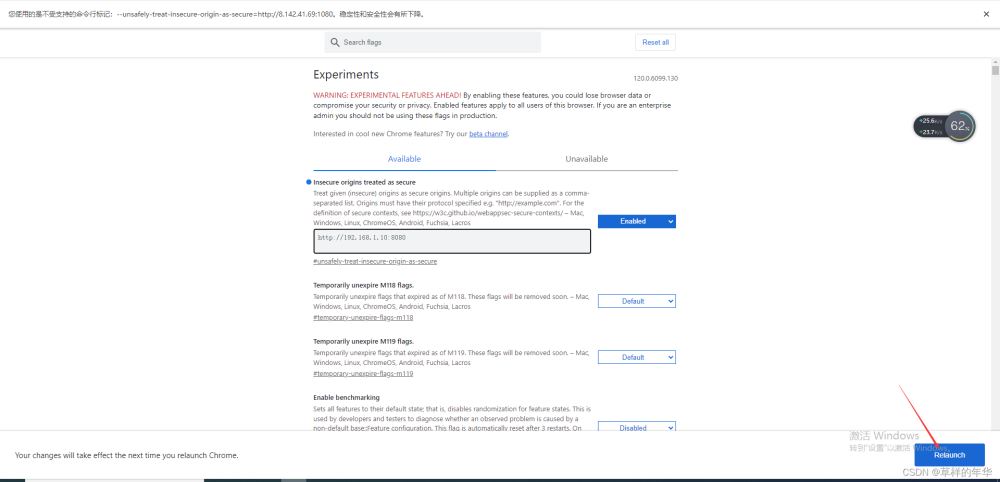
5、点击右下角的relaunch即可
到此这篇关于vue项目基于webrtc实现一对一音视频通话的文章就介绍到这了,更多相关vue音视频通话内容请搜索代码网以前的文章或继续浏览下面的相关文章希望大家以后多多支持代码网!



发表评论