
 我要评论
我要评论前言
ubuntu使用chkconfig命令时报错:
chkconfig: command not found
后来发现chkconfig是redhat下的程序,而在ubuntu需用用sysv-rc-conf来代替。
一、安装sysv-rc-conf
在ubuntu下,用apt-get安装sysv-rc-conf:
命令如下:
sudo apt-get install sysv-rc-conf
1.1 引入库安装可能报错
e: unable to locate package sysv-rc-conf
无法定位软件包 sysv-rc-conf,需要在sources.list 文件末尾添加镜像源:
sudo vim /etc/apt/sources.list
# 在sources.list 文件末尾添加镜像源
deb http://archive.ubuntu.com/ubuntu/ trusty main universe restricted multiverse
1.2 添加镜像源后更新安装源
sudo apt-get update
1.3 更新安装源可能报错如下内容
w: gpg error: http://archive.ubuntu.com/ubuntu trusty release: the following signatures couldn't be verified because the public key is not available: no_pubkey 40976eaf437d05b5 no_pubkey 3b4fe6acc0b21f32
e: the repository 'http://archive.ubuntu.com/ubuntu trusty release' is not signed.
n: updating from such a repository can't be done securely, and is therefore disabled by default.
n: see apt-secure(8) manpage for repository creation and user configuration details.
1.4 添加密钥
这个错误表示由于没有公钥,无法验证下列签名: no_pubkey 40976eaf437d05b5 no_pubkey 3b4fe6acc0b21f32
下面来添加密钥:
apt-key adv --keyserver keyserver.ubuntu.com --recv-keys 40976eaf437d05b5
apt-key adv --keyserver keyserver.ubuntu.com --recv-keys 3b4fe6acc0b21f32
1.5 添加密钥后更新安装源
sudo apt-get update
1.6 用apt-get安装sysv-rc-conf
sudo apt-get install sysv-rc-conf
1.7 安装sysv-rc-conf可能报错如下内容
sub-process /usr/bin/dpkg returned an error code (1)
1.8 使用下面命令进行修复
cd /var/lib/dpkg/
sudo mv info/ info_bak          # 现将info文件夹更名
sudo mkdir info                 # 再新建一个新的info文件夹
sudo apt-get update             # 更新
sudo apt-get -f install         # 修复
sudo mv info/* info_bak/        # 执行完上一步操作后会在新的info文件夹下生成一些文件,现将这些文件全部移到info_bak文件夹下
sudo rm -rf info                # 把自己新建的info文件夹删掉
sudo mv info_bak info           # 把以前的info文件夹重新改回名
1.9 链接 chkconfig
复制sysv-rc-conf文件为chkconfig
sudo cp /usr/sbin/sysv-rc-conf /usr/sbin/chkconfig
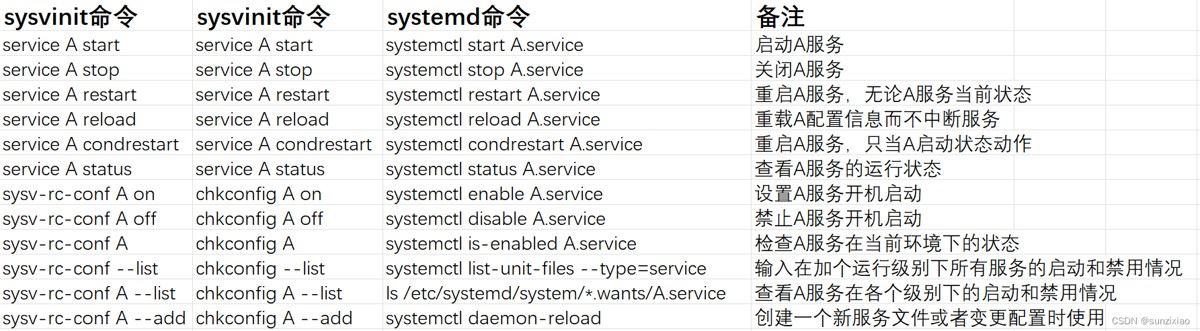
二、systemd命令和sysvinit命令对照信息表
三、总结
以上为个人经验,希望能给大家一个参考,也希望大家多多支持代码网。



发表评论