
 我要评论
我要评论日期比较在开发里面很是常见,我也踩了不少坑,本文就列举一下java日期比较的方式
一、字符串string的日期比较
string型的日期通过compareto()来比较,因为string实现了comparable接口
enddate.compareto(startdate)结果>0 说明前者 晚于 后者
string型日期(获取今天/系统当前时间)
获取今天当前时间,精确到 秒
string today= new simpledateformat("yyyy-mm-dd hh:mm:ss").format(new date());
如果获取当前时间要 精确到毫秒 的话,仅需要
string today= new simpledateformat("yyyy-mm-dd hh:mm:ss:sss").format(new date());即可~
比较示例
string startdate="2020-11-13 00:00:00";

//当前时间enddate 是2020-11-14 09:52:41
string enddate= new simpledateformat("yyyy-mm-dd hh:mm:ss").format(new date());
// return 1
system.out.println(enddate.compareto(startdate));
返回结果是1,,即 enddate>startdate
string日期比较要注意
- 比较的字符串格式要一致,yyyy-mm-dd hh:mm:ss 和 yyyymmddhhmmss 格式是不一样的,这么比较结果肯定不对
二、数值型long比较
获取long型的今日/系统当前时间
数值型(long型)日期的获取方式主要有2个:
long time=system.currenttimemillis()获取系统当前时间,精确到毫秒long today= date.gettime(),即通过date型日期调用gettime()方法获取,精确到毫秒
如果只需要精确到秒的话,大可用别的比较方式
string startdate="2020-11-13 00:00:00";
string enddate= "2020-11-14 23:59:59";
simpledateformat simpledateformat=new simpledateformat("yyyy-mm-dd hh:mm:ss");
try{
    date date01=simpledateformat.parse(startdate);
    date date02=simpledateformat.parse(enddate);

	// 精确到毫秒
    long millisecond01=date01.gettime();
    long millisecond02=date02.gettime();

	// true
    system.out.println(millisecond02 > millisecond01);
}catch (exception e){

}
三、日期型date直接比较
日期型date的比较通过before()和after()来完成,返回值均为boolean
- before(date when) :在指定日期when 之前
- after(date when) :在指定日期when 之后
string startdate="2020-11-13 00:00:00";
string enddate= "2020-11-14 23:59:59";
simpledateformat simpledateformat=new simpledateformat("yyyy-mm-dd hh:mm:ss");
try{
    date date01=simpledateformat.parse(startdate);
    date date02=simpledateformat.parse(enddate);

	// true , 11-13号 在 11-14号 之前
   	system.out.println(date01.before(date02));
}catch (exception e){

}
四、date型日期的获取方式
date date=new date()- 由java.util.calendar来获取
calendar获取date日期
//获取日历实例
calendar calendar=calendar.getinstance();
date date=calendar.gettime();
返回的date日期精确到了 毫秒
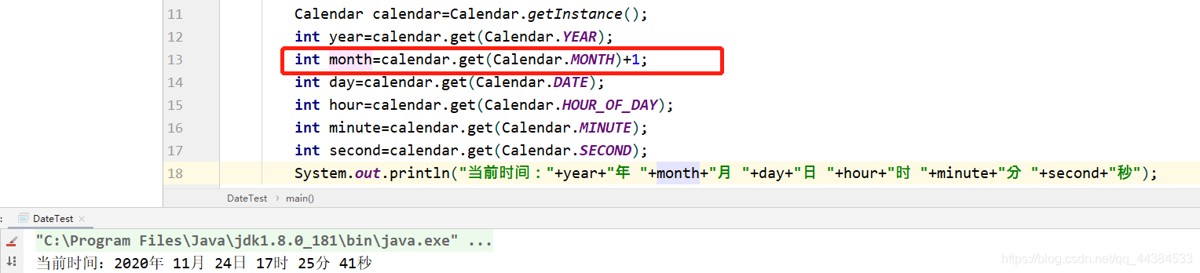
五、calendar获取年月日【拓展】
calendar calendar=calendar.getinstance();
int year=calendar.get(calendar.year);
int month=calendar.get(calendar.month)+1;
int day=calendar.get(calendar.date);
int hour=calendar.get(calendar.hour_of_day);
int minute=calendar.get(calendar.minute);
int second=calendar.get(calendar.second);
system.out.println("当前时间:"+year+"年 "+month+"月 "+day+"日 "+hour+"时 "+minute+"分 "+second+"秒");
calendar.get(calendar.month)拿到的是上一个月,要拿到这个月得+1
六、总结
以上为个人经验,希望能给大家一个参考,也希望大家多多支持代码网。




发表评论