
 我要评论
我要评论一、引言
本人在写用户信息模块的时候,觉得手机号、邮箱等内容不应该直接明文返回给前端。
{
    "username": "测试用户",
    "phone":    "13812346789",    ❌明文暴露
    "email":    "test@qq.com"     ❌
}一旦接口被抓包或日志泄露,用户的隐私就全暴露了。正确的做法是返回脱敏后的数据
{
    "username": "测试用户",
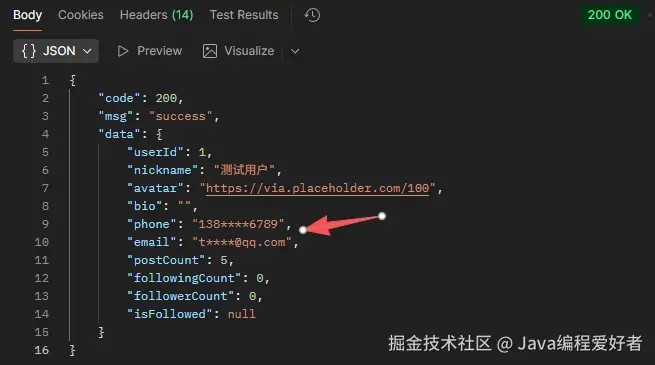
    "phone":    "138****6789",    ✅
    "email":    "t***@qq.com"     ✅
} 阅读网上资料,我觉得把脱敏做到序列化出参的这一层比较好,下面是具体实现
二、核心实现:四个组件
组件1:脱敏类型枚举 sensitivetype
先枚举出所有需要脱敏的字段类型:
public enum sensitivetype{
    mobile,    //手机号
    email,     //邮箱
    id_card    //身份证
}
组件2:打码规则 sensitiveutils
public class sensitiveutils {

    /** 手机号:13812346789 -> 138****6789(保留前3后4) */
    public static string maskmobile(string mobile) {
        if (mobile == null || mobile.length() != 11) {
            return mobile;   // 格式不符时原样返回,不抛异常
        }
        return mobile.substring(0, 3) + "****" + mobile.substring(7);
    }

    /** 邮箱:test@qq.com -> t****@qq.com(保留首字母 + @后面) */
    public static string maskemail(string email) {
        if (email == null || !email.contains("@")) {
            return email;
        }
        int atindex = email.indexof("@");
        return email.substring(0, 1) + "****" + email.substring(atindex);
    }

    /** 身份证:110101199001011234 -> 110***********1234(保留前3后4) */
    public static string maskidcard(string idcard) {
        if (idcard == null || idcard.length() != 18) {
            return idcard;
        }
        return idcard.substring(0, 3) + "***********" + idcard.substring(14);
    }
}
组件3:脱敏序列化器 sensitivejsonserializer
public class sensitivejsonserializer extends jsonserializer<string>
        implements contextualserializer {

    /** 当前字段的脱敏类型 */
    private sensitivetype type;

    /** 无参构造:jackson 反射创建实例时调用 */
    public sensitivejsonserializer() {
    }

    /** 有参构造:内部使用,携带脱敏类型 */
    private sensitivejsonserializer(sensitivetype type) {
        this.type = type;
    }

    /** 核心方法:序列化时打码 */
    @override
    public void serialize(string value, jsongenerator gen, serializerprovider serializers)
            throws ioexception {
        if (value == null) {
            gen.writenull();
            return;
        }
        gen.writestring(mask(value, type));
    }

    /** 关键方法:读取字段上的 @sensitive 注解,拿到脱敏类型 */
    @override
    public jsonserializer<?> createcontextual(serializerprovider prov, beanproperty property) {
        if (property != null) {
            sensitive annotation = property.getannotation(sensitive.class);
            if (annotation != null) {
                return new sensitivejsonserializer(annotation.type());
            }
        }
        return this;
    }

    /** 根据类型调用对应的打码方法 */
    private string mask(string value, sensitivetype type) {
        switch (type) {
            case mobile: return sensitiveutils.maskmobile(value);
            case email: return sensitiveutils.maskemail(value);
            case id_card: return sensitiveutils.maskidcard(value);
            default: return value;
        }
    }
}
组件4:脱敏注解 @sensitive
@target(elementtype.field)
@retention(retentionpolicy.runtime)
@documented
@jacksonannotationsinside                       // 关键:允许组合 @jsonserialize
@jsonserialize(using = sensitivejsonserializer.class)
public @interface sensitive {

    /** 脱敏类型,默认手机号 */
    sensitivetype type() default sensitivetype.mobile;
}
完成上面四步后,只需要在 vo 字段上标注,序列化时自动生效。
public class userprofilevo{

    @sensitive(type = sensitivetype.mobile)
    private string phone;

    @sensitive(type = sensitivetype.email)
    private string email;

    //其他字段...
}
三、完整数据流
数据库(user 表)
phone = 13812346789(完整值)
│
▼
user 实体(entity,对应数据库,没有 @sensitive)
user.phone = 13812346789
│
▼
controller 组装:user.getphone() 把完整值 copy 进 vo
vo.phone = 13812346789
│
▼
返回 result.success(vo) —— vo 是 userprofilevo
userprofilevo.phone 字段上有 @sensitive 注解
│
▼
jackson 序列化 userprofilevo 时
发现 phone 字段有 @sensitive(type = mobile)
→ 触发 sensitivejsonserializer
→ 调用 maskmobile 打码
│
▼
前端收到 json
phone = "138****6789"
脱敏实际上只发生在序列化出参时,数据库里存的一直是完整值,脱敏是一个展示的动作,而存储层要保护数据应该使用加密或者哈希
四、两个关键技术点
1、@jacksonannotationsinside 是什么?
jackson默认不认识我们自定义的 @sensitive 注解,@jacksonannotationsinside 的作用是:允许把 @jsonserialize 组合进自定义注解。
加了它之后,@sensitive 就等价于 @jsonserialize(using = sensitivejsonserializer.class) ,jackson才能识别并触发我们的序列化器。
2、contextualserializer 有什么用?
序列化器怎么知道是 手机号? 邮箱? 答案是 createcontextual 方法:
- jackson 序列化某个字段前,会调用 createcontextual
- 它通过 property.getannotation(sensitive.class) 读字段上的注解
- 拿到 type 后,返回一个携带类型的序列化实例
五、总结
本文实现了一个完整的 spring 数据脱敏方案,核心链路是:枚举定义类型 -> 工具类实现规则 -> 序列化器打码 -> 注解标记字段
到此这篇关于springboot自定义注解+jackson序列化器实现数据脱敏的文章就介绍到这了,更多相关springboot数据脱敏内容请搜索代码网以前的文章或继续浏览下面的相关文章希望大家以后多多支持代码网!





发表评论