
 我要评论
我要评论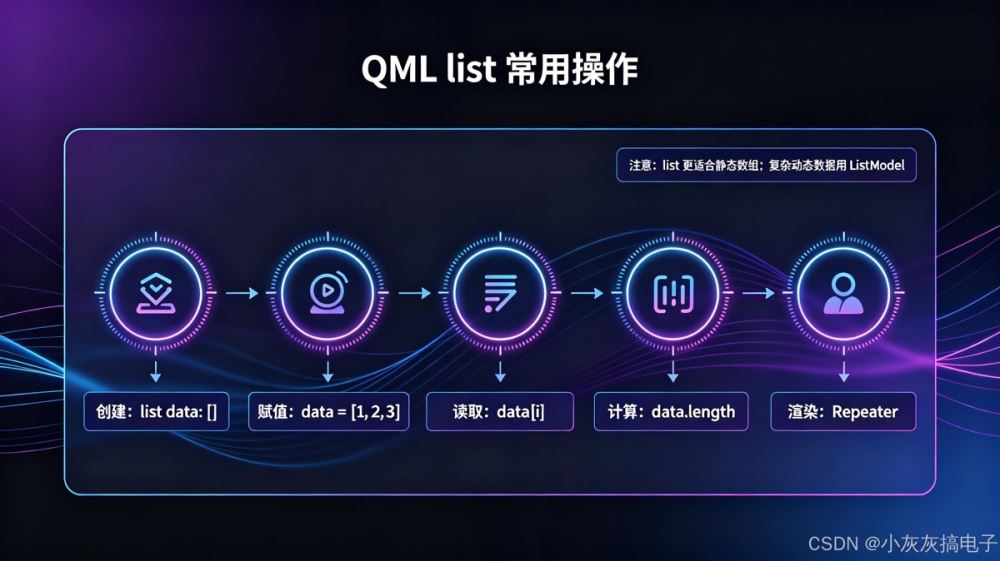
1、什么是 qml 中的 list?
在 qml(qt modeling language)中,list 是一种用于存储多个同类型元素的有序集合数据类型。它类似于 javascript 中的数组(array),但具有更严格的类型约束和 qt 特有的性能优化。
核心特性:
- 有序集合:元素按插入顺序排列
- 动态大小:可随时添加、删除元素
- 类型安全:通常要求所有元素为同一类型
- qml 原生支持:无需额外导入即可使用
2、 list 的基本语法
2.1、 声明与初始化
// 方式1:空列表
property list<int> numbers
// 方式2:初始化时赋值
property list<string> colors: ["red", "green", "blue"]
// 方式3:使用 listmodel(更灵活)
listmodel {
    id: fruitmodel
    listelement { name: "apple"; color: "red" }
    listelement { name: "banana"; color: "yellow" }
}
2.2 、访问元素
// 通过索引访问
property string firstcolor: colors[0]  // "red"
// 获取长度
property int colorcount: colors.length  // 3
// 遍历列表
repeater {
    model: colors.length
    text {
        text: "颜色 " + colors[index]
    }
}
3、 list 的常用操作
3.1、 添加元素
// 使用 push() 方法
colors.push("yellow")  // 添加到末尾
colors.push("purple")
// 使用 concat() 合并列表
property list<string> morecolors: ["cyan", "magenta"]
property list<string> allcolors: colors.concat(morecolors)
3.2、 删除元素
// 使用 pop() 删除末尾元素
colors.pop()  // 删除最后一个元素
// 使用 splice() 删除指定位置
colors.splice(1, 1)  // 从索引1开始删除1个元素
// 清空列表
colors = []
3.3 、查找与判断
// 查找元素索引
var index = colors.indexof("green")  // 返回1,找不到返回-1
// 判断是否包含
var hasred = colors.includes("red")  // true
// 判断列表是否为空
var isempty = colors.length === 0
4、 list 与 listmodel 的区别
| 特性 | list | listmodel |
|---|---|---|
| 类型 | 基本数据类型 | qml 对象类型 |
| 性能 | 轻量级,适合简单数据 | 重量级,功能丰富 |
| 数据绑定 | 支持属性绑定 | 支持角色绑定和信号 |
| 视图适配 | 需要手动处理 | 直接适配 listview、repeater |
| 动态修改 | 直接修改数组 | 通过 append()、remove() 等方法 |
// list 示例
property list<variant> simplelist: [1, "text", true]
// listmodel 示例
listmodel {
    id: personmodel
    listelement { name: "alice"; age: 25 }
    listelement { name: "bob"; age: 30 }
}
listview {
    model: personmodel
    delegate: text { text: name + " (" + age + ")" }
}
5、 高级用法
5.1、 类型化列表
// 定义自定义类型
item {
    id: root
    // 自定义对象类型
    property list<item> childitems: [
        rectangle { color: "red"; width: 50; height: 50 },
        rectangle { color: "blue"; width: 50; height: 50 }
    ]
    // 复杂类型列表
    property list<variant> mixeddata: [
        { name: "item1", value: 100 },
        { name: "item2", value: 200 }
    ]
}
5.2、 列表转换
// map() - 转换每个元素
property list<int> numbers: [1, 2, 3, 4, 5]
property list<int> doubled: numbers.map(function(n) { return n * 2 })
// filter() - 过滤元素
property list<int> evennumbers: numbers.filter(function(n) { return n % 2 === 0 })
// reduce() - 聚合计算
property int sum: numbers.reduce(function(acc, n) { return acc + n }, 0)
5.3、 性能优化技巧
// 1. 避免频繁修改大型列表
// 不好:每次循环都修改
for (var i = 0; i < 1000; i++) {
    biglist.push(i)
}
// 好:批量操作
var temp = []
for (var i = 0; i < 1000; i++) {
    temp.push(i)
}
biglist = biglist.concat(temp)
// 2. 使用 typed arrays 提高性能
property list<int> intlist: int32array.from([1, 2, 3, 4, 5])
// 3. 列表缓存
property list<string> cachedlist
onsomesignal: {
    if (cachedlist.length === 0) {
        cachedlist = calculateexpensivelist()
    }
    // 使用 cachedlist
}
6、 实际应用示例
6.1、 动态菜单项
item {
    property list<variant> menuitems: [
        { text: "首页", icon: "home.svg", action: "gohome" },
        { text: "设置", icon: "settings.svg", action: "opensettings" },
        { text: "帮助", icon: "help.svg", action: "showhelp" }
    ]
    column {
        repeater {
            model: menuitems.length
            button {
                text: menuitems[index].text
                icon.source: menuitems[index].icon
                onclicked: handleaction(menuitems[index].action)
            }
        }
    }
    function handleaction(action) {
        switch(action) {
            case "gohome": console.log("转到首页"); break
            case "opensettings": console.log("打开设置"); break
            case "showhelp": console.log("显示帮助"); break
        }
    }
}
6.2、 数据分页
item {
    property list<variant> alldata: []  // 所有数据
    property list<variant> currentpage: []
    property int pagesize: 10
    property int currentpageindex: 0
    function loadpage(pageindex) {
        var start = pageindex * pagesize
        var end = math.min(start + pagesize, alldata.length)
        currentpage = alldata.slice(start, end)
    }
    // 下一页
    function nextpage() {
        if ((currentpageindex + 1) * pagesize < alldata.length) {
            currentpageindex++
            loadpage(currentpageindex)
        }
    }
}
7、常见问题与解决方案
问题1:列表更新但界面不刷新
原因: qml 无法检测到列表内部元素的变化。
解决方案:
// 错误:直接修改元素
colors[0] = "newcolor"  // 界面不会更新
// 正确:重新赋值整个列表
var newcolors = colors.slice()
newcolors[0] = "newcolor"
colors = newcolors
问题2:类型不匹配错误
// 错误:混合类型
property list<int> numbers: [1, 2, "three"]  // 运行时错误
// 正确:统一类型或使用 variant
property list<variant> mixed: [1, 2, "three"]
问题3:性能问题
// 避免在频繁调用的函数中创建大列表
onsomepropertychanged: {
    // 不好:每次都会创建新列表
    var list = []
    for (var i = 0; i < 10000; i++) list.push(i)
    // 好:复用已有列表或使用缓存
    if (!cachedlist) {
        cachedlist = []
        for (var i = 0; i < 10000; i++) cachedlist.push(i)
    }
}
8、 最佳实践总结
- 类型明确:尽量使用具体类型而非
variant,提高性能和安全 - 不可变思想:修改时创建新列表而非修改原列表
- 适度使用:简单数据用
list,复杂数据用listmodel - 性能监控:大型列表注意内存和渲染性能
- 代码清晰:复杂操作封装成函数,提高可读性
// 良好实践示例
item {
    // 明确类型
    property list<string> usernames: []
    // 封装操作
    function adduser(name) {
        if (!usernames.includes(name)) {
            usernames = usernames.concat([name])
        }
    }
    function removeuser(name) {
        var index = usernames.indexof(name)
        if (index !== -1) {
            var newlist = usernames.slice()
            newlist.splice(index, 1)
            usernames = newlist
        }
    }
}
9、 扩展学习
9.1 、相关 qml 类型
listmodel:功能更丰富的列表模型listview:列表视图组件repeater:重复器组件array:javascript 数组(在 qml 中也可用)
9.2 、官方资源
- qt 官方文档:qml basic types - list
- qt 示例:
examples/quick/models/objectlistmodel - 博客教程:qml 数据绑定与列表操作
9.3、 进阶话题
- 列表与 workerscript 的配合使用
- 大型列表的虚拟化渲染
- 自定义列表排序与过滤
- 列表数据的持久化存储
通过本文,你应该已经掌握了 qml 中 list 数据类型的核心概念和实用技巧。在实际开发中,根据具体需求选择合适的列表实现方式,并遵循最佳实践,可以显著提升应用的性能和可维护性。
到此这篇关于qml 数据类型 list 从基础到高级用法的文章就介绍到这了,更多相关qml 数据类型 list 内容请搜索代码网以前的文章或继续浏览下面的相关文章希望大家以后多多支持代码网!


发表评论