
 我要评论
我要评论概述
在地理信息系统(gis)开发中,shp文件是一种常见的矢量数据格式。本文将详细介绍如何使用c#读取shp文件并实现地图显示功能,包括坐标转换、图形渲染、平移缩放操作以及属性表展示。
功能特点
- shp文件读取与解析
- 点、线、面要素的绘制
- 地图平移与缩放功能
- 属性数据表格展示
- 地图元素选择高亮
核心代码解析
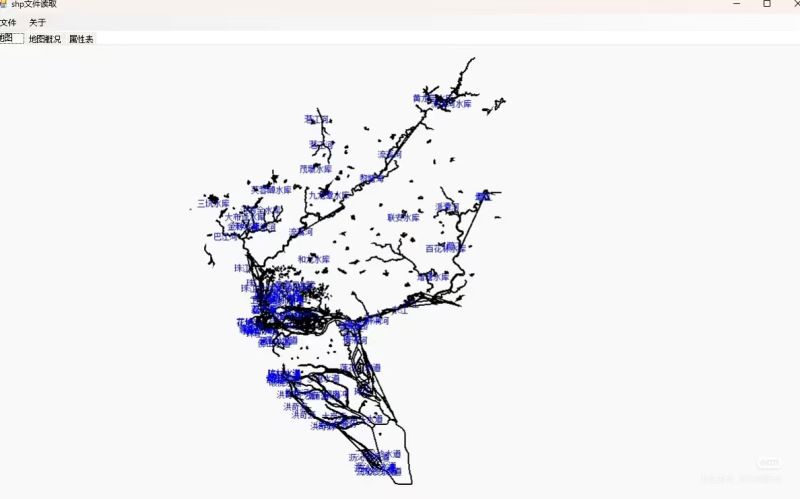
1. 文件读取与初始化
private void 打开toolstripmenuitem_click(object sender, eventargs e)
{
    // 清空现有数据
    if (listpolygonshp != null) listpolygonshp.clear();
    if (listpointshp != null) listpointshp.clear();
    location = new pointf((this.width - score) / 2, 25);

    // 打开文件对话框
    openfiledialog ofd = new openfiledialog();
    ofd.filter = "shp文件|*.shp";
    if (ofd.showdialog() == dialogresult.cancel) return;

    // 读取shp文件
    kl.openshpfile(ofd.filename);
    myds = kl.getdataset();//填充数据集

    // 显示文件头信息
    textbox1.text = "";
    textbox1.text += "文件代码:" + kl.getfilecode() + "\r\n"
     + "文件长度:" + kl.getfilelength() + "\r\n"
     // ... 其他文件头信息
}
2. 坐标转换
shp文件使用地理坐标系,而屏幕使用像素坐标系,需要进行转换:
private void transform(pointf[] points, int lenth)
{
    float width = (float)(kl.getxmax() - kl.getxmin());
    float height = (float)(kl.getymax() - kl.getymin());
    float wh = width / height;

    for (int i = 0; i < points.length; i++)
    {
        points[i].x = (this.width - lenth) / 2 +
                     (points[i].x - (float)kl.getxmin()) / width * lenth * wh;
        points[i].y = lenth - (points[i].y - (float)kl.getymin()) / height * lenth;
    }
}
3. 图形绘制
public void displayshp()
{
    bitmap bp = new bitmap(picturebox1.width, picturebox1.height);
    graphics g = graphics.fromimage(bp);

    // 绘制点要素
    foreach (pointshp p in listpointshp)
    {
        solidbrush bru = new solidbrush(color.green);
        g.fillellipse(bru, p.pf.x, p.pf.y, 10, 10);
        // 添加标注
        g.drawstring(p.label, new font("宋体", 9), brushes.black,
                    new pointf(p.pf.x - 25, p.pf.y));
    }

    // 绘制面要素
    foreach (polygonshp ls in listpolygonshp)
    {
        pen pen = new pen(color.black, 2);
        g.drawpolygon(pen, ls.points);

        // 计算标注位置(面中心)
        float w = 0, h = 0;
        foreach (pointf pf in ls.points)
        {
            w += pf.x;
            h += pf.y;
        }
        g.drawstring(ls.label, new font("宋体", 9), brushes.green,
                    new pointf(w / ls.points.length - 25, h / ls.points.length));
    }

    picturebox1.image = bp;
    g.dispose();
}
4. 地图交互功能
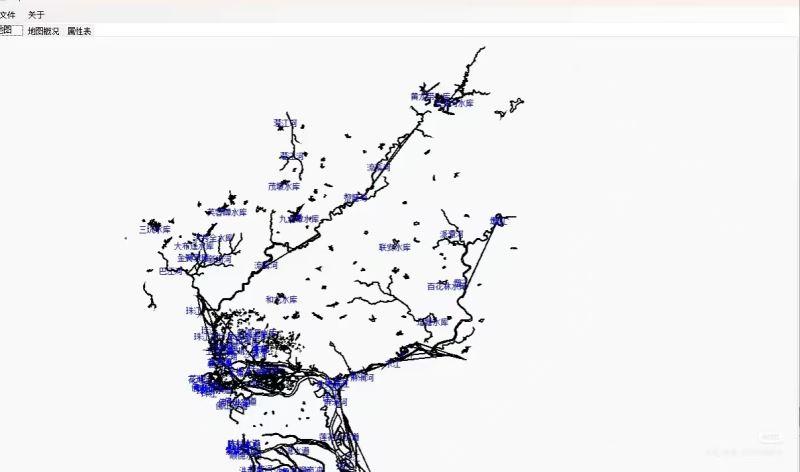
缩放功能
private void picturebox1_mousewheel(object sender, mouseeventargs e)
{
    float zoomnum = e.delta > 0 ? 1.1f : 0.9f;

    foreach(polygonshp ls in listpolygonshp)
    {
        zoom(ls.points, zoomnum);
    }

    foreach (pointshp p in listpointshp)
    {
        pointf[] pos = new pointf[1] { p.pf };
        zoom(pos, zoomnum);
        p.pf = pos[0];
    }

    displayshp();
}

private void zoom(pointf[] points, float zoomnum)
{
    for(int i = 0; i < points.length; i++)
    {
        points[i].x = location.x + (points[i].x - location.x) * zoomnum;
        points[i].y = location.y + (points[i].y - location.y) * zoomnum;
    }
}
平移功能
private void picturebox1_mousemove(object sender, mouseeventargs e)
{
    if(moving)
    {
        foreach(polygonshp ls in listpolygonshp)
        {
            for(int i = 0; i < ls.points.length; i++)
            {
                ls.points[i].x += e.x - xstart;
                ls.points[i].y += e.y - ystart;
            }
        }

        foreach (pointshp p in listpointshp)
        {
            p.pf.x += e.x - xstart;
            p.pf.y += e.y - ystart;
        }

        xstart = e.x;
        ystart = e.y;
        displayshp();
    }
}
5. 属性表展示
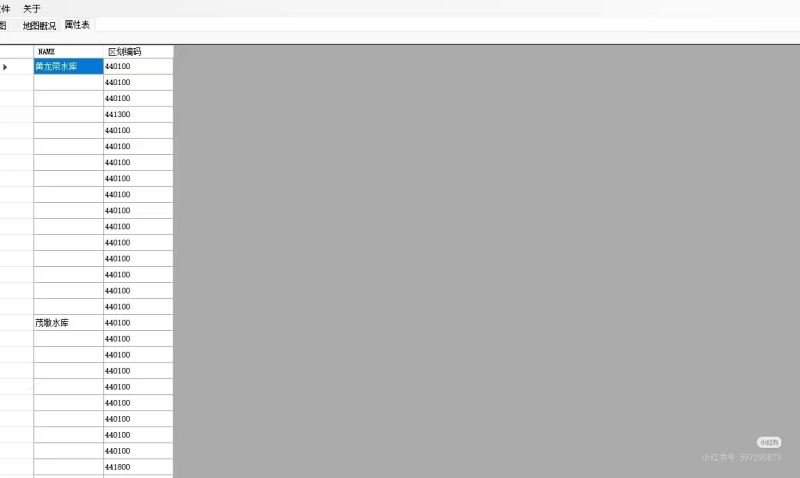
public void fillproptytable()
{
    datagridview1.datasource = myds.tables[0];
}
使用说明
- 点击"打开"菜单选择shp文件
- 查看"地图概况"选项卡了解文件基本信息
- 在"属性表"选项卡查看要素属性数据
- 使用鼠标滚轮进行地图缩放
- 按住鼠标左键拖动进行地图平移
- 点击属性表行头可选择对应地图要素
总结
本文介绍了如何使用c#实现shp文件的读取和地图显示功能。关键点包括:
- 正确处理地理坐标到屏幕坐标的转换
- 实现点、线、面要素的绘制
- 添加地图交互功能(平移、缩放)
- 展示属性数据并与图形要素关联
以上就是c#实现shp文件读取与地图显示的完整教程的详细内容,更多关于c# shp文件读取与地图显示的资料请关注代码网其它相关文章!





发表评论