
 我要评论
我要评论功能需求
将数据库查询出来的数据导出并生成 excel 文件,是项目中经常使用的一项功能。本文将介绍通过数据集生成二维数据数组并导出到 excel。
主要实现如下功能:
1、根据规则设计excel数据导出模板
2、查询数据,并生成 object[,] 二维数据数组
3、将二维数据数组,其它要输出的数据导出写入到模板 excel 文件
范例运行环境
操作系统: windows server 2019 datacenter
操作系统上安装 office excel 2016
.net版本: .netframework4.7.2 或以上
开发工具:vs2019 c#
excel dcom 配置
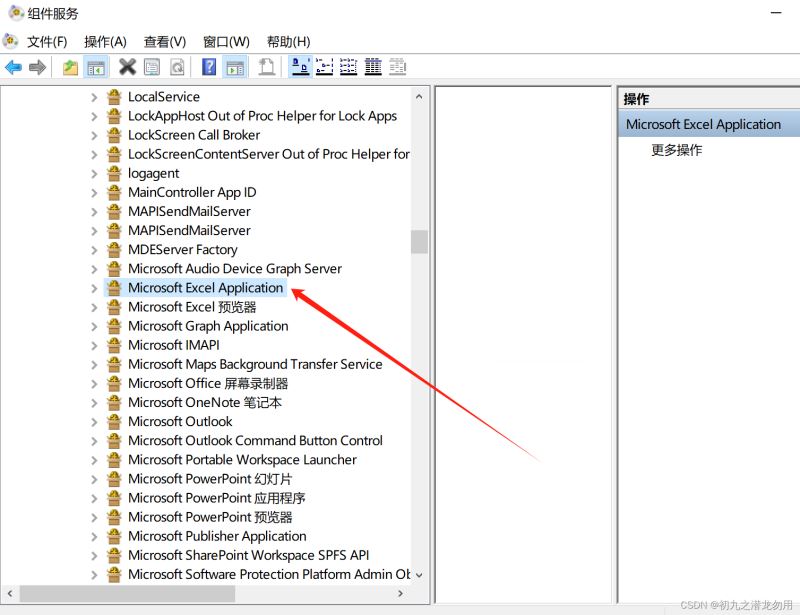
请参考文章《c# 读取word表格到dataset》有对office dcom详细配置介绍,这里不再赘述,excel的对应配置名称如下图所示:
设计实现
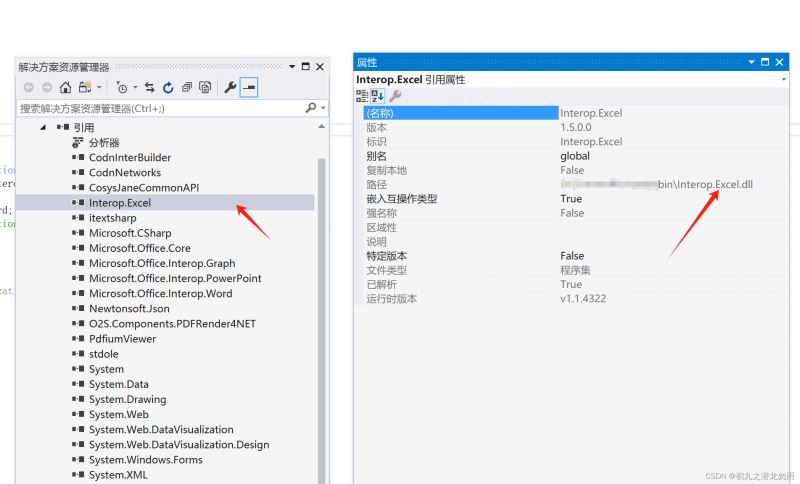
组件库引入
方法设计
| 序号 | 参数名 | 类型 | 说明 |
|---|---|---|---|
| 1 | _filename | string | excel 模板文件的全路径信息 |
| 2 | dataobj | object[,] | 生成的二维数据数组 |
| 3 | activesheetid | int | 指定要导出的活动的sheetid,序号从1开始 |
| 4 | startrowid | int | 指定数据导出的开始行id,序号从1开始 |
| 5 | startcolid | int | 指定数据导出的开始列id,序号从1开始 |
| 6 | _repls | string[,] | 在excel模板文件里的查找且替换数组,维度1为 key ,维度2 为 value ,系统会根据提供的数组key在模板文件进行查找,并替换对应的 value 值,例如: string[,] _repls=new string[1,2]; _repls[0,0]="模板标题 key "; _repls[0,1]="实际输出的标题值 value"; |
| 7 | drawtype | int | 该值包括0和1。 0:从原始指定起始位置覆盖粘贴数据 1:从原始指定起始位置插入粘贴数据 |
| 8 | alldataasstring | bool | 默认为 false,是否将所有数据以文本的形式进行输出 |
| 9 | dynamiccols | bool | 默认为false,是否按照二维数据数组动态输出行与列 |
| 10 | dynamiccolcfg | arraylist | 一个对各列进行配置的参数,每个项至少为两个object(一个为列名,一个为列宽),第三个为数据格式(如文本、数值等),例如: arraylist cfg = new arraylist(); string _cname = "列名1"; |
| 11 | startaddress | string | 对 startrowid 参数和 startcolid 参数 |
生成二维数据数组
如何生成二维数据数组,请参阅文章《c# 读取二维数组集合输出到word预设表格》中的dataset转二维数组 章节部分。
核心方法实现
代码如下:
public string expexcel(string _filename,object[,] dataobj,int activesheetid,int startrowid,int startcolid,string[,] _repls,int drawtype,bool alldataasstring,bool dynamiccols,arraylist dynamiccolcfg,string startaddress)
		{
			string asstring=(alldataasstring?"'":"");
			string _file="",_path=path.getdirectoryname(_filename)+"\\tempbfile\\",_ext="";
			if(!directory.exists(_path))
			{
				directory.createdirectory(_path);
			}

			_file=path.getfilenamewithoutextension(_filename);
			_ext=path.getextension(_filename);

			string _lastfile=_path+system.guid.newguid()+_ext;
			file.copy(_filename,_lastfile,true);
			if(!file.exists(_lastfile))
			{
				return "";
			}
			//取得word文件保存路径
			object filename=_lastfile;
			//创建一个名为excelapp的组件对象
			datetime beforetime=datetime.now;
			excel.application excel=new excel.application();


			excel.displayalerts=false;
			excel.asktoupdatelinks=false;

			excel.visible=true;

			datetime aftertime=datetime.now;


			excel.workbook xb=excel.workbooks.add(_lastfile);

			worksheet worksheet = (worksheet) excel.worksheets[activesheetid];
			sheetcount=excel.sheets.count;
			worksheet.activate();

			if(_repls!=null)
			{
				for(int i=0;i<_repls.getlength(0);i++)
				{
					worksheet.cells.replace(_repls[i,0],_repls[i,1],type.missing,type.missing,type.missing,type.missing,type.missing,type.missing);
				}
			}

			excel.range _range;
			excel.range srange;
			if(startaddress!="")
			{
				excel.range _range_s=worksheet.range[startaddress,startaddress];
				startrowid=_range_s.row;
				startcolid=_range_s.column;
			}


			int arraywidth=dataobj.getlength(1);
			int arrayheight=dataobj.getlength(0);
			arraylist ex_x = new arraylist();
			arraylist ex_y = new arraylist();
			arraylist ex_value = new arraylist();
			object _fvalue="";
			int _maxlen=910;
			for(int j=0;j<arrayheight;j++)
			{
				for(int k=0;k<arraywidth;k++)
				{
					_fvalue=dataobj[j,k];// field value
					if(_fvalue==null)
					{
						continue;
					}
					if(_fvalue.gettype().tostring()=="system.string")
					{
						if(((string)_fvalue).length>_maxlen)
						{
							ex_x.add(j+startrowid);
							ex_y.add(k+startcolid);
							ex_value.add(_fvalue);
							_fvalue="";
						}// end maxlen
					}
					dataobj[j,k]=(_fvalue.tostring().indexof("=")==0?"":asstring)+_fvalue;
				}//end columns
			}// end rows

			if(dynamiccols==true)
			{
				srange=excel.range[excel.cells[startrowid,startcolid],excel.cells[startrowid,startcolid]];
				for(int i=1;i<arraywidth;i++)
				{
					_range=excel.range[excel.cells[startrowid,startcolid+i],excel.cells[startrowid,startcolid+i]];
					copyrangestyle(srange,_range);
				}
			}

			object _copyheight=excel.range[excel.cells[startrowid,startcolid],excel.cells[startrowid,startcolid+arraywidth-1]].rowheight;


			if(drawtype==1)   //取startrow的格式
			{
				_range=excel.range[excel.cells[startrowid+1,startcolid],excel.cells[startrowid+arrayheight-1,startcolid]];
				if(arrayheight>1)
				{
					_range.entirerow.insert(excel.xlinsertshiftdirection.xlshiftdown,type.missing);
				}
				for(int i=0;i<arraywidth;i++)
				{
					srange=excel.range[excel.cells[startrowid,startcolid+i],excel.cells[startrowid,startcolid+i]];
					_range=excel.range[excel.cells[startrowid+1,startcolid+i],excel.cells[startrowid+arrayheight-1,startcolid+i]];
					copyrangestyle(srange,_range);
				}
				_range=excel.range[excel.cells[startrowid+1,startcolid],excel.cells[startrowid+arrayheight-1,startcolid+arraywidth-1]];
				_range.rowheight=_copyheight;
			}

			_range=excel.range[excel.cells[startrowid,startcolid],excel.cells[startrowid+arrayheight-1,startcolid+arraywidth-1]];
			_range.get_resize(arrayheight,arraywidth);
			_range.set_value(excel.xlrangevaluedatatype.xlrangevaluedefault,dataobj);


			for(int j=0;j<ex_value.count;j++)
			{
				excel.cells[ex_x[j],ex_y[j]]=ex_value[j].tostring();
			}

			if(dynamiccols==true)
			{
				if(dynamiccolcfg!=null)
				{
					for(int j=0;j<dynamiccolcfg.count;j++)
					{
						_range=excel.range[excel.cells[startrowid,startcolid+j],excel.cells[startrowid,startcolid+j]];
						object[] cfg=(object[])dynamiccolcfg[j];
						string _title=cfg[0].tostring();
						_range.value2=_title;
						_range=excel.range[excel.cells[startrowid,startcolid+j],excel.cells[65536,startcolid+j]];
						if(cfg.length>1)
						{
							int _width=int.parse(cfg[1].tostring());
							if(_width!=-1)
							{
								_range.columnwidth=_width;
							}
							else
							{
                                _range.columnwidth = 255;
								_range.columns.autofit();
							}
						}
						if(cfg.length>2)
						{
							_range.numberformatlocal=cfg[2].tostring();
						}
						//numberformatlocal
					}
				}
			}


            if (writepassword != "")
            {
                xb.writepassword = writepassword;
            }
            if (protectpassword != "")
            {
                worksheet.protect(protectpassword);
                xb.protect(protectpassword,true,true);

            }
            worksheet.saveas(@_lastfile, missing.value,writepassword==""?(object)missing.value:(object)writepassword, missing.value, missing.value, missing.value, missing.value, missing.value, missing.value, missing.value);
			xb.close(null,null,null);
			excel.workbooks.close();
			int pid=0;
			intptr a = new intptr(excel.parent.hwnd);
			uint32[] processid = new uint32[1];
			getwindowthreadprocessid((intptr)excel.hwnd,processid);


			excel.quit();

			if(worksheet != null)
			{
				system.runtime.interopservices.marshal.releasecomobject(worksheet);
				worksheet = null;
			}
			if(xb != null)
			{
				system.runtime.interopservices.marshal.releasecomobject(xb);
				xb = null;
			}
			if(excel != null)
			{
				system.runtime.interopservices.marshal.releasecomobject(excel);
				excel = null;
			}
			gc.collect();


			killprocessbystarttime("excel",beforetime,aftertime);


			return _lastfile;


		}

public string killprocessbystarttime(string processname,datetime beforetime,datetime aftertime)
		{
			process[] ps = process.getprocesses();
			foreach (process p in ps)
			{
				if(p.processname.toupper()!=processname) continue;
				if(p.starttime > beforetime && p.starttime < aftertime)
				{
					try
					{
						p.kill();
					}
					catch(exception e)
					{
						return e.message;
					}
				}
			}
			return "";
		}
调用示例
我们设计web应用中的输出模板(request.physicalapplicationpath + "\\bfile\\excel\\模板.xlsx"),如下图:
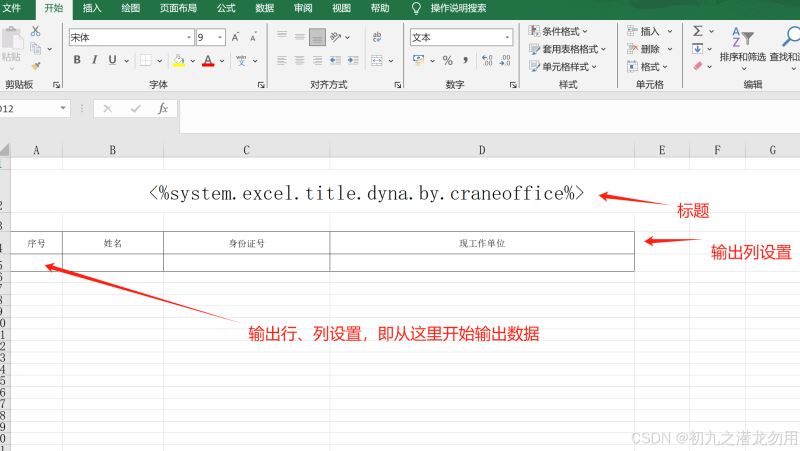
如图 <%system.excel.title.dyna.by.craneoffice%> ,表示要替换的标题 key ,下面的二维表格,表示预设好的输出列,下面的行即为数据输出行,在这里,我们预设要从第1列第5行输出数据。以下是调用的示例代码:
object[,] rv = datasettooject();    //这个是初始化二维数据数组的

    string[,] _repls = new string[1, 2];
    _repls[0, 0] = "<%system.excel.title.dyna.by.craneoffice%>";
    _repls[0, 1] = "考察对象家庭成员及主要社会关系人基本情况";

    string modulefile = request.physicalapplicationpath + "\\bfile\\excel\\模板.xlsx";
    string _lastfile = er.jree(@modulefile, rv, 1, 5, 1, _repls, 1, true, false, null);
    string _url = "/bfile/excel/tempbfile/" + path.getfilename(_lastfile);
_lastfile 为最终生成的 excel 数据导出文件全路径地址,_url 为转化的可下载url地址。
总结
为保持兼容性,本方法支持旧版本的word97-2003格式,如需要突破65536行限制,我们可以根据实际需要进行设计调整。
本方法支持数据输出行样式的持续复制,即我们可以设置单行样式(如字体大小、颜色、边框等),方法会根据数据行数,循环复制样式进行行输出 。
我们在此仅根据实际项目需要,讲述了一些导出数据到excel的参数需求,这里仅作参考,欢迎大家评论指教!



发表评论