
 我要评论
我要评论1、效果图
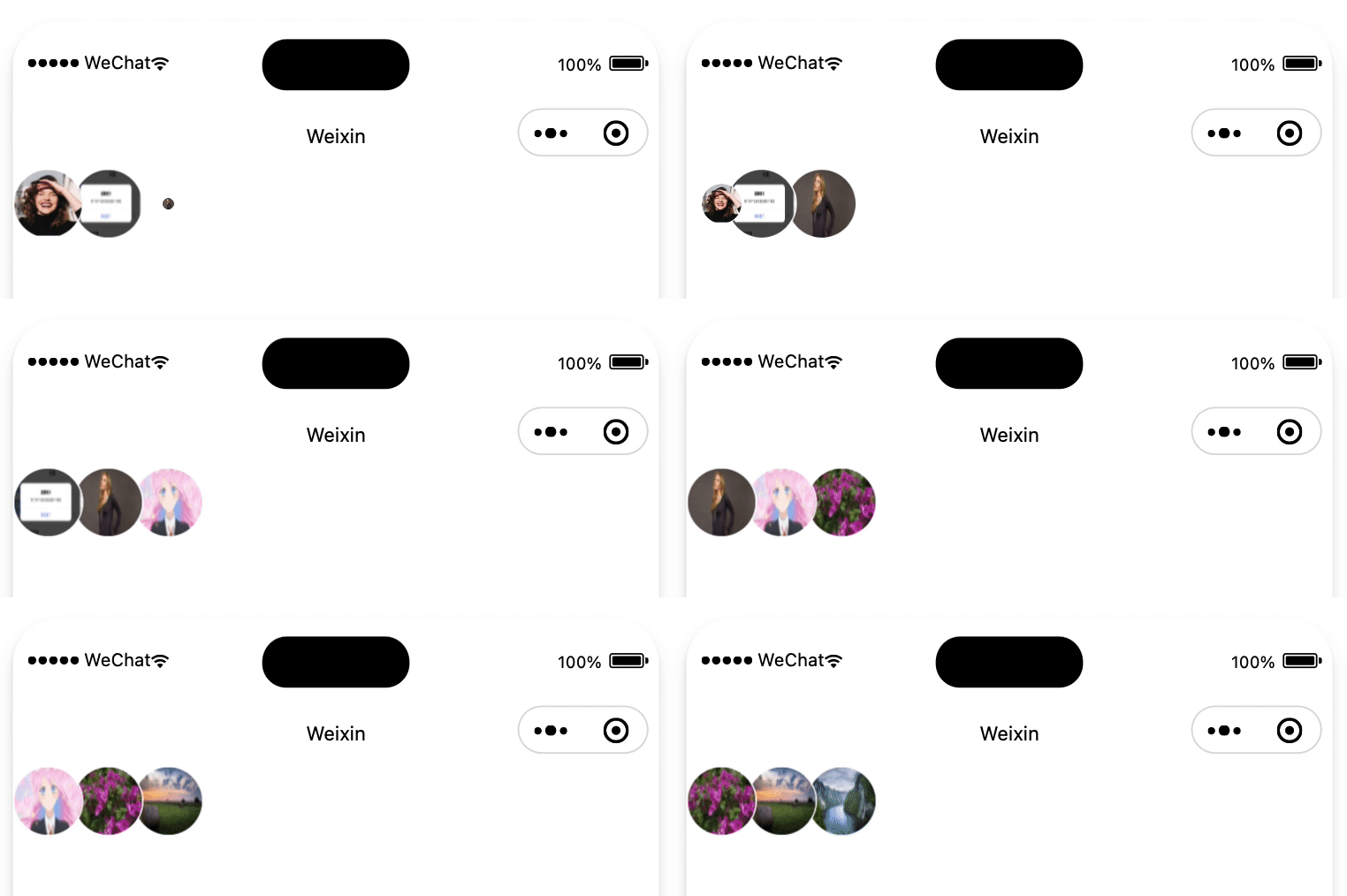
2、效果流程分析
1、第1个头像大小从1到0缩小的同时,第2个头像左移
2、上面动画结束后,延迟50ms,第3个头像从0到1放大
3、把头像列表顺序前移一位,并重置轮播状态,以此达到一个循环。然后继续第一个步骤
3、源码
组件使用
<avatarsbanner avatars="{{avatars}}" />index.wxml
<view
  class="avatarlist"
  style="width:{{itemwidth*3-overlapwidth*2}}rpx;"
>
  <!-- 备注:微信小程序经测试,即使不渲染的元素也要添加到节点上,否则第3个的放大动画不会展示 -->
  <image
    src="{{item}}"
    animation="{{index===0?firstanimation:(index===1?secondanimation:(index===2?lastanimation:''))}}"
    wx:for="{{avatars}}"
    wx:key="index"
    style="left: {{(itemwidth-overlapwidth)*index}}rpx; z-index: {{avatars.length-index}};width:{{itemwidth}}rpx;height:{{itemwidth}}rpx;"
    class="avatarimage {{index>2 && 'hidden'}}"
  />
</view>
index.js
const animaltime = 200; // 动画时间
const intervaltime = 1000; // 定时器频率
component({
  properties: {
    // 头像列表
    avatars: {
      type: array,
      value: [],
      observer(newvale) {
        this.interval && clearinterval(this.interval);
        this.startanimation();
      },
    },
    style: {
      type: string,
      value: '',
    },
    // 图片宽度:rpx
    itemwidth: {
      type: number,
      value: 36,
    },
    // 重叠部分宽度:rpx
    overlapwidth: {
      type: number,
      value: 10,
    },
  },
  data: {},
  methods: {
    startanimation() {
      const { avatars } = this.data;
      const { itemwidth, overlapwidth } = this.properties;
      if (avatars.length < 3) {
        return;
      }
      // 创建animation对象
      this.firstanimation = wx.createanimation();
      this.secondanimation = wx.createanimation();
      this.lastanimation = wx.createanimation();
      this.interval = setinterval(() => {
        // num1缩放动画
        this.firstanimation.scale(0).step({ duration: animaltime });
        this.setdata({
          firstanimation: this.firstanimation.export(),
        });
        // num2、num3平移动画(除以2是rpx转px)
        const offsetx = (overlapwidth - itemwidth)/2;
        this.secondanimation.translate(offsetx, 0).step({ duration: animaltime });
        this.lastanimation.translate(offsetx, 0).step({ duration: animaltime });
        this.setdata({
          secondanimation: this.secondanimation.export(),
          lastanimation: this.lastanimation.export(),
        });
        // num3放大动画(animaltime + 50:表示前面两个动画结束,并且setdata数据更新)
        settimeout(() => {
          this.lastanimation.scale(1).step({ duration: animaltime });
          this.setdata({
            lastanimation: this.lastanimation.export(),
          });
        }, animaltime + 50);
        // 还原动画 (等待缩小动画完成后再切换头像)
        settimeout(() => {
          this.firstanimation.scale(1).step({
            duration: 0,
          });
          this.secondanimation.translate(0, 0).step({
            duration: 0,
          });
          this.lastanimation.translate(0, 0).scale(0).step({
            duration: 0,
          });
          this.setdata({
            avatars: avatars.slice(1).concat(avatars[0]),
            lastanimation: this.lastanimation.export(),
            firstanimation: this.firstanimation.export(),
            secondanimation: this.secondanimation.export(),
          });
        }, animaltime);
      }, intervaltime);
    },
  },
});
index.wxss
.avatarlist {
  display: flex;
  flex-direction: row;
  position: relative;
  height: 100%;
}
.avatarimage {
  position: absolute;
  border: 1rpx solid #ffffff;
  border-radius: 50%;
  /* 占位图 */
  background-image: url('https://xm-1301527776.cos.ap-shanghai.myqcloud.com/images/miniprogram/channel/post/ic_default_header.png');
  background-repeat: no-repeat;
  background-position: center;
  background-color: #f6f6f6;
  background-size: cover;
}
.hidden {
  display: none;
}
到此这篇关于微信小程序仿qq头像轮播效果的文章就介绍到这了,更多相关微信小程序仿qq头像轮播效果内容请搜索代码网以前的文章或继续浏览下面的相关文章希望大家以后多多支持代码网!



发表评论