
 我要评论
我要评论一个小工具。
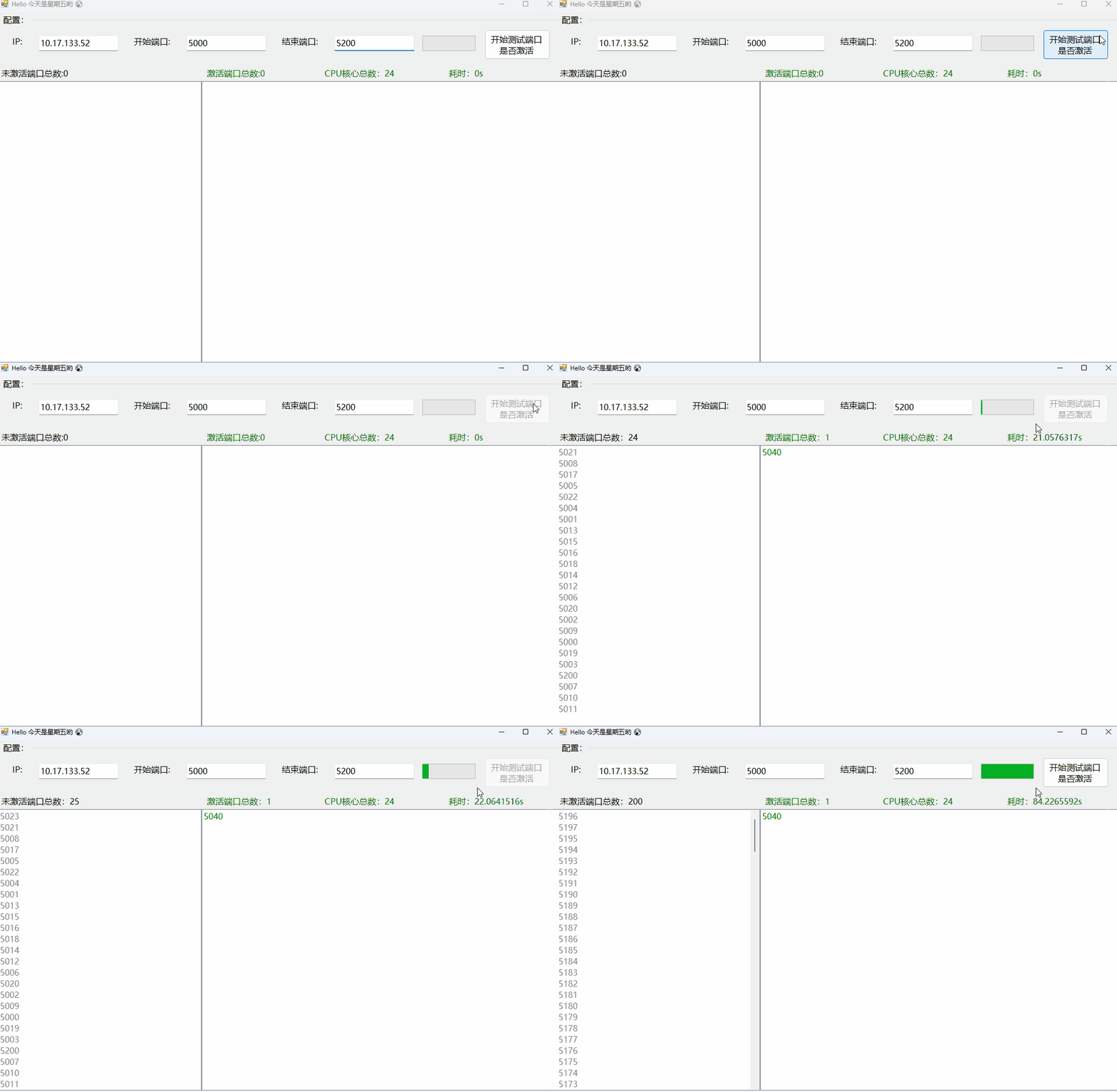
winform ui code
namespace ipport_checktool
{
    partial class mainform
    {
        /// <summary>
        /// 必需的设计器变量。
        /// </summary>
        private system.componentmodel.icontainer components = null;

        /// <summary>
        /// 清理所有正在使用的资源。
        /// </summary>
        /// <param name="disposing">如果应释放托管资源,为 true;否则为 false。</param>
        protected override void dispose(bool disposing)
        {
            if (disposing && (components != null))
            {
                components.dispose();
            }
            base.dispose(disposing);
        }

        #region windows 窗体设计器生成的代码

        /// <summary>
        /// 设计器支持所需的方法 - 不要修改
        /// 使用代码编辑器修改此方法的内容。
        /// </summary>
        private void initializecomponent()
        {
            this.groupbox1 = new system.windows.forms.groupbox();
            this.txt_time = new system.windows.forms.label();
            this.txt_corenum = new system.windows.forms.label();
            this.txt_active = new system.windows.forms.label();
            this.txt_noactive = new system.windows.forms.label();
            this.btn_start = new system.windows.forms.button();
            this.label3 = new system.windows.forms.label();
            this.label2 = new system.windows.forms.label();
            this.label1 = new system.windows.forms.label();
            this.txt_portend = new system.windows.forms.textbox();
            this.txt_portstart = new system.windows.forms.textbox();
            this.txt_ip = new system.windows.forms.textbox();
            this.listbox_noactive = new system.windows.forms.listbox();
            this.listbox_activeport = new system.windows.forms.listbox();
            this.progressbar = new system.windows.forms.progressbar();
            this.groupbox1.suspendlayout();
            this.suspendlayout();
            //
            // groupbox1
            //
            this.groupbox1.controls.add(this.progressbar);
            this.groupbox1.controls.add(this.txt_time);
            this.groupbox1.controls.add(this.txt_corenum);
            this.groupbox1.controls.add(this.txt_active);
            this.groupbox1.controls.add(this.txt_noactive);
            this.groupbox1.controls.add(this.btn_start);
            this.groupbox1.controls.add(this.label3);
            this.groupbox1.controls.add(this.label2);
            this.groupbox1.controls.add(this.label1);
            this.groupbox1.controls.add(this.txt_portend);
            this.groupbox1.controls.add(this.txt_portstart);
            this.groupbox1.controls.add(this.txt_ip);
            this.groupbox1.dock = system.windows.forms.dockstyle.top;
            this.groupbox1.location = new system.drawing.point(3, 3);
            this.groupbox1.margin = new system.windows.forms.padding(5);
            this.groupbox1.name = "groupbox1";
            this.groupbox1.padding = new system.windows.forms.padding(5);
            this.groupbox1.size = new system.drawing.size(1058, 127);
            this.groupbox1.tabindex = 0;
            this.groupbox1.tabstop = false;
            this.groupbox1.text = "配置:";
            //
            // txt_time
            //
            this.txt_time.autosize = true;
            this.txt_time.forecolor = system.drawing.color.green;
            this.txt_time.location = new system.drawing.point(844, 101);
            this.txt_time.name = "txt_time";
            this.txt_time.size = new system.drawing.size(74, 21);
            this.txt_time.tabindex = 10;
            this.txt_time.text = "耗时:0s";
            //
            // txt_corenum
            //
            this.txt_corenum.autosize = true;
            this.txt_corenum.forecolor = system.drawing.color.green;
            this.txt_corenum.location = new system.drawing.point(610, 101);
            this.txt_corenum.name = "txt_corenum";
            this.txt_corenum.size = new system.drawing.size(120, 21);
            this.txt_corenum.tabindex = 9;
            this.txt_corenum.text = "cpu核心总数:0";
            //
            // txt_active
            //
            this.txt_active.autosize = true;
            this.txt_active.forecolor = system.drawing.color.green;
            this.txt_active.location = new system.drawing.point(389, 101);
            this.txt_active.name = "txt_active";
            this.txt_active.size = new system.drawing.size(119, 21);
            this.txt_active.tabindex = 8;
            this.txt_active.text = "激活端口总数:0";
            //
            // txt_noactive
            //
            this.txt_noactive.autosize = true;
            this.txt_noactive.location = new system.drawing.point(3, 101);
            this.txt_noactive.name = "txt_noactive";
            this.txt_noactive.size = new system.drawing.size(135, 21);
            this.txt_noactive.tabindex = 7;
            this.txt_noactive.text = "未激活端口总数:0";
            //
            // btn_start
            //
            this.btn_start.location = new system.drawing.point(915, 30);
            this.btn_start.name = "btn_start";
            this.btn_start.size = new system.drawing.size(123, 56);
            this.btn_start.tabindex = 6;
            this.btn_start.text = "开始测试端口是否激活";
            this.btn_start.usevisualstylebackcolor = true;
            this.btn_start.click += new system.eventhandler(this.btn_start_click);
            //
            // label3
            //
            this.label3.autosize = true;
            this.label3.location = new system.drawing.point(530, 41);
            this.label3.name = "label3";
            this.label3.size = new system.drawing.size(78, 21);
            this.label3.tabindex = 5;
            this.label3.text = "结束端口:";
            //
            // label2
            //
            this.label2.autosize = true;
            this.label2.location = new system.drawing.point(252, 41);
            this.label2.name = "label2";
            this.label2.size = new system.drawing.size(78, 21);
            this.label2.tabindex = 4;
            this.label2.text = "开始端口:";
            //
            // label1
            //
            this.label1.autosize = true;
            this.label1.location = new system.drawing.point(23, 41);
            this.label1.name = "label1";
            this.label1.size = new system.drawing.size(29, 21);
            this.label1.tabindex = 3;
            this.label1.text = "ip:";
            //
            // txt_portend
            //
            this.txt_portend.location = new system.drawing.point(633, 41);
            this.txt_portend.name = "txt_portend";
            this.txt_portend.size = new system.drawing.size(150, 29);
            this.txt_portend.tabindex = 2;
            //
            // txt_portstart
            //
            this.txt_portstart.location = new system.drawing.point(355, 41);
            this.txt_portstart.name = "txt_portstart";
            this.txt_portstart.size = new system.drawing.size(150, 29);
            this.txt_portstart.tabindex = 1;
            //
            // txt_ip
            //
            this.txt_ip.location = new system.drawing.point(77, 41);
            this.txt_ip.name = "txt_ip";
            this.txt_ip.size = new system.drawing.size(150, 29);
            this.txt_ip.tabindex = 0;
            //
            // listbox_noactive
            //
            this.listbox_noactive.dock = system.windows.forms.dockstyle.left;
            this.listbox_noactive.forecolor = system.drawing.color.gray;
            this.listbox_noactive.formattingenabled = true;
            this.listbox_noactive.itemheight = 21;
            this.listbox_noactive.location = new system.drawing.point(3, 130);
            this.listbox_noactive.name = "listbox_noactive";
            this.listbox_noactive.size = new system.drawing.size(383, 548);
            this.listbox_noactive.tabindex = 1;
            //
            // listbox_activeport
            //
            this.listbox_activeport.dock = system.windows.forms.dockstyle.fill;
            this.listbox_activeport.forecolor = system.drawing.color.green;
            this.listbox_activeport.formattingenabled = true;
            this.listbox_activeport.itemheight = 21;
            this.listbox_activeport.location = new system.drawing.point(386, 130);
            this.listbox_activeport.name = "listbox_activeport";
            this.listbox_activeport.size = new system.drawing.size(675, 548);
            this.listbox_activeport.tabindex = 2;
            //
            // progressbar
            //
            this.progressbar.location = new system.drawing.point(798, 41);
            this.progressbar.name = "progressbar";
            this.progressbar.size = new system.drawing.size(100, 29);
            this.progressbar.tabindex = 11;
            //
            // mainform
            //
            this.autoscaledimensions = new system.drawing.sizef(10f, 21f);
            this.autoscalemode = system.windows.forms.autoscalemode.font;
            this.clientsize = new system.drawing.size(1064, 681);
            this.controls.add(this.listbox_activeport);
            this.controls.add(this.listbox_noactive);
            this.controls.add(this.groupbox1);
            this.font = new system.drawing.font("微软雅黑", 12f, system.drawing.fontstyle.regular, system.drawing.graphicsunit.point, ((byte)(134)));
            this.margin = new system.windows.forms.padding(5);
            this.name = "mainform";
            this.padding = new system.windows.forms.padding(3);
            this.startposition = system.windows.forms.formstartposition.centerscreen;
            this.text = "hello!";
            this.groupbox1.resumelayout(false);
            this.groupbox1.performlayout();
            this.resumelayout(false);

        }

        #endregion

        private system.windows.forms.groupbox groupbox1;
        private system.windows.forms.label label1;
        private system.windows.forms.textbox txt_portend;
        private system.windows.forms.textbox txt_portstart;
        private system.windows.forms.textbox txt_ip;
        private system.windows.forms.label label2;
        private system.windows.forms.label label3;
        private system.windows.forms.button btn_start;
        private system.windows.forms.listbox listbox_noactive;
        private system.windows.forms.listbox listbox_activeport;
        private system.windows.forms.label txt_noactive;
        private system.windows.forms.label txt_active;
        private system.windows.forms.label txt_corenum;
        private system.windows.forms.label txt_time;
        private system.windows.forms.progressbar progressbar;
    }
}
main code
using system;
using system.configuration;
using system.linq;
using system.net;
using system.net.networkinformation;
using system.net.sockets;
using system.threading.tasks;
using system.windows.forms;

namespace ipport_checktool
{
    public partial class mainform : form
    {
        private configuration config = configurationmanager.openexeconfiguration(application.executablepath);
        private datetime starttime;
        private task[] tasks;

        private notifyicon notifyicon;

        public mainform()
        {
            initializecomponent();

            var now = datetime.now;
            this.text = $"hello 今天是{now.tostring("dddd")}哟 🤭";

            this.txt_ip.text = configurationmanager.appsettings["ip"].tostring();
            this.txt_portstart.text = configurationmanager.appsettings["minportstart"].tostring();
            this.txt_portend.text = configurationmanager.appsettings["maxportend"].tostring();
            this.txt_corenum.text = $"cpu核心总数:{environment.processorcount}";

            this.components = new system.componentmodel.container();
            this.notifyicon = new notifyicon(this.components);
            this.notifyicon.visible = true;
            this.notifyicon.mouseclick += (sn, en) => { if (en.button == mousebuttons.left) this.show(); };
            var menus = new contextmenu();
            var menu1= new menuitem("退出软件");
            menu1.click += (s1, e1) => { this.close(); };
            menus.menuitems.add(menu1);
            notifyicon.contextmenu= menus;
        }

        private void btn_start_click(object sender, eventargs e)
        {
            string ip = this.txt_ip.text.trim();
            string min = this.txt_portstart.text.trim();
            string max = this.txt_portend.text.trim();

            if (string.isnullorwhitespace(ip) || string.isnullorwhitespace(min) || string.isnullorwhitespace(max))
            {
                messagebox.show("不能为空!");
                return;
            }

            if (!int.tryparse(min, out var minport) || !int.tryparse(max, out var maxport))
            {
                messagebox.show("端口不是整数!");
                return;
            }

            config.appsettings.settings["ip"].value = ip;
            config.appsettings.settings["minportstart"].value = min;
            config.appsettings.settings["maxportend"].value = max;
            config.save();
            configurationmanager.refreshsection("appsettings");

            ipaddress targetipaddress = ipaddress.parse(ip);
            var ipadrlist = dns.gethostaddresses(dns.gethostname()).tolist();
            ipadrlist.add(ipaddress.parse("127.0.0.1"));
            ipadrlist.add(ipaddress.parse("0.0.0.0"));
            if (ipadrlist.contains(targetipaddress))
            {
                checklocalport(minport, maxport);//本地ip
            }
            else
            {
                checkremoteport(ip, minport, maxport);//远程ip
            }
        }

        private void checklocalport(int minport, int maxport)
        {
            btn_start.enabled = false;

            listbox_noactive.items.clear();
            listbox_activeport.items.clear();
            starttime = datetime.now;
            int length = maxport - minport + 1;
            progressbar.maximum = length;
            progressbar.minimum = 0;

            var ips = ipglobalproperties.getipglobalproperties();
            var activeips = ips.getactivetcplisteners().select(p => p.port).tohashset();

            task.factory.startnew(new action(() =>
            {
                for (int i = minport; i <= maxport; i++)
                {
                    int port = i;
                    this?.invoke(new action(() =>
                    {
                        if (activeips.contains(port))
                        {
                            listbox_activeport.items.insert(0, port);
                            txt_active.text = $"激活端口总数:{listbox_activeport.items.count}";
                        }
                        else
                        {
                            listbox_noactive.items.insert(0, port);
                            txt_noactive.text = $"未激活端口总数:{listbox_noactive.items.count}";
                        }
                        progressbar.value = listbox_activeport.items.count + listbox_noactive.items.count;
                        txt_time.text = $"耗时:{(datetime.now - starttime).totalseconds.tostring()}s";

                        //耗时操作卡死ui 处理方法
                        application.doevents();
                    }));
                }

            })).continuewith(p => initui());

        }

        private void checkremoteport(string ip, int minport, int maxport)
        {
            btn_start.enabled = false;

            listbox_noactive.items.clear();
            listbox_activeport.items.clear();
            starttime = datetime.now;
            int length = maxport - minport + 1;
            tasks = new task[length];
            progressbar.maximum = length;
            progressbar.minimum = 0;

            task.run(() =>
            {
                for (int i = minport; i <= maxport; i++)
                {
                    int port = i;
                    var task = task.factory.startnew(new action(() =>
                    {
                        var res = checkremoteportcanconnect(ip, port);
                        this?.invoke(new action(() =>
                        {
                            if (res.item1)
                            {
                                listbox_activeport.items.insert(0, res.item2);
                                txt_active.text = $"激活端口总数:{listbox_activeport.items.count}";
                            }
                            else
                            {
                                listbox_noactive.items.insert(0, res.item2);
                                txt_noactive.text = $"未激活端口总数:{listbox_noactive.items.count}";
                            }
                            progressbar.value = listbox_activeport.items.count + listbox_noactive.items.count;
                            txt_time.text = $"耗时:{(datetime.now - starttime).totalseconds.tostring()}s";

                            //耗时操作卡死ui 处理方法
                            application.doevents();
                        }));
                    }));
                    tasks[i - minport] = task;
                }

                task.waitall(tasks);

            }).continuewith(p => initui());
        }

        private void initui()
        {
            this?.invoke(new action(() => { btn_start.enabled = true; }));
        }

        private (bool,int) checkremoteportcanconnect(string ipstring, int port)
        {
            ipaddress ip = ipaddress.parse(ipstring);

            bool isconnect = false;

            tcpclient tcp = new tcpclient();
            try
            {
                tcp.connect(ip, port);
                isconnect = tcp.connected;
            }
            catch (exception)
            {
                isconnect = false;
            }
            finally
            {
                tcp?.close();
                tcp?.dispose();
            }
            return (isconnect, port);
        }
    }
}
引用:
c#检查服务器ip和端口是否通畅,是否可访问
 		/// <summary>
        /// 检查服务器和端口是否可以连接
        /// </summary>
        /// <param name="ipstring">服务器ip</param>
        /// <param name="port">端口</param>
        /// <returns></returns>
        public static bool checkconnect(string ipstring, int port)
        {
            bool right =false;
            system.net.sockets.tcpclient tcpclient = new system.net.sockets.tcpclient()
            { sendtimeout = 1000 };
            ipaddress ip = ipaddress.parse(ipstring);
            try
            {
			    var result = tcpclient.beginconnect(ip, port, null, null);
			    var back = result.asyncwaithandle.waitone(2000);
			    right = tcpclient.connected;
            }
            catch (exception ex)
            {
                //loghelpter.addlog($"连接服务{ipstring}:{port}失败,设置的超时时间{tcpclient.sendtimeout}毫秒");
                //连接失败
                return false;
            }
            tcpclient.close();
            tcpclient.dispose();
            return right;
        }
以上就是c# winform实现检查目标ip端口是否可连接的详细内容,更多关于c#检查目标ip端口是否可连接的资料请关注代码网其它相关文章!





发表评论