
 我要评论
我要评论以下是在springboot中接入ai deepseek的过程。官网并没有java的示例。
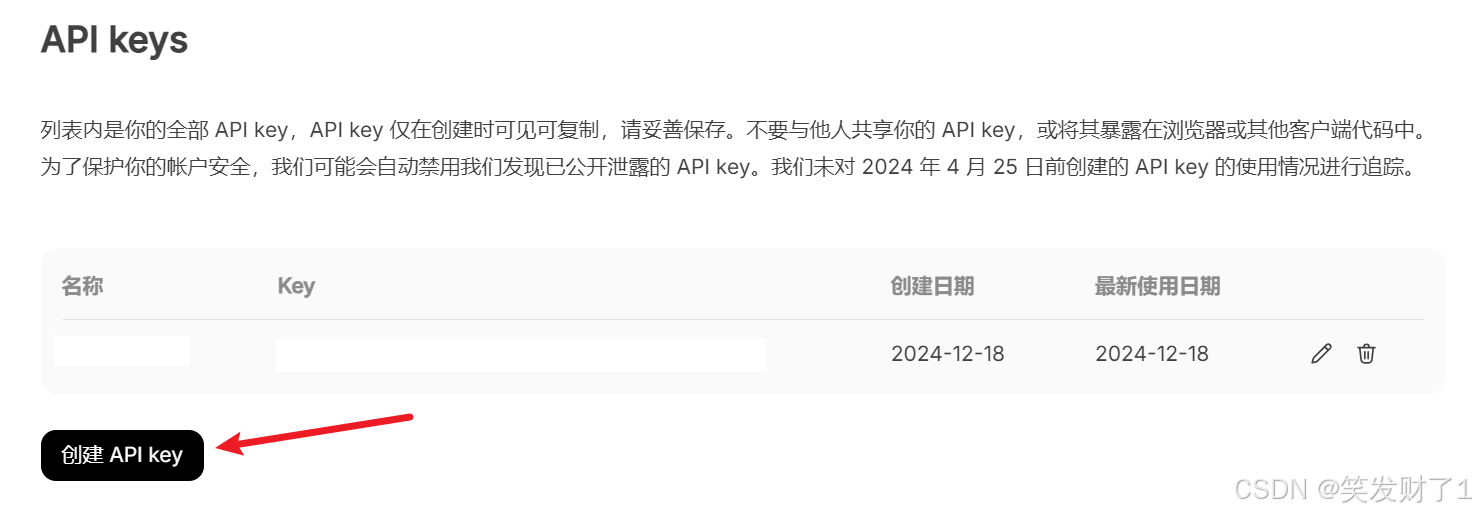
1. 创建 api key
点击创建api key,把创建的key值复制下来,以后就不能再查看了,只能重新创建。
2. 封装询问deepseek的工具方法
添加key值和询问路径。api_key为你创建的key值。
    private static final string api_url = "https://api.deepseek.com/chat/completions";
    private static final string api_key = "11111111"; // 替换为你的 api key
传入的question就是要询问的问题
public string askdeepseek(string question) throws ioexception {
        closeablehttpclient client = httpclients.createdefault();

        // 创建 http post 请求
        httppost request = new httppost(api_url);
        request.setheader("content-type", "application/json");
        request.setheader("authorization", "bearer " + api_key);

        // 动态构建请求体
        string requestbody = string.format(
                "{\"model\": \"deepseek-chat\", \"messages\": [{\"role\": \"user\", \"content\": \"%s\"}], \"stream\": false}",
                question
        );
        request.setentity(new stringentity(requestbody));

        // 发送请求并获取响应
        try (closeablehttpresponse response = client.execute(request)) {
            // 返回响应内容
            return entityutils.tostring(response.getentity());
        }
    }
3. 调用该询问ai的方法
string  question1= "今天是星期几。 " ;
string answer = askdeepseek(question);
system.out.println("answer = " + answer);
4. 成功返回示例
answer = {"id":"88dbce49-2841-448d-a74f-a2d3180c5672","object":"chat.completion","created":1734525002,"model":"deepseek-chat","choices":[{"index":0,"message":{"role":"assistant","content":"当然,我很高兴!谢谢你的关心。😊"},"logprobs":null,"finish_reason":"stop"}],"usage":{"prompt_tokens":12,"completion_tokens":11,"total_tokens":23,"prompt_cache_hit_tokens":0,"prompt_cache_miss_tokens":12},"system_fingerprint":"fp_1bcb2de9ac"}
不过我接入之后,他只能回答一些很简单的问题,有没有大佬会用啊~
总结
到此这篇关于springboot接入deepseek深度求索的文章就介绍到这了,更多相关springboot接入deepseek深度求索内容请搜索代码网以前的文章或继续浏览下面的相关文章希望大家以后多多支持代码网!




发表评论