
 我要评论
我要评论背景:
对el-table数据进行搜索筛选,但是不想调取接口,纯前端实现
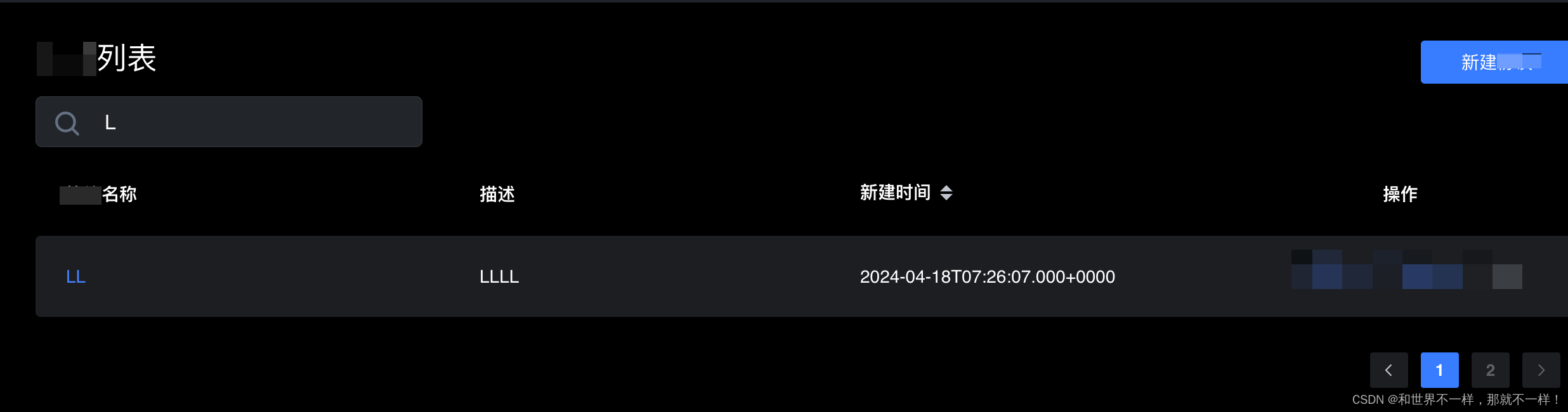
直接看代码:
<template>
  <div class="project-container">
    <searchinputvue :keyword.sync="keyword" :placeholder="placeholderwords" style="margin-bottom: 20px" />
    <div class="table">
      <defectlist :defect-list="keyword ? filterdefectlist : defectlist" :total="fetchlistpagedata.total" :on-page-change="pagechange" />
    </div>
  </div>
</template>

<script lang="ts">
import vue from 'vue'

import searchinputvue from '@/components/input/searchinput.vue'
import defectlist from './components/defectlist.vue'
// import info from '@/mock.json'
import api from '@/api'
import { warn } from '@/utils/common'

export default vue.extend({
  name: 'index',
  components: {
    searchinputvue,
    defectlist
    // typeicon
  },
  data() {
    return {
      defectlist: [],
      filterdefectlist: [],
      placeholderwords: '搜索缺陷',
      keyword: '',
      fetchlistpagedata: {
        total: 0,
        page: 1,
        pagesize: 10
      }
    }
  },
  watch: {
    keyword(newval) {
      const keyval = newval.replace(' ', '')
      this.filterdefectlist = keyval ? this.defectlist.filter(item => item.title.includes(keyval)) : this.defectlist
    }
  },
  created() {
    this.getdefectlist()
  },
  methods: {
    async getdefectlist() {
      try {
        const res = await api.defect.defectlistdata({
          keyword: '',
          page: this.fetchlistpagedata.page,
          pagesize: this.fetchlistpagedata.pagesize
        })
        this.defectlist = res.data.list
        this.fetchlistpagedata.total = res.data.total
      } catch (error) {
        warn(error, true)
      }
    },
    pagechange(current: number) {
      this.fetchlistpagedata.page = current
      this.getdefectlist()
    }
  }
})
</script>

<style lang="stylus" scoped>
.project-container {
  .project-name {
    img {
      position: relative;
      top: 3px;
    }
  }
}
</style>
searchinput.vue
<template>
  <el-input v-model="_keyword" :placeholder="placeholder" class="search" @change="$emit('trigger-event', _keyword)">
    <img slot="prefix" class="search-icon" src="@/image/search.svg" alt="search" />
  </el-input>
</template>

<script>
export default {
  name: 'searchinput',
  props: {
    placeholder: {
      type: string,
      default: '请输入要搜索的内容'
    },
    keyword: {
      type: string,
      default: ''
    }
  },
  computed: {
    _keyword: {
      set: function (val) {
        this.$emit('update:keyword', val)
      },
      get: function () {
        return this.keyword
      }
    }
  }
}
</script>

<style scoped lang="stylus">
.search {
  width: auto;

  /deep/ .el-input__prefix {
    margin-left: 10px;
    line-height: 40px;
  }

  /deep/ .el-input__inner {
    padding-left: 54px;
    width: 305px;
    // height: 56px;
    border-radius: 5px;
    background-color: rgba(34, 37, 41, 1);
    border: 0.5px solid rgba(255, 255, 255, 0.1);
    font-weight: normal;
    font-size: 16px;
    line-height: 32px;
    color: #fff;
  }

  /deep/ .el-input__suffix {
    .el-input__suffix-inner {
      border-color: none;
      position: relative;

      .el-icon-circle-close:before {
        content: '\e6db' !important;
        font-size: 24px;
        color: #387dff;
        right: 20px;
        top: -7px;
        position: absolute;
      }
    }
  }
}

.search-icon {
  vertical-align: middle;
  line-height: 40px;
}
</style>
总结
到此这篇关于vue el-table列表搜索功能纯前端实现的文章就介绍到这了,更多相关vue el-table列表搜索内容请搜索代码网以前的文章或继续浏览下面的相关文章希望大家以后多多支持代码网!




发表评论