
 我要评论
我要评论electron-updater使用指南
基础
检测是否最新版
autoupdater.checkforupdates()
下载最新版
autoupdater.downloadupdate()
项目使用
update.js
const { ipcmain } = require('electron')
const { autoupdater } = require('electron-updater')
const path = require("path")
// 更新地址,该地址下放的是安装包和latest.yml
const updateurl = 'https://jkcgy.obs.cn-south-1.myhuaweicloud.com/desktop/'


const message = {
  error: '软件更新异常,请重试',
  checking: '正在检查更新',
  updateava: '检测到新版本,准备下载',
  updatedown: '软件下载中,请耐心等待',
  updateset: '下载完成,准备安装',
  updatenotava: '已经是最新版本',
}

//软件版本更新
ipcmain.handle('on-soft-update', (e) => {
  autoupdater.checkforupdates()
})
ipcmain.on("updatedesktop", () => {
  console.log("checkforupdates");
  autoupdater.checkforupdates()
  // console.log("downloadupdate");

})
ipcmain.on("updatedesktopping", () => {
  autoupdater.downloadupdate()
})
// 检测更新,在你想要检查更新的时候执行,renderer事件触发后的操作自行编写
function handleupdate(mainwindow, callback) {
  // 设置是否自动下载,默认是true,当点击检测到新版本时,会自动下载安装包,所以设置为false
  autoupdater.autodownload = false

  // 如果安装包下载好了,当应用退出后是否自动安装更新
  autoupdater.autoinstallonappquit = false
  if (process.env.node_env == "development") {
    autoupdater.updateconfigpath = path.join(__dirname, "../../aaa/app-update.yml");

  }
  // 设置版本更新服务器地址
  autoupdater.setfeedurl(updateurl)

  // 更新发生错误时触发
  autoupdater.on('error', function () {
    console.log(" 更新发生错误时触发",);
    sendupdatemessage(message.error, "error")
  })

  // 开始检查更新事件
  autoupdater.on('checking-for-update', function () {
    console.log(" 开始检查更新事件",);
    sendupdatemessage(message.checking, "checking")
  })

  // 没有可更新版本
  autoupdater.on('update-not-available', function (info) {
    console.log(" 开始检查更新事件",);
    sendupdatemessage(message.updatenotava, "updatenotava")
  })

  // 发现可更新版本
  autoupdater.on('update-available', function (info) {
    console.log(" 发现可更新版本",);
    // autoupdater.downloadupdate()
    sendupdatemessage(message.updateava, "updateava")
  })

  // 更新下载进度事件

  autoupdater.on('download-progress', function (progressobj) {
    console.log(" 更新下载进度事件",);
    sendupdatemessage(message.updatedown, "updatedown")
    mainwindow.webcontents.send('on-soft-download', progressobj.percent)
  })

  // 下载监听
  autoupdater.on(
    'update-downloaded',
    function (event, releasenotes, releasename, releasedate, updateurl, quitandupdate) {
      mainwindow.webcontents.send('on-soft-download', 100)
      sendupdatemessage(message.updateset, "updateset")
      //3秒后更新
      settimeout(() => {
        autoupdater.quitandinstall()
      }, 3000)
    }
  )

  // 向渲染进程发送消息
  function sendupdatemessage(text, type) {
    mainwindow.webcontents.send('on-soft-message', text, type)
  }
}

module.exports = {
  handleupdate,
}
然后再 main.js 调用即可
  mainwindow.on('ready-to-show', () => {
    mainwindow.show();
    updater.handleupdate(mainwindow)
    if (!ipc) ipc = new ipc(mainwindow);
    mainwindow.opendevtools();
    // if(!callwindowipc) callwindowipc = new callwindowipc(maininstance);
  });
main.js 所有代码
const { app, browserwindow, ipcmain, globalshortcut, tray, menu } = require('electron');
const store = require('electron-store');
const captureview = require('./electron-captureview/main/captureview').default;
const path = require('path');
const url = require('url');
const timmain = require('im_electron_sdk/dist/main');
const { sdk_app_id, get_file_info_callback, screenshotmac } = require('./const/const');
const ipc = require('./ipc');
const callwindowipc = require('./callwindowipc');
const child_process = require('child_process')
const fs = require('fs')
const updater= require("./update")
const store = new store();
store.initrenderer();
const { autoupdater } = require('electron-updater')

process.env['electron_disable_security_warnings'] = 'true';

let callwindowipc;
let ipc;
let maininstance;
let catchedsdkappid;
const settingconfig = store.get('setting-config');
const sdkappid = catchedsdkappid = settingconfig?.sdkappid ?? sdk_app_id;

let tray = null  // 在外面创建tray变量,防止被自动删除,导致图标自动消失


const inittimmain = (appid) => {
  maininstance = new timmain({
    sdkappid: number(appid)
  });
}

inittimmain(sdkappid);

const sleep = ms => new promise(resolve => settimeout(resolve, ms));

ipcmain.handle('re-create-main-instance', async (event, newsdkappid) => {
  console.log("************ re-create-main-instance", newsdkappid)
  maininstance.setsdkappid(newsdkappid)
  return
})


// this allows typescript to pick up the magic constant that's auto-generated by forge's webpack
// plugin that tells the electron app where to look for the webpack-bundled app code (depending on
// whether you're running in development or production).
// declare const main_window_webpack_entry: string;

// handle creating/removing shortcuts on windows when installing/uninstalling.
// app.on('window-all-closed', function () {
//   if (process.platform !== 'darwin') app.quit()
// })

const createwindow = () => {
  // create the browser window.
  const mainwindow = new browserwindow({
    height: 628,
    width: 975,
    minwidth: 975,
    minheight: 628,
    // show:false,
    icon: path.resolve(__dirname, "../../icon/logo.png"),
    frame: false,
    webpreferences: {
      websecurity: true,
      nodeintegration: true,
      nodeintegrationinworker: true,
      enableremotemodule: true,
      contextisolation: false,
    }
  });
  maininstance.enable(mainwindow.webcontents)
  global.win = mainwindow;

  mainwindow.on('ready-to-show', () => {
    mainwindow.show();

    updater.handleupdate(mainwindow)


    if (!ipc) ipc = new ipc(mainwindow);
    mainwindow.opendevtools();
    // if(!callwindowipc) callwindowipc = new callwindowipc(maininstance);
  });
  mainwindow.on('close', (e) => {
    // mainwindow.webcontents.send('updatehistorymessage');
    // settimeout(() => {

    //   app.exit();
    // }, 30);
    e.preventdefault();  // 阻止退出程序
    mainwindow.setskiptaskbar(true)   // 取消任务栏显示
    mainwindow.hide();    // 隐藏主程序窗口

  });
  console.log('======process env======', process.env?.node_env);
  if (process.env?.node_env?.trim() === 'development') {
    mainwindow.loadurl(`http://localhost:3000`);
    mainwindow.webcontents.opendevtools();
  } else {
    mainwindow.loadurl(
      url.format({
        pathname: path.join(__dirname, '../../bundle/index.html'),
        protocol: 'file:',
        slashes: true
      })
    );
  }

  // 创建任务栏图标
  tray = new tray(path.join(__dirname, "../../icon/logo.png"))

  // 自定义托盘图标的内容菜单
  const contextmenu = menu.buildfromtemplate([
    {
      // 点击退出菜单退出程序
      label: '退出', click: function () {
        mainwindow.webcontents.send('updatehistorymessage');
        settimeout(() => {
          app.exit();
        }, 30);
        // mainwindow.destroy()
      }
    }
  ])

  tray.settooltip('君凯智管')  // 设置鼠标指针在托盘图标上悬停时显示的文本
  tray.setcontextmenu(contextmenu)  // 设置图标的内容菜单
  // 点击托盘图标,显示主窗口
  tray.on("click", () => {
    mainwindow.show();
    mainwindow.setskiptaskbar(false)   // 取消任务栏显示
  })


  // const capture = new captureview({
  //   devtools: false,
  //   mosaic: false,
  //   text: false,
  //   // onshow: () => {
  //   //   console.log('start screenshot');
  //   // },
  //   onclose: () => {
  //    const png = clipboard.readimage().tobitmap();
  //    const fileexample = new file([png], 'xxx.png', { type: 'image/jpeg' });
  //     console.log('结束截图', fileexample);
  //   },
  //   onshowbyshortcut: () => {
  //     console.log('shortcut key to start screenshot')
  //   }
  // });
  // capture.setmultiscreen(true);
  // capture.updateshortcutkey('shift+option+c');
  globalshortcut.register('shift+commandorcontrol+c', function () {
    console.log("i am shortcut~~~~~~~~~");
    const newdate = new date();
    const date = newdate.toisostring().replaceall(":", "");
    // console.log(date.toisostring());
    if (process.platform == "darwin") {
      let ex = "screencapture -i ~/desktop/screenshot" + date + ".png"
      child_process.exec(`screencapture -i ~/desktop/screenshot` + date + `.png`, (error, stdout, stderr) => {
        if (!error) {
          var _img = fs.readfilesync(process.env.home + "/desktop/screenshot" + date + ".png");
          // console.log(_img);
          mainwindow.webcontents.send(get_file_info_callback, {
            triggertype: screenshotmac,
            data: { _img: _img, date }
          })
        }
      });
    } else {
      let url = path.resolve(__dirname, "../snipaste-2.8.2-beta-x64/snipaste.exe");
      let command = url + " snip -o c:\\users\\public\\desktop\\screenshot" + date + ".png";
      // console.log(command);
      var id = setinterval(dealfile, 300);
      child_process.exec(command, async (error, stdout, stderr) => {
        if (!error) {
          console.log("done capture");
        }
      })
      function dealfile() {
        try {
          var _img = fs.readfilesync("c:\\users\\public\\desktop\\screenshot" + date + ".png");
          clearinterval(id);
          console.log("file exists");
          console.log(_img);
          event.reply(get_file_info_callback, {
            triggertype: screenshotmac,
            data: { _img: _img, date }
          })
        } catch (err) {
          if (err.code == 'enoent') {
            // console.log("file doesn't exist yet")
          } else {
            throw err;
          }
        }


      }
    }

  })
  // mainwindow.loadurl(`http://localhost:3000`);
  // mainwindow.webcontents.opendevtools();
};

// this method will be called when electron has finished
// initialization and is ready to create browser windows.
// some apis can only be used after this event occurs.
app.on('ready', createwindow);

object.defineproperty(app, 'ispackaged', {
  get() {
    return true;
  }
});

// quit when all windows are closed, except on macos. there, it's common
// for applications and their menu bar to stay active until the user quits
// explicitly with cmd + q.
app.on('window-all-closed', () => {
  console.log('all-window-closed');
  if (process.platform !== 'darwin') {
    app.exit();
  }
});

app.on('activate', () => {
  // on os x it's common to re-create a window in the app when the
  // dock icon is clicked and there are no other windows open.
  if (browserwindow.getallwindows().length === 0) {
    createwindow();
  }
});

// in this file you can include the rest of your app's specific main process
// code. you can also put them in separate files and import them here.
常见错误指南
electron更新报错-skip checkforupdates because application is not packed and dev update config is not forced
原因是在本地启动的不是安装导致的,在根中配置即可
const { app, browserwindow, ipcmain, globalshortcut, tray, menu } = require('electron');

object.defineproperty(app, 'ispackaged', {
  get() {
    return true;
  }
});
electron更新报错-
必须设置这个内容
  "publish": [
      {
        "provider": "generic",
        "channel": "latest",
        "url": "https://jkcgy.obs.cn-south-1.myhuaweicloud.com/desktop/%e5%90%9b%e5%87%af%e6%99%ba%e7%ae%a1%20setup%200.0.2.exe"
      }
    ],
electron更新报错-unhandledpromiserejectionwarning: error: enoent: no such file or directory, open '****\app-update.yml'
找不到app-update.yml 文件,可以去打包路径中的 dist\win-unpacked\resources 复制,然后通过修改 autoupdater.updateconfigpath 路径
该路径是自定义的路径,自己在 dist\win-unpacked\resources 复制的
const { autoupdater } = require('electron-updater')
 autoupdater.updateconfigpath = path.join(__dirname, "../../aaa/app-update.yml");
electron更新报错-找不到latest.yml 文件
找不到latest.yml文件 可以去dist 复制
这里跟配置的 autoupdater.setfeedurl 路径有关系
const { autoupdater } = require('electron-updater')
const updateurl = 'https://jkcgy.obs.cn-south-1.myhuaweicloud.com/desktop/'
 // 设置版本更新服务器地址
autoupdater.setfeedurl(updateurl)
拓展:更新electron的版本
方式1
首先,查看electron的版本
electron -v
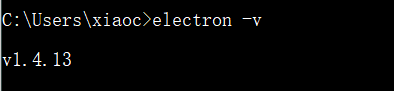
发现版本为1.4.13
我们输入如下的cmd来查看 electron系列版本
npm view electron versions

可供更新的版本有如下[部分截图]:
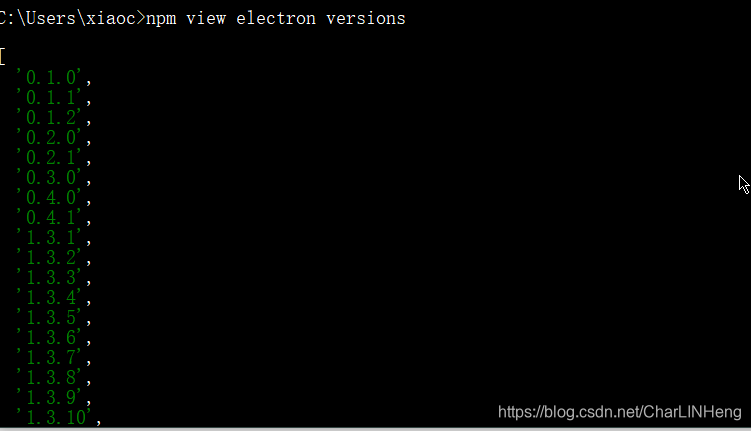
完整可供下载的版本如下:
[
  '0.1.0',
  '0.1.1',
  '0.1.2',
  '0.2.0',
  '0.2.1',
  '0.3.0',
  '0.4.0',
  '0.4.1',
  '1.3.1',
  '1.3.2',
  '1.3.3',
  '1.3.4',
  '1.3.5',
  '1.3.6',
  '1.3.7',
  '1.3.8',
  '1.3.9',
  '1.3.10',
  '1.3.12',
  '1.3.13',
  '1.3.14',
  '1.3.15',
  '1.4.0',
  '1.4.1',
  '1.4.2',
  '1.4.3',
  '1.4.4',
  '1.4.5',
  '1.4.6',
  '1.4.7',
  '1.4.8',
  '1.4.10',
  '1.4.11',
  '1.4.12',
  '1.4.13',
  '1.4.14',
  '1.4.15',
  '1.4.16',
  '1.5.0',
  '1.5.1',
  '1.6.0',
  '1.6.1',
  '1.6.2',
  '1.6.3',
  '1.6.4',
  '1.6.5',
  '1.6.6',
  '1.6.7',
  '1.6.8',
  '1.6.9',
  '1.6.10',
  '1.6.11',
  '1.6.12',
  '1.6.13',
  '1.6.14',
  '1.6.15',
  '1.6.16',
  '1.6.17',
  '1.6.18',
  '1.7.0',
  '1.7.1',
  '1.7.2',
  '1.7.3',
  '1.7.4',
  '1.7.5',
  '1.7.6',
  '1.7.7',
  '1.7.8',
  '1.7.9',
  '1.7.10',
  '1.7.11',
  '1.7.12',
  '1.7.13',
  '1.7.14',
  '1.7.15',
  '1.7.16',
  '1.8.1',
  '1.8.2-beta.1',
  '1.8.2-beta.2',
  '1.8.2-beta.3',
  '1.8.2-beta.4',
  '1.8.2-beta.5',
  '1.8.2',
  '1.8.3',
  '1.8.4',
  '1.8.5',
  '1.8.6',
  '1.8.7',
  '1.8.8',
  '2.0.0-beta.1',
  '2.0.0-beta.2',
  '2.0.0-beta.3',
  '2.0.0-beta.4',
  '2.0.0-beta.5',
  '2.0.0-beta.6',
  '2.0.0-beta.7',
  '2.0.0-beta.8',
  '2.0.0',
  '2.0.1',
  '2.0.2',
  '2.0.3',
  '2.0.4',
  '2.0.5',
  '2.0.6',
  '2.0.7',
  '2.0.8-nightly.20180819',
  '2.0.8-nightly.20180820',
  '2.0.8',
  '2.0.9',
  '2.0.10',
  '2.0.11',
  '2.0.12',
  '2.0.13',
  '2.0.14',
  '2.0.15',
  '2.0.16',
  '2.0.17',
  '2.0.18',
  '2.1.0-unsupported.20180809',
  '3.0.0-beta.1',
  '3.0.0-beta.2',
  '3.0.0-beta.3',
  '3.0.0-beta.4',
  '3.0.0-beta.5',
  '3.0.0-beta.6',
  '3.0.0-beta.7',
  '3.0.0-beta.8',
  '3.0.0-beta.9',
  '3.0.0-beta.10',
  '3.0.0-beta.11',
  '3.0.0-beta.12',
  '3.0.0-beta.13',
  '3.0.0-nightly.20180818',
  '3.0.0-nightly.20180821',
  '3.0.0-nightly.20180904',
  '3.0.0',
  '3.0.1',
  '3.0.2',
  '3.0.3',
  '3.0.4',
  '3.0.5',
  '3.0.6',
  '3.0.7',
  '3.0.8',
  '3.0.9',
  '3.0.10',
  '3.0.11',
  '3.0.12',
  '3.0.13',
  '3.0.14',
  '3.0.15',
  '3.0.16',
  '3.1.0-beta.1',
  '3.1.0-beta.2',
  '3.1.0-beta.3',
  '3.1.0-beta.4',
  '3.1.0-beta.5',
  '3.1.0',
  '3.1.1',
  '3.1.2',
  '3.1.3',
  '3.1.4',
  '3.1.5',
  '3.1.6',
  '3.1.7',
  '3.1.8',
  '3.1.9',
  '3.1.10',
  '3.1.11',
  '3.1.12',
  '3.1.13',
  '4.0.0-beta.1',
  '4.0.0-beta.2',
  '4.0.0-beta.3',
  '4.0.0-beta.4',
  '4.0.0-beta.5',
  '4.0.0-beta.6',
  '4.0.0-beta.7',
  '4.0.0-beta.8',
  '4.0.0-beta.9',
  '4.0.0-beta.10',
  '4.0.0-beta.11',
  '4.0.0-nightly.20180816',
  '4.0.0-nightly.20180817',
  '4.0.0-nightly.20180819',
  '4.0.0-nightly.20180821',
  '4.0.0-nightly.20180929',
  '4.0.0-nightly.20181006',
  '4.0.0-nightly.20181010',
  '4.0.0',
  '4.0.1',
  '4.0.2',
  '4.0.3',
  '4.0.4',
  '4.0.5',
  '4.0.6',
  '4.0.7',
  '4.0.8',
  '4.1.0',
  '4.1.1',
  '4.1.2',
  '4.1.3',
  '4.1.4',
  '4.1.5',
  '4.2.0',
  '4.2.1',
  '4.2.2',
  '4.2.3',
  '4.2.4',
  '4.2.5',
  '4.2.6',
  '4.2.7',
  '4.2.8',
  '4.2.9',
  '4.2.10',
  '4.2.11',
  '4.2.12',
  '5.0.0-beta.1',
  '5.0.0-beta.2',
  '5.0.0-beta.3',
  '5.0.0-beta.4',
  '5.0.0-beta.5',
  '5.0.0-beta.6',
  '5.0.0-beta.7',
  '5.0.0-beta.8',
  '5.0.0-beta.9',
  '5.0.0',
  '5.0.1',
  '5.0.2',
  '5.0.3',
  '5.0.4',
  '5.0.5',
  '5.0.6',
  '5.0.7',
  '5.0.8',
  '5.0.9',
  '5.0.10',
  '5.0.11',
  '5.0.12',
  '5.0.13',
  '6.0.0-beta.1',
  '6.0.0-beta.2',
  '6.0.0-beta.3',
  '6.0.0-beta.4',
  '6.0.0-beta.5',
  '6.0.0-beta.6',
  '6.0.0-beta.7',
  '6.0.0-beta.8',
  '6.0.0-beta.9',
  '6.0.0-beta.10',
  '6.0.0-beta.11',
  '6.0.0-beta.12',
  '6.0.0-beta.13',
  '6.0.0-beta.14',
  '6.0.0-beta.15',
  '6.0.0',
  '6.0.1',
  '6.0.2',
  '6.0.3',
  '6.0.4',
  '6.0.5',
  '6.0.6',
  '6.0.7',
  '6.0.8',
  '6.0.9',
  '6.0.10',
  '6.0.11',
  '6.0.12',
  '6.1.0',
  '6.1.1',
  '6.1.2',
  '6.1.3',
  '6.1.4',
  '6.1.5',
  '6.1.6',
  '6.1.7',
  '6.1.8',
  '6.1.9',
  '6.1.10',
  '6.1.11',
  '6.1.12',
  '7.0.0-beta.1',
  '7.0.0-beta.2',
  '7.0.0-beta.3',
  '7.0.0-beta.4',
  '7.0.0-beta.5',
  '7.0.0-beta.6',
  '7.0.0-beta.7',
  '7.0.0',
  '7.0.1',
  '7.1.0',
  '7.1.1',
  '7.1.2',
  '7.1.3',
  '7.1.4',
  '7.1.5',
  '7.1.6',
  '7.1.7',
  '7.1.8',
  '7.1.9',
  '7.1.10',
  '7.1.11',
  '7.1.12',
  '7.1.13',
  '7.1.14',
  '7.2.0',
  '7.2.1',
  '7.2.2',
  '7.2.3',
  '7.2.4',
  '7.3.0',
  '8.0.0-beta.1',
  '8.0.0-beta.2',
  '8.0.0-beta.3',
  '8.0.0-beta.4',
  '8.0.0-beta.5',
  '8.0.0-beta.6',
  '8.0.0-beta.7',
  '8.0.0-beta.8',
  '8.0.0-beta.9',
  '8.0.0',
  '8.0.1',
  '8.0.2',
  '8.0.3',
  '8.1.0',
  '8.1.1',
  '8.2.0',
  '8.2.1',
  '8.2.2',
  '8.2.3',
  '8.2.4',
  '8.2.5',
  '8.3.0',
  '9.0.0-beta.1',
  '9.0.0-beta.2',
  '9.0.0-beta.3',
  '9.0.0-beta.4',
  '9.0.0-beta.5',
  '9.0.0-beta.6',
  '9.0.0-beta.7',
  '9.0.0-beta.9',
  '9.0.0-beta.10',
  '9.0.0-beta.12',
  '9.0.0-beta.13',
  '9.0.0-beta.14',
  '9.0.0-beta.15',
  '9.0.0-beta.16',
  '9.0.0-beta.17',
  '9.0.0-beta.18',
  '9.0.0-beta.19',
  '9.0.0-beta.20',
  '9.0.0-beta.21',
  '9.0.0-beta.22',
  '9.0.0-beta.24',
  '9.0.0',
  '10.0.0-beta.1'
]
接下来,我们使用如下命令卸载原来的electron:
npm uninstall -g electron

使用安装electron的命令:
npm uninstall -g electron
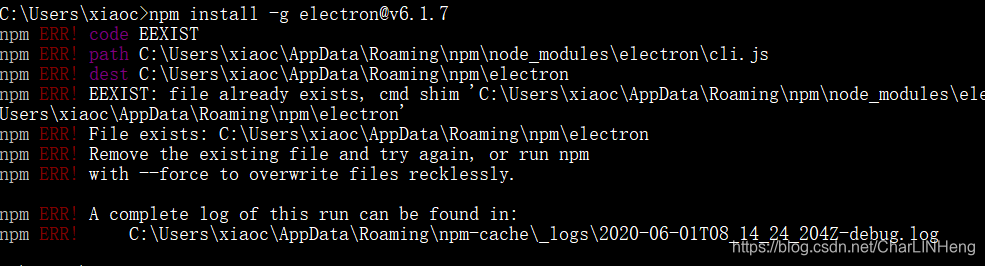
[选] 如果出现如上图所示,说明是文件夹没删干净。这时候我们需要去删除对应文件夹,它这里提示该路径文件还存在。
'c:\users\xiaoc\appdata\roaming\npm\node_modules\electron\cli.js
输入win + r, 输入
%appdata%
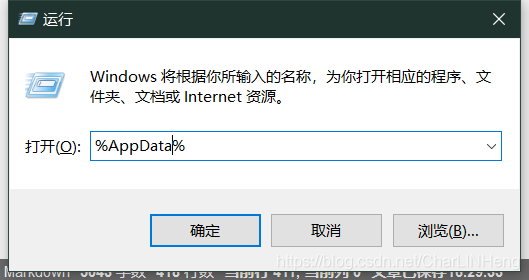
在该文件夹下 找到 npm,点进去

把该目录下的文件全删了。在 cmd中重新执行
npm install -g electron@v6.1.7
@后面跟随的是版本号,具体可以更新的版本号在上面所示。

这样就表示已经安装完毕。
接下来查看版本
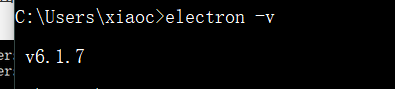
已经更新到想要的版本了.
方式二 :官网
以上就是electron版本升级的简单步骤的详细内容,更多关于electron版本升级的资料请关注代码网其它相关文章!





发表评论