
 我要评论
我要评论在之前我们写过一个上传组件,现在我们在写一个下载组件,下面可能依赖了一些公用的工具类 有任何的使用疑问可以私信!!!
一、效果展示
1. 下载触发效果
当触发下载功能的时候,会触发一个下载动画,下载悬浮球会自动弹出,并且闪烁提示有新的下载任务直到下载任务完场提示

在提示有新下载之后,悬浮球会半隐在屏幕右下角,如果所有文件的下载进度均完成,悬浮球会在1分钟后小消失

2. 下载中的进度,详情展示
点击悬浮球可以看到下载的文件列表,并对文件的下载进度,速度等信息进行展示

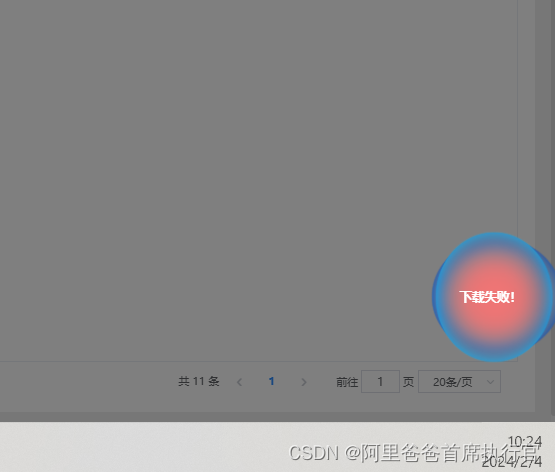
3.下载失败
当文件下载过程中,由于各种原因导致文件失败的时候,悬浮球会发生闪烁,并提示下载失败
二、优点
1.本组件将使用vuex对下载数据文件在session中做持久化,以防止数据在刷新页面后丢失。
2.支持多文件下载展示
3.拥有假进度条和真进度条两种,可根据业务需求,自行选择
4.对大型文件的下载给予用户动画提示,增强用户体验,以防服务器响应过长,导致页面没有响应,用户会觉得系统功能没有被触发。
5.支持私有npm包引用
三、代码展示
因为我这边已经封装到了npm包中,所以有些代码可能需要根据自己的项目进行自行调整(有任何的使用疑问可以私信!!!)
代码将分为两个部分
1. 工具类
2. ui组件部分
3. 下载方法部分
ui组件部分
工具类 tableutil.js
export const filestate = {
  // 等待上传或者下载
  waiting: 0,
  // 上传中或者下载中
  uploaddownloadstatus: 1,
  // 上传成功
  success: 2,
  // 上传失败
  error: 3,
  // 等待服务器处理
  waitserver: 4,
};
export class tableutils {
  static formatfilesize(filesize) {
    if (filesize < 1024) {
      return `${filesize.tofixed(2)}b`;
    }
    if (filesize < 1024 * 1024) {
      let temp = filesize / 1024;
      temp = +temp.tofixed(2);
      return `${temp}kb`;
    }
    if (filesize < 1024 * 1024 * 1024) {
      let temp = filesize / (1024 * 1024);
      temp = +temp.tofixed(2);
      return `${temp}mb`;
    }
    let temp = filesize / (1024 * 1024 * 1024);
    temp = +temp.tofixed(2);
    return `${temp}gb`;
  }
}
export function objecttoformdata(obj) {
  const formdata = new formdata();
  object.keys(obj).foreach(key => {
    formdata.append(key, obj[key]);
  });
  return formdata;
}
export function geticonbyfilename(file) {
  // 文件扩展名
  const parts = file.name.split(".");
  const ext = parts.length > 1 ? parts[parts.length - 1].tolowercase() : "";
  // 文件扩展名和图标的映射关系
  const mapping = {
    audio: "mp3,wav,aac,flac,ogg,wma,m4a",
    doc: "doc,docx",
    pdf: "pdf",
    ppt: "ppt,pptx",
    txt: "txt",
    video: "mp4,avi,wmv,rmvb,mkv,mov,flv,f4v,m4v,rm,3gp,dat,ts,mts,vob",
    xls: "xls,xlsx",
    zip: "zip,rar,7z",
    pic: "jpg,jpeg,png,gif,bmp,webp",
  };
  // 根据文件扩展名获取对应的图标
  let icon = "file";
  object.keys(mapping).foreach(key => {
    const exts = mapping[key].split(",");
    if (exts.includes(ext)) {
      icon = key;
    }
  });
  return `icon-${icon}-m`;
}
ui组件部分 axdownload.vue
主要是容纳悬浮球和文件列表的主容器
<template>
  <div v-if="showball">
    <!-- 类名不要改,防止冲突 -->
    <div
      id="ax-private-download-continer"
      :class="{
        'ax-private-download-continer-add-newtask': addnewtask,
      }"
      @click="showfloatball()"
      @mouseleave="hidefloatball"
      @mouseenter="enterball"
    >
      <div
        class="ax-private-download-text-content"
        :class="{
          'ax-private-circle-add-active': taskanminate === '添加',
          'ax-private-circle-error-active': taskanminate === '失败',
        }"
      >
        <div v-html="balltext"></div>
      </div>
      <downloadfloatingball :taskanminate="taskanminate"></downloadfloatingball>
    </div>
    <filedownlistdialog ref="filedownlistdialog"></filedownlistdialog>
  </div>
</template>
<script>
import downloadfloatingball from "./components/downloadfloatingball.vue";
import filedownlistdialog from "./components/filedownlistdialog.vue";
import { filestate } from "../../../src/utils/tableutil";
export default {
  name: "axdownload",
  components: {
    downloadfloatingball,
    filedownlistdialog,
  },
  data() {
    return {
      //显示出 悬浮球
      showdownloadball: false,
      timer: null, //计时自动移入
      //延迟移入移出
      movetimer: null, //移出时间器
      addnewtask: false, //是否是添加的新任务
      newtasktimer: null,
      showball: false,
      taskanminatetimer: null,
      balloldtext: "我的下载",
      balltext: "",
      taskanminate: "",
      hidedownloadballtimer: null,
    };
  },
  mounted() {
    const downloadlist = this.$store.state.file.downloadlist;
    this.showball = downloadlist.length > 0;
    this.balltext = downloadlist.length > 0 ? `下载任务${"<br />"}${downloadlist.length}个` : this.balloldtext;
  },
  methods: {
    hidefloatball(event) {
      this.movetimer = settimeout(() => {
        if (this.timer) {
          clearinterval(this.timer);
        }
        document.getelementbyid("ax-private-download-continer").style.transform = "translatex(0px)";
        this.showdownloadball = false;
      }, 500);
    },
    enterball() {
      if (this.movetimer) {
        cleartimeout(this.movetimer);
      }
    },
    showfloatball() {
      if (!this.showdownloadball) {
        //显示出 悬浮球
        this.showdownloadball = true;
        document.getelementbyid("ax-private-download-continer").style.transform = "translatex(-100px)";
      } else {
        //点击悬浮球,展示下载的附件列表
        this.$refs.filedownlistdialog.showdialog({}, 0);
      }
    },
    //添加新的下载任务 动画
    adddownloadtask(text) {
      this.showdownloadball = true;
      this.addnewtask = true;
      this.taskanminate = text;
      if (this.newtasktimer) {
        clearinterval(this.newtasktimer);
      }
      this.newtasktimer = settimeout(() => {
        this.addnewtask = false;
        this.taskanminate = "";
      }, 3000);
    },
    clearanimatetask() {
      this.taskanminate = "";
      this.balltext = this.balloldtext;
    },
    //延时动画
    delayanimate(func) {
      if (this.taskanminatetimer) {
        clearinterval(this.taskanminatetimer);
      }
      this.taskanminatetimer = settimeout(() => {
        func();
      }, 500);
    },
    isallend(downloadlist) {
      // 判断下载列表中每一个文件的状态是否为:等待、上传下载状态、等待服务器
      const flag = downloadlist.every(
        item =>
          item.state !== filestate.waiting &&
          item.state !== filestate.uploaddownloadstatus &&
          item.state !== filestate.waitserver
      );
      if (flag) {
        if (this.hidedownloadballtimer) {
          clearinterval(this.hidedownloadballtimer);
        }
        //下载全部完成,隐藏悬浮球
        this.balltext = `下载任务完成`;
        this.hidedownloadballtimer = settimeout(() => {
          this.showball = false;
          this.$store.commit("clear_download_list");
        }, 60000);
      } else {
        if (this.hidedownloadballtimer) {
          clearinterval(this.hidedownloadballtimer);
        }
      }
    },
  },
  watch: {
    showdownloadball(newval, oldval) {
      if (newval) {
        this.timer = settimeout(() => {
          this.hidefloatball();
        }, 5000);
      }
    },
    "$store.state.file.downloadlist": {
      handler(newval, oldval) {
        // 在这里处理变化
        this.showball = newval.length > 0;
        this.balloldtext = `下载任务${"<br />"}${newval.length}个`;
        this.balltext = this.balloldtext;
        this.isallend(newval);
      },
      deep: true,
    },
    "$store.state.file.errorevent": {
      handler(newval, oldval) {
        this.adddownloadtask("失败");
        this.$message({
          type: "warning",
          message: `${newval.name}下载失败了!`,
        });
        this.balltext = "下载失败!";
        this.delayanimate(this.clearanimatetask);
      },
      deep: true,
    },
    "$store.state.file.downloadeventcount": {
      handler(newval, oldval) {
        this.adddownloadtask("添加");
        this.$message({
          type: "success",
          message: "您添加了新的下载任务!",
        });
        this.balltext = "新下载!";
        this.delayanimate(this.clearanimatetask);
      },
      deep: true,
    },
  },
};
</script>
<style lang="scss" scoped>
#ax-private-download-continer {
  position: fixed;
  transition: transform 0.3s ease; /* 持续时间和缓动函数可以调整 */
  transform: translatex(0px); /* 初始转换状态 */
  right: -50px;
  bottom: 100px;
  width: 100px;
  height: 100px;
  z-index: 99999;
  border-radius: 100%;
  text-align: center;
  line-height: 100px;
  -webkit-user-select: none; /* safari */
  -moz-user-select: none; /* firefox */
  -ms-user-select: none; /* internet explorer/edge */
  user-select: none; /* 非前缀版本,适用于chrome和opera */
  cursor: pointer;
  .ax-private-download-text-content {
    position: relative;
    color: #409eff;
    width: 90px;
    z-index: 2; /* 高于背景层 */
    line-height: 21px;
    font-weight: 600;
    top: 50%;
    right: 50%;
    transform: translate(50px, -44%);
  }
}
.ax-private-download-continer-add-newtask {
  transform: translatex(-100px) !important; /* 初始转换状态 */
}
.ax-private-circle-add-active {
  animation: addtask 1s !important;
}
.ax-private-circle-error-active {
  animation: errortask 1s !important;
}
@keyframes addtask {
  10% {
    color: #67c23a;
  }
  80% {
    color: #c9f6b2;
  }
}
@keyframes errortask {
  10% {
    color: white;
  }
  80% {
    color: white;
  }
}
</style>
ui组件下载悬浮球 downloadfloatingball.vue
下载悬浮球的主体,以及悬浮球的动画
<template>
  <!-- 类名不要改,防止冲突 -->
  <div
    class="ax-private-download-circle-container"
    :class="{
      'ax-private-download-circle-container-add-active': taskanminate == '添加',
      'ax-private-download-circle-container-error-active': taskanminate == '失败',
    }"
  >
    <div
      v-for="(item, index) in 4"
      :key="index"
      class="ax-private-circle"
      :class="{
        'ax-private-circle-active': taskanminate !== '',
      }"
    ></div>
  </div>
</template>
<script>
export default {
  name: "downloadfloatingball",
  props: {
    taskanminate: {
      type: string,
      default: "",
    },
  },
  data() {
    return {};
  },
};
</script>
<style scoped>
.ax-private-download-circle-container {
  position: absolute;
  top: 0;
  left: 0;
  bottom: 0;
  right: 0;
  width: 100px;
  height: 100px;
  border-radius: 50%;
}
.ax-private-download-circle-container-add-active {
  animation: addtaskcontainer 1s !important;
}
.ax-private-download-circle-container-error-active {
  animation: errortaskcontainer 1s !important;
}
@keyframes addtaskcontainer {
  10% {
    background-color: #2887e6;
  }
  100% {
    background-color: transparent;
  }
}
@keyframes errortaskcontainer {
  10% {
    background-color: #f56c6c;
  }
  100% {
    background-color: transparent;
  }
}
.ax-private-download-circle-container .ax-private-circle {
  position: absolute;
  margin: auto;
  top: 0;
  right: 0;
  bottom: 0;
  left: 0;
  border-radius: 50%;
  background: rgba(204, 180, 225, 0.02);
  backdrop-filter: blur(5px); /* 应用模糊效果 */
}
.ax-private-circle-active {
  animation: addtask 1.5s !important;
}
.ax-private-circle-error-active {
  animation: errortask 1.5s !important;
}
.ax-private-download-circle-container .ax-private-circle:nth-of-type(1) {
  width: 100px;
  height: 90px;
  animation: rt 6s infinite linear;
  box-shadow: 0 0 1px 0 #2887e6, inset 0 0 10px 0 #2887e6;
}
.ax-private-download-circle-container .ax-private-circle:nth-of-type(2) {
  width: 90px;
  height: 100px;
  animation: rt 10s infinite linear;
  box-shadow: 0 0 1px 0 #006edb, inset 0 0 10px 0 #006edb;
}
.ax-private-download-circle-container .ax-private-circle:nth-of-type(3) {
  width: 105px;
  height: 95px;
  animation: rt 5s infinite linear;
  /* box-shadow: 0 0 1px 0 #003c9b, inset 0 0 10px 0 #003c9b; */
  box-shadow: 0 0 1px 0 #0148ba, inset 0 0 10px 0 #0148ba;
}
.ax-private-download-circle-container .ax-private-circle:nth-of-type(4) {
  width: 95px;
  height: 105px;
  animation: rt 15s infinite linear;
  box-shadow: 0 0 1px 0 #01acfc, inset 0 0 10px 0 #01acfc;
}
@keyframes rt {
  100% {
    transform: rotate(360deg);
  }
}
@keyframes addtask {
  10% {
    transform: scale(1.5);
  }
  30% {
    transform: scale(0.6);
  }
  60% {
    transform: scale(1);
  }
}
</style>
ui组件下载文件列表弹窗 filedownlistdialog
主要是点击悬浮球之后的弹窗,用于展示文件的列表
<template>
  <!-- 对话框 -->
  <el-dialog
    v-if="dialog.visible"
    ref="dialog"
    :title="getheadertext"
    :visible.sync="dialog.visible"
    width="70%"
    :close-on-click-modal="false"
  >
    <div class="ax-private-file-container">
      <template v-if="filetasklist.length > 0">
        <div class="ax-private-file-item" v-for="(item, index) in filetasklist" :key="index">
          <div class="ax-file-progress" :style="{ width: `${item.process}%` }"></div>
          <div class="ax-file-content">
            <div class="ax-file-type-icon">
              <svgicon :icon-class="geticonbyfilename({ name: item.name })"></svgicon>
            </div>
            <div class="ax-file-info">
              <div class="ax-file-filename">{{ item.name }}</div>
              <div class="ax-file-loadinfo">
                <span class="info-span">已下载:{{ item.loaded }}</span>
                <span class="info-span" v-if="item.size !== 'nangb'">文件大小:{{ item.size }}</span>
                {{ getuploadstatus(item.state, item.message) }}
                <span
                  style="color: #409eff; cursor: pointer"
                  v-if="item.message && item.state == 3"
                  @click="showerror(item.message)"
                >
                  查看详情</span
                >
                {{ getspeed(item) }}
              </div>
            </div>
            <div class="ax-file-operate">
              <i v-if="item.state == 0" class="el-icon-download" style="color: #909399"></i>
              <!-- 上传中 -->
              <span v-else-if="item.state == 1 || item.state == 4"> {{ item.process }}%</span>
              <!-- 已完成 -->
              <i v-else-if="item.state == 2" class="el-icon-circle-check" style="color: #67c23a"></i>
              <i v-else-if="item.state == 3" class="el-icon-warning" style="color: #f56c6c"></i>
            </div>
          </div>
        </div>
      </template>
      <template v-else>
        <div class="ax-top-label">暂无下载文件记录</div>
      </template>
    </div>
    <el-row type="flex" justify="end"> </el-row>
  </el-dialog>
</template>
<script>
import { geticonbyfilename, filestate } from "../../../../src/utils/tableutil.js";
const status = {
  create: 0,
  update: 1,
};
export default {
  name: "filedownlistdialog",
  props: {
    // 对话框标题
    textmap: {
      type: object,
      default: () => ({
        add: "文件下载列表",
        edit: "编辑",
      }),
    },
  },
  data() {
    return {
      filetasklist: [],
      // 对话框
      dialog: {
        // 对话框状态
        status: null,
        // 对话框参数,用于编辑时暂存id
        params: {},
        // 对话框是否显示
        visible: false,
      },
      errorcount: 0,
      waitingoruploadingcount: 0,
    };
  },
  computed: {
    // 对话框标题
    dialogtitle() {
      return this.dialog.status === status.create ? this.textmap.add : this.textmap.edit;
    },
    getheadertext() {
      if (this.waitingoruploadingcount > 0 || this.errorcount > 0) {
        if (this.waitingoruploadingcount > 0) {
          return `正在下载,剩余
           ${this.waitingoruploadingcount}
         个文件,其中(有${this.errorcount}个失败)`;
        }
        return `下载任务完成,有
         ${this.errorcount}个失败`;
      }
      return "所有下载任务完成";
    },
  },
  methods: {
    /**
     * 显示对话框,父元素调用
     *
     * @param {object} param 对话框保存时的参数
     * @param {number} status 对话框状态[添加:0,编辑:1],必须是status枚举
     * @param {object} formvalues 编辑时传入所有字段的默认值
     */
    async showdialog(param = {}, status = status.create) {
      // 保存参数用于save方法
      this.dialog.params = param;
      this.dialog.status = status;
      this.filetasklist = this.$store.state.file.downloadlist;
      this.getfilestatus();
      this.dialog.visible = true;
    },
    geticonbyfilename(item) {
      const file = {
        name: item.name,
      };
      return geticonbyfilename(file);
    },
    // 取消按钮点击
    btncancelonclick() {
      this.dialog.visible = false;
      this.$emit("cancel");
    },
    showerror(message) {
      this.$message.error(message);
    },
    getuploadstatus(state, message) {
      const mapping = ["等待下载,请稍后...", "下载中", "下载成功", "下载失败", "等待服务器处理"];
      if (message) {
        return message.slice(0, 15);
      }
      return mapping[state];
    },
    getspeed(item) {
      if (item.state === 2 || item.state === 3 || item.state === 4) {
        return "";
      }
      return item.state === 1 && item.speed === "速度计算中..." ? "" : item.speed;
    },
    getfilestatus() {
      // 计算state等于filestate.waiting或filestate.uploading的元素数量
      this.waitingoruploadingcount = this.filetasklist.filter(
        item =>
          item.state === filestate.waitserver ||
          item.state === filestate.waiting ||
          item.state === filestate.uploaddownloadstatus
      ).length;
      // 计算state等于filestate.error的元素数量
      this.errorcount = this.filetasklist.filter(item => item.state === filestate.error).length;
    },
  },
  watch: {
    "$store.state.file.downloadlist": {
      handler(newval, oldval) {
        // 在这里处理变化
        this.filetasklist = newval;
        this.getfilestatus();
      },
      deep: true,
    },
  },
};
</script>
<style lang="scss" scoped>
::v-deep .el-dialog__body {
  height: 680px;
}
.ax-private-file-container {
  width: 100%;
  height: 600px;
  overflow: auto;
  .ax-private-file-item {
    float: left;
    width: 100%;
    height: 100px;
    position: relative;
    .ax-file-progress {
      height: 100px;
      background-color: #f5f9ff;
      position: absolute;
      z-index: 0;
      left: 0px;
    }
    .ax-file-content {
      z-index: 9999;
      width: 100%;
      position: absolute;
      height: 100px;
      display: flex;
      align-items: center;
      border-bottom: 1px solid #e0e2e6;
    }
    .ax-file-type-icon {
      width: 70px;
      height: 70px;
      float: left;
      .svgicon {
        width: 100%;
        height: 100%;
      }
    }
    .ax-file-info {
      width: calc(100% - 170px);
      float: left;
      //   background-color: red;
      .ax-file-filename {
        width: 100%;
        overflow: hidden;
        white-space: nowrap;
        text-overflow: ellipsis;
        font-size: 16px;
        font-weight: 600;
        color: black;
        margin-bottom: 5px;
      }
      .ax-file-loadinfo {
        width: 100%;
        font-weight: 400;
        overflow: hidden;
        white-space: nowrap;
        text-overflow: ellipsis;
        color: #8e8e8e;
        .info-span {
          margin-right: 10px;
        }
      }
    }
    .ax-file-operate {
      width: 100px;
      height: 100px;
      display: flex;
      align-items: center;
      justify-content: center;
      font-size: 20px;
      float: right;
    }
  }
}
</style>
下载工具方法 download.ts
主要触发ui动画,触发下载的方法
import vue from "vue";
import { messagebox } from "element-ui"; // eslint-disable-line
import guid from "./generator";
import { filestate, tableutils } from "./tableutil.js";
// import store from "../store/index";
interface fileitem {
  name: string;
  state?: number;
  size: number | string; //文件大小转义 类似10mb
  total?: number | string; //文件字节大小 114882037
  loaded?: number | string; //已下载大小
  process?: number;
  speed?: string;
  id: string; //唯一键
  realid?: string; //真实文件id
  starttime?: number;
  message?: string; //文件下载提示一些文字或者错误
}
interface filepojo {
  name: string; //文件名称
  id?: string; //文件id
  size?: string | number; //文件大小
  total?: string | number; //文件总大小
}
function getrandomint(min, max) {
  min = math.ceil(min);
  max = math.floor(max);
  return math.floor(math.random() * (max - min + 1)) + min;
}
//模拟随机进度
function getrandomprocess(fileitem) {
  let percentcompleted = 0;
  const randomint = getrandomint(1, 2);
  const randommaxpro = getrandomint(94, 97);
  if (fileitem.process < randommaxpro) {
    fileitem.process += randomint;
    percentcompleted = fileitem.process;
  } else {
    //无操作
    percentcompleted = fileitem.process;
  }
  return percentcompleted;
}
//判断total是否为未知
function ishastotal(fileitem, loaded, total) {
  let percentcompleted = 0;
  //如果total为0
  if (total === 0) {
    //如果文件大小为0,就说明文件的大小属于未知状态,需要模拟进度条
    percentcompleted = getrandomprocess(fileitem);
  } else {
    //如果文件大小不为0,就可以计算真实的下载进度
    const realprocess = math.round((loaded * 100) / total);
    if (realprocess > 80) {
      percentcompleted = getrandomprocess(fileitem);
    } else {
      percentcompleted = realprocess;
    }
  }
  return percentcompleted;
}
//监听下载进度
function ondownloadprogress(progressevent, file) {
  //获取下载列表
  const downloadlist = vue.prototype.$store.getters.downloadlist;
  //如果下载列表不为空,且下载列表长度大于0
  if (downloadlist && downloadlist.length > 0) {
    //在下载列表中查找id与文件id相同的文件
    const index = downloadlist.findindex(i => i.id === file.id);
    let percentcompleted = 0;
    percentcompleted = ishastotal(
      downloadlist[index],
      progressevent.loaded,
      file.total === 0 ? progressevent.total : file.total
    );
    //如果索引大于-1,说明文件在下载列表中
    if (index > -1) {
      const currenttime = new date().gettime();
      const timeinterval = (currenttime - downloadlist[index].starttime) / 1000;
      const speed = progressevent.loaded / timeinterval;
      downloadlist[index].speed = `${tableutils.formatfilesize(speed)}/秒`;
      const randommaxpro = getrandomint(94, 97);
      //更新进度条
      downloadlist[index].process = percentcompleted;
      downloadlist[index].loaded = tableutils.formatfilesize(progressevent.loaded);
      //更新文件状态
      downloadlist[index].state = filestate.uploaddownloadstatus;
      if (percentcompleted >= randommaxpro) {
        //说明已经进入了模拟进度
        downloadlist[index].state = filestate.waitserver;
      }
      const fileitem = downloadlist[index];
      vue.prototype.$store.commit("update_download_item", { item: fileitem, index: index });
    }
  }
}
//获取下载文件存进session
function setfilesessionstorage(file) {
  const newfile: fileitem = {
    name: file.name,
    state: filestate.waiting,
    size: file.size || "未知",
    total: file.total || "未知",
    loaded: 0 || "未知", //已下载大小
    process: 0,
    speed: "速度计算中...",
    id: file.id,
    realid: file.realid,
    message: file.message || "",
    starttime: new date().gettime(),
  };
  //判断是否已经存在
  const downloadlist = vue.prototype.$store.getters.downloadlist;
  // 如果下载列表存在且长度大于0
  if (downloadlist && downloadlist.length > 0) {
    // 查找下载列表中是否有与文件id相同的文件
    const index = downloadlist.findindex(i => i.id === file.id);
    // 如果没有找到
    if (index === -1) {
      // 将文件添加到下载列表中
      vue.prototype.$store.commit("add_download_item", newfile);
    } else {
      // 如果找到,更新下载列表中的文件
      vue.prototype.$store.commit("update_download_item", { item: newfile, index: index });
    }
  } else {
    // 如果下载列表不存在或长度等于0,将文件添加到下载列表中
    vue.prototype.$store.commit("set_download_list", [newfile]);
  }
  vue.prototype.$store.commit("add_download_event_count");
}
//判断是get还是post
function ismethod(file, url, method, data, params) {
  return vue.prototype.axios({
    url: url,
    method: method,
    responsetype: "blob", // 确保以blob形式接收文件数据
    data: data,
    params: params, // 将查询参数添加到请求中
    ondownloadprogress: progressevent => {
      ondownloadprogress(progressevent, file);
    },
  });
}
function setfilename(name) {
  const date = new date();
  let filename;
  if (/^.*\..{1,4}$/.test(name)) {
    filename = name;
  } else {
    filename = `${name} ${date.getfullyear()}年${date.getmonth() + 1}月
      ${date.getdate()}日${date.gethours()}时${date.getminutes()}分${date.getseconds()}秒.xls`;
  }
  return filename;
}
/**
 * 通用下载 老版本
 *
 * @export
 * @param {string} url 请求地址
 * @param {string} name 文件名
 * @param {object} params 请求参数
 * @param {string} requesttype 请求方式(get,post)
 * @param {function} callbackfun 回调函数
 */
// eslint-disable-next-line
export  function download(url, name, data, requesttype = 'get', params, callbackfun: function = () => { },file?:filepojo) {
  let axiosobj;
  const filename = setfilename(name);
  let fileobj: fileitem = {
    name: filename,
    id: guid(),
    size: "未知",
    realid: "",
    total: 0,
  };
  if (file) {
    fileobj = {
      name: file.name || filename,
      id: guid(),
      realid: file.id || "",
      size: tableutils.formatfilesize(number(file.size)) || "未知",
      total: number(file.size) || 0,
    };
  }
  //将即将要下载的文件存进session中
  setfilesessionstorage(fileobj);
  if (requesttype === "get") {
    axiosobj = ismethod(fileobj, url, "get", {}, params);
  } else {
    //    axios.post(url, data, { responsetype: "blob", params });
    axiosobj = ismethod(fileobj, url, "post", data, params);
  }
  axiosobj
    .then(res => {
      //获取下载列表
      const downloadlist = vue.prototype.$store.getters.downloadlist;
      const index = downloadlist.findindex(i => i.id === fileobj.id);
      if (!res) {
        //返回数据异常,附件要求失败
        if (index !== -1) {
          //更新文件状态
          downloadlist[index].state = filestate.error;
          downloadlist[index].message = res.message || res.data.message || "文件下载失败";
          const fileitem = downloadlist[index];
          vue.prototype.$store.commit("update_download_item", { item: fileitem, index: index });
          vue.prototype.$store.commit("error_event", fileitem.name);
        }
        return;
      }
      // 如果返回类型为json 代表导出失败 此时读取后端返回报错信息
      if (res.type === "application/json") {
        const reader: any = new filereader(); // 创建一个filereader实例
        reader.readastext(res, "utf-8"); // 读取文件,结果用字符串形式表示
        reader.onload = () => {
          // 读取完成后,**获取reader.result**
          const { message } = json.parse(reader.result);
          downloadlist[index].state = filestate.error;
          downloadlist[index].message = message || "文件下载失败";
          const fileitem = downloadlist[index];
          vue.prototype.$store.commit("update_download_item", { item: fileitem, index: index });
          vue.prototype.$store.commit("error_event", fileitem.name);
          // 请求出错
          messagebox.alert(`${message}`, "操作失败", {
            confirmbuttontext: "我知道了",
            type: "warning",
            showclose: true,
          });
        };
        if (callbackfun) callbackfun("error");
        return;
      }
      const blob = new blob([res]);
      let filename;
      const date = new date();
      if (/^.*\..{1,4}$/.test(name)) {
        filename = name;
      } else if (res.headers && res.headers.includes("filename=")) {
        filename = decodeuricomponent(res.headers.split("filename=")[1]);
      } else if (res.headers && res.headers.includes(`filename*=utf-8''`)) {
        filename = decodeuricomponent(res.headers.split(`filename*=utf-8''`)[1]);
      } else {
        filename = `${name} ${date.getfullyear()}年${
          date.getmonth() + 1
        }月${date.getdate()}日${date.gethours()}时${date.getminutes()}分${date.getseconds()}秒.xls`;
      }
      downloadlist[index].name = filename;
      downloadlist[index].state = filestate.success;
      downloadlist[index].process = 100;
      const fileitem = downloadlist[index];
      vue.prototype.$store.commit("update_download_item", { item: fileitem, index: index });
      const atag = document.createelement("a");
      atag.style.display = "none";
      atag.download = filename;
      atag.href = url.createobjecturl(blob);
      document.body.appendchild(atag);
      atag.click();
      url.revokeobjecturl(atag.href);
      document.body.removechild(atag);
      if (callbackfun) callbackfun();
    })
    .catch(error => {
      // 处理错误
      const downloadlist = vue.prototype.$store.getters.downloadlist;
      const index = downloadlist.findindex(i => i.id === fileobj.id);
      if (index !== -1) {
        //更新文件状态
        downloadlist[index].state = filestate.error;
        const msg = json.stringify(error);
        downloadlist[index].message = error.message || `文件下载失败!${msg}`;
        const fileitem = downloadlist[index];
        vue.prototype.$store.commit("update_download_item", { item: fileitem, index: index });
        vue.prototype.$store.commit("error_event", fileitem.name);
      }
    });
}
//新版本 推荐
export function downloadfile({ url, name, data, method, params, callbackfun, file }) {
  download(url, name, data, method, params, callbackfun, file);
}
//不走接口,虚假进度条
export function fakedownprogress(file: filepojo, func, funcargs, message) {
  if (!file) {
    console.error("文件类型异常,file不能为null");
    return;
  }
  const fileobj = {
    name: file.name,
    id: guid(),
    realid: file.id || "",
    size: tableutils.formatfilesize(number(file.size)) || "未知",
    total: number(file.size) || 0,
    message: message || "任务进行中",
  };
  setfilesessionstorage(fileobj);
  let timer;
  const downloadlist = vue.prototype.$store.getters.downloadlist;
  const index = downloadlist.findindex(i => i.id === fileobj.id);
  if (index !== -1) {
    if (timer) {
      clearinterval(timer);
    }
    timer = setinterval(() => {
      downloadlist[index].state = filestate.uploaddownloadstatus;
      const percentcompleted = ishastotal(downloadlist[index], 0, 0);
      downloadlist[index].process = percentcompleted;
      const fileitem = downloadlist[index];
      vue.prototype.$store.commit("update_download_item", { item: fileitem, index: index });
    }, getrandomint(800, 2000));
  }
  // eslint-disable-next-line no-async-promise-executor
  new promise(async (resolve, reject) => {
    const res = await func(funcargs);
    console.log(res);
    resolve(res);
  }).then(state => {
    console.log("state", state);
    if (timer) {
      clearinterval(timer);
    }
    console.log(index);
    if (index !== -1) {
      downloadlist[index].state = state;
      if (downloadlist[index].state === filestate.success) {
        downloadlist[index].process = 100;
        downloadlist[index].message = "";
        const fileitem = downloadlist[index];
        vue.prototype.$store.commit("update_download_item", { item: fileitem, index: index });
      }
      if (downloadlist[index].state === filestate.error) {
        const fileitem = downloadlist[index];
        vue.prototype.$store.commit("update_download_item", { item: fileitem, index: index });
        vue.prototype.$store.commit("error_event", fileitem.name);
      }
    }
  });
}
当我们注意到再download的方法中多次使用了store,所以我们要使用到vuex来做持久化
对应的store对象
const file = {
  state: {
    downloadlist: [], //文件下载列表
    downloadeventcount: 0, //文件下载触发次数
    errorevent: {
      count: 0,
      name: "",
    }, //错误事件触发
    successevent: 0, //成功事件触发
  },
  mutations: {
    set_download_list: (state, list) => {
      state.downloadlist = list;
    },
    add_download_event_count: state => {
      state.downloadeventcount += 1;
    },
    add_download_item: (state, item) => {
      state.downloadlist = [...state.downloadlist, item];
    },
    //修改downloadlist其中的某个元素
    update_download_item: (state, { item, index }) => {
      state.downloadlist.splice(index, 1, item);
    },
    //删除downloadlist所有元素
    clear_download_list: state => {
      state.downloadlist = [];
    },
    clear_error_event: state => {
      state.errorevent.count = 0;
      state.errorevent.name = "";
    },
    error_event: (state, name) => {
      state.errorevent.count += 1;
      state.errorevent.name = name;
    },
    success_event: state => {
      state.successevent += 1;
    },
  },
  actions: {},
};
export default file;
持久化vuex store对象的入口处
import vue from "vue";
import vuex from "vuex";
import createpersistedstate from "vuex-persistedstate";
import app from "./modules/app";
import user from "./modules/user";
import file from "./modules/file";
import getters from "./getters";
vue.use(vuex);
const store = new vuex.store({
  // 注意:新增的modules如果需要持久化还需要在plugins配置一下
  modules: {
    app,
    user,
    file,
  },
  getters,
  // 局部持久化,之所以不能全部持久化,详见src/permission.js
  plugins: [
    createpersistedstate({
      paths: ["app", "file"],
      storage: window.sessionstorage,
    }),
  ],
});
export default store;
getters中配置对应的属性,用于获取
const getters = {
  //文件管理
  downloadlist: state => state.file.downloadlist,
};
export default getters;
下载组件的使用
在使用download.ts中的方法触发下载之前,需要引入ui组件,在app.vue中,引用
<template>
  <div id="app" v-loading.fullscreen.lock="$store.state.app.isloading" element-loading-text="请稍候">
    <router-view />
    <axdownload></axdownload>
  </div>
</template>
在使用下载组件的时候会用到的一些内部方法
import {download,downloadfile, fakedownprogress, filestate } from 'download.ts';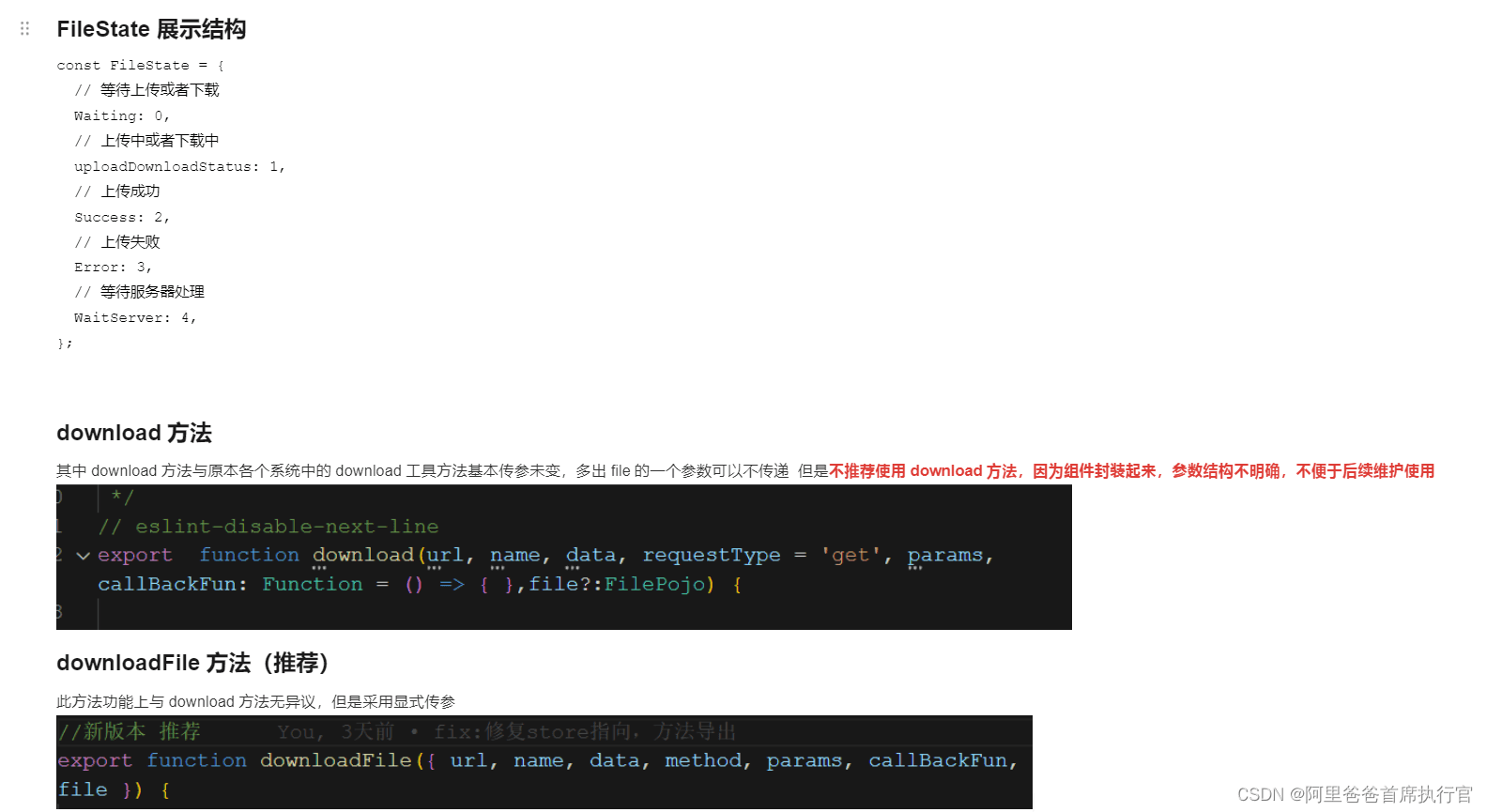
使用例子 采用下列方法,可以明确传递的参数是什么,便于后续维护更新,复用
 btndownloadonclick(row) {
      const { filename, fileextension, picturebase64code, affixid } = row;
        const url = `${this.api_url}iqpquery/file/flowaffixdownload`;
        const params = { affixinfoid: affixid };
        //采用下列方法,可以明确传递的参数是什么,便于后续维护更新,复用
        downloadfile({
          url,
          name: `${filename}.${fileextension}`,
          params,
        });
    },
如果希望下载进度为真实进度,那么可以考虑上传file这个对象,里面的size,把真实的文件大小传入,或者由服务端在header加上contentlength
fakedownprogress方法
此方法为虚假的进度展示,以便于一些没有进度功能的长期方法的进度展示,
//使用fakedownprogress方法进行进度展示,
//依次参数说明
//file:为filepojo类型,可以传递文件id,也可以不传递,name必须传递
//func:需要等待的方法
//funcargs:方法需要传递的对象,
//message:进度展示的文字信息
使用例子
//这是一个文件转码的方法,消耗时间的大小,不可计算,需要使用promise方法进行包裹,除此以外,可以再执行完成后的使用 resolve(filestate.success);,失败同理!
// a code block
var foo = 'bar';
 base64fileevent({ id, base64string, filename, fileextension }) {
      return new promise((resolve, reject) => {
        const bytecharacters = atob(base64string);
        const bytenumbers = new array(bytecharacters.length);
        // eslint-disable-next-line no-plusplus
        for (let i = 0; i < bytecharacters.length; i++) {
          bytenumbers[i] = bytecharacters.charcodeat(i);
        }
        const bytearray = new uint8array(bytenumbers);
        const blob = new blob([bytearray], { type: 'application/octet-stream' });
        const downloadlink = document.createelement('a');
        const url = window.url.createobjecturl(blob);
        console.log(url);
        downloadlink.href = url;
        downloadlink.download = `${filename}.${fileextension}`;
          downloadlink.click();
eventlistener('click', () => {
          document.body.removechild(downloadlink);
          window.url.revokeobjecturl(url);
          resolve(filestate.success);
        });
        // settimeout(() => {
        //   resolve(2);
        // }, 2000);
      });
    },
     downloadbase64asfile(id, base64string, filename, fileextension) {
      const data = {
        id,
        base64string,
        filename,
        fileextension,
      };
      const file = {
        id,
        name: `${filename}.${fileextension}`,
      };
      //使用fakedownprogress方法进行进度展示,
      //依次参数说明
      //file:为filepojo类型,可以传递文件id,也可以不传递,name必须传递
      //func:需要等待的方法
      //funcargs:方法需要传递的对象,
      //message:进度展示的文字信息
      fakedownprogress(file, this.base64fileevent, data, '文件转码中...');
    },
到此这篇关于vuecli+axdownload下载组件封装 +css3下载悬浮球动画的文章就介绍到这了,更多相关vuecli+axdownload下载组件内容请搜索代码网以前的文章或继续浏览下面的相关文章希望大家以后多多支持代码网!



发表评论