
 我要评论
我要评论一、asp.net处理管道
- asp.net处理管道的第一步是创建httpworkerrequest对象,它包含于当前请求有关的所有信息。
- httpworkerrequest把请求传递给httpruntime类的静态processrequest方法。httpruntime首先要做的事是创建httpcontext对象,并用httpworkerrequest进行初始化。
- 创建了httpcontext实例之后,httpruntime类就通过调用httpapplicationfactory的静态getapplicationinstance()方法,为该应用程序请求httpapplication派生类的一个示例。getapplicationinstance()方法要么创建一个httpapplication类的一个新实例,要么从应用程序对象池中取出一个实例。
- 在创建完成httpapplication实例之后,就对它进行初始化,并在初始化期间分配应用程序定义的所
- 有模块。模块式实现ihttpmodule接口的类,作用就是为了实现那经典的19个标准处理事件。
- 在创建了模块之后,httpruntime类通过调用它的beginprocessrequest方法,要求最新检索到的httpapplication类对当前请求提供服务。然后,为当前请求找到合适的处理程序工厂。
- 创建处理程序,传递当前httpcontext,一旦processrequest方法返回,请求完成。

二、ihttphandler
httphandler是asp.net真正处理http请求的地方。在这个httphandler容器中,asp.net framework才真正地对客户端请求的服务器页面做出编译和执行,并将处理过后的信息附加在http请求信息流中再次返回到httpmodule中。
当一个http请求经过httpmodule容器传递到httphandler容器中时,asp.net framework会调用httphandler的processrequest成员方法来对这个http请求进行真正的处理。并将处理完成的结果继续经由httpmodule传递下去,直至到达客户端。
httphandler与httpmodule不同,一旦定义了自己的httphandler类,那么它对系统的httphandler的关系将是“覆盖”关系。

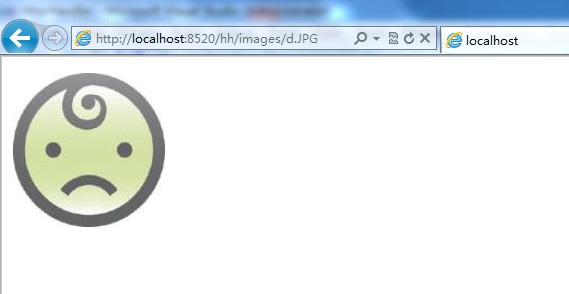
应用1:图片防盗链(实现一个自定义的ihttphandler)
第一:定义一个实现了ihttphandler的类,并且实现其processrequest方法。在一个httphandler容器中如果需要访问session,必须实现irequiressessionstate接口,这只是一个标记接口,没有任何方法。
public class picturehttphandler : ihttphandler
{
    public bool isreusable
    {
        get { return true; }
    }

    public void processrequest(httpcontext context)
    {
        //站点的域名
        string mydomain = "localhost";

        if (context.request.urlreferrer == null ||
            context.request.urlreferrer.host.tolower().indexof(mydomain) < 0)
        {
            //如果是通过浏览器直接访问或者是通过其他站点访问过来的,则显示“资源不存在”图片
            context.response.contenttype = "image/jpeg";
            context.response.writefile(context.request.physicalapplicationpath + "/images/noimg.jpg");
        }
        else
        {
            //如果是通过站内访问的,这正常显示图片
            context.response.contenttype = "image/jpeg";
            context.response.writefile(context.request.physicalpath);
        }

    }
}
第二:在web.config中注册这个类,并且指定handler处理的请求类型,把此节点插入system.web节点中
<httphandlers>
      <!--path中指定的是执行type中httphandler的访问路径。此路径可以带后缀也可以不带后缀。如果path配置为*,则会对所有的请求执行此httphandler-->
     <add  verb="*" path="*.jpg" type="myhttphandler.picturehttphandler,myhttphandler"/>
</httphandlers>
正常访问default页面时:

通过图片地址直接访问时:
应用2、生成验证码
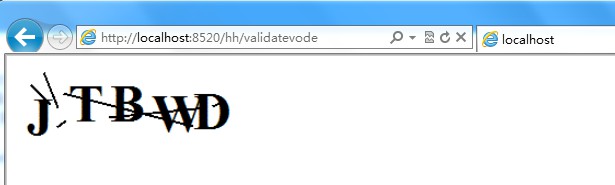
public class validatecodehttphandler : ihttphandler
{
    public void processrequest(httpcontext context)
    {
        context.response.contenttype = "image/gif";
        //建立bitmap对象,绘图
        bitmap basemap = new bitmap(200, 60);
        graphics graph = graphics.fromimage(basemap);
        graph.fillrectangle(new solidbrush(color.white), 0, 0, 200, 60);
        font font = new font(fontfamily.genericserif, 48, fontstyle.bold, graphicsunit.pixel);
        random r = new random();
        string letters = "abcdefghijklmnpqrstuvwxyz";
        string letter;
        stringbuilder s = new stringbuilder();
        //添加随机的五个字母
        for (int x = 0; x < 5; x++)
        {
            letter = letters.substring(r.next(0, letters.length - 1), 1);
            s.append(letter);
            graph.drawstring(letter, font, new solidbrush(color.black), x * 38, r.next(0, 15));
        }
        //混淆背景
        pen linepen = new pen(new solidbrush(color.black), 2);
        for (int x = 0; x < 6; x++)
            graph.drawline(linepen, new point(r.next(0, 199), r.next(0, 59)),
                new point(r.next(0, 199), r.next(0, 59)));
        //将图片保存到输出流中
        basemap.save(context.response.outputstream, imageformat.gif);
        //context.session["checkcode"] = s.tostring();
        //如果没有实现irequiressessionstate,则这里会出错,也无法生成图片
        context.response.end();
    }
    public bool isreusable
    {
        get { return true; }
    }
}
把下面的项加到web.config中的httphandler节点中:
<add verb="*" path="validatevode" type="myhttphandler.validatecodehttphandler,myhttphandler"/>
访问validatevode时:
三、自定义httpmodule:
每次请求的开始和结束定义的httpmodule。
在asp.net中,创建在system.web命名空间下的ihttpmodule接口专门用来定义httpapplication对象的事件处理。实现ihttpmodule接口的类称为httpmodule(http模块)。
1、通过ihttpmodule创建httpapplication的事件处理程序
public class moduleexample : ihttpmodule
{
    public void init(system.web.httpapplication application)
    {
        application.postauthenticaterequest += (sender, args) =>
         {
             httpcontext context = ((httpapplication)sender).context;
             context.response.write("请求postauthenticate");
         };

        application.beginrequest += (sender, args) =>
        {
            httpcontext context = ((httpapplication)sender).context;
            context.response.write("请求到达");
        };

        application.endrequest += (sender, args) =>
        {
            httpcontext context = ((httpapplication)sender).context;
            context.response.write("请求结束");
        };
    }
    public void dispose()
    {
        throw new notimplementedexception();
    }
}
2、注册httpmodule
在asp.net中,实现ihttpmodule接口只是实现httpmodule的第一步,在asp.net中所使用的httpmodule还必须在网站配置文件中进行注册才能真正生效,并在asp.net中使用。
<system.webserver>
    <modules>
      <add name="moduleexample" type="samples.modeleexample">
    </modules>
</system.webserver>
3、常见的httpmodule
在asp.net中,已经预定义了许多httpmodule,甚至已经在服务器的网站配置文件中进行了注册,在系统文件夹c:\windows\microsoft.net\framework\v4.0.30319\config\web.config中看到已经注册的httpmodule如下:
<httpmodules>
    <add name="outputcache" type="system.web.caching.outputcachemodule" />
    <add name="session" type="system.web.sessionstate.sessionstatemodule" />
    <add name="windowsauthentication" type="system.web.security.windowsauthenticationmodule" />
    <add name="formsauthentication" type="system.web.security.formsauthenticationmodule" />
    <add name="passportauthentication" type="system.web.security.passportauthenticationmodule" />
    <add name="rolemanager" type="system.web.security.rolemanagermodule" />
     <add name="urlauthorization" type="system.web.security.urlauthorizationmodule" />
     <add name="fileauthorization" type="system.web.security.fileauthorizationmodule" />
     <add name="anonymousidentification" type="system.web.security.anonymousidentificationmodule" />
     <add name="profile" type="system.web.profile.profilemodule" />
     <add name="errorhandlermodule" type="system.web.mobile.errorhandlermodule, system.web.mobile, version=4.0.0.0, culture=neutral, publickeytoken=b03f5f7f11d50a3a" />
     <add name="servicemodel" type="system.servicemodel.activation.httpmodule, system.servicemodel.activation, version=4.0.0.0, culture=neutral, publickeytoken=31bf3856ad364e35" />
     <add name="urlroutingmodule-4.0" type="system.web.routing.urlroutingmodule" />
     <add name="scriptmodule-4.0" type="system.web.handlers.scriptmodule, system.web.extensions, version=4.0.0.0, culture=neutral, publickeytoken=31bf3856ad364e35"/>
 </httpmodules>
以上就是本文的全部内容,希望对大家的学习有所帮助,也希望大家多多支持代码网。




发表评论