
 我要评论
我要评论前言
我们在浏览网站后台的时候,假如我们频繁请求,那么网站会提示 “请勿重复提交” 的字样,那么这个功能究竟有什么用呢,又是如何实现的呢?
其实这就是接口防刷的一种处理方式,通过在一定时间内限制同一用户对同一个接口的请求次数,其目的是为了防止恶意访问导致服务器和数据库的压力增大,也可以防止用户重复提交。
思路分析
接口防刷有很多种实现思路,例如:拦截器/aop+redis、拦截器/aop+本地缓存、前端限制等等很多种实现思路,在这里我们来讲一下 拦截器+redis 的实现方式。
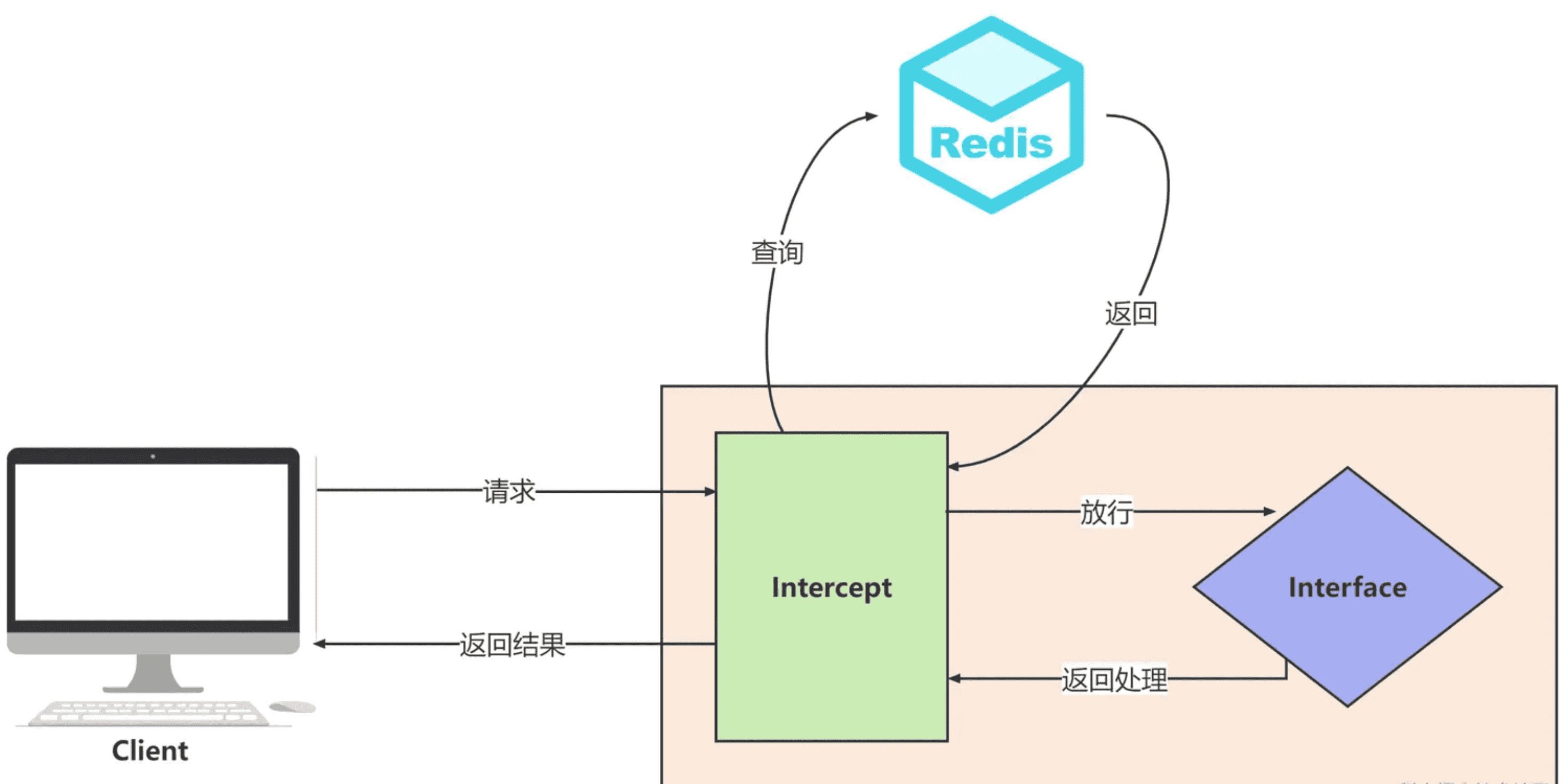
其原理就是 在接口请求前由拦截器拦截下来,然后去 redis 中查询是否已经存在请求了,如果不存在则将请求缓存,若已经存在则返回异常。具体可以参考下图
具体实现
注:以下代码中的 ajaxresult 为统一返回对象,这里就不贴出代码了,大家可以根据自己的业务场景来编写。
编写 redisutils
import com.apply.core.exception.myredidsexception;
import org.springframework.beans.factory.annotation.autowired;
import org.springframework.data.redis.core.redistemplate;
import org.springframework.stereotype.component;
import org.springframework.util.collectionutils;

import java.util.collections;
import java.util.list;
import java.util.map;
import java.util.set;
import java.util.concurrent.timeunit;

/**
 * redis工具类
 */
@component
public class redisutils {

    @autowired
    private redistemplate<string, object> redistemplate;

    /****************** common start ****************/
    /**
     * 指定缓存失效时间
     *
     * @param key  键
     * @param time 时间(秒)
     * @return
     */
    public boolean expire(string key, long time) {
        try {
            if (time > 0) {
                redistemplate.expire(key, time, timeunit.seconds);
            }
            return true;
        } catch (exception e) {
            e.printstacktrace();
            return false;
        }
    }

    /**
     * 根据key 获取过期时间
     *
     * @param key 键 不能为null
     * @return 时间(秒) 返回0代表为永久有效
     */
    public long getexpire(string key) {
        return redistemplate.getexpire(key, timeunit.seconds);
    }

    /**
     * 判断key是否存在
     *
     * @param key 键
     * @return true 存在 false不存在
     */
    public boolean haskey(string key) {
        try {
            return redistemplate.haskey(key);
        } catch (exception e) {
            e.printstacktrace();
            return false;
        }
    }

    /**
     * 删除缓存
     *
     * @param key 可以传一个值 或多个
     */
    @suppresswarnings("unchecked")
    public void del(string... key) {
        if (key != null && key.length > 0) {
            if (key.length == 1) {
                redistemplate.delete(key[0]);
            } else {
                redistemplate.delete(collectionutils.arraytolist(key));
            }
        }
    }
    /****************** common end ****************/


    /****************** string start ****************/

    /**
     * 普通缓存获取
     *
     * @param key 键
     * @return 值
     */
    public object get(string key) {
        return key == null ? null : redistemplate.opsforvalue().get(key);
    }

    /**
     * 普通缓存放入
     *
     * @param key   键
     * @param value 值
     * @return true成功 false失败
     */
    public boolean set(string key, object value) {
        try {
            redistemplate.opsforvalue().set(key, value);
            return true;
        } catch (exception e) {
            e.printstacktrace();
            return false;
        }
    }

    /**
     * 普通缓存放入并设置时间
     *
     * @param key   键
     * @param value 值
     * @param time  时间(秒) time要大于0 如果time小于等于0 将设置无限期
     * @return true成功 false 失败
     */
    public boolean set(string key, object value, long time) {
        try {
            if (time > 0) {
                redistemplate.opsforvalue().set(key, value, time, timeunit.seconds);
            } else {
                set(key, value);
            }
            return true;
        } catch (exception e) {
            e.printstacktrace();
            return false;
        }
    }

    /**
     * 递增
     *
     * @param key   键
     * @param delta 要增加几(大于0)
     * @return
     */
    public long incr(string key, long delta) {
        if (delta < 0) {
            throw new myredidsexception("递增因子必须大于0");
        }
        return redistemplate.opsforvalue().increment(key, delta);
    }

    /**
     * 递减
     *
     * @param key   键
     * @param delta 要减少几(小于0)
     * @return
     */
    public long decr(string key, long delta) {
        if (delta < 0) {
            throw new myredidsexception("递减因子必须大于0");
        }
        return redistemplate.opsforvalue().increment(key, -delta);
    }
    /****************** string end ****************/
}
定义interceptor
import com.alibaba.fastjson.json;
import com.apply.common.utils.redis.redisutils;
import com.apply.common.validator.annotation.accesslimit;
import com.apply.core.http.ajaxresult;
import org.springframework.beans.factory.annotation.autowired;
import org.springframework.stereotype.component;
import org.springframework.web.method.handlermethod;
import org.springframework.web.servlet.handler.handlerinterceptoradapter;

import javax.servlet.servletoutputstream;
import javax.servlet.http.httpservletrequest;
import javax.servlet.http.httpservletresponse;
import java.io.ioexception;
import java.util.objects;

/**
 * @description 重复请求拦截
 * @date 2023-08-13 14:14
 */
@component
public class repeatrequestintercept extends handlerinterceptoradapter {

    @autowired
    private redisutils redisutils;

    /**
     * 限定时间 单位:秒
     */
    private final int seconds = 1;

    /**
     * 限定请求次数
     */
    private final int max = 1;

    public boolean prehandle(httpservletrequest request, httpservletresponse response, object handler) throws exception {
        //判断请求是否为方法的请求
        if (handler instanceof handlermethod) {
            string key = request.getremoteaddr() + "-" + request.getmethod() + "-" + request.getrequesturl();
            object requestcountobj = redisutils.get(key);
            if (objects.isnull(requestcountobj)) {
                //若为空则为第一次请求
                redisutils.set(key, 1, seconds);
            } else {
                response.setcontenttype("application/json;charset=utf-8");
                servletoutputstream os = response.getoutputstream();
                ajaxresult<void> result = ajaxresult.error(100, "请求已提交,请勿重复请求");
                string jsonstring = json.tojsonstring(result);
                os.write(jsonstring.getbytes());
                os.flush();
                os.close();
                return false;
            }
        }
        return true;
    }

}
然后我们 将拦截器注册到容器中
import com.apply.common.validator.intercept.repeatrequestintercept;
import com.apply.core.base.entity.constants;
import org.springframework.beans.factory.annotation.autowired;
import org.springframework.context.annotation.configuration;
import org.springframework.web.servlet.config.annotation.corsregistry;
import org.springframework.web.servlet.config.annotation.interceptorregistry;
import org.springframework.web.servlet.config.annotation.resourcehandlerregistry;
import org.springframework.web.servlet.config.annotation.webmvcconfigurer;

/**
 * @description
 * @date 2023-08-13 14:17
 */
@configuration
public class webconfig implements webmvcconfigurer {

    @autowired
    private repeatrequestintercept repeatrequestintercept;

    @override
    public void addinterceptors(interceptorregistry registry) {
        registry.addinterceptor(repeatrequestintercept);
    }
}
我们再来编写一个接口用于测试
import com.apply.common.validator.annotation.accesslimit;
import org.springframework.web.bind.annotation.getmapping;
import org.springframework.web.bind.annotation.requestmapping;
import org.springframework.web.bind.annotation.restcontroller;

/**
 * @description
 * @date 2023-08-13 14:35
 */
@restcontroller
public class testcontroller {

    @getmapping("/test")
    public string test(){
        return "success";
    }

}
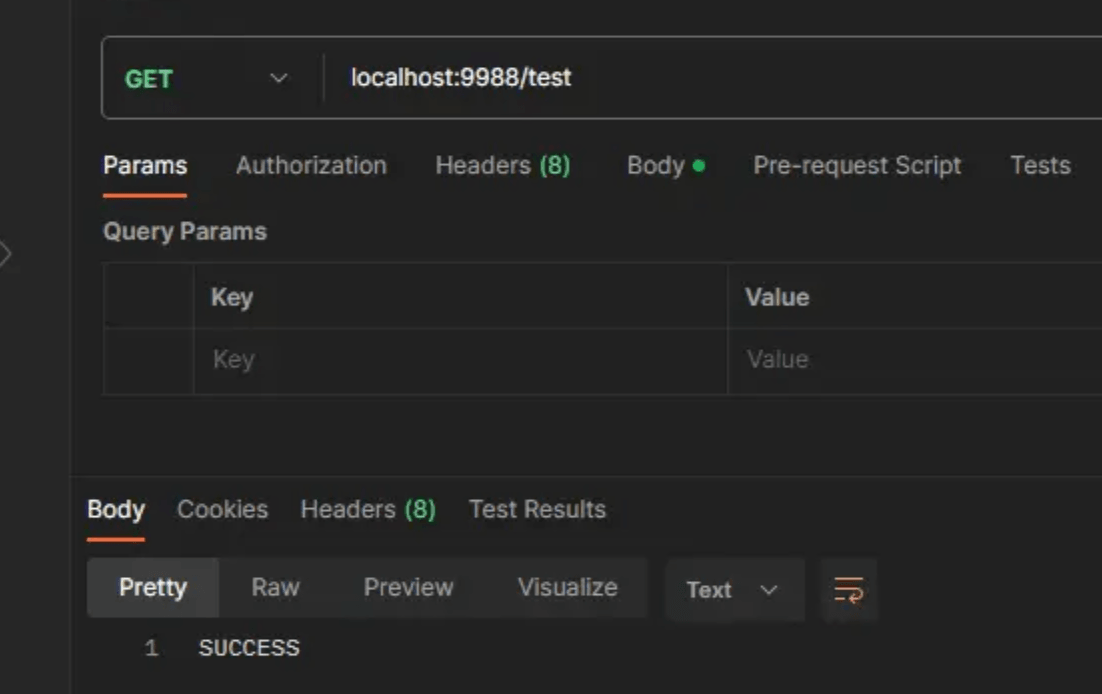
最后我们来看一下结果是否符合我们的预期:
1秒内的第一次请求:
1秒内的第二次请求:
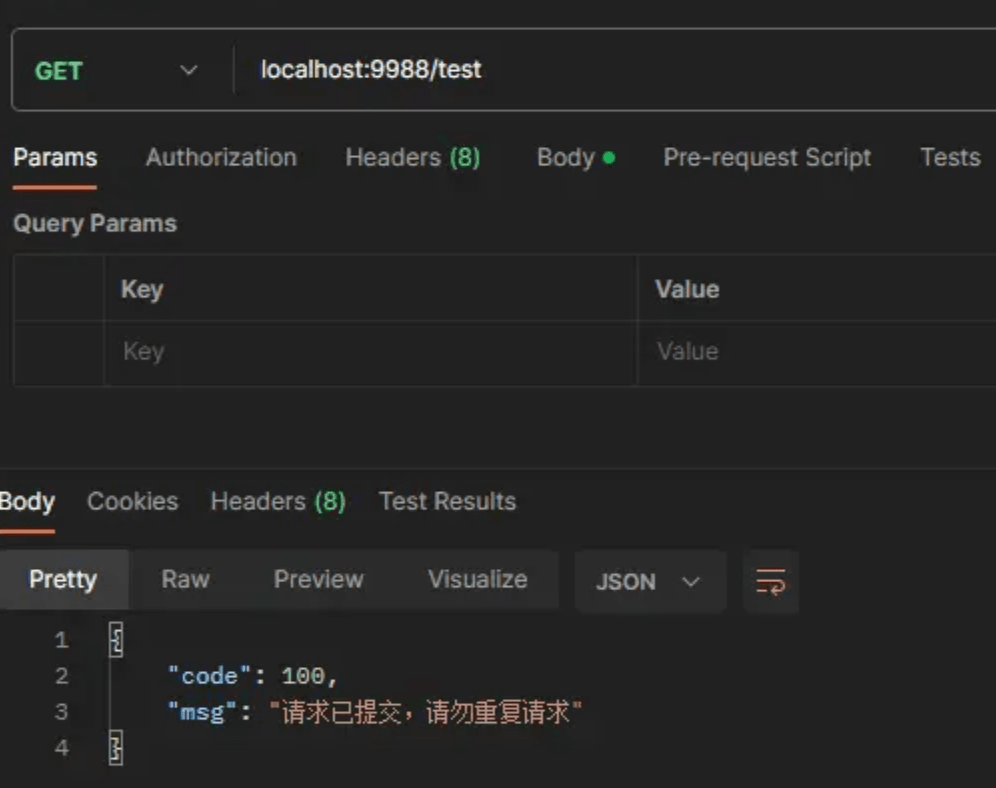
确实已经达到了我们的预期,但是如果我们对特定接口进行拦截,或对不同接口的限定拦截时间和次数不同的话,这种实现方式无法满足我们的需求,所以我们要提出改进。
改进
我们可以去写一个自定义的注解,并将 seconds 和 max 设置为该注解的属性,再在拦截器中判断请求的方法是否包含该注解,如果包含则执行拦截方法,如果不包含则直接返回。
自定义注解 requestlimit
import java.lang.annotation.elementtype;
import java.lang.annotation.retention;
import java.lang.annotation.retentionpolicy;
import java.lang.annotation.target;

/**
 * @description 幂等性注解
 * @date 2023-08-13 15:10
 */
@retention(retentionpolicy.runtime)
@target(elementtype.method)
public @interface requestlimit {

    /**
     * 限定时间
     */
    int seconds() default 1;

    /**
     * 限定请求次数
     */
    int max() default 1;

}
改进 repeatrequestintercept
/**
 * @description 重复请求拦截
 * @date 2023-08-13 15:14
 */
@component
public class repeatrequestintercept extends handlerinterceptoradapter {

    @autowired
    private redisutils redisutils;

    @override
    public boolean prehandle(httpservletrequest request, httpservletresponse response, object handler) throws exception {
        //判断请求是否为方法的请求
        if (handler instanceof handlermethod) {
            handlermethod hm = (handlermethod) handler;
            //获取方法中是否有幂等性注解
            requestlimit anno = hm.getmethodannotation(requestlimit.class);
            //若注解为空则直接返回
            if (objects.isnull(anno)) {
                return true;
            }
            int seconds = anno.seconds();
            int max = anno.max();
            string key = request.getremoteaddr() + "-" + request.getmethod() + "-" + request.getrequesturl();
            object requestcountobj = redisutils.get(key);
            if (objects.isnull(requestcountobj)) {
                //若为空则为第一次请求
                redisutils.set(key, 1, seconds);
            } else {
                //限定时间内的第n次请求
                int requestcount = integer.parseint(requestcountobj.tostring());
                //判断是否超过最大限定请求次数
                if (requestcount < max) {
                    //未超过则请求次数+1
                    redisutils.incr(key, 1);
                } else {
                    //否则拒绝请求并返回信息
                    refuse(response);
                    return false;
                }
            }
        }
        return true;
    }
    /**
     * @date 2023-08-14 15:25
     * @author bummon
     * @description 拒绝请求并返回结果
     */
    private void refuse(httpservletresponse response) throws ioexception {
        response.setcontenttype("application/json;charset=utf-8");
        servletoutputstream os = response.getoutputstream();
        ajaxresult<void> result = ajaxresult.error(100, "请求已提交,请勿重复请求");
        string jsonstring = json.tojsonstring(result);
        os.write(jsonstring.getbytes());
        os.flush();
        os.close();
    }

}
这样我们就可以实现我们的需求了。
到此这篇关于教你实现java接口防刷的文章就介绍到这了,更多相关java接口防刷内容请搜索代码网以前的文章或继续浏览下面的相关文章希望大家以后多多支持代码网!





发表评论