
 我要评论
我要评论一、kafaka介绍
kafka是一个分布式的、可分区的、可复制的消息系统,下面是kafka的几个基本术语:
- kafka将消息以topic为单位进行归纳;
- 将向kafka topic发布消息的程序成为producers;
- 将预订topics并消费消息的程序成为consumer;
- kafka以集群的方式运行,可以由一个或多个服务组成,每个服务叫做一个broker。
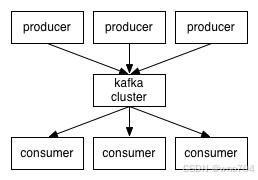
producers通过网络将消息发送到kafka集群,集群向消费者提供消息,如下图所示:
创建一个topic时,可以指定partitions(分区)数目,partitions数越多,其吞吐量也越大,但是需要的资源也越多,同时也会导致更高的不可用性,kafka在接收到producers发送的消息之后,会根据均衡策略将消息存储到不同的partitions中:
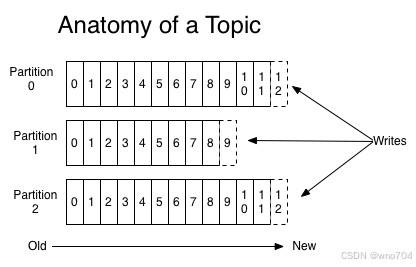
在每个partitions中,消息以顺序存储,最晚接收的的消息会最后被消费。
producers在向kafka集群发送消息的时候,可以通过指定partitions来发送到指定的partitions中。也可以通过指定均衡策略来将消息发送到不同的partitions中。
如果不指定,就会采用默认的随机均衡策略,将消息随机的存储到不同的partitions中。
在consumer消费消息时,kafka使用offset来记录当前消费的位置:
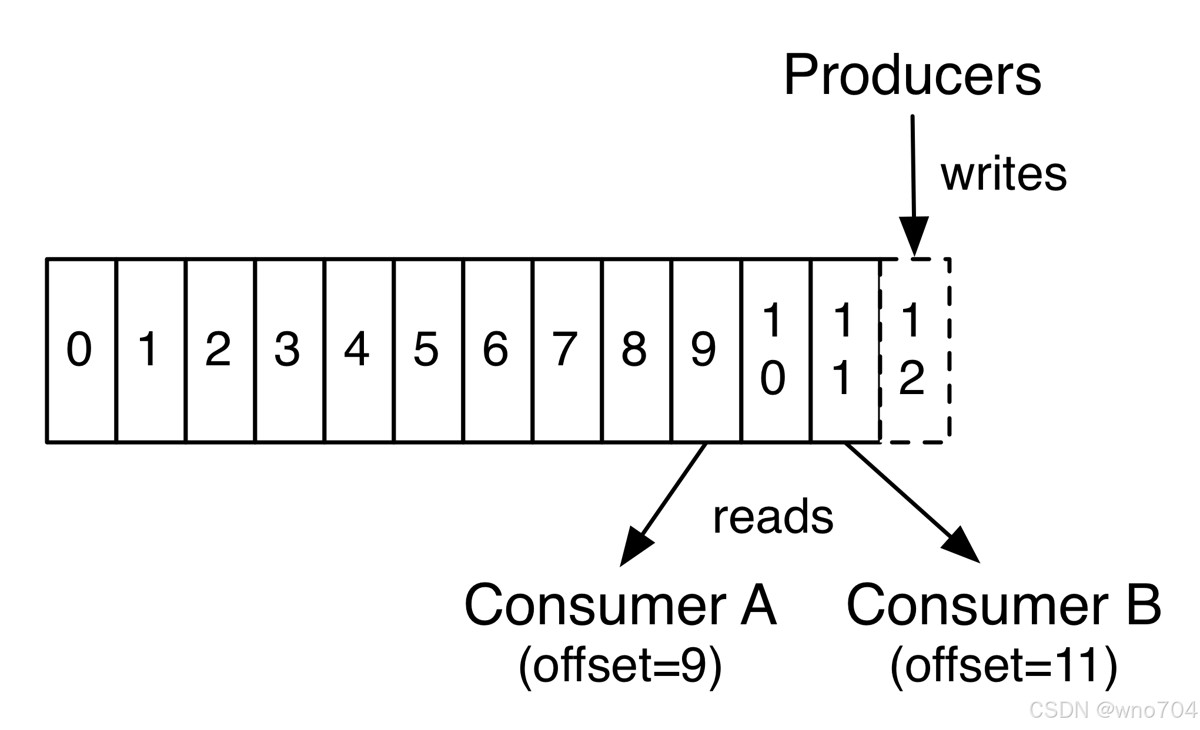
在kafka的设计中,可以有多个不同的group来同时消费同一个topic下的消息,如图,我们有两个不同的group同时消费,他们的的消费的记录位置offset各不项目,不互相干扰。
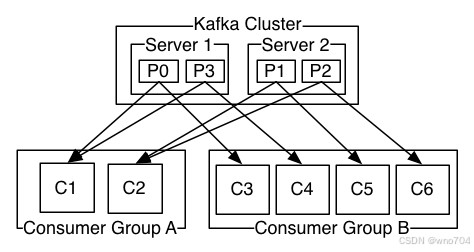
对于一个group而言,consumer的数量不应该多于partitions的数量,因为在一个group中,每个partitions至多只能绑定到一个consumer上,即一个consumer可以消费多个partitions,一个partitions只能给一个consumer消费。因此,若一个group中的consumer数量大于partitions数量的话,多余的consumer将不会收到任何消息。
二、kafka存储机制
kafka中消息是以topic进行分类的,生产者生产消息,消费者消费消息,都是面向topic。
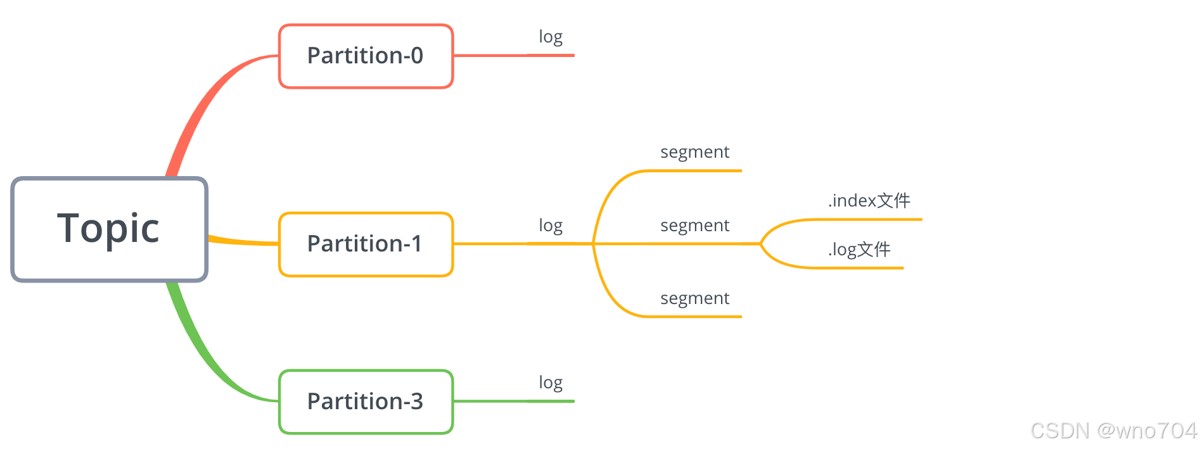
topic是逻辑上的概念,而partition是物理上的概念,每个partition对应于一个log文件,该log文件中存储的就是producer生产的数据。
producer生产的数据会被不断追加到该log文件末端,且每条数据都有自己的offset。
消费者组中的每个消费者,都会实时记录自己消费到了哪个offset,以便出错恢复时,从上次的位置继续消费。
2.1 topic构成
在kafka中,一个topic可以分为多个partition,一个partition分为多个segment,每个segment对应两个文件:.index和.log文件:
2.2 消息存储原理
由于生产者生产的消息会不断追加到log文件末尾,为防止log文件过大导致数据定位效率低下,kafka采取了分片和索引机制,将每个partition分为多个segment。
如前面所说,每个segment对应.index文件和.log文件。这些文件位于一个以特定规则命名的文件夹下,该文件夹的命名 规则为:topic 名称 + 分区序号。
例如,我们在上一节创建了一个名称为test的topic,该topic只有一个分区,所以在kafka日会志目录下会有个名为test-0的文件夹:
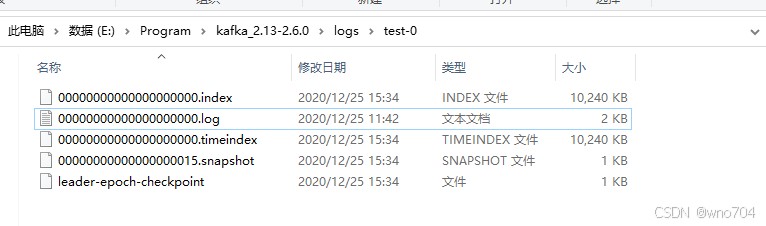
这些文件的含义如下:
| 类别 | 作用 |
|---|---|
| .index | 偏移量索引文件,存储数据对应的偏移量 |
| .timestamp | 时间戳索引文件 |
| .log | 日志文件,存储生产者生产的数据 |
| .snaphot | 快照文件 |
| leader-epoch-checkpoint | 保存了每一任leader开始写入消息时的offset,会定时更新。 follower被选为leader时会根据这个确定哪些消息可用 |
index和log文件以当前segment的第一条消息的偏移量offset命名。偏移量offset是一个64位的长整形数,固定是20位数字,长度未达到,用0进行填补,索引文件和日志文件都由该作为文件名命名规则。
所以从上图可以看出,我们的偏移量是从0开始的,.index和.log文件名称都为00000000000000000000。
上节中,我们通过生产者发送了wno和test等数据,所以我们可以查看下.log文件下是否有这些数据:
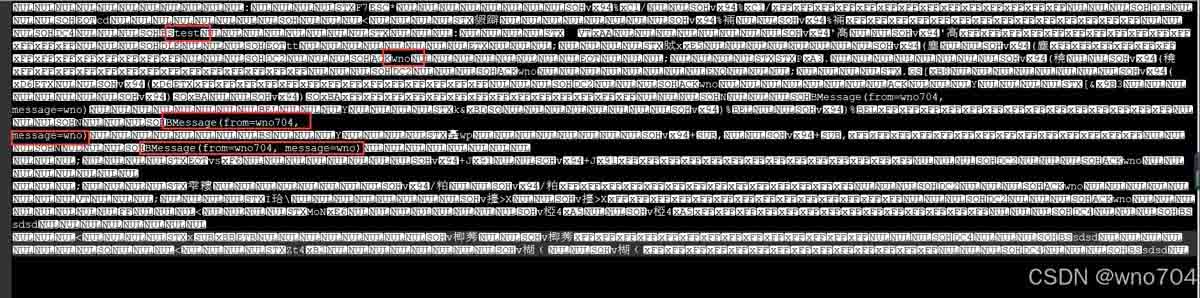
内容存在一些”乱码“,因为数据是经过序列化压缩的。
那么数据文件.log大小有限制吗,能保存多久时间?这些我们都可以通过kafka目录下conf/server.properties配置文件修改:
# log文件存储时间,单位为小时,这里设置为1周
log.retention.hours=168

# log文件大小的最大值,这里为1g,超过这个值,则会创建新的segment(也就是新的.index和.log文件)
log.segment.bytes=1073741824
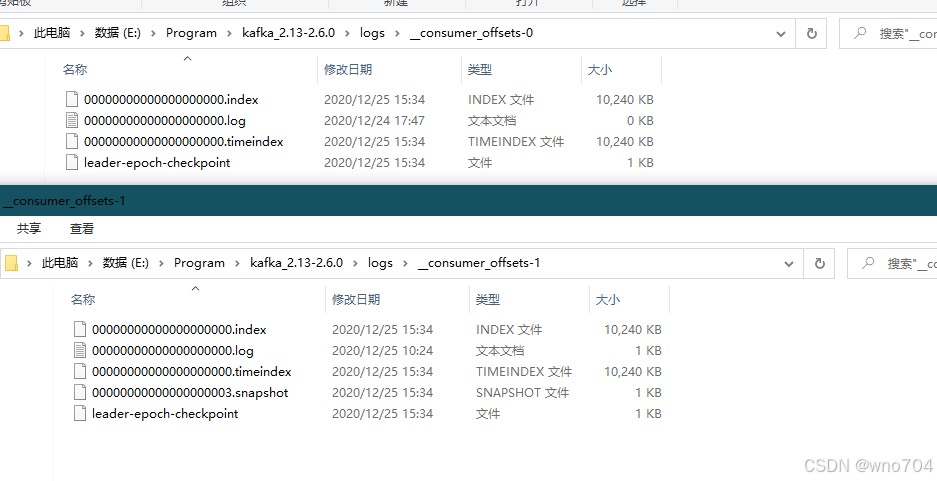
比如,当生产者生产数据量较多,一个segment存储不下触发分片时,在日志topic目录下你会看到类似如下所示的文件:
下图展示了kafka查找数据的过程:
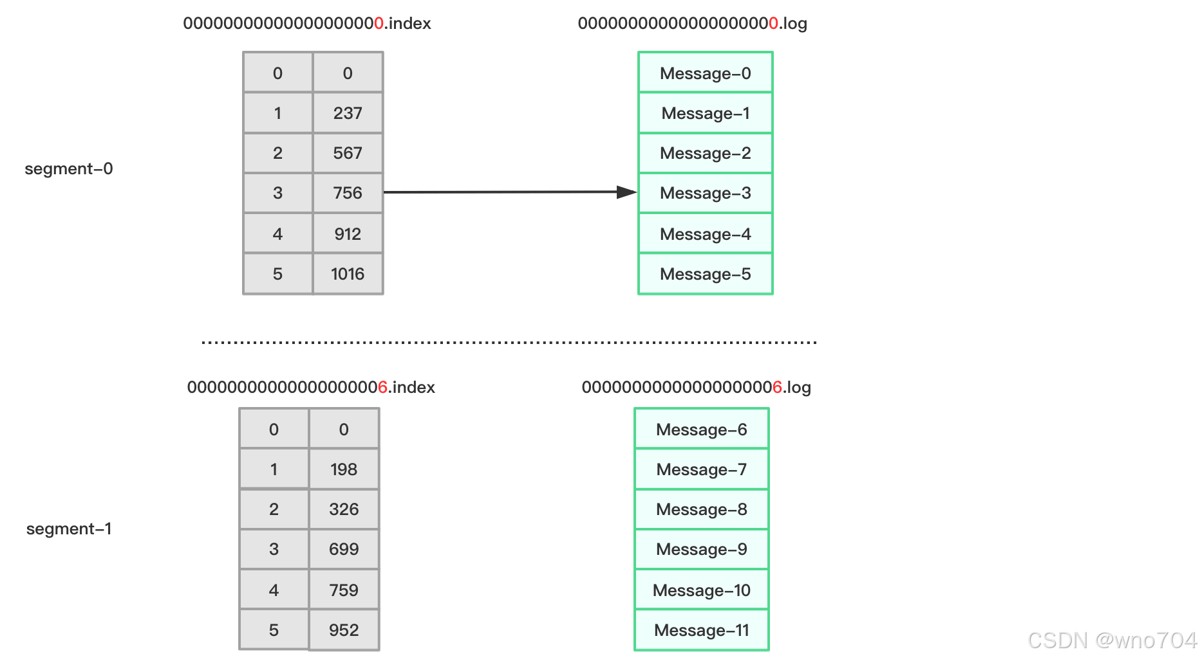
比如现在要查找偏移量offset为3的消息,根据.index文件命名我们可以知道,offset为3的索引应该从00000000000000000000.index里查找。
根据上图所示,其对应的索引地址为756~911,所以kafka将读取00000000000000000000.log 756~911区间的数据。
三、spring boot整合kafaka
在《kafka运行环境安装》简单介绍了kafka的使用,下面我们开始在spring boot里使用kafka。
3.1 引入依赖
        <dependency>
            <groupid>org.springframework.boot</groupid>
            <artifactid>spring-boot-starter-web</artifactid>
        </dependency>
        <dependency>
            <groupid>org.springframework.kafka</groupid>
            <artifactid>spring-kafka</artifactid>
        </dependency>
3.2 生产者与消费者配置
server:
  port: 8089
spring:
  kafka:
    bootstrap-servers: 127.0.0.1:9092  #指定kafka server的地址,集群配多个,中间,逗号隔开
    producer:
      key-serializer: org.apache.kafka.common.serialization.stringserializer
      value-serializer: org.apache.kafka.common.serialization.stringserializer
    consumer:
      group-id: test-consumer
      auto-offset-reset: latest
      enable-auto-commit: true
      key-deserializer: org.apache.kafka.common.serialization.stringdeserializer
      value-deserializer: org.apache.kafka.common.serialization.stringdeserializer
3.3 发布消息
配置好生产者,我们就可以开始发布消息了。
新建一个sendmessagecontroller:
@restcontroller
@slf4j
public class sendmessagecontroller {

    @autowired
    private kafkatemplate<string, string> kafkatemplate;

    @getmapping("send/{message}")
    public void send(@pathvariable string message) {
        this.kafkatemplate.send("test", message);
    }

}
我们注入了kafkatemplate对象,key-value都为string类型,并通过它的send方法来发送消息。其中test为topic的名称,上面我们已经使用命令创建过这个topic了。
send方法是一个异步方法,我们可以通过回调的方式来确定消息是否发送成功,我们改造sendmessagecontroller:
@restcontroller
@slf4j
public class sendmessagecontroller {

    @autowired
    private kafkatemplate<string, string> kafkatemplate;

    @getmapping("send/{message}")
    public void send(@pathvariable string message) {
        listenablefuture<sendresult<string, string>> future = this.kafkatemplate.send("test", message);
        future.addcallback(new listenablefuturecallback<sendresult<string, string>>() {
            @override
            public void onsuccess(sendresult<string, string> result) {
                log.info("成功发送消息:{},offset=[{}]", message, result.getrecordmetadata().offset());
            }

            @override
            public void onfailure(throwable ex) {
                log.error("消息:{} 发送失败,原因:{}", message, ex.getmessage());
            }
        });
    }
}
消息发送成功后,会回调onsuccess方法,发送失败后回调onfailure方法。
3.4 消息消费
配置好消费者,我们就可以开始消费消息了,新建kafkamessagelistener:
@component
@slf4j
public class kafkamessagelistener {
    @kafkalistener(topics = "test", groupid = "test-consumer")
    public void listen(consumerrecord<?, ?> record) {
        log.info("接收消息: topic is {}, offset is {}, partition is {}, value is {} ", record.topic(), record.offset(), record.partition(), record.value());
    }
}
我们通过@kafkalistener注解来监听名称为test的topic,消费者分组的组名为test-consumer。
3.5 演示
启动spring boot项目,启动过程中,控制台会输出kafka的配置,启动好后,访问 http://localhost:8089/send/wno704,wno704,控制台输出如下:
2020-09-09 17:25:22.240 info 5740 — [ad | producer-5] c.w.b.controller.sendmessagecontroller : 成功发送消息:wno704,wno704,offset=[58]
2020-09-09 17:25:22.241 info 5740 — [ntainer#0-0-c-1] c.w.boot.listener.kafkamessagelistener : 接收消息: topic is test, offset is 58, partition is 0, value is wno704,wno704
四、@kafkalistener详解
4.1 监听多个topic
@kafkalistener除了可以指定topic名称和分组id外,我们还可以同时监听来自多个topic的消息:
@kafkalistener(topics = “topic1, topic2”)
4.2 获取分区信息
我们还可以通过@header注解来获取当前消息来自哪个分区(partitions):
@kafkalistener(topics = "test", groupid = "test-consumer")
public void listen(@payload string message,
                   @header(kafkaheaders.received_partition_id) int partition) {
    logger.info("接收消息: {},partition:{}", message, partition);
}
或者
@component
@slf4j
public class kafkamessagelistener {
    @kafkalistener(topics = "test", groupid = "test-consumer")
    public void listen(consumerrecord<?, ?> record) {
        log.info("接收消息: topic is {}, offset is {}, partition is {}, value is {} ", record.topic(), record.offset(), record.partition(), record.value());
    }
}
4.3 接收特定分区信息
我们可以通过@kafkalistener来指定只接收来自特定分区的消息:
@kafkalistener(groupid = "test-consumer",
        topicpartitions = @topicpartition(topic = "test",
                partitionoffsets = {
                        @partitionoffset(partition = "0", initialoffset = "0")
            }))

public void listen(@payload string message,
                   @header(kafkaheaders.received_partition_id) int partition) {
    logger.info("接收消息: {},partition:{}", message, partition);
}
如果不需要指定initialoffset,上面代码可以简化为:
@kafkalistener(groupid = "test-consumer",
	topicpartitions = @topicpartition(topic = "test", partitions = { "0", "1" }))
五、消息过滤器
我们可以为消息监听添加过滤器来过滤一些特定的信息。
我们新建一个消费者配置类kafkaconsumerconfig的kafkalistenercontainerfactory方法里配置过滤规则:
@configuration
public class kafkainitialconfig {

    // 监听器工厂
    @autowired
    private consumerfactory consumerfactory;

    // 配置一个消息过滤策略
    @bean
    public concurrentkafkalistenercontainerfactory<string, string> kafkalistenercontainerfactory() {
        concurrentkafkalistenercontainerfactory<string, string> factory
                = new concurrentkafkalistenercontainerfactory<>();
        factory.setconsumerfactory(consumerfactory);
        // ------- 过滤配置 --------
        factory.setrecordfilterstrategy(
                r -> r.value().contains("test")
        );
        return factory;
    }

}
setrecordfilterstrategy接收recordfilterstrategy<k, v>,他是一个函数式接口:
public interface recordfilterstrategy<k, v> {
    boolean filter(consumerrecord<k, v> var1);
}
所以我们用lambda表达式指定了上面这条规则,即如果消息内容包含fuc k这个粗鄙之语的时候,则不接受消息。
配置好后我们重启项目,发送下面这三条请求:
- http://localhost:8089/send/wno704,wno704
- http://localhost:8089/send/wno704test
- http://localhost:8089/send/wno704,test
观察控制台:

可以看到,wno704test、wno704,test这两条消息没有被接收。
六、更多配置
spring.kafka.admin.client-id= # id to pass to the server when making requests. used for server-side logging.
spring.kafka.admin.fail-fast=false # whether to fail fast if the broker is not available on startup.
spring.kafka.admin.properties.*= # additional admin-specific properties used to configure the client.
spring.kafka.admin.ssl.key-password= # password of the private key in the key store file.
spring.kafka.admin.ssl.key-store-location= # location of the key store file.
spring.kafka.admin.ssl.key-store-password= # store password for the key store file.
spring.kafka.admin.ssl.key-store-type= # type of the key store.
spring.kafka.admin.ssl.protocol= # ssl protocol to use.
spring.kafka.admin.ssl.trust-store-location= # location of the trust store file.
spring.kafka.admin.ssl.trust-store-password= # store password for the trust store file.
spring.kafka.admin.ssl.trust-store-type= # type of the trust store.
spring.kafka.bootstrap-servers= # comma-delimited list of host:port pairs to use for establishing the initial connections to the kafka cluster. applies to all components unless overridden.
spring.kafka.client-id= # id to pass to the server when making requests. used for server-side logging.
spring.kafka.consumer.auto-commit-interval= # frequency with which the consumer offsets are auto-committed to kafka if 'enable.auto.commit' is set to true.
spring.kafka.consumer.auto-offset-reset= # what to do when there is no initial offset in kafka or if the current offset no longer exists on the server.
spring.kafka.consumer.bootstrap-servers= # comma-delimited list of host:port pairs to use for establishing the initial connections to the kafka cluster. overrides the global property, for consumers.
spring.kafka.consumer.client-id= # id to pass to the server when making requests. used for server-side logging.
spring.kafka.consumer.enable-auto-commit= # whether the consumer's offset is periodically committed in the background.
spring.kafka.consumer.fetch-max-wait= # maximum amount of time the server blocks before answering the fetch request if there isn't sufficient data to immediately satisfy the requirement given by "fetch-min-size".
spring.kafka.consumer.fetch-min-size= # minimum amount of data the server should return for a fetch request.
spring.kafka.consumer.group-id= # unique string that identifies the consumer group to which this consumer belongs.
spring.kafka.consumer.heartbeat-interval= # expected time between heartbeats to the consumer coordinator.
spring.kafka.consumer.key-deserializer= # deserializer class for keys.
spring.kafka.consumer.max-poll-records= # maximum number of records returned in a single call to poll().
spring.kafka.consumer.properties.*= # additional consumer-specific properties used to configure the client.
spring.kafka.consumer.ssl.key-password= # password of the private key in the key store file.
spring.kafka.consumer.ssl.key-store-location= # location of the key store file.
spring.kafka.consumer.ssl.key-store-password= # store password for the key store file.
spring.kafka.consumer.ssl.key-store-type= # type of the key store.
spring.kafka.consumer.ssl.protocol= # ssl protocol to use.
spring.kafka.consumer.ssl.trust-store-location= # location of the trust store file.
spring.kafka.consumer.ssl.trust-store-password= # store password for the trust store file.
spring.kafka.consumer.ssl.trust-store-type= # type of the trust store.
spring.kafka.consumer.value-deserializer= # deserializer class for values.
spring.kafka.jaas.control-flag=required # control flag for login configuration.
spring.kafka.jaas.enabled=false # whether to enable jaas configuration.
spring.kafka.jaas.login-module=com.sun.security.auth.module.krb5loginmodule # login module.
spring.kafka.jaas.options= # additional jaas options.
spring.kafka.listener.ack-count= # number of records between offset commits when ackmode is "count" or "count_time".
spring.kafka.listener.ack-mode= # listener ackmode. see the spring-kafka documentation.
spring.kafka.listener.ack-time= # time between offset commits when ackmode is "time" or "count_time".
spring.kafka.listener.client-id= # prefix for the listener's consumer client.id property.
spring.kafka.listener.concurrency= # number of threads to run in the listener containers.
spring.kafka.listener.idle-event-interval= # time between publishing idle consumer events (no data received).
spring.kafka.listener.log-container-config= # whether to log the container configuration during initialization (info level).
spring.kafka.listener.monitor-interval= # time between checks for non-responsive consumers. if a duration suffix is not specified, seconds will be used.
spring.kafka.listener.no-poll-threshold= # multiplier applied to "polltimeout" to determine if a consumer is non-responsive.
spring.kafka.listener.poll-timeout= # timeout to use when polling the consumer.
spring.kafka.listener.type=single # listener type.
spring.kafka.producer.acks= # number of acknowledgments the producer requires the leader to have received before considering a request complete.
spring.kafka.producer.batch-size= # default batch size.
spring.kafka.producer.bootstrap-servers= # comma-delimited list of host:port pairs to use for establishing the initial connections to the kafka cluster. overrides the global property, for producers.
spring.kafka.producer.buffer-memory= # total memory size the producer can use to buffer records waiting to be sent to the server.
spring.kafka.producer.client-id= # id to pass to the server when making requests. used for server-side logging.
spring.kafka.producer.compression-type= # compression type for all data generated by the producer.
spring.kafka.producer.key-serializer= # serializer class for keys.
spring.kafka.producer.properties.*= # additional producer-specific properties used to configure the client.
spring.kafka.producer.retries= # when greater than zero, enables retrying of failed sends.
spring.kafka.producer.ssl.key-password= # password of the private key in the key store file.
spring.kafka.producer.ssl.key-store-location= # location of the key store file.
spring.kafka.producer.ssl.key-store-password= # store password for the key store file.
spring.kafka.producer.ssl.key-store-type= # type of the key store.
spring.kafka.producer.ssl.protocol= # ssl protocol to use.
spring.kafka.producer.ssl.trust-store-location= # location of the trust store file.
spring.kafka.producer.ssl.trust-store-password= # store password for the trust store file.
spring.kafka.producer.ssl.trust-store-type= # type of the trust store.
spring.kafka.producer.transaction-id-prefix= # when non empty, enables transaction support for producer.
spring.kafka.producer.value-serializer= # serializer class for values.
spring.kafka.properties.*= # additional properties, common to producers and consumers, used to configure the client.
spring.kafka.ssl.key-password= # password of the private key in the key store file.
spring.kafka.ssl.key-store-location= # location of the key store file.
spring.kafka.ssl.key-store-password= # store password for the key store file.
spring.kafka.ssl.key-store-type= # type of the key store.
spring.kafka.ssl.protocol= # ssl protocol to use.
spring.kafka.ssl.trust-store-location= # location of the trust store file.
spring.kafka.ssl.trust-store-password= # store password for the trust store file.
spring.kafka.ssl.trust-store-type= # type of the trust store.
spring.kafka.streams.application-id= # kafka streams application.id property; default spring.application.name.
spring.kafka.streams.auto-startup=true # whether or not to auto-start the streams factory bean.
spring.kafka.streams.bootstrap-servers= # comma-delimited list of host:port pairs to use for establishing the initial connections to the kafka cluster. overrides the global property, for streams.
spring.kafka.streams.cache-max-size-buffering= # maximum memory size to be used for buffering across all threads.
spring.kafka.streams.client-id= # id to pass to the server when making requests. used for server-side logging.
spring.kafka.streams.properties.*= # additional kafka properties used to configure the streams.
spring.kafka.streams.replication-factor= # the replication factor for change log topics and repartition topics created by the stream processing application.
spring.kafka.streams.ssl.key-password= # password of the private key in the key store file.
spring.kafka.streams.ssl.key-store-location= # location of the key store file.
spring.kafka.streams.ssl.key-store-password= # store password for the key store file.
spring.kafka.streams.ssl.key-store-type= # type of the key store.
spring.kafka.streams.ssl.protocol= # ssl protocol to use.
spring.kafka.streams.ssl.trust-store-location= # location of the trust store file.
spring.kafka.streams.ssl.trust-store-password= # store password for the trust store file.
spring.kafka.streams.ssl.trust-store-type= # type of the trust store.
spring.kafka.streams.state-dir= # directory location for the state store.
spring.kafka.template.default-topic= # default topic to which messages are sent.
总结
以上为个人经验,希望能给大家一个参考,也希望大家多多支持代码网。





发表评论