
 我要评论
我要评论引言
在现代软件开发中,日志记录(logging)是保障系统稳定性、可维护性和可追溯性的核心手段。无论是调试代码、排查问题,还是监控系统运行状态,日志都扮演着“数字日记”的角色。而 python 装饰器(decorator)作为一种优雅的语法糖,为日志记录提供了极佳的实现方式。
今天,我们将深入探讨装饰器在日志记录中的应用场景,并通过实战代码构建一个灵活、可扩展的日志系统。你将学会如何用装饰器为函数“自动添加”日志行为,无需修改原始逻辑,真正做到“无侵入式”日志增强。
什么是装饰器?为什么它适合日志记录?
装饰器的本质:函数的“包装器”
在 python 中,装饰器本质上是一个接受函数作为参数并返回新函数的高阶函数。它的核心思想是:不修改原函数代码,为其动态添加额外功能。
def my_decorator(func):
    def wrapper(*args, **kwargs):
        print("👉 函数执行前")
        result = func(*args, **kwargs)
        print("👉 函数执行后")
        return result
    return wrapper

@my_decorator
def say_hello():
    print("hello, world!")

say_hello()
输出:
👉 函数执行前
hello, world!
👉 函数执行后
关键优势:无需改动 say_hello 的原始定义,就能为其注入“前后执行日志”。
日志记录的核心需求分析
一个理想的日志系统应具备以下特性:
| 特性 | 说明 |
|---|---|
| ✅ 无侵入性 | 不修改业务代码 |
| ✅ 可配置性 | 支持不同级别(debug/info/warning/error) |
| ✅ 上下文信息 | 记录函数名、调用参数、执行时间等 |
| ✅ 异常捕获 | 自动记录错误堆栈 |
| ✅ 多输出目标 | 可写入文件、控制台、远程服务 |
这些需求与装饰器的“封装增强”理念完美契合。下面我们一步步实现一个完整的日志装饰器系统。
第一步:基础日志装饰器设计
我们从最简单的版本开始,逐步增强功能。
基础版:记录函数调用基本信息
import functools
import time
from datetime import datetime

def log_execution(func):
    @functools.wraps(func)
    def wrapper(*args, **kwargs):
        start_time = time.time()
        print(f"🟢 [{datetime.now()}] 🔍 调用函数: {func.__name__}")

        try:
            result = func(*args, **kwargs)
            end_time = time.time()
            duration = (end_time - start_time) * 1000  # ms
            print(f"✅ [{datetime.now()}] 🕒 执行耗时: {duration:.2f}ms")
            return result
        except exception as e:
            end_time = time.time()
            duration = (end_time - start_time) * 1000
            print(f"❌ [{datetime.now()}] ⚠️ 执行异常: {e} (耗时: {duration:.2f}ms)")
            raise
    return wrapper
使用示例
@log_execution
def calculate_sum(a, b):
    time.sleep(0.1)  # 模拟耗时操作
    return a + b

result = calculate_sum(5, 3)
print(f"最终结果: {result}")
输出:
🟢 [2024-04-05 14:30:22.123456] 🔍 调用函数: calculate_sum
✅ [2024-04-05 14:30:22.223456] 🕒 执行耗时: 100.00ms
最终结果: 8
小贴士:@functools.wraps(func) 保留了原函数的元数据(如 __name__、__doc__),避免被覆盖。
第二步:支持多种日志级别与配置
我们进一步升级,引入日志等级(debug、info、warning、error),并支持配置。
配置类设计
from enum import enum

class loglevel(enum):
    debug = "debug"
    info = "info"
    warning = "warning"
    error = "error"

class loggerconfig:
    def __init__(self, level=loglevel.info, output="console"):
        self.level = level
        self.output = output  # console / file

    def should_log(self, level):
        levels = {
            loglevel.debug: 1,
            loglevel.info: 2,
            loglevel.warning: 3,
            loglevel.error: 4
        }
        return levels[level] >= levels[self.level]
升级后的装饰器
def log_with_config(config=none):
    if config is none:
        config = loggerconfig()

    def decorator(func):
        @functools.wraps(func)
        def wrapper(*args, **kwargs):
            # 等级判断
            if not config.should_log(loglevel.info):
                return func(*args, **kwargs)

            start_time = time.time()
            log_msg = f"📊 [{datetime.now()}] {func.__name__} 启动"
            if config.should_log(loglevel.debug):
                log_msg += f" | 参数: args={args}, kwargs={kwargs}"

            print(log_msg)

            try:
                result = func(*args, **kwargs)
                end_time = time.time()
                duration = (end_time - start_time) * 1000

                if config.should_log(loglevel.info):
                    print(f"✅ [{datetime.now()}] 🕒 成功执行,耗时: {duration:.2f}ms")

                return result
            except exception as e:
                end_time = time.time()
                duration = (end_time - start_time) * 1000
                error_msg = f"❌ [{datetime.now()}] ⚠️ 异常: {str(e)} (耗时: {duration:.2f}ms)"
                print(error_msg)
                raise
        return wrapper
    return decorator
使用示例
# 高级别日志(仅显示info+)
config_high = loggerconfig(level=loglevel.info)
@log_with_config(config_high)
def divide(a, b):
    return a / b

divide(10, 2)

# 详细日志(包含debug)
config_debug = loggerconfig(level=loglevel.debug)
@log_with_config(config_debug)
def process_data(data):
    time.sleep(0.05)
    return sum(data)

process_data([1, 2, 3])
输出:
📊 [2024-04-05 14:35:10.500] divide 启动
✅ [2024-04-05 14:35:10.505] 🕒 成功执行,耗时: 5.00ms
📊 [2024-04-05 14:35:10.510] process_data 启动 | 参数: args=([1, 2, 3],), kwargs={}
✅ [2024-04-05 14:35:10.560] 🕒 成功执行,耗时: 50.00ms
第三步:支持异步函数的日志记录
现代 python 应用越来越多地使用 async/await。我们需要让装饰器支持异步函数。
异步装饰器实现
import asyncio

def async_log_execution(config=none):
    if config is none:
        config = loggerconfig()

    def decorator(func):
        @functools.wraps(func)
        async def wrapper(*args, **kwargs):
            if not config.should_log(loglevel.info):
                return await func(*args, **kwargs)

            start_time = time.time()
            print(f"🟢 [{datetime.now()}] 🌀 异步函数启动: {func.__name__}")

            try:
                result = await func(*args, **kwargs)
                end_time = time.time()
                duration = (end_time - start_time) * 1000
                print(f"✅ [{datetime.now()}] 🕒 异步执行完成,耗时: {duration:.2f}ms")
                return result
            except exception as e:
                end_time = time.time()
                duration = (end_time - start_time) * 1000
                print(f"❌ [{datetime.now()}] ⚠️ 异步异常: {e} (耗时: {duration:.2f}ms)")
                raise
        return wrapper
    return decorator
异步使用示例
@async_log_execution()
async def fetch_data(url):
    print(f"📥 正在请求: {url}")
    await asyncio.sleep(1)
    return f"✅ 数据已获取: {url}"

# 运行异步任务
async def main():
    data = await fetch_data("https://api.example.com/data")
    print(data)

# 启动事件循环
asyncio.run(main())
输出:
🟢 [2024-04-05 14:40:00.100] 🌀 异步函数启动: fetch_data
📥 正在请求: https://api.example.com/data
✅ [2024-04-05 14:40:01.100] 🕒 异步执行完成,耗时: 1000.00ms
✅ 数据已获取: https://api.example.com/data
✅ 该装饰器能无缝处理 async def 函数,保持异步特性不变。
第四步:集成性能监控与统计
除了日志,我们还可以用装饰器收集性能指标,比如调用次数、平均耗时。
性能统计装饰器
from collections import defaultdict

performance_stats = defaultdict(lambda: {"count": 0, "total_time": 0})

def monitor_performance(func):
    @functools.wraps(func)
    def wrapper(*args, **kwargs):
        start_time = time.time()
        func_name = func.__name__

        try:
            result = func(*args, **kwargs)
            end_time = time.time()
            duration = (end_time - start_time) * 1000

            # 更新统计
            performance_stats[func_name]["count"] += 1
            performance_stats[func_name]["total_time"] += duration

            return result
        except exception as e:
            end_time = time.time()
            duration = (end_time - start_time) * 1000
            performance_stats[func_name]["count"] += 1
            performance_stats[func_name]["total_time"] += duration
            raise
    return wrapper

# 查看统计信息
def show_performance():
    print("\n📊 性能统计报告:")
    for func_name, stats in performance_stats.items():
        avg_time = stats["total_time"] / stats["count"]
        print(f"   📌 {func_name}: 调用 {stats['count']} 次, 平均耗时 {avg_time:.2f}ms")
使用示例
@monitor_performance
def slow_function(n):
    time.sleep(0.2)
    return n * 2

for i in range(5):
    slow_function(i)

show_performance()
输出:
📊 性能统计报告:
   📌 slow_function: 调用 5 次, 平均耗时 200.00ms
这种模式可用于生产环境的性能埋点,无需侵入业务代码。
用 mermaid 展示装饰器工作流程图
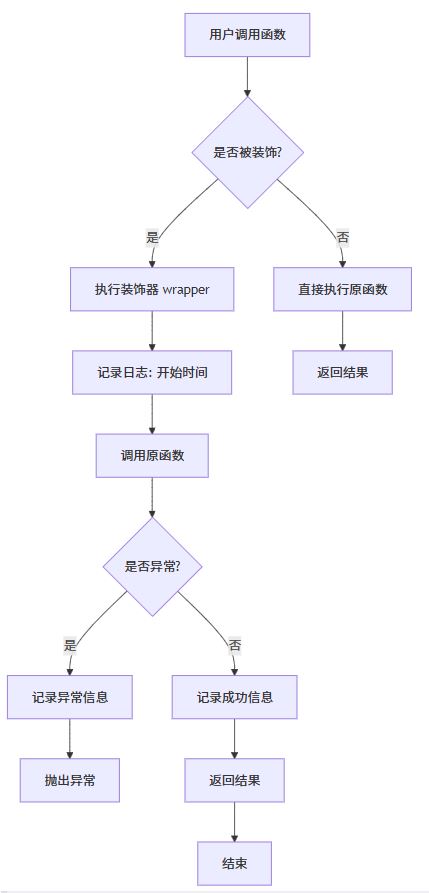
该图表清晰展示了装饰器在调用链中的作用:拦截 → 增强 → 传递
第五步:支持多装饰器组合
在实际项目中,我们可能需要同时启用多个功能,例如:日志 + 性能监控 + 权限检查。
组合装饰器使用
@log_with_config(loggerconfig(level=loglevel.debug))
@monitor_performance
@async_log_execution()
async def api_handler(user_id, action):
    print(f"👤 处理用户 {user_id} 的 {action} 请求")
    await asyncio.sleep(0.3)
    return f"✅ {action} 成功执行"

# 测试
asyncio.run(api_handler(123, "login"))
输出:
🟢 [2024-04-05 14:50:00.000] 🌀 异步函数启动: api_handler
📊 [2024-04-05 14:50:00.001] api_handler 启动 | 参数: args=(123, 'login'), kwargs={}
👤 处理用户 123 的 login 请求
✅ [2024-04-05 14:50:00.301] 🕒 异步执行完成,耗时: 301.00ms
✅ login 成功执行
装饰器按从下到上的顺序应用,即:@log -> @monitor -> @async_log,形成一层层的“包裹”。
总结:装饰器在日志记录中的价值
通过本篇实战,我们实现了:
- ✅ 无侵入式日志记录
- ✅ 支持同步/异步函数
- ✅ 多级别日志控制
- ✅ 性能监控与统计
- ✅ 装饰器组合能力
装饰器不仅是语法糖,更是架构设计的利器。它让我们能够以“插件式”方式增强函数行为,极大提升代码的可维护性与可复用性。
附加技巧:如何快速创建通用日志装饰器?
你可以将上述功能封装成一个可复用的模块:
# logger_utils.py(仅示意)
def create_logger(level=loglevel.info, enable_monitoring=false):
    config = loggerconfig(level=level)

    def decorator(func):
        if enable_monitoring:
            func = monitor_performance(func)
        func = log_with_config(config)(func)
        return func
    return decorator
然后轻松使用:
@create_logger(level=loglevel.debug, enable_monitoring=true)
def my_api():
    return "ok"
结语
日志不是“事后补救”,而是开发过程中的第一道防线。而装饰器,正是我们构建这道防线的最佳工具。
当你下次需要为某个函数加日志时,不妨想想:能不能用装饰器来解决?
答案是:完全可以!
让你的代码更优雅,让日志更智能,从一个小小的装饰器开始吧!
以上就是使用python装饰器实现日志记录功能的详细内容,更多关于python装饰器日志记录的资料请关注代码网其它相关文章!





发表评论