
 我要评论
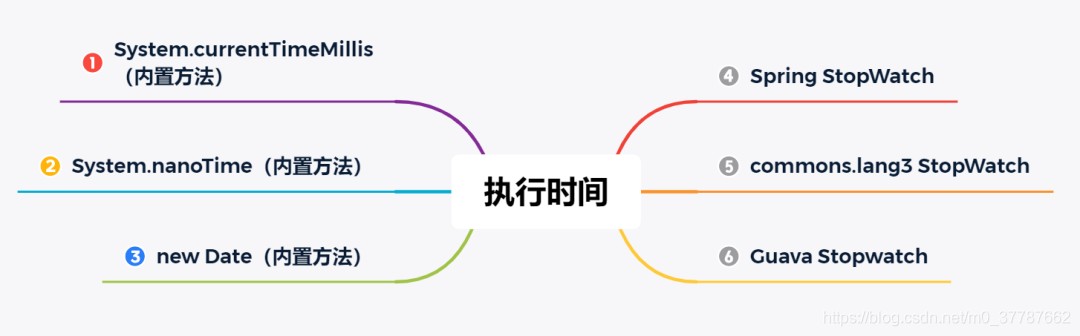
我要评论在日常开发中经常需要测试一些代码的执行时间,但又不想使用向 jmh(java microbenchmark harness,java 微基准测试套件)这么重的测试框架,所以本文就汇总了一些 java 中比较常用的执行时间统计方法,总共包含以下 6 种,如下图所示:
方法一:system.currenttimemillis
此方法为 java 内置的方法,使用 system#currenttimemillis 来统计执行的时间(统计单位:毫秒),示例代码如下:
public class timeintervaltest {
    public static void main(string[] args) throws interruptedexception {
        // 开始时间
        long stime = system.currenttimemillis();
        // 执行时间(1s)
        thread.sleep(1000);
        // 结束时间
        long etime = system.currenttimemillis();
        // 计算执行时间
        system.out.printf("执行时长:%d 毫秒.", (etime - stime));
    }
}
以上程序的执行结果为:
执行时长:1000 毫秒.
方法二:system.nanotime
此方法为 java 内置的方法,使用 system#nanotime 来统计执行时间(统计单位:纳秒),它的执行方法和 system#currenttimemillis 类似,示例代码如下:
public class timeintervaltest {
    public static void main(string[] args) throws interruptedexception {
        // 开始时间
        long stime = system.nanotime();
        // 执行时间(1s)
        thread.sleep(1000);
        // 结束时间
        long etime = system.nanotime();
        // 计算执行时间
        system.out.printf("执行时长:%d 纳秒.", (etime - stime));
    }
}
以上程序的执行结果为:
执行时长:1000769200 纳秒.
小贴士:1 毫秒 = 100 万纳秒。
方法三:new date
此方法也是 java 的内置方法,在开始执行前 new date() 创建一个当前时间对象,在执行结束之后 new date() 一个当前执行时间,然后再统计两个 date 的时间间隔,示例代码如下:
import java.util.date;

public class timeintervaltest {
    public static void main(string[] args) throws interruptedexception {
        // 开始时间
        date sdate = new date();
        // 执行时间(1s)
        thread.sleep(1000);
        // 结束时间
        date edate = new date();
        //  统计执行时间(毫秒)
        system.out.printf("执行时长:%d 毫秒." , (edate.gettime() - sdate.gettime()));
    }
}
以上程序的执行结果为:
执行时长:1000 毫秒.
方法四:spring stopwatch
如果我们使用的是 spring 或 spring boot 项目,可以在项目中直接使用 stopwatch 对象来统计代码执行时间,示例代码如下:
stopwatch stopwatch = new stopwatch();
// 开始时间
stopwatch.start();
// 执行时间(1s)
thread.sleep(1000);
// 结束时间
stopwatch.stop();
// 统计执行时间(秒)
system.out.printf("执行时长:%d 秒.%n", stopwatch.gettotaltimeseconds()); // %n 为换行
// 统计执行时间(毫秒)
system.out.printf("执行时长:%d 毫秒.%n", stopwatch.gettotaltimemillis());
// 统计执行时间(纳秒)
system.out.printf("执行时长:%d 纳秒.%n", stopwatch.gettotaltimenanos());
以上程序的执行结果为:
执行时长:0.9996313 秒. 执行时长:999 毫秒. 执行时长:999631300 纳秒.
小贴士:thread#sleep 方法的执行时间稍有偏差,在 1s 左右都是正常的。
方法五:commons-lang3 stopwatch
如果我们使用的是普通项目,那我们可以用 apache commons-lang3 中的 stopwatch 对象来实现时间统计,首先先添加 commons-lang3 的依赖:
<!-- https://mvnrepository.com/artifact/org.apache.commons/commons-lang3 -->
<dependency>
  <groupid>org.apache.commons</groupid>
  <artifactid>commons-lang3</artifactid>
  <version>3.10</version>
</dependency>
然后编写时间统计代码:
import org.apache.commons.lang3.time.stopwatch;

import java.util.concurrent.timeunit;

public class timeintervaltest {
    public static void main(string[] args) throws interruptedexception {
        stopwatch stopwatch = new stopwatch();
        // 开始时间
        stopwatch.start();
        // 执行时间(1s)
        thread.sleep(1000);
        // 结束时间
        stopwatch.stop();
        // 统计执行时间(秒)
        system.out.println("执行时长:" + stopwatch.gettime(timeunit.seconds) + " 秒.");
        // 统计执行时间(毫秒)
        system.out.println("执行时长:" + stopwatch.gettime(timeunit.milliseconds) + " 毫秒.");
        // 统计执行时间(纳秒)
        system.out.println("执行时长:" + stopwatch.gettime(timeunit.nanoseconds) + " 纳秒.");
    }
}
以上程序的执行结果为:
执行时长:1 秒. 执行时长:1000 毫秒.
执行时长:1000555100 纳秒.
方法六:guava stopwatch
除了 apache 的 commons-lang3 外,还有一个常用的 java 工具包,那就是 google 的 guava,guava 中也包含了 stopwatch 统计类。首先先添加 guava 的依赖:
<!-- https://mvnrepository.com/artifact/com.google.guava/guava -->
<dependency>
  <groupid>com.google.guava</groupid>
  <artifactid>guava</artifactid>
  <version>29.0-jre</version>
</dependency>
然后编写时间统计代码:
import com.google.common.base.stopwatch;

import java.util.concurrent.timeunit;

public class timeintervaltest {
    public static void main(string[] args) throws interruptedexception {
        // 创建并启动计时器
        stopwatch stopwatch = stopwatch.createstarted();
        // 执行时间(1s)
        thread.sleep(1000);
        // 停止计时器
        stopwatch.stop();
        // 执行时间(单位:秒)
        system.out.printf("执行时长:%d 秒. %n", stopwatch.elapsed().getseconds()); // %n 为换行
        // 执行时间(单位:毫秒)
        system.out.printf("执行时长:%d 豪秒.", stopwatch.elapsed(timeunit.milliseconds));
    }
}
以上程序的执行结果为:
执行时长:1 秒.
执行时长:1000 豪秒.
原理分析
本文我们从 spring 和 google 的 guava 源码来分析一下,它们的 stopwatch 对象底层是如何实现的?
1.spring stopwatch 原理分析
在 spring 中 stopwatch 的核心源码如下:
package org.springframework.util;

import java.text.numberformat;
import java.util.linkedlist;
import java.util.list;
import java.util.concurrent.timeunit;
import org.springframework.lang.nullable;

public class stopwatch {
    private final string id;
    private boolean keeptasklist;
    private final list<stopwatch.taskinfo> tasklist;
    private long starttimenanos;
    @nullable
    private string currenttaskname;
    @nullable
    private stopwatch.taskinfo lasttaskinfo;
    private int taskcount;
    private long totaltimenanos;

    public stopwatch() {
        this("");
    }

    public stopwatch(string id) {
        this.keeptasklist = true;
        this.tasklist = new linkedlist();
        this.id = id;
    }

    public string getid() {
        return this.id;
    }

    public void setkeeptasklist(boolean keeptasklist) {
        this.keeptasklist = keeptasklist;
    }

    public void start() throws illegalstateexception {
        this.start("");
    }

    public void start(string taskname) throws illegalstateexception {
        if (this.currenttaskname != null) {
            throw new illegalstateexception("can't start stopwatch: it's already running");
        } else {
            this.currenttaskname = taskname;
            this.starttimenanos = system.nanotime();
        }
    }

    public void stop() throws illegalstateexception {
        if (this.currenttaskname == null) {
            throw new illegalstateexception("can't stop stopwatch: it's not running");
        } else {
            long lasttime = system.nanotime() - this.starttimenanos;
            this.totaltimenanos += lasttime;
            this.lasttaskinfo = new stopwatch.taskinfo(this.currenttaskname, lasttime);
            if (this.keeptasklist) {
                this.tasklist.add(this.lasttaskinfo);
            }

            ++this.taskcount;
            this.currenttaskname = null;
        }
    }
    // .... 忽略其他代码
}
从上述 start() 和 stop() 的源码中可以看出,spring 实现时间统计的本质还是使用了 java 的内置方法 system.nanotime() 来实现的。
2.google stopwatch 原理分析
google stopwatch 实现的核心源码如下:
public final class stopwatch {
    private final ticker ticker;
    private boolean isrunning;
    private long elapsednanos;
    private long starttick;
    @canignorereturnvalue
    public stopwatch start() {
        preconditions.checkstate(!this.isrunning, "this stopwatch is already running.");
        this.isrunning = true;
        this.starttick = this.ticker.read();
        return this;
    }

    @canignorereturnvalue
    public stopwatch stop() {
        long tick = this.ticker.read();
        preconditions.checkstate(this.isrunning, "this stopwatch is already stopped.");
        this.isrunning = false;
        this.elapsednanos += tick - this.starttick;
        return this;
    }
    // 忽略其他源码...
}
从上述源码中可以看出 stopwatch 对象中调用了 ticker 类来实现时间统计的,那接下来我们进入 ticker 类的实现源码:
public abstract class ticker {
    private static final ticker system_ticker = new ticker() {
        public long read() {
            return platform.systemnanotime();
        }
    };
    protected ticker() {
    }
    public abstract long read();
    public static ticker systemticker() {
        return system_ticker;
    }
}
final class platform {
    private static final logger logger = logger.getlogger(platform.class.getname());
    private static final patterncompiler patterncompiler = loadpatterncompiler();

    private platform() {
    }

    static long systemnanotime() {
        return system.nanotime();
    }
    // 忽略其他源码...
}
从上述源码可以看出 google stopwatch 实现时间统计的本质还是调用了 java 内置的 system.nanotime() 来实现的。
结论
对于所有框架的 stopwatch 来说,其底层都是通过调用 java 内置的 system.nanotime() 得到两个时间,开始时间和结束时间,然后再通过结束时间减去开始时间来统计执行时间的。
总结
本文介绍了 6 种实现代码统计的方法,其中 3 种是 java 内置的方法:
- system.currenttimemillis()
- system.nanotime()
- new date()
还介绍了 3 种常用框架 spring、commons-langs3、guava 的时间统计器 stopwatch。
在没有用到 spring、commons-langs3、guava 任意一种框架的情况下,推荐使用 system.currenttimemillis() 或 system.nanotime() 来实现代码统计,否则建议直接使用 stopwatch 对象来统计执行时间。
知识扩展—stopwatch 让统计更方便
stopwatch 存在的意义是让代码统计更简单,比如 guava 中 stopwatch 使用示例如下:
import com.google.common.base.stopwatch;

import java.util.concurrent.timeunit;

public class timeintervaltest {
    public static void main(string[] args) throws interruptedexception {
        // 创建并启动计时器
        stopwatch stopwatch = stopwatch.createstarted();
        // 执行时间(1s)
        thread.sleep(1000);
        // 停止计时器
        stopwatch.stop();
        // 执行统计
        system.out.printf("执行时长:%d 毫秒. %n",
                stopwatch.elapsed(timeunit.milliseconds));
        // 清空计时器
        stopwatch.reset();
        // 再次启动统计
        stopwatch.start();
        // 执行时间(2s)
        thread.sleep(2000);
        // 停止计时器
        stopwatch.stop();
        // 执行统计
        system.out.printf("执行时长:%d 秒. %n",
                stopwatch.elapsed(timeunit.milliseconds));
    }
}
我们可以使用一个 stopwatch 对象统计多段代码的执行时间,也可以通过指定时间类型直接统计出对应的时间间隔,比如我们可以指定时间的统计单位,如秒、毫秒、纳秒等类型。
方法补充
在 java 中统计代码执行时间有多种方法,从简单的基础 api 到功能丰富的工具类,各有适用场景。下面介绍几种最常用的方式,并给出示例代码和注意事项。
使用 system.currenttimemillis()(毫秒级)
最简单、最直接的方法,返回当前时间与 1970-01-01 utc 的毫秒差值。
long start = system.currenttimemillis();
// 待测代码
thread.sleep(100);
long end = system.currenttimemillis();
system.out.println("执行耗时:" + (end - start) + " ms");优点:
- 简单易用,无需额外依赖。
- 适合粗略测量(毫秒级精度)。
缺点:
- 受系统时间调整影响(如手动修改系统时间会导致结果错误)。
- 精度有限(毫秒级,无法测量极短时间)。
使用 system.nanotime()(纳秒级,推荐)
返回正在运行的 java 虚拟机的高精度时间源,不受系统时间调整影响,适合测量短时间间隔。
long start = system.nanotime();
// 待测代码
thread.sleep(100);
long end = system.nanotime();
system.out.println("执行耗时:" + (end - start) / 1_000_000.0 + " ms");优点:
- 高精度(通常可达纳秒级)。
- 不受系统时钟修改影响,是测量代码执行时间的首选。
缺点:不能用于计算绝对时间(只适合测量时间差)。
使用 instant 与 duration(java 8+,更可读)
使用 java.time.instant 记录时间点,java.time.duration 计算差值。
import java.time.duration;
import java.time.instant;
instant start = instant.now();
// 待测代码
thread.sleep(100);
instant end = instant.now();
duration duration = duration.between(start, end);
system.out.println("执行耗时:" + duration.tomillis() + " ms");优点:
- 代码语义清晰,可读性好。
duration提供丰富的单位转换(纳秒、毫秒、秒等)。
缺点:底层依赖系统时钟,与 system.currenttimemillis() 类似,受系统时间调整影响。
使用 spring 的 stopwatch(方便管理多个任务)
若项目中已使用 spring,可以利用 org.springframework.util.stopwatch,支持多任务计时、漂亮输出。
import org.springframework.util.stopwatch;
stopwatch stopwatch = new stopwatch();
stopwatch.start("task1");
// 任务1代码
thread.sleep(100);
stopwatch.stop();
stopwatch.start("task2");
// 任务2代码
thread.sleep(50);
stopwatch.stop();
system.out.println(stopwatch.prettyprint());
输出示例:
stopwatch '': running time = 150 ms
---------------------------------------------
ms % task name
---------------------------------------------
00100 067% task1
00050 033% task2
优点:
- 支持多个任务、任务名、分阶段统计。
- 输出格式美观,适合性能分析。
缺点:需要引入 spring 框架(或单独使用 spring-core)。
使用 apache commons lang 的 stopwatch
不依赖 spring 时可使用 apache commons lang 3 的 stopwatch。
import org.apache.commons.lang3.time.stopwatch;
stopwatch watch = new stopwatch();
watch.start();
// 待测代码
thread.sleep(100);
watch.stop();
system.out.println("耗时:" + watch.gettime() + " ms");优点:
- 轻量级,仅依赖
commons-lang3。 - 支持
split()、suspend()等更细粒度的控制。
缺点:需要额外引入依赖。
jmh(java microbenchmark harness)—— 专业的基准测试工具
当需要精准、可靠地测量微秒级性能、避免 jvm 优化干扰时,应使用 jmh。例如测试某个算法的吞吐量。
import org.openjdk.jmh.annotations.*;
@state(scope.thread)
@benchmarkmode(mode.averagetime)
@outputtimeunit(timeunit.nanoseconds)
public class mybenchmark {
    @benchmark
    public void testmethod() {
        // 待测代码
    }
}
运行方式:
mvn clean install
java -jar target/benchmarks.jar
优点:
- 自动处理 jvm 预热、死代码消除、黑盒优化等问题。
- 提供多种测量模式(吞吐量、平均时间、采样时间等)。
- 结果统计信息全面(均值、误差、百分位数等)。
缺点:
- 学习曲线较陡,配置相对复杂。
- 不适合简单的“一次性”计时。
总结与对比
| 方法 | 精度 | 是否受系统时间调整 | 适用场景 |
|---|---|---|---|
system.currenttimemillis() | 毫秒 | 是 | 粗略测量,简单日志 |
system.nanotime() | 纳秒(高精度) | 否 | 绝大多数计时需求推荐 |
instant + duration | 毫秒(实际同系统时间) | 是 | 追求可读性,且不受系统时间影响不重要时 |
spring stopwatch | 毫秒 | 否(使用nanotime) | 多任务分段计时,输出美观 |
apache commons stopwatch | 毫秒 | 否 | 轻量级,需要额外库 |
| jmh | 极高(纳秒级) | 否 | 微基准测试,jvm 性能调优 |
最佳实践:
- 对于单元测试或简单性能日志,使用
system.nanotime()即可满足绝大部分需求。 - 若需要同时测量多个阶段或输出美观报告,选用 spring 或 apache commons 的
stopwatch。 - 编写正式的性能基准(如方法优化对比),务必使用 jmh,避免 jvm 优化带来的虚假结果。
最后,测量代码执行时间时,要注意:
- jvm 存在预热(just-in-time 编译),第一次执行往往较慢,建议多次运行取平均值。
- 测量时间过短的代码(< 1ms)容易受操作系统线程调度影响,应循环多次测量并求平均。
以上就是java统计代码的执行时间的常见方法总结的详细内容,更多关于java统计代码执行时间的资料请关注代码网其它相关文章!





发表评论