
 我要评论
我要评论本篇的目标是做一个真正能跑的命令行待办事项管理器。把列表、字典、函数、文件操作、异常处理、标准库全部串联起来,成为一个可以每天使用的工具。
知识点串联表:
| 功能 | 涉及的前置知识点 |
|---|---|
| 待办项存储(dict + 列表) | #04 列表与字典 |
| 每个功能一个函数 | #05 函数入门 |
| 主循环 + 输入验证 | #03 条件判断与循环 |
| 文件不存在时自动创建 | #06 文件操作 + #07 错误与异常 |
| json 数据持久化 | #06 json 模块 |
| 菜单选项 → 函数映射 | #03 + #04 字典做映射 |
| 加载标准库工具 | #09 模块与包 |
| 类封装(可选进阶) | #08 类与对象 |
一、先看架构
在写代码之前,先把程序的结构想清楚。整体是一个菜单驱动的循环程序:
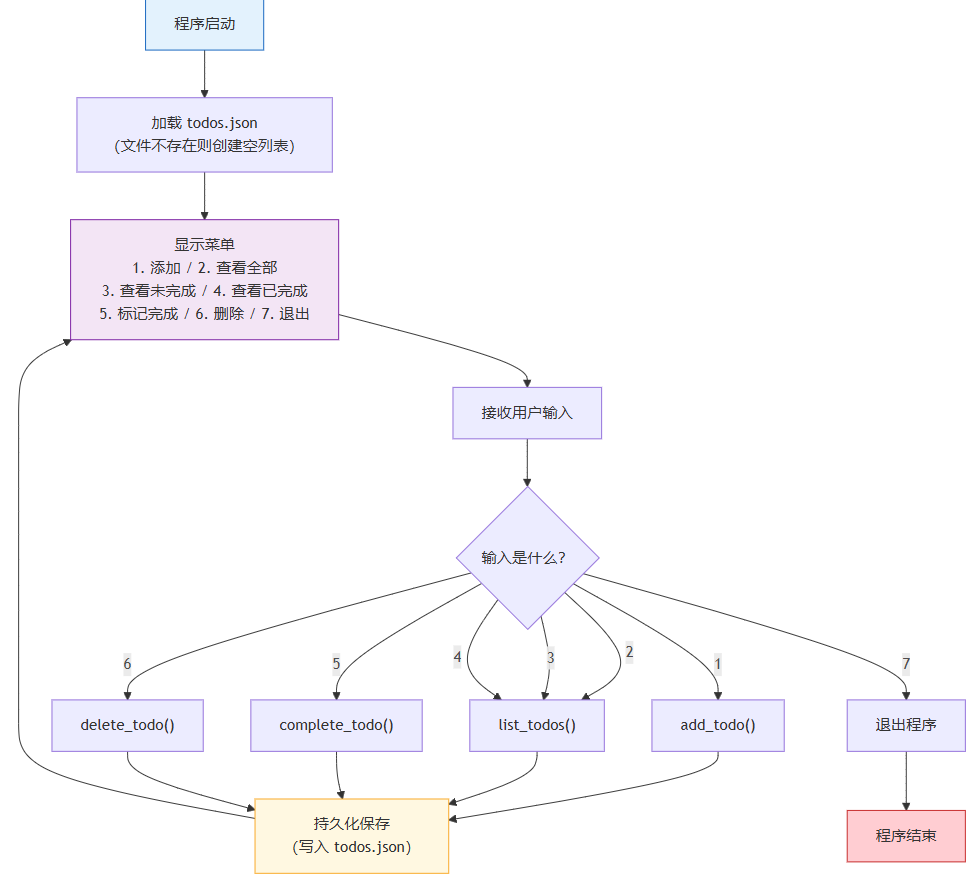
数据存储结构是这样的:
// todos.json
[
  {
    "id": 1,
    "title": "阅读模块与包文章",
    "completed": false,
    "created_at": "2026-04-27 09:15"
  },
  {
    "id": 2,
    "title": "整理 python 笔记",
    "completed": true,
    "created_at": "2026-04-26 20:30"
  }
]
二、第一步:内存版——只管添加和查看
先写一个最简单版本,不涉及文件操作。所有待办项存在内存列表里,程序退出就消失——这个版本用来验证数据结构是否合理。
2.1 定义数据结构
每个待办项是一个字典,包含:
id:唯一编号,用于精确定位每条记录title:待办内容completed:是否已完成(布尔值)created_at:创建时间
import datetime

todos = []          # 全局列表,存储所有待办项
next_id = 1        # 下一个可用的 id


def add_todo(title):
    global next_id
    todo = {
        "id": next_id,
        "title": title,
        "completed": false,
        "created_at": datetime.datetime.now().strftime("%y-%m-%d %h:%m"),
    }
    todos.append(todo)
    next_id += 1
    print(f"✅ 已添加:{title}")


def list_todos():
    if not todos:
        print("📋 暂无待办事项")
        return

    for todo in todos:
        status = "✓" if todo["completed"] else "○"
        print(f"  [{status}] #{todo['id']} {todo['title']}")
2.2 测试这两个函数
add_todo("阅读模块与包文章")
add_todo("整理 python 笔记")
add_todo("完成待办管理器 v1")
list_todos()
输出:
✅ 已添加:阅读模块与包文章
✅ 已添加:整理 python 笔记
✅ 已添加:完成待办管理器 v1
[○] #1 阅读模块与包文章
[○] #2 整理 python 笔记
[○] #3 完成待办管理器 v1
关键理解:到这里,待办项的数据结构已经验证完毕。后续所有工作都是在这些基础上加功能,而不是重新设计数据结构。
三、第二步:加上标记完成和删除
3.1 标记完成
用户输入待办 id,程序找到对应项并将其 completed 设为 true:
def complete_todo(todo_id):
    for todo in todos:
        if todo["id"] == todo_id:
            if todo["completed"]:
                print(f"⚠️  #{todo_id} 已经是完成状态")
                return
            todo["completed"] = true
            print(f"🎉 #{todo_id} {todo['title']} 已标记完成")
            return
    print(f"❌ 未找到 id 为 {todo_id} 的待办项")
3.2 删除待办
def delete_todo(todo_id):
    for i, todo in enumerate(todos):
        if todo["id"] == todo_id:
            removed = todos.pop(i)
            print(f"🗑️  已删除:{removed['title']}")
            return
    print(f"❌ 未找到 id 为 {todo_id} 的待办项")
注意:pop(i) 按索引删除——但查找时用的是 id(内容),删除时用的是 enumerate 获取的索引 i。这两个操作必须配合,不能直接用 id 作为列表索引,因为 id 是逻辑编号,不等于列表下标。
测试:
complete_todo(2)
delete_todo(3)
list_todos()
输出:
🎉 #2 整理 python 笔记 已标记完成
🗑️ 已删除:完成待办管理器 v1
[○] #1 阅读模块与包文章
[✓] #2 整理 python 笔记
四、第三步:加上 json 文件持久化
内存版本的致命问题是程序退出后数据全丢了。加一层文件操作,让数据保存到 todos.json。
4.1 保存和加载函数
import json
import os

filename = "todos.json"


def save_todos():
    """将当前 todos 列表写入 json 文件"""
    with open(filename, "w", encoding="utf-8") as f:
        json.dump(todos, f, ensure_ascii=false, indent=2)
    print(f"💾 已保存到 {filename}")


def load_todos():
    """从 json 文件加载待办项列表"""
    global next_id
    if not os.path.exists(filename):
        print("📁 首次运行,创建空数据文件")
        return

    with open(filename, "r", encoding="utf-8") as f:
        loaded = json.load(f)

    todos.clear()
    todos.extend(loaded)

    # 恢复 next_id:已有 id 的最大值 + 1
    if todos:
        next_id = max(t["id"] for t in todos) + 1
    else:
        next_id = 1

    print(f"📂 已从 {filename} 加载 {len(todos)} 条待办")


def add_todo(title):
    global next_id
    todo = {
        "id": next_id,
        "title": title,
        "completed": false,
        "created_at": datetime.datetime.now().strftime("%y-%m-%d %h:%m"),
    }
    todos.append(todo)
    next_id += 1
    save_todos()           # 每次添加后自动保存
    print(f"✅ 已添加:{title}")


def complete_todo(todo_id):
    for todo in todos:
        if todo["id"] == todo_id:
            todo["completed"] = true
            save_todos()
            print(f"🎉 #{todo_id} {todo['title']} 已标记完成")
            return
    print(f"❌ 未找到 id 为 {todo_id} 的待办项")


def delete_todo(todo_id):
    for i, todo in enumerate(todos):
        if todo["id"] == todo_id:
            removed = todos.pop(i)
            save_todos()
            print(f"🗑️  已删除:{removed['title']}")
            return
    print(f"❌ 未找到 id 为 {todo_id} 的待办项")
设计说明:把 save_todos() 嵌入了 add_todo、complete_todo、delete_todo 三个函数——这叫"每次修改后立即保存",简单可靠。复杂系统会用事务或缓冲,但这里每条操作都足够轻量,即时保存没有性能问题。
五、第四步:加上主循环和异常处理
5.1 菜单选项 → 函数映射
用字典替代大量 if/elif,是让代码更优雅的实用技巧:
menu = """
========================================
         📝 待办事项管理器
========================================
  1. 添加待办
  2. 查看待办
  3. 标记完成
  4. 删除待办
  5. 退出
========================================
请输入选项(1-5):
"""
主循环:
def main():
    load_todos()

    while true:
        try:
            choice = input(menu).strip()

            if choice == "1":
                title = input("请输入待办内容:").strip()
                if not title:
                    print("⚠️  内容不能为空")
                    continue
                add_todo(title)

            elif choice == "2":
                list_todos()

            elif choice == "3":
                list_todos()
                if not todos:
                    continue
                try:
                    todo_id = int(input("请输入要完成的待办 id:").strip())
                except valueerror:
                    print("⚠️  请输入数字 id")
                    continue
                complete_todo(todo_id)

            elif choice == "4":
                list_todos()
                if not todos:
                    continue
                try:
                    todo_id = int(input("请输入要删除的待办 id:").strip())
                except valueerror:
                    print("⚠️  请输入数字 id")
                    continue
                delete_todo(todo_id)

            elif choice == "5":
                print("👋 下次见!")
                break

            else:
                print("⚠️  无效选项,请输入 1-5 之间的数字")

        except keyboardinterrupt:
            print("\n👋 强制退出,下次见!")
            break


if __name__ == "__main__":
    main()
5.2 异常处理的三处场景
这段代码里有三处不同类型的异常处理,各自解决不同问题:
| 位置 | 异常类型 | 保护什么 |
|---|---|---|
int(input(...)) | valueerror | 用户输入了非数字内容 |
open(filename, "r") | filenotfounderror | 数据文件不存在(load_todos 里已处理) |
input() 外层 | keyboardinterrupt | 用户按 ctrl+c 强制退出 |
六、完整代码
把所有部分组合在一起,加上注释和 docstring:
"""
待办事项管理器 v1.0
命令行界面,数据持久化到 json 文件
"""

import json
import os
import datetime

filename = "todos.json"
todos = []
next_id = 1


def load_todos():
    """从 json 文件加载待办项列表,不存在则创建空文件"""
    global next_id
    if not os.path.exists(filename):
        open(filename, "w", encoding="utf-8").close()
        print("📁 首次运行,已创建空数据文件")
        return

    try:
        with open(filename, "r", encoding="utf-8") as f:
            data = json.load(f)
        todos.clear()
        todos.extend(data)
        next_id = (max(t["id"] for t in todos) + 1) if todos else 1
        print(f"📂 已加载 {len(todos)} 条待办")
    except (json.jsondecodeerror, ioerror) as e:
        print(f"⚠️  数据文件读取失败,将使用空列表:{e}")


def save_todos():
    """将当前 todos 列表写入 json 文件"""
    try:
        with open(filename, "w", encoding="utf-8") as f:
            json.dump(todos, f, ensure_ascii=false, indent=2)
    except ioerror as e:
        print(f"❌ 保存失败:{e}")


def add_todo(title):
    """添加一条待办项"""
    global next_id
    todo = {
        "id": next_id,
        "title": title,
        "completed": false,
        "created_at": datetime.datetime.now().strftime("%y-%m-%d %h:%m"),
    }
    todos.append(todo)
    next_id += 1
    save_todos()
    print(f"✅ 已添加 [{todo['id']}] {title}")


def list_todos(filter_status=none):
    """列出所有待办项,支持按状态过滤"""
    if not todos:
        print("📋 暂无待办事项")
        return

    print("\n" + "=" * 40)
    for todo in todos:
        if filter_status is not none and todo["completed"] != filter_status:
            continue
        status = "✓" if todo["completed"] else "○"
        line = f"  [{status}] #{todo['id']} {todo['title']}"
        if todo["completed"]:
            line += f" ({todo['created_at']})"
        print(line)
    print("=" * 40)
    print(f"共 {len(todos)} 条,"
          f"已完成 {sum(1 for t in todos if t['completed'])} 条,"
          f"未完成 {sum(1 for t in todos if not t['completed'])} 条")


def complete_todo(todo_id):
    """将指定 id 的待办标记为已完成"""
    for todo in todos:
        if todo["id"] == todo_id:
            if todo["completed"]:
                print(f"⚠️  #{todo_id} 已经是完成状态")
                return
            todo["completed"] = true
            save_todos()
            print(f"🎉 #{todo_id} 已标记完成:{todo['title']}")
            return
    print(f"❌ 未找到 id 为 {todo_id} 的待办项")


def delete_todo(todo_id):
    """删除指定 id 的待办项"""
    for i, todo in enumerate(todos):
        if todo["id"] == todo_id:
            removed = todos.pop(i)
            save_todos()
            print(f"🗑️  已删除:{removed['title']}")
            return
    print(f"❌ 未找到 id 为 {todo_id} 的待办项")


def main():
    load_todos()

    menu = """
========================================
         📝 待办事项管理器 v1.0
========================================
  1. 添加待办
  2. 查看全部
  3. 查看未完成
  4. 查看已完成
  5. 标记完成
  6. 删除待办
  7. 退出
========================================
    """

    while true:
        try:
            choice = input(menu).strip()

            if choice == "1":
                title = input("请输入待办内容:").strip()
                if not title:
                    print("⚠️  内容不能为空")
                    continue
                add_todo(title)

            elif choice == "2":
                list_todos()

            elif choice == "3":
                list_todos(filter_status=false)

            elif choice == "4":
                list_todos(filter_status=true)

            elif choice == "5":
                list_todos(filter_status=false)
                if not todos:
                    continue
                raw = input("请输入要完成的待办 id(直接回车取消):").strip()
                if not raw:
                    continue
                try:
                    complete_todo(int(raw))
                except valueerror:
                    print("⚠️  请输入数字")

            elif choice == "6":
                list_todos()
                if not todos:
                    continue
                raw = input("请输入要删除的待办 id(直接回车取消):").strip()
                if not raw:
                    continue
                try:
                    delete_todo(int(raw))
                except valueerror:
                    print("⚠️  请输入数字")

            elif choice == "7":
                print("👋 下次见!")
                break

            else:
                print("⚠️  无效选项,请输入 1-7")

        except keyboardinterrupt:
            print("\n👋 下次见!")
            break


if __name__ == "__main__":
    main()
七、运行效果
$ python todo_manager.py
📂 已加载 3 条待办

========================================
         📝 待办事项管理器 v1.0
========================================
  1. 添加待办
  2. 查看全部
  3. 查看未完成
  4. 查看已完成
  5. 标记完成
  6. 删除待办
  7. 退出
========================================

请输入选项(1-7):
2

========================================
  [○] #1 阅读模块与包文章
  [✓] #2 整理 python 笔记
  [○] #3 完成待办管理器 v1
========================================
共 3 条,已完成 1 条,未完成 2 条

请输入选项(1-7):
1
请输入待办内容:发布文章到 csdn
💾 已保存到 todos.json
✅ 已添加 [4] 发布文章到 csdn

请输入选项(1-7):
5

========================================
  [○] #1 阅读模块与包文章
  [○] #3 完成待办管理器 v1
  [○] #4 发布文章到 csdn
========================================
共 3 条,已完成 0 条,未完成 3 条

请输入要完成的待办 id(直接回车取消):3
💾 已保存到 todos.json
🎉 #3 已标记完成:完成待办管理器 v1

请输入选项(1-7):
7
👋 下次见!
程序退出后,todos.json 文件里已经保存了所有数据,下次运行会自动加载:
[
  {
    "id": 1,
    "title": "阅读模块与包文章",
    "completed": false,
    "created_at": "2026-04-27 09:15"
  },
  {
    "id": 2,
    "title": "整理 python 笔记",
    "completed": true,
    "created_at": "2026-04-26 20:30"
  },
  {
    "id": 3,
    "title": "完成待办管理器 v1",
    "completed": true,
    "created_at": "2026-04-27 10:00"
  },
  {
    "id": 4,
    "title": "发布文章到 csdn",
    "completed": false,
    "created_at": "2026-04-27 10:05"
  }
]
八、扩展方向:让工具更接近真实产品
当前版本可以正常工作,但真实场景中还需要更多功能。以下是几个典型的扩展方向,每个都能独立成一个小专题:

| 扩展功能 | 涉及的新知识点 |
|---|---|
| 优先级(高/中/低) | 字典增加 priority 字段,列表排序 sort(key=...) |
| 截止日期 + 排序 | datetime 模块,按日期排序 |
| 分类标签 | 列表的列表或 set,支持多标签 |
| 命令行参数入口 | sys.argv,python todo.py add "内容" |
| 数据统计 | 汇总计算、格式化输出 |
九、知识结构图

十、工程原则
- 数据结构先行:先确定 json 存储结构,再写代码——改数据结构代价很高,中途发现结构不对再改会推翻很多代码。
- 每个功能一个函数:
add_todo、list_todos、complete_todo、delete_todo各司其职,主循环只负责分发任务,不写具体逻辑。 - 每次修改立即保存:这个工具的数据量极小(几百条),每次操作后保存没有性能问题,却能保证程序崩溃时数据不丢失。
- 异常处理分散到各处,而非集中:
load_todos处理文件不存在,main的循环处理用户输入格式错误和强制退出——每个场景独立处理,不需要一个大 try 包住整个程序。 - 用字典做分支映射:菜单选项 → 函数映射是一个值得养成的习惯——加新选项只需要在字典里加一行,主循环保持整洁。
到这里,从变量到函数,从数据结构到文件操作,从异常处理到模块化设计——这一路走下来,已经具备了独立编写小型 python 程序的能力。
到此这篇关于使用python编写一个待办事项管理器(cli 版)的文章就介绍到这了,更多相关python待办事项管理器内容请搜索代码网以前的文章或继续浏览下面的相关文章希望大家以后多多支持代码网!




发表评论