
 我要评论
我要评论在 springboot 项目开发中,静态资源访问是前端页面、图片上传、富文本、后台管理系统必备的功能。
很多同学经常遇到:图片上传成功但访问 404、js/css 加载失败、自定义目录不生效、线上环境无法访问等问题。
今天就来讲讲 springboot 静态资源的默认规则、自定义配置、本地映射、外部路径、权限放行、打包部署。
一、什么是静态资源?
- • 图片:jpg、png、gif、webp
- • 样式:css、less、scss
- • 脚本:js、ts
- • 静态页面:html、ico、font
- • 上传文件:excel、pdf、视频
springboot 对这些资源提供自动映射,也支持高度自定义。
二、springboot 默认静态资源规则(自动生效)
默认 5 个静态资源路径(优先级从高到低):
- 1.
meta-inf/resources - 2.
resources/ - 3.
static/(最常用) - 4.
public/ - 5.
webapp/
默认访问规则:
直接访问资源名即可,不需要加目录前缀。
示例:
src/main/resources/static/images/logo.png
访问地址:
http://localhost:8080/images/logo.png
三、最常用场景:自定义静态资源映射
实际项目中,我们会把用户上传的图片/文件存放在服务器外部路径,避免项目重新打包文件丢失。
这时候必须用:springmvc 资源映射
1. 编写配置类
package com.demo.config;
import org.springframework.context.annotation.configuration;
import org.springframework.web.servlet.config.annotation.resourcehandlerregistry;
import org.springframework.web.servlet.config.annotation.webmvcconfigurer;
/**
 * 静态资源配置
 */
@configuration
public class webmvcconfig implements webmvcconfigurer {
    /**
     * 静态资源映射
     * 访问路径 /uploads/xxx.jpg  →  映射到本地 d:/uploads/xxx.jpg
     */
    @override
    public void addresourcehandlers(resourcehandlerregistry registry) {
        // 1. 访问 url 规则
        registry.addresourcehandler("/uploads/**")
                // 2. 本地真实路径(末尾必须加 /)
                .addresourcelocations("file:d:/uploads/");
        // 2. 也可以配置相对路径
        registry.addresourcehandler("/static/**")
                .addresourcelocations("classpath:/static/");
    }
}
2. 访问示例
本地文件:
d:/uploads/avatar.jpg
访问地址:
http://localhost:8080/uploads/avatar.jpg
四、application.yml 配置静态资源
如果你不想写配置类,可以直接在 yml 中配置:
spring:
  web:
    resources:
      # 自定义静态资源路径
      static-locations: classpath:/static/,classpath:/public/,file:./uploads/
⚠️ 注意:
配置后会覆盖默认路径,不是追加,所以要把需要的路径都写上。
五、静态资源放行(解决 shiro/security 拦截 404)
如果项目集成了 shiro/spring security,静态资源会被登录拦截,必须手动放行:
1. shiro 放行配置
filtermap.put("/static/**", "anon");
filtermap.put("/uploads/**", "anon");
filtermap.put("/**.js", "anon");
filtermap.put("/**.css", "anon");
filtermap.put("/**.png", "anon");
filtermap.put("/**.jpg", "anon");
filtermap.put("/**.ico", "anon");
2. security 放行配置
http.authorizerequests()
    .antmatchers("/static/**","/uploads/**","/**.js","/**.css").permitall()
    .anyrequest().authenticated();
六、自定义 favicon.ico(网站图标)
只需要把 favicon.ico 放到:
resources/static/favicon.ico
springboot 自动加载,无需任何配置。
七、springboot 静态资源缓存(生产优化)
registry.addresourcehandler("/static/**")
        .addresourcelocations("classpath:/static/")
        // 浏览器缓存 10 天
        .setcacheperiod(864000);
八、图片上传 + 回显完整实战
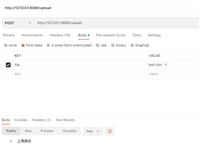
1. 上传接口
@postmapping("/upload")
public result upload(multipartfile file) throws ioexception {
    // 上传目录
    string path = "d:/uploads/";
    file dir = new file(path);
    if (!dir.exists()) dir.mkdirs();
    // 文件名
    string filename = uuid.randomuuid() + file.getoriginalfilename().substring(file.getoriginalfilename().lastindexof("."));
    file.transferto(new file(path + filename));
    // 返回可访问的 url
    string url = "http://localhost:8080/uploads/" + filename;
    return result.success(url);
}
2. 配置映射
registry.addresourcehandler("/uploads/**")
        .addresourcelocations("file:d:/uploads/");
九、linux 服务器部署路径写法
registry.addresourcehandler("/uploads/**")
        .addresourcelocations("file:/usr/local/uploads/");
十、静态资源 404 常见原因
- 1. 路径末尾缺少 /
- 错误:/uploads
- 正确:/uploads/**
- 2. 本地路径末尾缺少 /
- 错误:file:d:/uploads
- 正确:file:d:/uploads/
- 3. 被拦截器/权限框架拦截
- 需要放行静态资源
- 4. windows 与 linux 路径格式不一致
- windows:d:/uploads/
- linux:/usr/local/uploads/
- 5. 目录权限不足
- linux 需要给目录读写权限
十一、springboot 静态资源核心总结
- 1. 默认路径:
static文件夹直接访问 - 2. 外部文件:用
addresourcehandler映射 - 3. 图片上传:必须用外部路径,避免打包丢失
- 4. 权限拦截:一定要放行静态资源
- 5. 路径格式:末尾必须加
/ - 6. 生产环境:配置缓存提升性能
掌握这些,所有静态资源问题全部解决!
总结与建议
- 简单项目:直接使用默认的
src/main/resources/static目录存放所有静态资源即可,无需任何配置。 - 需要区分请求:在
application.yml中设置spring.mvc.static-path-pattern: /resources/**,为静态资源请求统一加上前缀。 - 处理上传文件:不要使用
static-locations,而是创建一个配置类,通过addresourcehandlers方法将特定 url 映射到磁盘绝对路径。
到此这篇关于springboot 静态资源访问(图片/js/css)配置详解(最新推荐)的文章就介绍到这了,更多相关springboot 静态资源访问配置内容请搜索代码网以前的文章或继续浏览下面的相关文章希望大家以后多多支持代码网!




发表评论