
 我要评论
我要评论背景
后台需要批量处理excel数据,常见的就是导入导出了。故自己写了一个小工具。
依赖
<dependency>
    <groupid>com.alibaba</groupid>
    <artifactid>easyexcel</artifactid>
    <version>3.3.4</version>
</dependency>
工具类
package org.test.exceldemo.excel;

import com.alibaba.excel.easyexcel;
import com.alibaba.excel.excelwriter;
import com.alibaba.excel.enums.celldatatypeenum;
import com.alibaba.excel.metadata.head;
import com.alibaba.excel.metadata.data.celldata;
import com.alibaba.excel.metadata.data.writecelldata;
import com.alibaba.excel.read.listener.pagereadlistener;
import com.alibaba.excel.write.metadata.writesheet;
import com.alibaba.excel.write.metadata.holder.writesheetholder;
import com.alibaba.excel.write.style.column.abstractcolumnwidthstylestrategy;
import com.alibaba.excel.write.style.column.longestmatchcolumnwidthstylestrategy;
import org.apache.poi.ss.usermodel.cell;
import org.apache.poi.ss.usermodel.sheet;
import org.springframework.util.collectionutils;
import org.springframework.web.multipart.multipartfile;

import java.io.*;
import java.net.url;
import java.util.hashmap;
import java.util.list;
import java.util.map;
import java.util.function.consumer;
import java.util.function.function;

/**
 * excel 导入导出工具类
 * 包含只读写、只写、流式读、流式写
 */
public class easyexcelpipelineutil {
    /**
     * ⭐⭐⭐ 同步读取(小文件用)
     */
    public static <t> list<t> readsync(inputstream inputstream, class<t> clazz) {
        return easyexcel.read(inputstream)
                .head(clazz)
                .sheet()
                .doreadsync();
    }

    /**
     * ⭐⭐⭐ 分页读取(推荐)
     */
    public static <t> void readbypage(inputstream inputstream,
                                      class<t> clazz,
                                      consumer<list<t>> consumer,
                                      int pagesize) {

        easyexcel.read(inputstream, clazz,
                        new pagereadlistener<t>(consumer, pagesize))
                .sheet()
                .doread();
    }

    /**
     * ⭐⭐⭐ multipartfile 分页读取
     */
    public static <t> void readbymultipart(multipartfile file,
                                           class<t> clazz,
                                           consumer<list<t>> consumer,
                                           int pagesize) throws ioexception {

        readbypage(file.getinputstream(), clazz, consumer, pagesize);
    }

    /**
     * ⭐⭐⭐ url 分页读取
     */
    public static <t> void readbyurl(string url,
                                     class<t> clazz,
                                     consumer<list<t>> consumer,
                                     int pagesize) throws exception {

        try (inputstream in = new url(url).openstream()) {
            readbypage(in, clazz, consumer, pagesize);
        }
    }

    /**
     * ====================================
     * ⭐⭐⭐⭐⭐ 直接写 excel(最常用导出)
     * ====================================
     */
    public static <t> void write(string filepath,
                                 class<t> clazz,
                                 list<t> data, string sheetname) {

        easyexcel.write(filepath, clazz)
                .registerwritehandler(new longestmatchcolumnwidthstylestrategy())
                .registerwritehandler(new excelcellwritewidthconfig())
                .sheet(sheetname)
                .dowrite(data);
    }

    /**
     * ⭐ 写到 outputstream(浏览器下载用)
     */
    public static <t> void write(outputstream outputstream,
                                 class<t> clazz,
                                 list<t> data, string sheetname) {

        easyexcel.write(outputstream, clazz)
                .registerwritehandler(new longestmatchcolumnwidthstylestrategy())
                .registerwritehandler(new excelcellwritewidthconfig())
                .sheet(sheetname)
                .dowrite(data);
    }

    /**
     * ⭐⭐⭐⭐ 超大数据流式写(百万行推荐)
     */
    public static <t> void writestream(string filepath,
                                       class<t> clazz,
                                       consumer<excelwriter> writerconsumer) {

        excelwriter writer = easyexcel.write(filepath, clazz)
                .registerwritehandler(new longestmatchcolumnwidthstylestrategy())
                .registerwritehandler(new excelcellwritewidthconfig())
                .build();

        try {
            writerconsumer.accept(writer);
        } finally {
            writer.finish();
        }
    }
// 调用样例
//    easyexcelutil.writestream(
//            "d:/big.xlsx",
//    userexportvo.class,
//    writer -> {
//
//        for (int i = 0; i < 100; i++) {
//
//            list<userexportvo> page =
//                    userservice.querypage(i);
//
//            easyexcelutil.writebatchsheet(
//                    writer,
//                    page,
//                    0,
//                    "用户表"
//            );
//        }
//    }
//);

    /**
     * ⭐ 分批写 sheet
     */
    public static <t> void writebatchsheet(excelwriter writer,
                                           list<t> data,
                                           int sheetno,
                                           string sheetname) {

        writesheet sheet = easyexcel.writersheet(sheetno, sheetname)
                .registerwritehandler(new longestmatchcolumnwidthstylestrategy())
                .registerwritehandler(new excelcellwritewidthconfig())
                .build();
        writer.write(data, sheet);
    }

    /**
     * ⭐⭐⭐ 核心流式分页处理(真正生产级)
     * ⭐⭐⭐ 不关心读写,只需要处理数据即可,包含excel文件的读写
     */
    private static <in, out> void processstream(
            inputstream inputstream,
            outputstream outputstream,
            class<in> inclass,
            class<out> outclass,
            function<list<in>, list<out>> mapper,
            int pagesize) {

        excelwriter writer = easyexcel.write(outputstream, outclass)
                        .registerwritehandler(new longestmatchcolumnwidthstylestrategy())
                        .registerwritehandler(new excelcellwritewidthconfig())
                        .build();
        writesheet sheet = easyexcel.writersheet("result").build();

        easyexcel.read(inputstream, inclass,
                        new pagereadlistener<in>(pagedata -> {
                            list<out> result = mapper.apply(pagedata);
                            writer.write(result, sheet);
                        }, pagesize))
                .sheet()
                .doread();

        writer.finish();
    }

    /**
     * =========================
     * ⭐ 本地文件路径
     * =========================
     */
    public static <in, out> void processbyfilepath(
            string inputfile,
            string outputfile,
            class<in> inclass,
            class<out> outclass,
            function<list<in>, list<out>> mapper,
            int pagesize) throws exception {

        try (inputstream in = new fileinputstream(inputfile);
             outputstream out = new fileoutputstream(outputfile)) {

            processstream(in, out, inclass, outclass, mapper, pagesize);
        }
    }

    /**
     * =========================
     * ⭐ url 网络文件
     * =========================
     */
    public static <in, out> void processbyurl(
            string fileurl,
            string outputfile,
            class<in> inclass,
            class<out> outclass,
            function<list<in>, list<out>> mapper,
            int pagesize) throws exception {

        try (inputstream in = new url(fileurl).openstream();
             outputstream out = new fileoutputstream(outputfile)) {

            processstream(in, out, inclass, outclass, mapper, pagesize);
        }
    }

    /**
     * =========================
     * ⭐ multipartfile(web上传)
     * =========================
     */
    public static <in, out> void processbymultipart(
            multipartfile file,
            string outputfile,
            class<in> inclass,
            class<out> outclass,
            function<list<in>, list<out>> mapper,
            int pagesize) throws exception {
        try (inputstream in = file.getinputstream();
             outputstream out = new fileoutputstream(outputfile)) {

            processstream(in, out, inclass, outclass, mapper, pagesize);
        }
    }

    /**
     * =========================
     * ⭐ inputstream 通用入口
     * =========================
     */
    public static <in, out> void processbystream(
            inputstream inputstream,
            outputstream outputstream,
            class<in> inclass,
            class<out> outclass,
            function<list<in>, list<out>> mapper,
            int pagesize) {

        processstream(inputstream, outputstream, inclass, outclass, mapper, pagesize);
    }

    /**
     * 自动计算列宽
     *
     */
    private static class excelcellwritewidthconfig extends abstractcolumnwidthstylestrategy {
        private final map<integer, map<integer, integer>> cache = new hashmap<>();

        @override
        protected void setcolumnwidth(writesheetholder writesheetholder, list<writecelldata<?>> celldatalist, cell cell, head head, integer integer, boolean ishead) {
            boolean needsetwidth = ishead || !collectionutils.isempty(celldatalist);
            if (needsetwidth) {
                map<integer, integer> maxcolumnwidthmap = cache.computeifabsent(writesheetholder.getsheetno(), k -> new hashmap<>());

                integer columnwidth = this.datalength(celldatalist, cell, ishead);
                // 单元格文本长度大于60换行
                if (columnwidth >= 0) {
                    if (columnwidth > 60) {
                        columnwidth = 60;
                    }
                    integer maxcolumnwidth = maxcolumnwidthmap.get(cell.getcolumnindex());
                    if (maxcolumnwidth == null || columnwidth > maxcolumnwidth) {
                        maxcolumnwidthmap.put(cell.getcolumnindex(), columnwidth);
                        sheet sheet = writesheetholder.getsheet();
                        sheet.setcolumnwidth(cell.getcolumnindex(), columnwidth * 2 * 256);
                    }
                }
            }
        }

        /**
         * 计算长度
         */
        private integer datalength(list<writecelldata<?>> celldatalist, cell cell, boolean ishead) {
            if (ishead) {
                return cell.getstringcellvalue().getbytes().length;
            } else {
                celldata<?> celldata = celldatalist.get(0);
                celldatatypeenum type = celldata.gettype();
                if (type == null) {
                    return -1;
                } else {
                    switch (type) {
                        case string:
                            // 换行符(数据需要提前解析好)
                            int index = celldata.getstringvalue().indexof("\n");
                            return index != -1 ?
                                    celldata.getstringvalue().substring(0, index).getbytes().length + 1 : celldata.getstringvalue().getbytes().length + 1;
                        case boolean:
                            return celldata.getbooleanvalue().tostring().getbytes().length;
                        case number:
                            return celldata.getnumbervalue().tostring().getbytes().length;
                        default:
                            return -1;
                    }
                }
            }
        }
    }
}
举例
定义exel文件数据类,定义数据处理函数即可。
导入类
package org.test.exceldemo.excel;

import com.alibaba.excel.annotation.excelproperty;
import lombok.data;

/**
 *  导入数据类,对应excel表格字段
 */
@data
public class userimportvo {

    @excelproperty("user name")
    private string name;

    @excelproperty("user age")
    private integer age;
}
导出类
package org.test.exceldemo.excel;

import com.alibaba.excel.annotation.excelproperty;
import lombok.data;

/**
 * 导入结果类
 */
@data
public class userimportresultvo {

    @excelproperty("user name")
    private string name;

    @excelproperty("user age")
    private integer age;

    @excelproperty("import result")
    private string result;
}
数据处理函数类
package org.test.exceldemo.excel;

import org.springframework.beans.beanutils;
import org.springframework.stereotype.service;

import java.util.arraylist;
import java.util.list;
import java.util.set;

/**
 *
 */
@service
public class testexceldemoservice {
    /**
     * excel数据处理类
     * @param list excel数据
     * @param globalunique 全局唯一
     * @return 处理结果
     */
    public list<userimportresultvo> convertpage(list<userimportvo> list, set<string> globalunique) {

        list<userimportresultvo> result = new arraylist<>();

        for (userimportvo in : list) {
            userimportresultvo out = new userimportresultvo();
            beanutils.copyproperties(in, out);
            // 判断数据重复
            if (!globalunique.add(in.getname())){
                out.setresult("重复数据");
                result.add(out);
                continue;
            }
            // 数据处理逻辑

            // 处理结果
            out.setresult("success");
            result.add(out);
        }
        return result;
    }
}
模拟请求处理类
@restcontroller
@requestmapping("/")
public class testexcelcontroller {
    @resource
    private testexceldemoservice testexceldemoservice;

    @postmapping(path = "upload", consumes = mediatype.multipart_form_data_value)
    public string uploadfile(@requestparam("file") multipartfile file) throws exception {
        //通过文件后缀名或文件魔数进行更可靠的校验
        string originalfilename = file.getoriginalfilename();
        // 只处理excel文件
        if (originalfilename != null && !originalfilename.tolowercase().endswith(".xlsx")) {
            return "仅支持 excel 文件";
        }

        set<string> globalunique = new hashset<>();
        easyexcelpipelineutil.processbymultipart(file,
                "d:/output.xlsx",
                userimportvo.class,
                userimportresultvo.class,  list -> testexceldemoservice.convertpage(list, globalunique), 1000);
        return "上传成功";
    }
}
测试数据
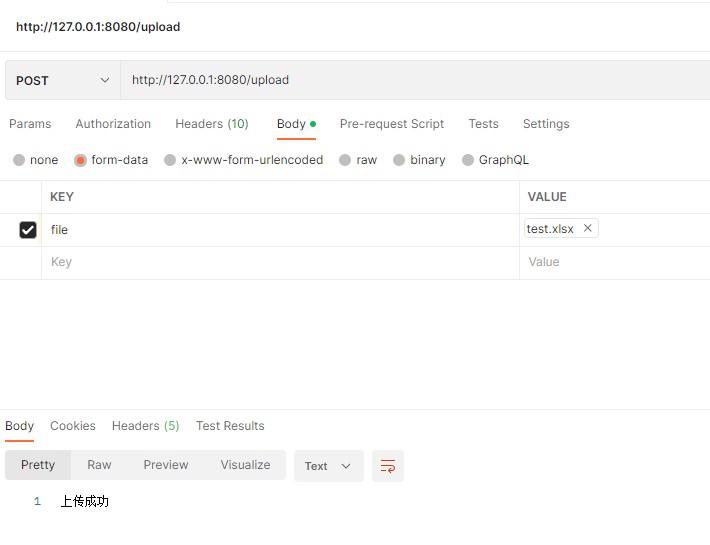
模拟请求
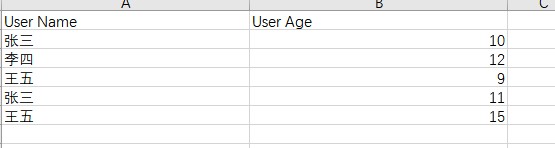
请求文件数据
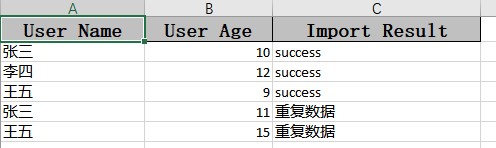
生成导出结果文件数据
总结
以上为个人经验,希望能给大家一个参考,也希望大家多多支持代码网。





发表评论