
 我要评论
我要评论1.解决问题
前后端在交互过程中,请求和响应的数据需要加密处理,并保证安全和性能。
方案名称:ecies (elliptic curve integrated encryption scheme,椭圆曲线集成加密方案)
2.核心思路
服务端准备
- 生成密钥对(ec-椭圆曲线),私钥servprikey放在服务端。
- 公钥servpubkey安全地预置或下发给客户端(如通过初始化接口)。
客户端加密(每次请求)
- 生成临时密钥对(ec-椭圆曲线),公钥pubkey,私钥prikey
- 用私钥prikey + 服务端公钥servpubkey计算共享密钥key(ecdh-协商+sha256)
- 加密请求业务数据(aes):encryptdata = aes.encrypt(data, key)
- 发送加密后的业务数据encryptdata 和公钥pubkey给服务端
服务端解密
- 用私钥servprikey + 客户端公钥pubkey计算共享密钥key(ecdh-协商+sha256)
- 解密请求数据,data = aes.decrypt(encryptdata, key)
服务端加密:通过3中计算的key直接加密数据即可
客户端解密:通过2中计算的key直接解密数据即可
3.代码示例
package com.visy.utils;

import cn.hutool.crypto.symmetric.aes;

import javax.crypto.keyagreement;
import java.security.*;
import java.security.spec.ecgenparameterspec;
import java.security.spec.pkcs8encodedkeyspec;
import java.security.spec.x509encodedkeyspec;
import java.util.base64;
import java.util.function.consumer;


/**
 * ecies (elliptic curve integrated encryption scheme,椭圆曲线集成加密方案)
 * 这个方案是椭圆曲线密码学中的密码学方案,用于实现前后端间通信的数据加密,是应用内的加密机制。
 * 核心是密钥协商:使用ecdh算法生成密钥对,并计算出共享密钥。
 */
public class eciesdemo {

    //base64工具类
    static class base64 {
        public static string encode(byte[] data) {
            return base64.getencoder().encodetostring(data);
        }

        public static byte[] decode(string base64str) {
            return base64.getdecoder().decode(base64str);
        }
    }

    //ecdh工具
    static class ecdh {
        public static strkeypair generatekeypair(string curvename) throws exception {
            // 1. 指定椭圆曲线参数,例如 secp256r1 (nist p-256)
            ecgenparameterspec ecspec = new ecgenparameterspec(curvename);
            // 2. 生成ecc密钥对
            keypairgenerator kpg = keypairgenerator.getinstance("ec");
            kpg.initialize(ecspec, new securerandom());
            keypair keypair = kpg.generatekeypair();
            return strkeypair.of(keypair);
        }

        /**
         * ecdh核心方法:计算共享秘密
         * @param myprikey 己方的私钥(base64字符串)
         * @param otherpubkey 对方的公钥(base64字符串)
         * @return base64编码的共享秘密字符串
         */
        public static string derivesharedsecret(string myprikey, string otherpubkey) throws exception {
            privatekey myprivatekey = toprivatekey(myprikey);
            publickey otherpublickey = topublickey(otherpubkey);

            keyagreement ka = keyagreement.getinstance("ecdh");
            ka.init(myprivatekey);
            ka.dophase(otherpublickey, true);

            byte[] rawsecret = ka.generatesecret();
            //用sha-256哈希一次,得到32字节aes-256密钥
            messagedigest sha256 = messagedigest.getinstance("sha-256");

            string shearedsecret = base64.encode(sha256.digest(rawsecret));
            system.out.println("【共享密钥】计算-私钥:"+myprikey);
            system.out.println("【共享密钥】计算-公钥:"+otherpubkey);
            system.out.println("【共享密钥】计算-结果:"+shearedsecret);
            system.out.println("---------------------------------");
            return shearedsecret;
        }

        private static publickey topublickey(string pubkey) throws exception {
            byte[] decodedbytes = base64.decode(pubkey);
            keyfactory keyfactory = keyfactory.getinstance("ec");
            x509encodedkeyspec keyspec = new x509encodedkeyspec(decodedbytes);
            return keyfactory.generatepublic(keyspec);
        }

        private static privatekey toprivatekey(string prikey) throws exception {
            byte[] decodedbytes = base64.decode(prikey);
            keyfactory keyfactory = keyfactory.getinstance("ec");
            pkcs8encodedkeyspec keyspec = new pkcs8encodedkeyspec(decodedbytes);
            return keyfactory.generateprivate(keyspec);
        }
    }

    //aes加解密工具
    static class aes {
        public static string  encrypt(string data, string key){
            aes aes = new aes(base64.decode(key));
            return aes.encryptbase64(data);
        }
        public static string decrypt(string data, string key){
            aes aes = new aes(base64.decode(key));
            return aes.decryptstr(base64.decode(data));
        }
    }

    //模拟客户端(如浏览器)
    static class client {
        //服务端公钥,固定值,后续不再更新
        private final string servpubkey;

        public client(string servpubkey){
            this.servpubkey = servpubkey;
            system.out.println("【客户端】初始化完成,服务端公钥: " + servpubkey);
            system.out.println("---------------------------------");
        }

        public void request(server server, string message, consumer<string> callback) throws exception {
            //生成密钥对
            strkeypair keypair = genkeypair();
            //计算共享密钥
            string sharedsecret = getsharedsecret(keypair.getprikey());
            //对称加密数据
            string reqdata = aes.encrypt(message, sharedsecret);
            //封装传输通道
            channel channel = new channel(keypair.getpubkey(), reqdata, resdata -> {
                //解密数据
                string data = aes.decrypt(resdata, sharedsecret);
                //将数据传给回调
                callback.accept(data);
            });
            //发送给服务端
            server.receive(channel);
        }

        private strkeypair genkeypair() throws exception {
            strkeypair keypair = ecdh.generatekeypair("secp256r1");
            system.out.println("【客户端】公钥: " + keypair.getpubkey());
            system.out.println("【客户端】私钥: " + keypair.getprikey());
            system.out.println("【客户端】已刷新密钥对!");
            system.out.println("---------------------------------");
            return keypair;
        }

        private string getsharedsecret(string prikey) throws exception {
            return ecdh.derivesharedsecret(prikey, this.servpubkey);
        }
    }

    //模拟后台服务端
    static class server {
        //服务端密钥对,只生成一次
        private final strkeypair keypair;

        public server() throws exception {
            this.keypair = ecdh.generatekeypair("secp256r1");
            system.out.println("【服务端】公钥: " + this.keypair.getpubkey());
            system.out.println("【服务端】私钥: " + this.keypair.getprikey());
            system.out.println("【服务端】初始化完成!");
            system.out.println("---------------------------------");
        }

        public string getpubkey(){
            return this.keypair.getpubkey();
        }

        public void receive(channel channel) throws exception {
            //客户端公钥
            string clientpubkey = channel.getclientpubkey();
            //计算共享密钥
            //因为服务端私钥是固定的
            //如果客户端不是每次请求都刷新密钥对,可以按clientpubkey直接缓存key
            //但是要注意内存溢出,可以设置缓存有效时间,指定最大缓存个数等
            string sharedsecret = getsharedsecret(clientpubkey);
            //解密数据
            string message = aes.decrypt(channel.read(), sharedsecret);
            system.out.println("【服务端】收到消息: " + message);
            system.out.println("【服务端】客户端公钥:" + clientpubkey);
            system.out.println("---------------------------------");

            //响应消息
            string resmsg = "服务端已收到消息->"+ message;
            //加密
            string data = aes.encrypt(resmsg, sharedsecret);
            //发送
            channel.write(data);
        }

        /**
         * 计算共享密钥(服务端私钥 + 客户端公钥)
         */
        private string getsharedsecret(string clientpubkey) throws exception {
            return ecdh.derivesharedsecret(this.keypair.getprikey(), clientpubkey);
        }
    }

    //模拟请求通道
    static class channel {
        private final string reqdata;
        private final string clientpubkey;
        private final consumer<string> callback;

        public channel(string clientpubkey, string reqdata, consumer<string> callback) {
            this.reqdata = reqdata;
            this.clientpubkey = clientpubkey;
            this.callback = callback;
        }

        //获取客户端公钥
        public string getclientpubkey(){
            return this.clientpubkey;
        }

        //读取数据
        public string read() {
            return this.reqdata;
        }

        //写入数据
        public void write(string resdata){
            this.callback.accept(resdata);
        }
    }

    //密钥对(base64字符串)
    static class strkeypair {
        private final string prikey;
        private final string pubkey;

        private strkeypair(keypair keypair) {
            this.prikey = base64.encode(keypair.getprivate().getencoded());
            this.pubkey = base64.encode(keypair.getpublic().getencoded());
        }

        public static strkeypair of(keypair keypair) {
            return new strkeypair(keypair);
        }

        public string getprikey() {
            return this.prikey;
        }

        public string getpubkey() {
            return this.pubkey;
        }
    }

    //测试
    public static void main(string[] args) throws  exception {
        //创建服务端
        server server = new server();
        //创建客户端
        client client = new client(server.getpubkey());

        //向服务端发送请求
        client.request(server, "hello world", data -> {
            system.out.println("【客户端】收到消息: " + data);
        });
        system.out.println("============================================");
        //向服务端发送请求
        client.request(server, "{\"name\": \"张三\"}", data -> {
            system.out.println("【客户端】收到消息: " + data);
        });
        system.out.println("============================================");
    }
}
4.输出
【服务端】公钥: mfkwewyhkozizj0caqyikozizj0daqcdqgaeuutqzsan1kh+ffvs95lkfob0zkzzy0mtbknoyfsz/wzalo8chh1zjch3nv82mxxwyj0t+yhp/dugfriy8viwbg==
【服务端】私钥: meecaqawewyhkozizj0caqyikozizj0daqcejzalagebbcaaj/unsk4tt+1vyt9vyanyqinr8uobgpzolvcmeihkkg==
【服务端】初始化完成!
---------------------------------
【客户端】初始化完成,服务端公钥: mfkwewyhkozizj0caqyikozizj0daqcdqgaeuutqzsan1kh+ffvs95lkfob0zkzzy0mtbknoyfsz/wzalo8chh1zjch3nv82mxxwyj0t+yhp/dugfriy8viwbg==
---------------------------------
【客户端】公钥: mfkwewyhkozizj0caqyikozizj0daqcdqgaedz5yrdfrm1l0wj0bqibmeq2zlca96eidx/deizipqol8gzv4ykilwtwxms2rplaay1/4stiuofvlfzzaj0rm/w==
【客户端】私钥: meecaqawewyhkozizj0caqyikozizj0daqcejzalagebbcdlgtj2lxm+8cd+o1idbxkigojjfdy+9k/wvhq0xjtrqw==
【客户端】已刷新密钥对!
---------------------------------
【共享密钥】计算-私钥:meecaqawewyhkozizj0caqyikozizj0daqcejzalagebbcdlgtj2lxm+8cd+o1idbxkigojjfdy+9k/wvhq0xjtrqw==
【共享密钥】计算-公钥:mfkwewyhkozizj0caqyikozizj0daqcdqgaeuutqzsan1kh+ffvs95lkfob0zkzzy0mtbknoyfsz/wzalo8chh1zjch3nv82mxxwyj0t+yhp/dugfriy8viwbg==
【共享密钥】计算-结果:fipylcxiu26stp2c4bgycu8eh+uyuwp3w8pjrwdxh8k=
---------------------------------
【共享密钥】计算-私钥:meecaqawewyhkozizj0caqyikozizj0daqcejzalagebbcaaj/unsk4tt+1vyt9vyanyqinr8uobgpzolvcmeihkkg==
【共享密钥】计算-公钥:mfkwewyhkozizj0caqyikozizj0daqcdqgaedz5yrdfrm1l0wj0bqibmeq2zlca96eidx/deizipqol8gzv4ykilwtwxms2rplaay1/4stiuofvlfzzaj0rm/w==
【共享密钥】计算-结果:fipylcxiu26stp2c4bgycu8eh+uyuwp3w8pjrwdxh8k=
---------------------------------
【服务端】收到消息: hello world
【服务端】客户端公钥:mfkwewyhkozizj0caqyikozizj0daqcdqgaedz5yrdfrm1l0wj0bqibmeq2zlca96eidx/deizipqol8gzv4ykilwtwxms2rplaay1/4stiuofvlfzzaj0rm/w==
---------------------------------
【客户端】收到消息: 服务端已收到消息->hello world
============================================
【客户端】公钥: mfkwewyhkozizj0caqyikozizj0daqcdqgaegbyrs8jte32tlamxyafpi8py8cf2r7u9gdta+pnb7thgyaz5febgjgrhnel2mfd7g5b8ylx3ctghpjisajs4tw==
【客户端】私钥: meecaqawewyhkozizj0caqyikozizj0daqcejzalagebbcadaxxp8ambxxhrdjixpfbh9byfr+ak38day1j1+zcktq==
【客户端】已刷新密钥对!
---------------------------------
【共享密钥】计算-私钥:meecaqawewyhkozizj0caqyikozizj0daqcejzalagebbcadaxxp8ambxxhrdjixpfbh9byfr+ak38day1j1+zcktq==
【共享密钥】计算-公钥:mfkwewyhkozizj0caqyikozizj0daqcdqgaeuutqzsan1kh+ffvs95lkfob0zkzzy0mtbknoyfsz/wzalo8chh1zjch3nv82mxxwyj0t+yhp/dugfriy8viwbg==
【共享密钥】计算-结果:7ngho0nz8w2zv9vmkoru5jc7upihgszas/657vcpcus=
---------------------------------
【共享密钥】计算-私钥:meecaqawewyhkozizj0caqyikozizj0daqcejzalagebbcaaj/unsk4tt+1vyt9vyanyqinr8uobgpzolvcmeihkkg==
【共享密钥】计算-公钥:mfkwewyhkozizj0caqyikozizj0daqcdqgaegbyrs8jte32tlamxyafpi8py8cf2r7u9gdta+pnb7thgyaz5febgjgrhnel2mfd7g5b8ylx3ctghpjisajs4tw==
【共享密钥】计算-结果:7ngho0nz8w2zv9vmkoru5jc7upihgszas/657vcpcus=
---------------------------------
【服务端】收到消息: {"name": "张三"}
【服务端】客户端公钥:mfkwewyhkozizj0caqyikozizj0daqcdqgaegbyrs8jte32tlamxyafpi8py8cf2r7u9gdta+pnb7thgyaz5febgjgrhnel2mfd7g5b8ylx3ctghpjisajs4tw==
---------------------------------
【客户端】收到消息: 服务端已收到消息->{"name": "张三"}
============================================
5.落地建议
服务端的加解密数据操作应该添加全局处理,比如拦截器,aop切面等。
客户端的加解密数据操作同样应该全局处理,比如 axios的拦截器内。
全局处理加解密数据可以让编写业务的人不用关心加解密,使用起来是无感的(就像不加解密之前一样)
前后端应该协商好传输的格式,比如:
post提交,json格式:
{
	"key": "客户端公钥",
	"data": "加密数据"
}get提交:url?key=客户端公钥&data=加密数据
6.结合前端完整示例
本示例中为了和前端js插件统一,所有密钥均用十六进制(hex)表示,不再用base64的形式
6.1后端代码
package com.visy.utils;

import cn.hutool.core.util.hexutil;
import cn.hutool.crypto.mode;
import cn.hutool.crypto.padding;
import cn.hutool.crypto.symmetric.aes;

import javax.crypto.keyagreement;
import java.math.biginteger;
import java.security.*;
import java.security.interfaces.ecprivatekey;
import java.security.interfaces.ecpublickey;
import java.security.spec.*;
import java.util.arrays;
import java.util.base64;

/**
 * hex 十六进制版本的ecdh工具
 */
public class hexecdhdemo {
    static class hex {
        /**
         * biginteger转64字符hex(补零)
         */
        private static string to64hex(biginteger num) {
            string hex = num.tostring(16);
            if (hex.length() < 64) {
                return repeatedstr('0', 64 - hex.length()) + hex;
            }
            return hex;
        }

        private static string bytestohex(byte[] bytes) {
            return hexutil.encodehexstr(bytes);
        }

        public static byte[] hextobytes(string hex){
            return hexutil.decodehex(hex);
        }

        private static string repeatedstr(char ch, int count) {
            if (count <= 0) {
                return "";
            }
            char[] chars = new char[count];
            arrays.fill(chars, ch);
            return new string(chars);
        }
    }

    public static class strkeypair {
        private final string prikey;
        private final string pubkey;

        private strkeypair(string prikey, string pubkey) {
            this.prikey = prikey;
            this.pubkey = pubkey;
        }

        public static strkeypair of(keypair keypair) {
            // 1. 提取公钥坐标
            ecpublickey ecpubkey = (ecpublickey) keypair.getpublic();
            ecpoint point = ecpubkey.getw(); //返回椭圆曲线上的点 (x, y坐标)

            // 2. 格式化为04+x+y格式
            biginteger x = point.getaffinex(), y = point.getaffiney();
            string xhex = hex.to64hex(x), yhex = hex.to64hex(y);
            string publickey = "04" + xhex + yhex;

            // 3. 提取私钥原始值
            ecprivatekey ecprikey = (ecprivatekey) keypair.getprivate();
            string privatekey = hex.to64hex(ecprikey.gets()); //返回私钥的标量值(大整数)

            return new strkeypair(privatekey, publickey);
        }

        public string getprikey() {
            return this.prikey;
        }

        public string getpubkey() {
            return this.pubkey;
        }
    }

    public static class ecdh {
        private static final string curve_name = "secp256r1";
        /**
         * 生成密钥对(返回hex格式)
         */
        public static strkeypair genkeypair() throws exception {
            // 1. 生成标准密钥对
            ecgenparameterspec ecspec = new ecgenparameterspec(curve_name);
            keypairgenerator kpg = keypairgenerator.getinstance("ec");
            kpg.initialize(ecspec, new securerandom());
            keypair keypair = kpg.generatekeypair();

            //转换成hex字符串的密钥对
            return strkeypair.of(keypair);
        }

        public static string derive(string myprikey, string otherpubkey) throws exception {
            privatekey myprivatekey = toprivatekey(myprikey);
            publickey otherpublickey = topublickey(otherpubkey);

            // 3. 执行ecdh
            keyagreement keyagreement = keyagreement.getinstance("ecdh");
            keyagreement.init(myprivatekey);
            keyagreement.dophase(otherpublickey, true);

            // 4. 获取共享密钥(原始字节)
            byte[] sharedsecret = keyagreement.generatesecret();

            // 5. 返回hex
            return hex.bytestohex(sharedsecret);
        }

        /**
         * 将04+x+y格式的hex公钥转换为java publickey
         */
        private static publickey topublickey(string pubkey) throws exception {
            if (!pubkey.startswith("04")) {
                throw new illegalargumentexception("公钥必须以04开头");
            }else if(pubkey.length() !=  130){
                throw new illegalargumentexception("公钥格式有误");
            }

            // 提取x, y坐标
            string xhex = pubkey.substring(2, 66), yhex = pubkey.substring(66, 130);
            biginteger x = new biginteger(xhex, 16), y = new biginteger(yhex, 16);

            // 获取曲线参数
            ecparameterspec ecparams = getecparameterspec();

            // 创建ec点
            ecpoint point = new ecpoint(x, y);

            // 创建公钥规范
            ecpublickeyspec keyspec = new ecpublickeyspec(point, ecparams);
            keyfactory keyfactory = keyfactory.getinstance("ec");

            return keyfactory.generatepublic(keyspec);
        }

        /**
         * 将hex私钥转换为java privatekey
         */
        private static privatekey toprivatekey(string prikey) throws exception {
            biginteger s = new biginteger(prikey, 16);

            // 获取曲线参数
            ecparameterspec ecparams = getecparameterspec();

            // 创建私钥规范
            ecprivatekeyspec keyspec = new ecprivatekeyspec(s, ecparams);
            keyfactory keyfactory = keyfactory.getinstance("ec");

            return keyfactory.generateprivate(keyspec);
        }

        /**
         * 获取椭圆曲线参数
         */
        private static ecparameterspec getecparameterspec() throws exception {
            // 通过生成临时密钥对获取曲线参数
            keypairgenerator kpg = keypairgenerator.getinstance("ec");
            kpg.initialize(new ecgenparameterspec(curve_name));
            keypair tempkeypair = kpg.generatekeypair();

            return ((ecpublickey) tempkeypair.getpublic()).getparams();
        }
    }

    //base64工具类
    static class base64 {
        public static string encode(byte[] data) {
            return base64.getencoder().encodetostring(data);
        }

        public static byte[] decode(string base64str) {
            return base64.getdecoder().decode(base64str);
        }
    }

    //aes加解密工具
    static class aes {
        public static string  encrypt(string data, string key, string iv){
            aes aes = new aes(mode.cbc, padding.pkcs5padding, hex.hextobytes(key), hex.hextobytes(iv));
            return aes.encryptbase64(data);
        }
        public static string decrypt(string data, string key, string iv){
            aes aes = new aes(mode.cbc, padding.pkcs5padding, hex.hextobytes(key), hex.hextobytes(iv));
            return aes.decryptstr(base64.decode(data));
        }
    }

    public static void main(string[] args) throws exception {
        // 生成密钥对,只生成一次,将公钥和前端共享
        //strkeypair strkeypair = ecdh.genkeypair();
        //04122670c45aa251ecef1528f76c248e288cd35dd728538764cbdaf3efa1c91bccc184daec61cc9abd660f947a530da82e3b4a76a07271d0d96a92660592722d39
        //system.out.println("服务端公钥:" + strkeypair.getpubkey());
        //9353c717bb2d65b5516e0e6c56fa7574592767d8abe70e796c1719e8f9d4d55b
        //system.out.println("服务端私钥:" + strkeypair.getprikey());

        //服务端私钥(需保密)
        string servprivatekey = "9353c717bb2d65b5516e0e6c56fa7574592767d8abe70e796c1719e8f9d4d55b";
        //客户端公钥,来自前端请求参数
        string clientpublickey = "04dd42dadd5d99539c15410aede7943a9c55ecb175d687feac37a602293e8a90fc76daa2d1d0186147628cb8ca24e86e7710b5e024e5a0d7ff55d0b342cf4f2d6e";
        //计算共享秘密(aes 加密密钥)
        string secret = ecdh.derive(servprivatekey, clientpublickey);
        system.out.println("共享秘密:"+ secret);

        //来自前端的向量iv和加密后的数据
        string iv = "34f5653b77a3b85db7826a40768d12a3";
        string encryptdata = "pbkwidr15bws7xk2r5ypvmnxasrqpyybtq+c1n8/xtu=";

        //解密并输出结果
        system.out.println("解密结果:"+aes.decrypt(encryptdata, secret, iv));
    }
}
6.2 前端代码
<!doctype html>
<html>
  <head >
	<title>ecdh test</title>
  </head>
  <body >
	  <div style="text-align: center">
		<div style = "margin-top:200px;display:flex;flex-direction: column;align-items: center;gap: 10px;">
		  <div style="width: 800px;display:flex;flex-direction: row">
			<div style="width:150px;text-align:right;margin-right:10px">服务端公钥: </div>
			<textarea rows="3" cols="80" id="serv_pub_key_ipt" style="font-size: 20px"></textarea>
			<button id="compute" style="margin-left:20px">生成并计算共享密钥</button>
		  </div>
		  <div style="width: 800px;display:flex;flex-direction: row">
			<div style="width:150px;text-align:right;margin-right:10px">本地公钥: </div>
			<textarea rows="3" cols="80" id="pub_key_ipt" style="font-size: 20px"></textarea>
		  </div>
		  <div style="width: 800px;display:flex;flex-direction: row">
			<div style="width:150px;text-align:right;margin-right:10px">本地私钥: </div>
			<textarea rows="3" cols="80" id="pri_key_ipt" style="font-size: 20px"></textarea>
		  </div>
		  <div style="width: 800px;display:flex;flex-direction: row">
			<div style="width:150px;text-align:right;margin-right:10px">共享秘密: </div>
			<textarea rows="3" cols="80" id="sheared_key_ipt" style="font-size: 20px; font-weight:bold"></textarea>
		  </div>
		  <div style="width: 800px;display:flex;flex-direction: row">
			<div style="width:150px;text-align:right;margin-right:10px">发送内容: </div>
			<textarea rows="3" cols="80" id="data_ipt" style="font-size: 20px"></textarea>
			<button id="do_encrypt" style="margin-left:20px">加密</button>
		  </div>
		  <div style="width: 800px;display:flex;flex-direction: row">
			<div style="width:150px;text-align:right;margin-right:10px">iv: </div>
			<textarea rows="1" cols="80" id="iv_ipt" style="font-size: 20px; font-weight:bold"></textarea>
		  </div>
		  <div style="width: 800px;display:flex;flex-direction: row">
			<div style="width:150px;text-align:right;margin-right:10px">加密结果: </div>
			<textarea rows="3" cols="80" id="encrypt_data_ipt" style="font-size: 20px; font-weight:bold"></textarea>
		  </div>
		</div>
	  </div>
	<script src="https://cdnjs.cloudflare.com/ajax/libs/jquery/3.7.1/jquery.min.js"></script>
	<!-- ecdh用到的插件,生成密钥对,计算共享秘密 -->
	<script src="https://cdnjs.cloudflare.com/ajax/libs/elliptic/6.6.1/elliptic.min.js"></script>
	<!-- 数据加密插件,需用到aes -->
	<script src="https://cdnjs.cloudflare.com/ajax/libs/crypto-js/4.2.0/crypto-js.min.js"></script>
	<script>
		(function(){
			const ec = elliptic.ec;
			const ec = new ec('p256'); // 选择椭圆曲线secp256k1的别名是p256
			//生成共享秘密
			$("#compute").on("click", function (){
			  const servpubkey = $("#serv_pub_key_ipt").val();
				if(servpubkey==null || !(servpubkey+"").trim()){
					alert("请先输入服务端公钥!");
					return;
				}
				const keypair = ec.genkeypair(); //生成密钥对
				const prikey = keypair.getprivate("hex");
				const pubkey = keypair.getpublic("hex");
				$("#pub_key_ipt").val(pubkey);
				$("#pri_key_ipt").val(prikey);
				const secret = derive(prikey, servpubkey);
				$("#sheared_key_ipt").val(secret);
			})
			//加密
			$("#do_encrypt").on("click", function(){
				const data = $("#data_ipt").val();
				if(data==null || !(data+"").trim()){
					alert("请先输入发送内容!");
					return;
				}
				const secret = $("#sheared_key_ipt").val();
				if(secret==null || !(secret+"").trim()){
					alert("请先生成共享秘密!");
					return;
				}
			    const iv = generateiv();
				$("#iv_ipt").val(iv);
			    const encryptdata = aesencrypt(data, secret, iv);
				$("#encrypt_data_ipt").val(encryptdata);
			})
			// 2. 使用对方公钥和自己的私钥生成共享密钥
			function derive(myprikey, otherpubkey) {
			  try {
				// 从十六进制字符串加载自己的私钥
				const myprivatekey = ec.keyfromprivate(myprikey, 'hex');
				// 从十六进制字符串加载对方的公钥
				const otherpublickey = ec.keyfrompublic(otherpubkey, 'hex').getpublic();
				// 计算共享密钥
				const sharedsecret = myprivatekey.derive(otherpublickey);
				return sharedsecret.tostring(16);
			  } catch (error) {
				console.error('生成共享密钥失败:', error);
				return null;
			  }
			}
			/**
			 * aes加密函数
			 * @param {string} plaintext - 明文
			 * @param {string} keyhex - 密钥(64字符hex,对应32字节)
			 * @param {string} ivhex - 初始向量(32字符hex,对应16字节)
			 * @returns {string} base64格式的加密结果
			 */
			function aesencrypt(plaintext, keyhex, ivhex) {
				// 将hex字符串转换为cryptojs格式
				var key = cryptojs.enc.hex.parse(keyhex);
				var iv = cryptojs.enc.hex.parse(ivhex);
				// 执行aes-256-cbc加密
				var encrypted = cryptojs.aes.encrypt(plaintext, key, {
					iv: iv,
					mode: cryptojs.mode.cbc,
					padding: cryptojs.pad.pkcs7
				});
				// 返回base64字符串
				return encrypted.tostring();
			}
			/**
			 * aes解密函数
			 * @param {string} ciphertextbase64 - base64格式的密文
			 * @param {string} keyhex - 密钥(64字符hex)
			 * @param {string} ivhex - 初始向量(32字符hex)
			 * @returns {string} 解密后的明文
			 */
			function aesdecrypt(ciphertextbase64, keyhex, ivhex) {
				// 将hex字符串转换为cryptojs格式
				var key = cryptojs.enc.hex.parse(keyhex);
				var iv = cryptojs.enc.hex.parse(ivhex);
				// 执行aes-256-cbc解密
				var decrypted = cryptojs.aes.decrypt(ciphertextbase64, key, {
					iv: iv,
					mode: cryptojs.mode.cbc,
					padding: cryptojs.pad.pkcs7
				});
				// 转换为utf-8字符串
				return decrypted.tostring(cryptojs.enc.utf8);
			}
			/**
			 * 生成随机iv(16字节)
			 * @returns {string} 32字符的hex iv
			 */
			function generateiv() {
				// 生成16字节随机数
				var randombytes = cryptojs.lib.wordarray.random(16);
				// 转换为hex字符串
				return randombytes.tostring(cryptojs.enc.hex);
			}
		})();
	</script>
  </body>
</html>
前端页面
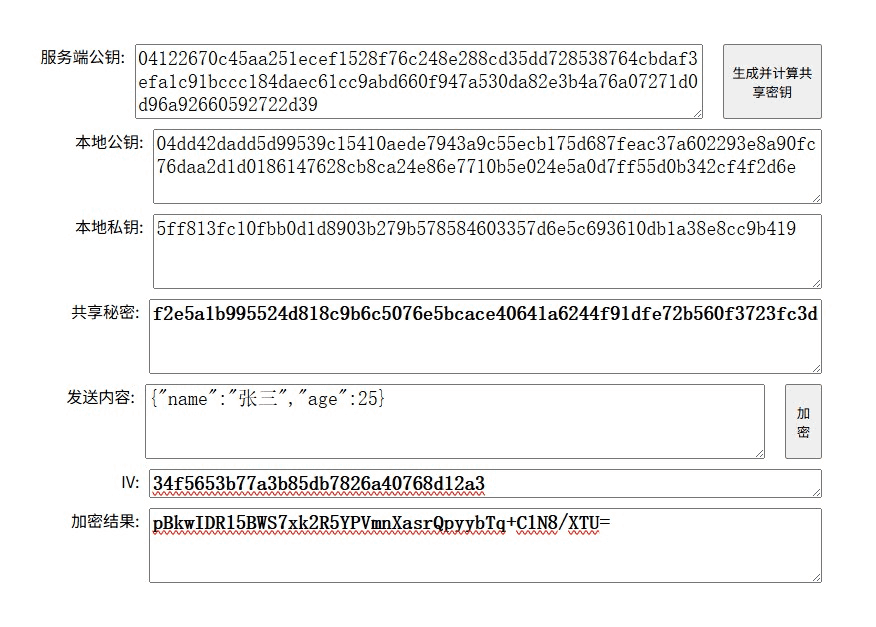
前端传参
{
	"clientpublickey": "04dd42dadd5d99539c15410aede7943a9c55ecb175d687feac37a602293e8a90fc76daa2d1d0186147628cb8ca24e86e7710b5e024e5a0d7ff55d0b342cf4f2d6e",
	"iv": "34f5653b77a3b85db7826a40768d12a3",
	"encryptdata": "pbkwidr15bws7xk2r5ypvmnxasrqpyybtq+c1n8/xtu="
}
后端输出
后端需接收前端的本地公钥 + iv + 加密结果,然后计算出共享秘密,解密数据
共享秘密:f2e5a1b995524d818c9b6c5076e5bcace40641a6244f91dfe72b560f3723fc3d
解密结果:{"name":"张三","age":25}
到此这篇关于java实现后端和前端的接口数据加密方案详解的文章就介绍到这了,更多相关java接口数据加密内容请搜索代码网以前的文章或继续浏览下面的相关文章希望大家以后多多支持代码网!



发表评论