
 我要评论
我要评论一、简要概述
获取客户端ip地址是开发中常见的功能需求,获取ip地址后,一般可以记录日志备查或者针对ip做访问控制。nginx代理模式下,如何获取客户端真实ip地址呢?
二、java代码
为了简单起见,我们封装了restful接口,用来直接返回ip,核心代码如下
import javax.servlet.http.httpservletrequest;
import org.apache.commons.lang3.stringutils;
import org.springframework.beans.factory.annotation.autowired;
import org.springframework.web.bind.annotation.getmapping;
import org.springframework.web.bind.annotation.restcontroller;
import lombok.extern.slf4j.slf4j;
@slf4j
@restcontroller
public class indexcontroller
{
    @autowired
    httpservletrequest request;
    @getmapping({"/", "/index"})
    public string index()
    {
        return stringutils.join("client ip: ", getclientip());
    }
    string[] ip_headers = {"x-forwarded-for", "x-real-ip", "proxy-client-ip", "wl-proxy-client-ip", "http_x_forwarded_for", "http_x_forwarded", "http_x_cluster_client_ip", "http_client_ip", "http_forwarded_for", "http_forwarded", "http_via", "remote_addr"};
    /**
     * 获取客户端真实ip地址
     */
    private string getclientip()
    {
        for (string header : ip_headers)
        {
            string ip = request.getheader(header);
            if (ip != null && !ip.isempty() && !"unknown".equalsignorecase(ip))
            {
                // 处理多个ip的情况(逗号分隔)
                log.info("##### ip header: {}", header);
                string[] ips = ip.split(",");
                return ips[0].trim();
            }
        }
        log.info("##### request.getremoteaddr");
        return request.getremoteaddr();
    }
}为了方便运行,已经将工程打包成docker镜像,地址为:registry.cn-shanghai.aliyuncs.com/00fly/springboot-nginx:1.0.0
三、功能验证
目录结构
├── conf.d
│   └── web.conf
├── docker-compose.yml
1. 编排文件
docker-compose.yml
services:
  nginx:
    image: nginx:alpine
    container_name: my-nginx
    deploy:
      resources:
        limits:
          cpus: '2.0'
          memory: 10m
        reservations:
          cpus: '2.0'
          memory: 10m
    ports:
    - 8080:80
    links:
    - web:web
    restart: on-failure
    volumes:
    - ./conf.d/:/etc/nginx/conf.d/
    logging:
      driver: json-file
      options:
        max-size: 5m
        max-file: '1'
  web:
    hostname: web
    image: registry.cn-shanghai.aliyuncs.com/00fly/springboot-nginx:1.0.0
    container_name: web
    deploy:
      resources:
        limits:
          cpus: '2.0'
          memory: 200m
        reservations:
          cpus: '2.0'
          memory: 200m
    environment:
      context_path: /
      #context_path: /luck
    restart: on-failure
    logging:
      driver: json-file
      options:
        max-size: 5m
        max-file: '1'
2. 代理配置
web.conf
server {
    listen 80;
    proxy_set_header host $host;
    proxy_set_header x-real-ip $remote_addr;
    proxy_set_header x-forwarded-for $proxy_add_x_forwarded_for;
    location / {
        proxy_pass http://web:8080;
        client_max_body_size 5m;
    }
    error_page 500 502 503 504  /50x.html;
        location = /50x.html {
        root /usr/share/nginx/html;
    }
}
3. nginx配置
首先,确保启用了realip模块
进入nginx容器内执行nginx -v, 查看返回是否有--with-http_realip_module,如有说明当前版本镜像已经启用了realip模块。
[root@00fly docker]# docker ps
container id   image                                                                 command                  created         status         ports                                       names
ef8e4b3d8269   nginx:alpine                                                          "/docker-entrypoint.…"   5 seconds ago   up 3 seconds   0.0.0.0:8080->80/tcp, :::8080->80/tcp       my-nginx
5830a2be7439   registry.cn-shanghai.aliyuncs.com/00fly/springboot-nginx:1.0.0        "java -djava.securit…"   5 seconds ago   up 4 seconds   8080/tcp                                    web
[root@00fly docker]# docker exec -it my-nginx  sh
nginx -v
nginx version: nginx/1.29.7
built by gcc 15.2.0 (alpine 15.2.0)
built with openssl 3.5.5 27 jan 2026
tls sni support enabled
configure arguments: --prefix=/etc/nginx --sbin-path=/usr/sbin/nginx --modules-path=/usr/lib/nginx/modules --conf-path=/etc/nginx/nginx.conf --error-log-path=/var/log/nginx/error.log --http-log-path=/var/log/nginx/access.log --pid-path=/run/nginx.pid --lock-path=/run/nginx.lock --http-client-body-temp-path=/var/cache/nginx/client_temp --http-proxy-temp-path=/var/cache/nginx/proxy_temp --http-fastcgi-temp-path=/var/cache/nginx/fastcgi_temp --http-uwsgi-temp-path=/var/cache/nginx/uwsgi_temp --http-scgi-temp-path=/var/cache/nginx/scgi_temp --with-perl_modules_path=/usr/lib/perl5/vendor_perl --user=nginx --group=nginx --with-compat --with-file-aio --with-threads --with-http_addition_module --with-http_auth_request_module --with-http_dav_module --with-http_flv_module --with-http_gunzip_module --with-http_gzip_static_module --with-http_mp4_module --with-http_random_index_module --with-http_realip_module --with-http_secure_link_module --with-http_slice_module --with-http_ssl_module --with-http_stub_status_module --with-http_sub_module --with-http_v2_module --with-http_v3_module --with-mail --with-mail_ssl_module --with-stream --with-stream_realip_module --with-stream_ssl_module --with-stream_ssl_preread_module --with-cc-opt='-os -fstack-clash-protection -wformat -werror=format-security -fno-plt -g' --with-ld-opt='-wl,--as-needed,-o1,--sort-common -wl,-z,pack-relative-relocs'
其次,查看代理配置是否包含下面的配置
    proxy_set_header host $host;
    proxy_set_header x-real-ip $remote_addr;
    proxy_set_header x-forwarded-for $proxy_add_x_forwarded_for;
4. 功能验证
使用下面的脚本启动容器
docker-compose --compatibility up -d
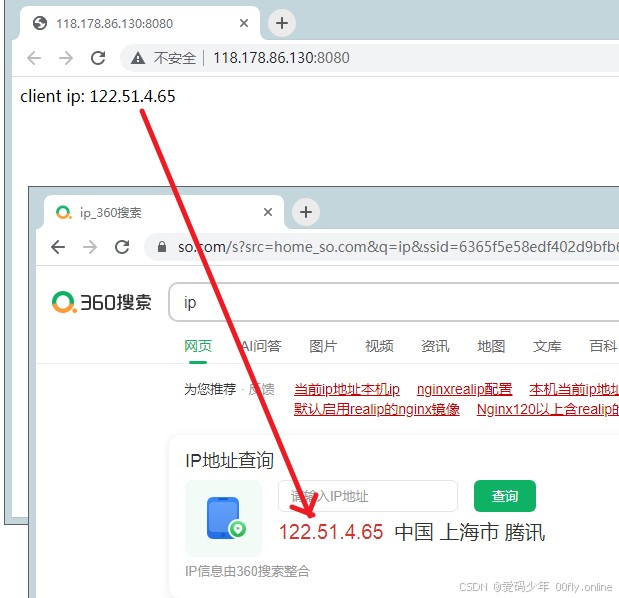
访问首页: http:{ip}:8080
查看返回值: 如 client ip: 122.51.4.65
将此返回值与本地ip查询网址值对比。
5. 源码放送
http://118.178.86.130:8081/git/down?name=springboot-nginx
总结
到此这篇关于nginx代理模式下java获取客户端真实ip地址的文章就介绍到这了,更多相关java获取客户端真实ip地址内容请搜索代码网以前的文章或继续浏览下面的相关文章希望大家以后多多支持代码网!




发表评论