
 我要评论
我要评论最近用基于windows下的nginx部署了服务器。
1.安装好windows下的nginx以后
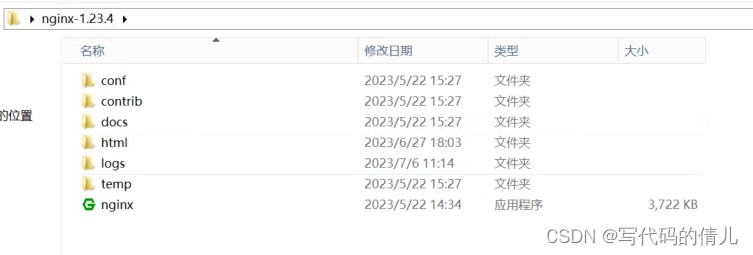
会有以下文件,找到conf下的nginx,此文件为nginx的配置文件
2.初始只有一个默认80端口
这是nginx的默认端口号
server {
        listen       80;
        server_name  "你的域名";

        #charset koi8-r;

        #access_log  logs/host.access.log  main;

        //你的前端打包文件路径
        location /{
           root  html/static/dist;
           index  index.html;    //指定入口文件
           try_files $uri $uri/ /index.html;   //重定向,解决刷新页面404问题
        }
	    location /shopdetail/ {
        	try_files $uri $uri/ /shopdetail.html; //解决伪静态页面刷新404问题
    	}
        //配置实现反向代理
        location /index.php {
		#rewrite ^/api(.*)$ /$1 break;
        	proxy_pass http://test:8080;    //你的后端接口api地址
        	proxy_set_header host $host;
        	proxy_set_header x-real-ip $remote_addr;

    	}
按照上面的配置以后,将前端打包文件放进对应路径以后,如:html/static/dist,此时你的前端静态网页就可以通过域名来进行访问了,但是我们后端项目也要通过nginx来部署一下,才可以实现在线访问。
上图中,可以看到,后端的端口号为8080,此时我们用nginx开一个8080端口来代理前端对后端api的访问:
“因为我的后端项目是用php-admin的ci框架来搭建的”,
server {
        listen       8080;
        server_name  localhost;

        #charset koi8-r;

        #access_log  logs/host.access.log  main;

        location / {
            root   d:\webroot;    //指定后端项目文件路径
            index  index.html index.htm index.php;
        }

        #error_page  404              /404.html;

        # redirect server error pages to the static page /50x.html
        #
        error_page   500 502 503 504  /50x.html;
        location = /50x.html {
            root   html;
        }

        # proxy the php scripts to apache listening on 127.0.0.1:80
        #
        #location ~ \.php$ {
        #    proxy_pass   http://127.0.0.1;
        #}

        # pass the php scripts to fastcgi server listening on 127.0.0.1:9000
        #
        #location ~ \.php$ {
	    location /index.php{
            root           d:\webroot;  //指定后端项目文件路径
            fastcgi_pass   127.0.0.1:9000;
            fastcgi_index  index.php;
            fastcgi_param  script_filename  /scripts$fastcgi_script_name;
            fastcgi_param  script_filename $document_root$fastcgi_script_name;
            fastcgi_split_path_info ^(.+\.php)(.*)$;
            fastcgi_param   path_info $fastcgi_path_info;
            include        fastcgi_params;
        }

        # deny access to .htaccess files, if apache's document root
        # concurs with nginx's one
        #
        #location ~ /\.ht {
        #    deny  all;
        #}
    }
此时配置好反向代理以后,假如我想再部署其他几个同域名不同端口的项目,又该怎么办呢。
可以通过设置不同端口号来进行区分:
server {
	listen       8083;
        server_name  "同一个域名";

        #charset koi8-r;

        #access_log  logs/host.access.log  main;
	location /index.php {
	   #rewrite ^/api(.*)$ /$1 break;
           proxy_pass http://test:8080;
           proxy_set_header host $host;
           proxy_set_header x-real-ip $remote_addr;

    	}

        location /{
           root  html/8083/dist;
           index  index.html;
           try_files $uri $uri/ /index.html;

        }
        location /shoplist {
         rewrite ^/shoplist(.*)$ /shoplist.htmls$1 redirect;
        }
    }
如上图,我可以再开一个server,监听8083端口,就可以通过同一个域名不同端口号部署另一个项目。
总结
以上为个人经验,希望能给大家一个参考,也希望大家多多支持代码网。




发表评论