
 我要评论
我要评论如果你的 vue 项目使用了 history 模式(而非默认的 hash 模式),在纯静态服务器中会出现类似的问题。因为 vue router 的 history 模式要求所有未匹配的路径都重定向到 index.html,以便 vue 前端处理路径。
首先在本地执行npm run build编译项目,会生成一个dist的项目源码文件
1.创建一个简单的 http 服务器
修改你的 server.js,确保所有未匹配的请求都返回 index.html。
const http = require('http');
const fs = require('fs');
const path = require('path');

const port = 14515;

http.createserver((req, res) => {
    let filepath = path.join(__dirname, req.url === '/' ? '/index.html' : req.url);

    fs.readfile(filepath, (err, data) => {
        if (err) {
            // 如果文件不存在,返回 index.html
            fs.readfile(path.join(__dirname, 'index.html'), (err, indexdata) => {
                if (err) {
                    res.writehead(500, { 'content-type': 'text/plain' });
                    res.end('500 internal server error');
                } else {
                    res.writehead(200, { 'content-type': 'text/html' });
                    res.end(indexdata);
                }
            });
        } else {
            // 返回找到的文件
            const ext = path.extname(filepath).tolowercase();
            const mimetypes = {
                '.html': 'text/html',
                '.js': 'application/javascript',
                '.css': 'text/css',
                '.json': 'application/json',
                '.png': 'image/png',
                '.jpg': 'image/jpg',
                '.gif': 'image/gif',
                '.svg': 'image/svg+xml',
            };

            res.writehead(200, { 'content-type': mimetypes[ext] || 'application/octet-stream' });
            res.end(data);
        }
    });
}).listen(port, () => {
    console.log(`server running at http://0.0.0.0:${port}/`);
});
2.运行
在 dist 目录下启动服务器:
node server.js

nohup node server.js &  //在后台可以运行
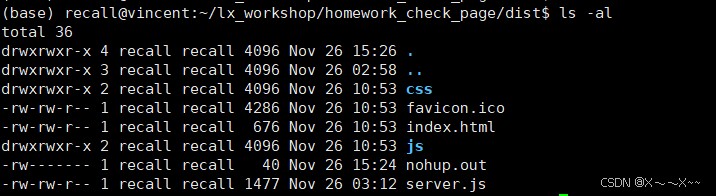
项目目录
总结
以上为个人经验,希望能给大家一个参考,也希望大家多多支持代码网。




发表评论