
 我要评论
我要评论问题描述
同一个端口部署pc和app端项目,nginx配置,前端打包配置
解决方案
配置pc端vue项目打包配置
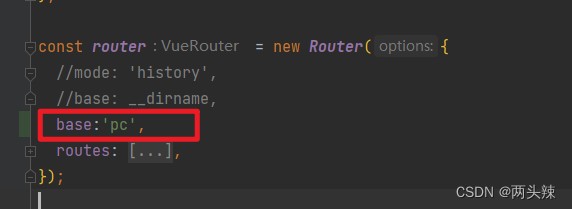
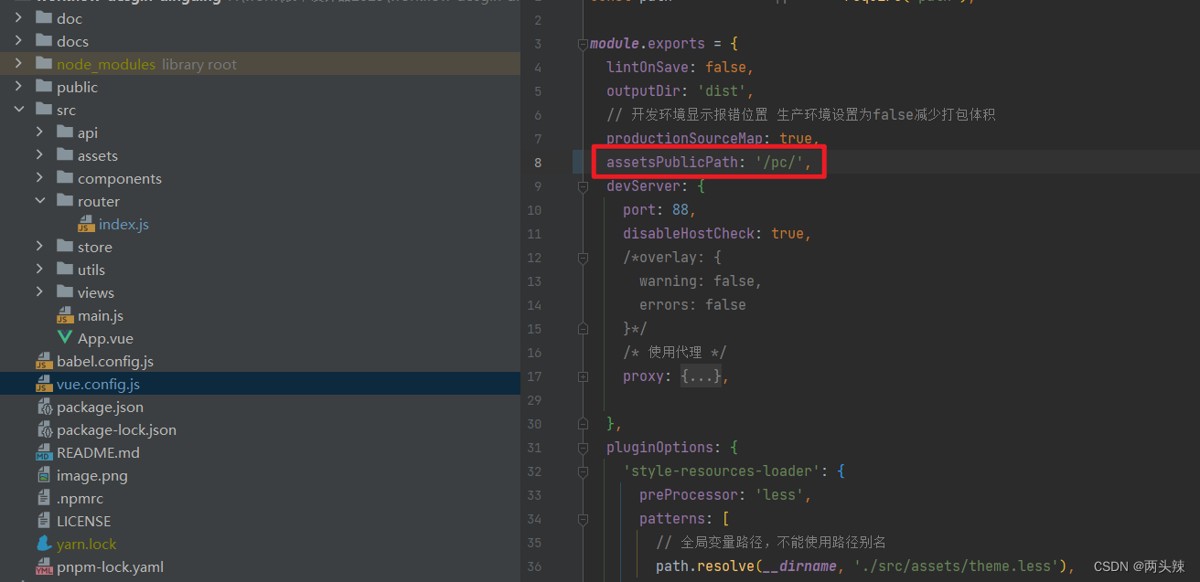
配置uniapp项目打包配置,manifest.json文件添加配置
  "h5": {
    "router": {
      "mode": "hash",
      "base": "./"//改为 /app/
    },
    // pubilcpath的路径要和h5配置中的运行基础路径一致
    "publicpath": "./", //改为 /app/
    "devserver": {
      "disablehostcheck": true,
      //禁止访问本地host文件
      "port": 8088,
      "https": false
    },
    "sdkconfigs": {
      "maps": {
        "qqmap": {
          "key": ""
        }
      }
    },
    "title": "xxxxxxx",
    "optimization": {
      "treeshaking": {
        "enable": true
      }
    }
  }
nginx config配置
   server {
        listen       3114 default_server;
	listen       [::]:3114 default_server;
	server_name  _;

	root /mnt/menghai_ds;

        location /pc/ {
	    alias /mnt/menghai_ds/pc/;
            index  index.html index.htm;
		}

        location /app/{
            alias /mnt/menghai_ds/app/;
            index  index.html index.htm;
        }
    }
vue3 + vite
项目配置(以项目a和项目b为例)
修改vite配置文件(vite.config.js)
// 项目a配置(访问路径:/projecta)
export default defineconfig({
base: ‘/projecta/', // 关键配置:资源基础路径
plugins: [vue()],
// 其他配置…
})

// 项目b配置(访问路径:/projectb)
export default defineconfig({
base: ‘/projectb/',
plugins: [vue()],
// 其他配置…
})
2. 调整路由配置(router.js)
// 两个项目均需修改路由历史模式
import { createrouter, createwebhistory } from ‘vue-router'

const router = createrouter({
history: createwebhistory(import.meta.env.base_url), // 自动匹配base配置
routes: [
// 路由定义…
]
})
nginx配置(关键步骤)
nginx
server {
listen 80;
server_name your-domain.com;
主项目配置(假设项目a为主项目)
location / {
root /var/www/projecta/dist;
index index.html;
try_files $uri $uri/ /projecta/index.html; # 路由回退配置
}
子项目配置(项目b)
location /projectb {
alias /var/www/projectb/dist; # 注意使用alias而非root
index index.html;
try_files $uri $uri/ /projectb/index.html;
}
可继续添加更多项目…
location /projectc { … }

}
总结
以上为个人经验,希望能给大家一个参考,也希望大家多多支持代码网。




发表评论