
 我要评论
我要评论一、mybatis简介与crud基础
mybatis是一款优秀的持久层框架,它支持自定义sql、存储过程以及高级映射。mybatis避免了几乎所有的jdbc代码和手动设置参数以及获取结果集的工作。
1.1 传统jdbc的问题
在传统jdbc编程中,我们经常遇到以下问题:
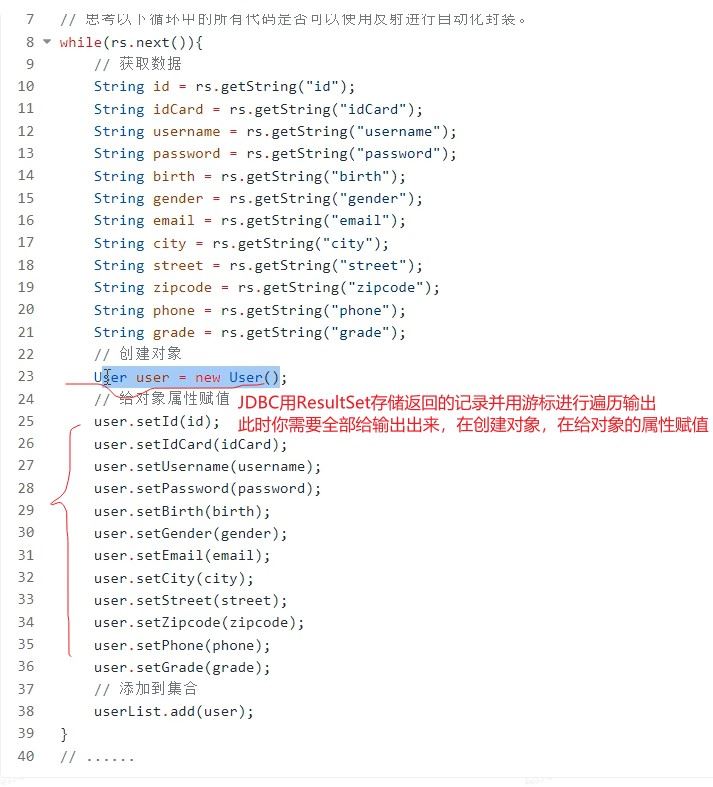
// jdbc中繁琐的结果集处理
while(rs.next()) {
    user user = new user();
    user.setid(rs.getstring("id"));
    user.setidcard(rs.getstring("idcard"));
    user.setusername(rs.getstring("username"));
    // ... 需要为每个属性手动赋值
    userlist.add(user);
}
这种方式存在以下缺点:
- 代码冗余,每个字段都需要手动映射
- 容易出错,字段名写错会导致运行时错误
- 维护困难,表结构变化时需要修改大量代码
二、mybatis中使用map实现crud
2.1 使用map进行数据插入
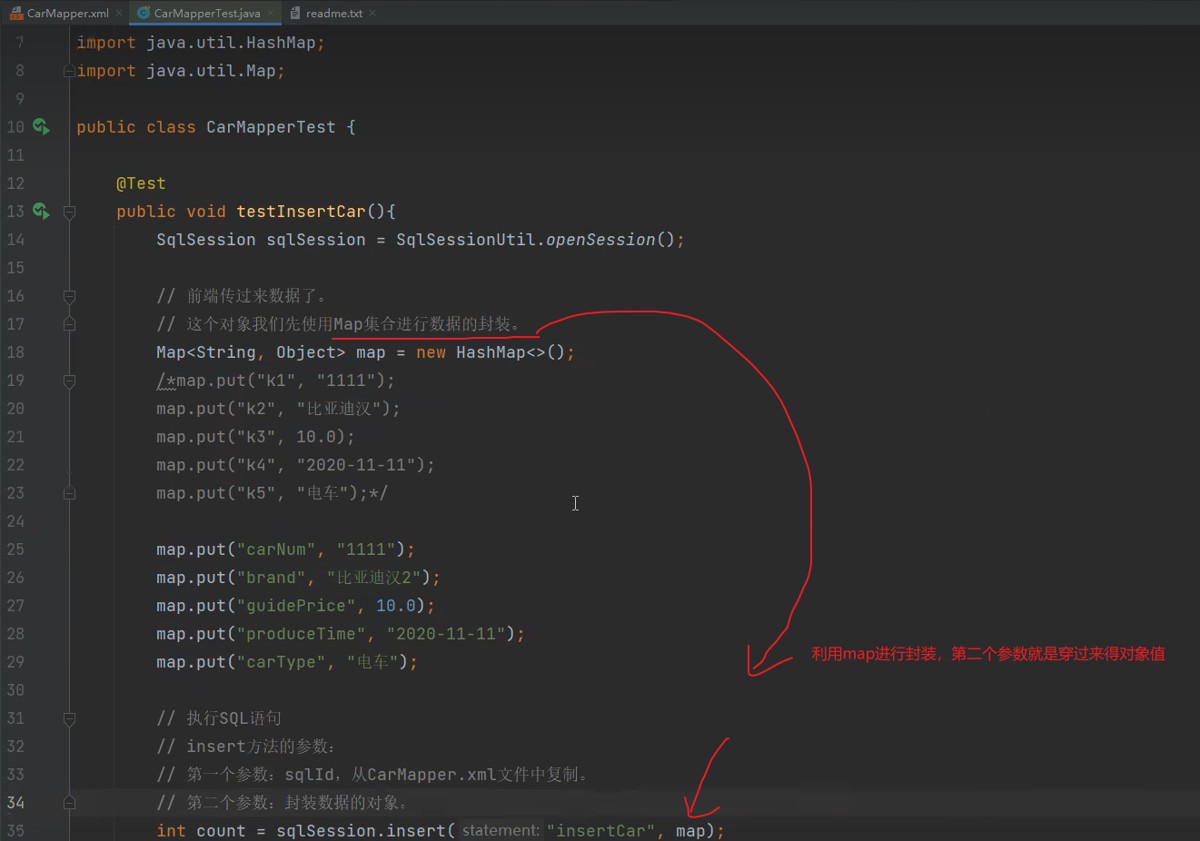
map集合提供了灵活的键值对存储方式,适合不确定参数数量或临时性的数据操作。
2.1.1 基础map传参
@test
public void testinsertcarbymap() {
    sqlsession sqlsession = sqlsessionutil.opensession();

    // 使用map封装前端传递的数据
    map<string, object> map = new hashmap<>();
    map.put("carnum", "11111");
    map.put("brand", "比亚迪汉");
    map.put("guideprice", 10.0);
    map.put("producetime", "2020-11-11");
    map.put("cartype", "电车");

    // 执行sql插入操作
    int count = sqlsession.insert("insertcar", map);
    system.out.println("插入记录数:" + count);

    sqlsession.commit();
    sqlsession.close();
}
2.1.2 mapper xml配置
<!-- carmapper.xml -->
<?xml version="1.0" encoding="utf-8"?>
<!doctype mapper
    public "-//mybatis.org//dtd mapper 3.0//en"
    "http://mybatis.org/dtd/mybatis-3-mapper.dtd">
<mapper namespace="com.example.mapper.carmapper">

    <insert id="insertcar">
        insert into t_car(id, car_num, brand, guide_price, produce_time, car_type)
        values(null, #{carnum}, #{brand}, #{guideprice}, #{producetime}, #{cartype})
    </insert>

</mapper>
2.1.3 注意事项
- 键名匹配原则:
#{}中的名称必须与map中的key完全一致 - 空值处理:如果key不存在,对应的值将为null
- 命名规范:建议使用有意义的key名称,提高代码可读性
2.2 使用map进行数据查询
@test
public void testselectbymap() {
    sqlsession sqlsession = sqlsessionutil.opensession();

    map<string, object> parammap = new hashmap<>();
    parammap.put("minprice", 10.0);
    parammap.put("brand", "宝马");

    list<map<string, object>> result = sqlsession.selectlist("selectcarbycondition", parammap);

    for (map<string, object> car : result) {
        system.out.println(car);
    }

    sqlsession.close();
}
三、mybatis中使用pojo类实现crud
3.1 pojo类定义
// car.java
public class car {
    private long id;
    private string carnum;
    private string brand;
    private double guideprice;
    private string producetime;
    private string cartype;

    // 构造方法
    public car() {}

    public car(long id, string carnum, string brand, double guideprice,
               string producetime, string cartype) {
        this.id = id;
        this.carnum = carnum;
        this.brand = brand;
        this.guideprice = guideprice;
        this.producetime = producetime;
        this.cartype = cartype;
    }

    // getter和setter方法
    public long getid() { return id; }
    public void setid(long id) { this.id = id; }

    public string getcarnum() { return carnum; }
    public void setcarnum(string carnum) { this.carnum = carnum; }

    // ... 其他getter和setter
}
3.2 使用pojo进行数据插入
@test
public void testinsertcarbypojo() {
    sqlsession sqlsession = sqlsessionutil.opensession();

    // 使用pojo对象封装数据
    car car = new car(null, "3333", "比亚迪秦", 30.0, "2020-11-11", "新能源");

    // 执行sql
    int count = sqlsession.insert("insertcar", car);
    system.out.println("插入记录数:" + count);

    sqlsession.commit();
    sqlsession.close();
}
3.3 pojo传参原理
重要规则:#{}占位符中的名称对应的是pojo类的getter方法名去掉"get"并将首字母小写后的名称。
例如:
getcarnum()→#{carnum}getguideprice()→#{guideprice}getusername()→#{username}
3.4 使用pojo进行数据查询
3.4.1 查询单个对象
<!-- 根据id查询汽车信息 -->
<select id="selectbyid" resulttype="com.example.pojo.car">
    select * from t_car where id = #{id}
</select>
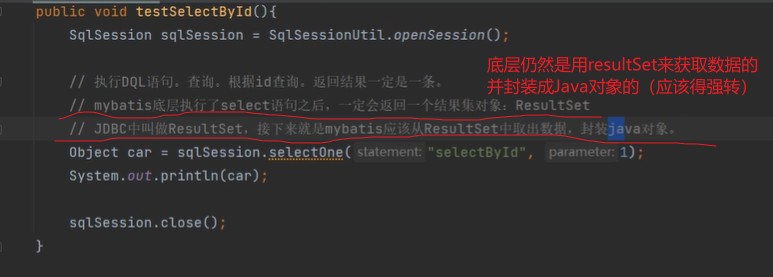
@test
public void testselectbyid() {
sqlsession sqlsession = sqlsessionutil.opensession();
// 查询单个对象
car car = sqlsession.selectone("selectbyid", 1);
system.out.println(car);
sqlsession.close();
}
3.4.2 查询所有记录
<!-- 查询所有汽车信息 -->
<select id="selectall" resulttype="com.example.pojo.car">
    select
        id,
        car_num as carnum,
        brand,
        guide_price as guideprice,
        produce_time as producetime,
        car_type as cartype
    from t_car
</select>
@test
public void testselectall() {
sqlsession sqlsession = sqlsessionutil.opensession();
// 查询所有记录,返回list集合
list<car> carlist = sqlsession.selectlist("selectall");
for (car car : carlist) {
system.out.println(car);
}
sqlsession.close();
}四、解决字段名与属性名映射问题
4.1 问题现象
当数据库字段名与java类属性名不一致时,会出现属性值为null的情况:
-- 数据库表结构
+----+----------+------------+--------------+---------------+----------+
| id | car_num  | brand      | guide_price  | produce_time  | car_type |
+----+----------+------------+--------------+---------------+----------+
|  1 | 1001     | 宝马520li  |       10.00  | 2020-10-11    | 燃油车   |
+----+----------+------------+--------------+---------------+----------+

-- 直接查询会导致car对象的carnum、guideprice等属性为null
-- 因为数据库字段是car_num,而java属性是carnum
4.2 解决方案
方案一:sql中使用as别名(推荐)
<select id="selectbyid" resulttype="com.example.pojo.car">
    select
        id,
        car_num as carnum,           -- 起别名
        brand,
        guide_price as guideprice,   -- 起别名
        produce_time as producetime, -- 起别名
        car_type as cartype          -- 起别名
    from t_car
    where id = #{id}
</select>
方案二:配置驼峰命名自动映射
在mybatis配置文件中开启驼峰命名自动映射:
<!-- mybatis-config.xml -->
<configuration>
    <settings>
        <!-- 开启驼峰命名自动映射 -->
        <setting name="mapunderscoretocamelcase" value="true"/>
    </settings>
</configuration>
开启后,mybatis会自动将下划线命名的数据库字段映射到驼峰命名的java属性:
car_num→carnumguide_price→guidepriceproduce_time→producetime
方案三:使用resultmap自定义映射
<resultmap id="carresultmap" type="com.example.pojo.car">
    <id property="id" column="id"/>
    <result property="carnum" column="car_num"/>
    <result property="brand" column="brand"/>
    <result property="guideprice" column="guide_price"/>
    <result property="producetime" column="produce_time"/>
    <result property="cartype" column="car_type"/>
</resultmap>

<select id="selectbyid" resultmap="carresultmap">
    select * from t_car where id = #{id}
</select>
五、map与pojo对比与选择
5.1 使用场景对比
| 特性 | map集合 | pojo类 |
|---|---|---|
| 灵活性 | 高,适合动态参数 | 低,结构固定 |
| 类型安全 | 低,运行时才能发现错误 | 高,编译时检查 |
| 代码可读性 | 低,需要查看map键名 | 高,属性明确 |
| ide支持 | 有限,无法自动提示 | 好,有代码提示 |
| 适合场景 | 临时查询、参数不固定 | 业务实体、固定结构 |
5.2 最佳实践建议
业务实体操作使用pojo
- 用户、订单、商品等核心业务实体
- 需要频繁操作和传递的数据
- 有利于代码维护和重构
临时查询使用map
- 动态条件查询,参数不固定
- 统计报表等临时性数据操作
- 快速原型开发阶段
混合使用策略
// 示例:使用map封装查询条件,返回pojo列表
public list<car> findcars(map<string, object> params) {
    return sqlsession.selectlist("findcarsbycondition", params);
}
六、完整示例与总结
6.1 完整mapper示例
<?xml version="1.0" encoding="utf-8"?>
<!doctype mapper
    public "-//mybatis.org//dtd mapper 3.0//en"
    "http://mybatis.org/dtd/mybatis-3-mapper.dtd">
<mapper namespace="com.example.mapper.carmapper">

    <!-- 插入操作 -->
    <insert id="insertcar">
        insert into t_car(id, car_num, brand, guide_price, produce_time, car_type)
        values(null, #{carnum}, #{brand}, #{guideprice}, #{producetime}, #{cartype})
    </insert>

    <!-- 根据id查询 -->
    <select id="selectbyid" resulttype="com.example.pojo.car">
        select
            id,
            car_num as carnum,
            brand,
            guide_price as guideprice,
            produce_time as producetime,
            car_type as cartype
        from t_car
        where id = #{id}
    </select>

    <!-- 查询所有 -->
    <select id="selectall" resulttype="com.example.pojo.car">
        select
            id,
            car_num as carnum,
            brand,
            guide_price as guideprice,
            produce_time as producetime,
            car_type as cartype
        from t_car
    </select>

    <!-- 更新操作 -->
    <update id="updatecar">
        update t_car
        set car_num = #{carnum},
            brand = #{brand},
            guide_price = #{guideprice},
            produce_time = #{producetime},
            car_type = #{cartype}
        where id = #{id}
    </update>

    <!-- 删除操作 -->
    <delete id="deletebyid">
        delete from t_car where id = #{id}
    </delete>

</mapper>
6.2 关键点总结
#{}与${}的区别:
#{}是预编译处理,防止sql注入${}是字符串替换,有sql注入风险
resulttype与resultmap:
resulttype:自动映射,要求字段名与属性名一致或配置别名resultmap:自定义映射,处理复杂映射关系
占位符命名规则:
- map传参:
#{}中写map的key - pojo传参:
#{}中写getter方法对应的属性名
性能优化建议:
- 尽量使用pojo,享受编译时检查的好处
- 复杂查询考虑使用resultmap提高可读性
- 批量操作使用批量api提高性能
通过本文的学习,你应该掌握了mybatis中使用map和pojo实现crud操作的核心技术。在实际开发中,根据具体场景选择合适的方式,既能提高开发效率,又能保证代码质量。
以上就是mybatis使用map与pojo类实现crud操作的步骤详解的详细内容,更多关于mybatis map与pojo类实现crud的资料请关注代码网其它相关文章!



发表评论