
 我要评论
我要评论前言:
前面学习了表的增删查改之后,今天我们重点来讲解一下有关查询的复杂问题——复合查询
一、复合查询基础概念
1.1 什么是复合查询
复合查询是指将多个简单查询通过特定的sql语法组合起来,形成一个功能更加强大的查询语句。与简单查询相比,复合查询能够:
- 处理更复杂的数据关系
- 减少应用程序中的数据处理逻辑
- 提高数据检索效率(当正确使用时)
- 实现跨表的数据关联和分析
1.2 复合查询的主要类型
mysql中常见的复合查询包括:
- 子查询(subqueries)
- 连接查询(join operations)
- 联合查询(union queries)
- 派生表(derived tables)
- 公用表表达式(common table expressions,cte)
二、示例数据库结构详解
在进行讲解我们的查询之前,我们先看一下名为需要用到的表,以及往表里添加几组示例数据,以方便我们查询后看到查询的效果
2.1 完整的表结构设计
-- 部门表
create table departments (
    dept_id int primary key auto_increment,
    dept_name varchar(50) not null,
    location varchar(50) not null,
    established_date date,
    budget decimal(12,2)
);
-- 员工表
create table employees (
    emp_id int primary key auto_increment,
    emp_name varchar(50) not null,
    dept_id int,
    salary decimal(10,2) not null,
    hire_date date not null,
    manager_id int,
    email varchar(100),
    constraint fk_dept foreign key (dept_id) references departments(dept_id),
    constraint fk_manager foreign key (manager_id) references employees(emp_id)
);
-- 项目表
create table projects (
    project_id int primary key auto_increment,
    project_name varchar(100) not null,
    budget decimal(12,2),
    start_date date,
    end_date date,
    dept_id int,
    status enum('planning', 'in progress', 'completed', 'on hold') default 'planning',
    constraint fk_project_dept foreign key (dept_id) references departments(dept_id)
);
-- 员工项目关联表
create table emp_projects (
    emp_id int,
    project_id int,
    role varchar(50),
    join_date date,
    hours_allocated int,
    primary key (emp_id, project_id),
    constraint fk_emp foreign key (emp_id) references employees(emp_id),
    constraint fk_project foreign key (project_id) references projects(project_id)
);
2.2 示例数据填充
-- 部门数据
insert into departments values
(1, '技术研发部', '北京总部', '2015-06-01', 2000000.00),
(2, '市场营销部', '上海分公司', '2016-03-15', 1500000.00),
(3, '人力资源部', '广州办事处', '2017-01-10', 800000.00),
(4, '财务部', '北京总部', '2015-06-01', 1200000.00);
-- 员工数据
insert into employees values
(1, '张伟', 1, 25000.00, '2016-03-10', null, 'zhangwei@company.com'),
(2, '李娜', 1, 18000.00, '2017-05-15', 1, 'lina@company.com'),
(3, '王芳', 2, 22000.00, '2016-11-20', null, 'wangfang@company.com'),
(4, '赵刚', 2, 16000.00, '2018-02-28', 3, 'zhaogang@company.com'),
(5, '钱强', 3, 19000.00, '2017-08-05', null, 'qianqiang@company.com'),
(6, '孙丽', 3, 14000.00, '2019-06-15', 5, 'sunli@company.com'),
(7, '周明', 4, 21000.00, '2016-07-22', null, 'zhouming@company.com');
-- 项目数据
insert into projects values
(1, '新一代电商平台开发', 800000.00, '2023-01-10', '2023-09-30', 1, 'in progress'),
(2, '全球市场推广计划', 500000.00, '2023-02-15', '2023-08-15', 2, 'in progress'),
(3, '员工技能提升计划', 200000.00, '2023-03-01', '2023-12-31', 3, 'planning'),
(4, '财务系统云迁移', 350000.00, '2023-04-01', null, 4, 'in progress'),
(5, '移动端应用优化', 300000.00, '2023-05-15', '2023-11-30', 1, 'planning');
-- 员工项目关联
insert into emp_projects values
(1, 1, '技术负责人', '2023-01-05', 30),
(2, 1, '开发工程师', '2023-01-10', 40),
(1, 5, '架构师', '2023-05-10', 20),
(3, 2, '市场总监', '2023-02-10', 25),
(4, 2, '市场专员', '2023-02-15', 35),
(5, 3, '培训经理', '2023-03-01', 30),
(6, 3, '培训助理', '2023-03-05', 20),
(7, 4, '项目经理', '2023-04-01', 40);
三、子查询深度解析
3.1 子查询分类与语法
3.1.1 按子查询位置分类
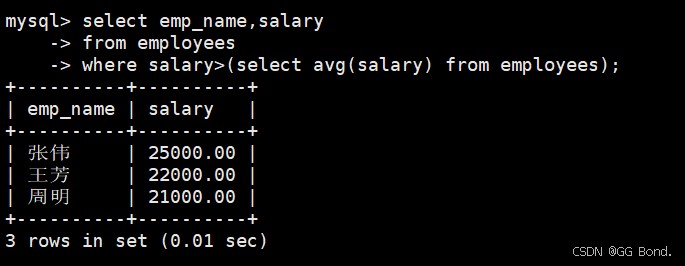
where子句子查询
select emp_name, salary
from employees
where salary > (select avg(salary) from employees);
from子句子查询(派生表)
select d.dept_name, avg_sal.avg_salary
from departments d
join (select dept_id, avg(salary) as avg_salary
      from employees group by dept_id) avg_sal
on d.dept_id = avg_sal.dept_id;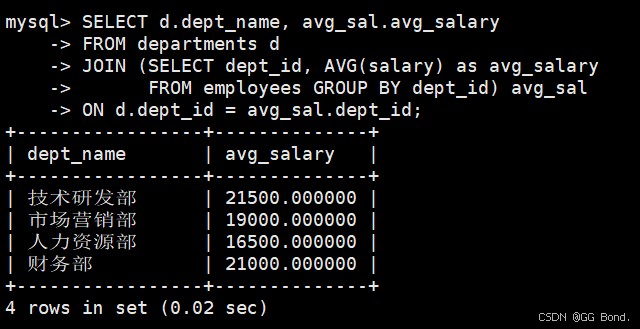
select子句子查询
select emp_name, salary,
       (select avg(salary) from employees) as company_avg
from employees;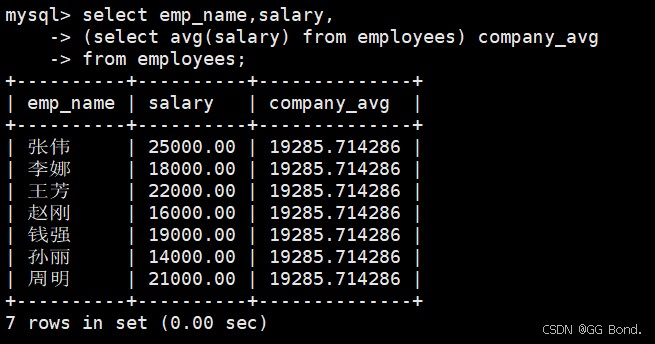
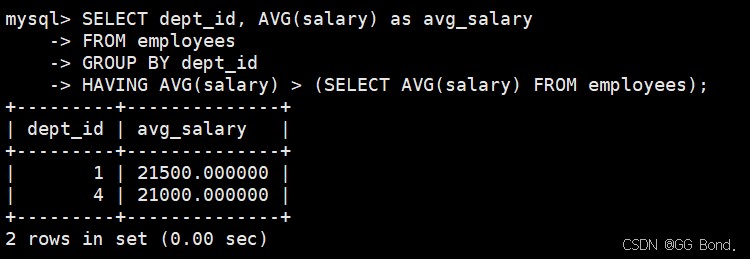
having子句子查询
select dept_id, avg(salary) as avg_salary
from employees
group by dept_id
having avg(salary) > (select avg(salary) from employees);
3.1.2 按子查询相关性分类
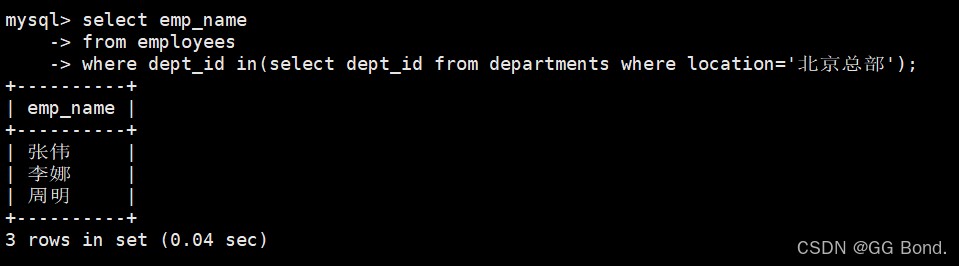
非相关子查询
select emp_name
from employees
where dept_id in (select dept_id from departments where location = '北京总部');
相关子查询
select e1.emp_name, e1.salary
from employees e1
where salary > (select avg(salary)
                from employees e2
                where e2.dept_id = e1.dept_id);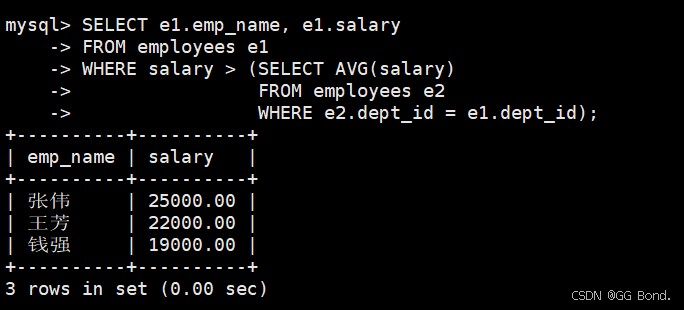
3.2 子查询操作符详解
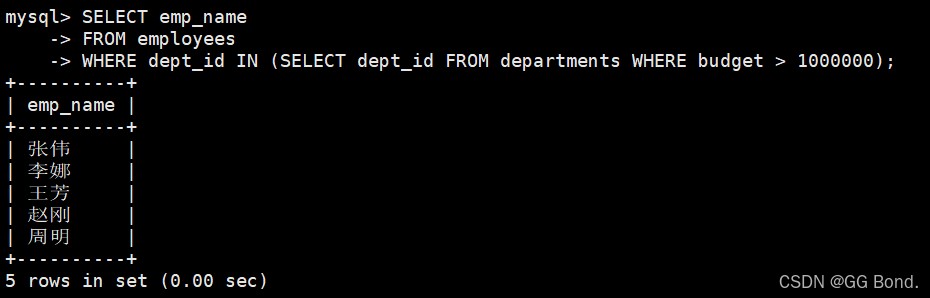
in操作符
select emp_name
from employees
where dept_id in (select dept_id from departments where budget > 1000000);
not in操作符
select emp_name
from employees
where emp_id not in (select distinct emp_id from emp_projects);

exists操作符
select d.dept_name
from departments d
where exists (select 1 from projects p
             where p.dept_id = d.dept_id and p.status = 'in progress');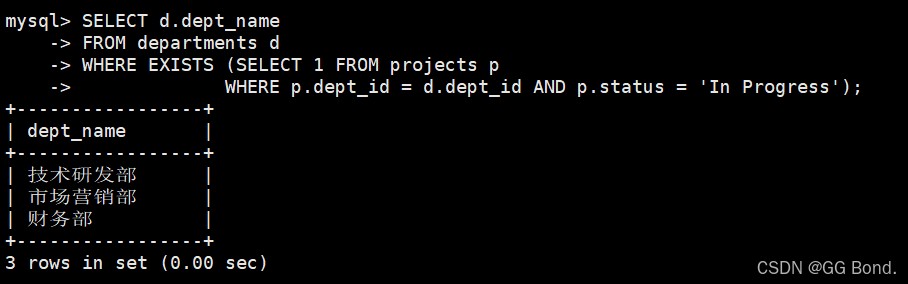
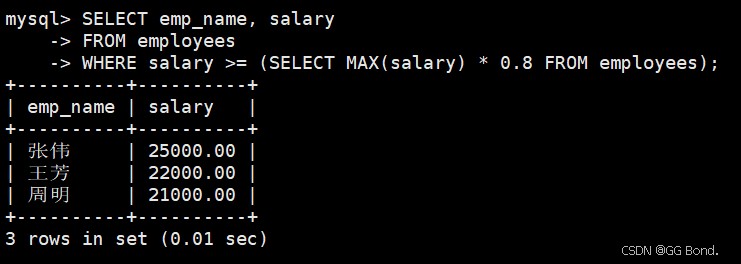
比较运算符子查询
select emp_name, salary
from employees
where salary >= (select max(salary) * 0.8 from employees);
3.3 子查询性能优化
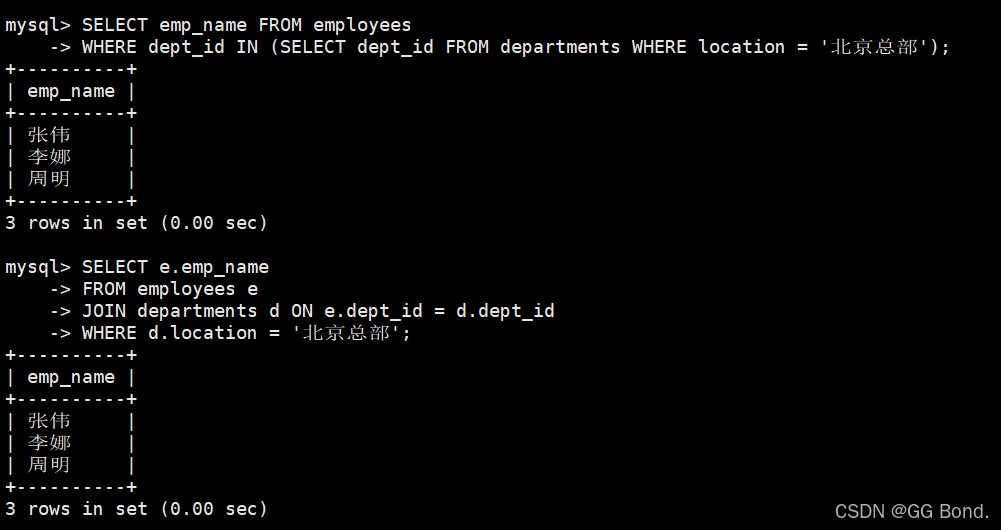
使用join替代子查询
-- 不推荐
select emp_name from employees
where dept_id in (select dept_id from departments where location = '北京总部');
-- 推荐
select e.emp_name
from employees e
join departments d on e.dept_id = d.dept_id
where d.location = '北京总部';
使用exists替代in
-- 当子查询结果集大时更高效
select d.dept_name
from departments d
where exists (select 1 from projects p
             where p.dept_id = d.dept_id);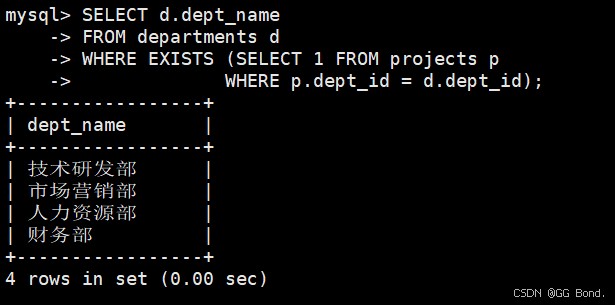
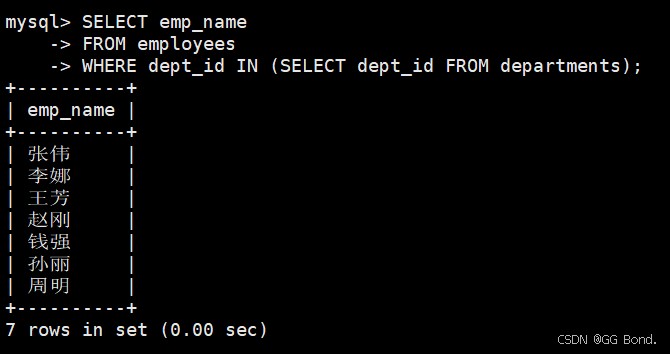
限制子查询返回的列数
-- 只选择必要的列
select emp_name
from employees
where dept_id in (select dept_id from departments);  -- 而不是 select *
四、连接查询全面讲解
4.1 连接类型详解
4.1.1 内连接(inner join)
-- 基本内连接
select e.emp_name, d.dept_name
from employees e
inner join departments d on e.dept_id = d.dept_id;
-- 带条件的内连接
select e.emp_name, p.project_name, ep.role
from employees e
inner join emp_projects ep on e.emp_id = ep.emp_id
inner join projects p on ep.project_id = p.project_id
where p.status = 'in progress';
4.1.2 外连接(outer join)
左外连接(left join)
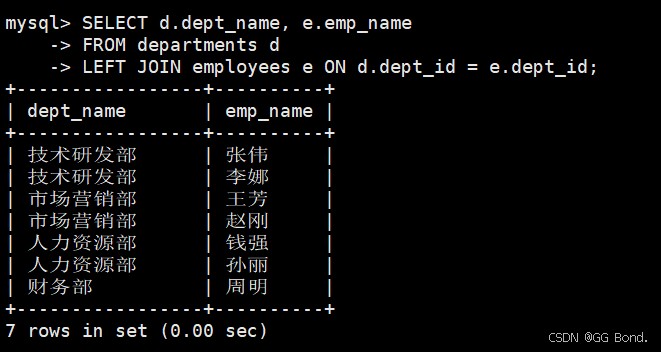
-- 查询所有部门及其员工(包括没有员工的部门)
select d.dept_name, e.emp_name
from departments d
left join employees e on d.dept_id = e.dept_id;
右外连接(right join)
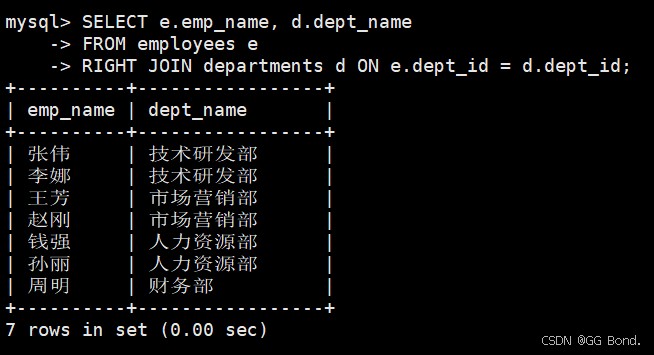
-- 查询所有员工及其部门(包括没有部门的员工)
select e.emp_name, d.dept_name
from employees e
right join departments d on e.dept_id = d.dept_id;
全外连接(full outer join) - mysql通过union实现
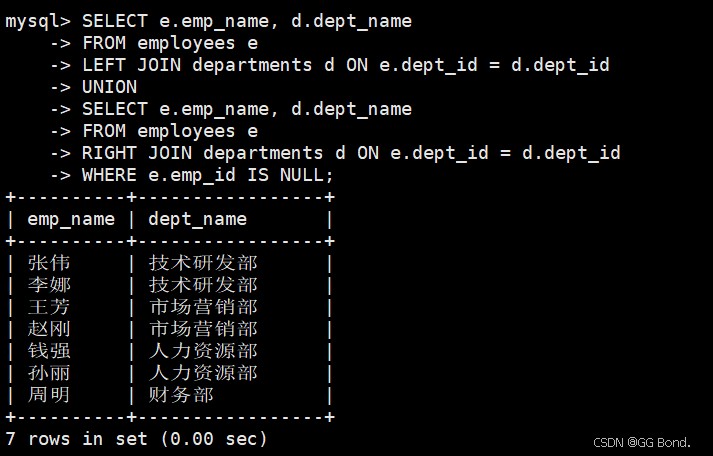
-- 查询所有员工和所有部门的组合
select e.emp_name, d.dept_name
from employees e
left join departments d on e.dept_id = d.dept_id
union
select e.emp_name, d.dept_name
from employees e
right join departments d on e.dept_id = d.dept_id
where e.emp_id is null;
4.1.3 交叉连接(cross join)
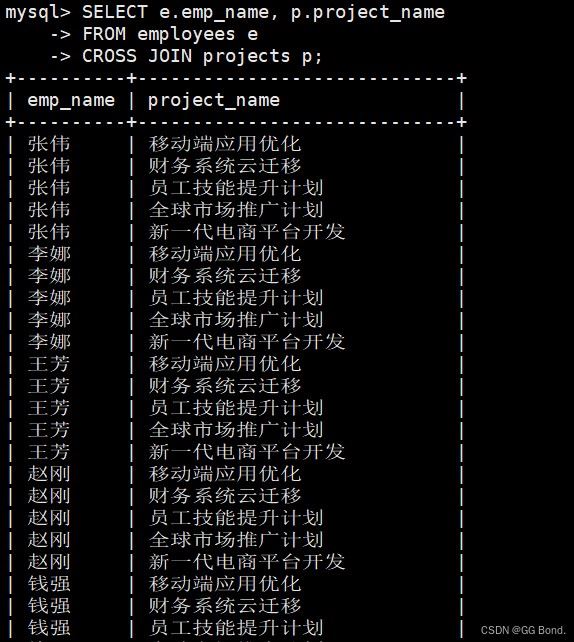
-- 生成员工和项目的所有可能组合
select e.emp_name, p.project_name
from employees e
cross join projects p;
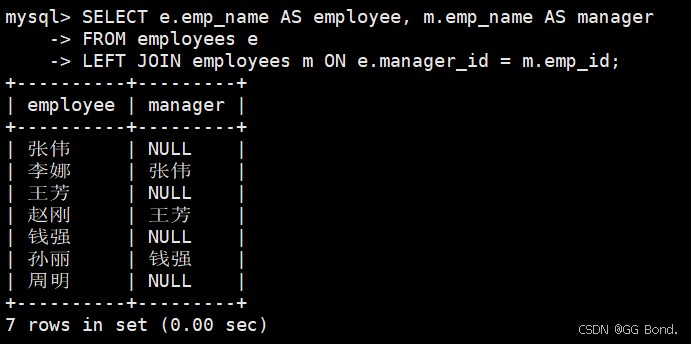
4.1.4 自连接(self join)
-- 查询员工及其经理信息
select e.emp_name as employee, m.emp_name as manager
from employees e
left join employees m on e.manager_id = m.emp_id;
4.2 连接查询优化策略
下面关于索引和视图的知识后面还会详细讲解
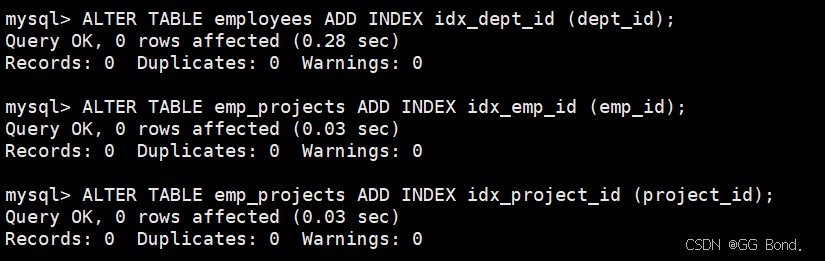
确保连接条件有索引
alter table employees add index idx_dept_id (dept_id);
alter table emp_projects add index idx_emp_id (emp_id);
alter table emp_projects add index idx_project_id (project_id);
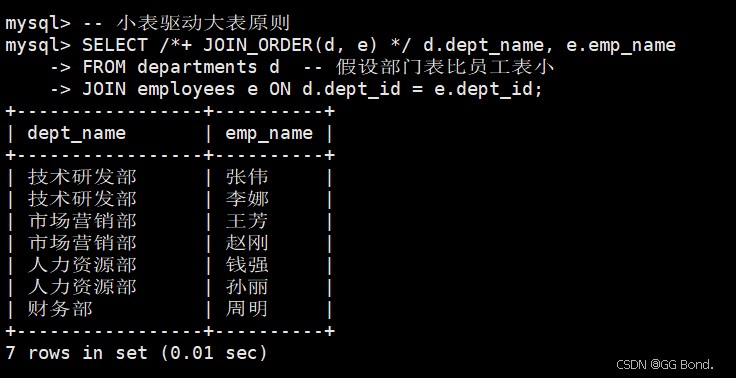
选择适当的连接顺序
-- 小表驱动大表原则
select /*+ join_order(d, e) */ d.dept_name, e.emp_name
from departments d  -- 假设部门表比员工表小
join employees e on d.dept_id = e.dept_id;
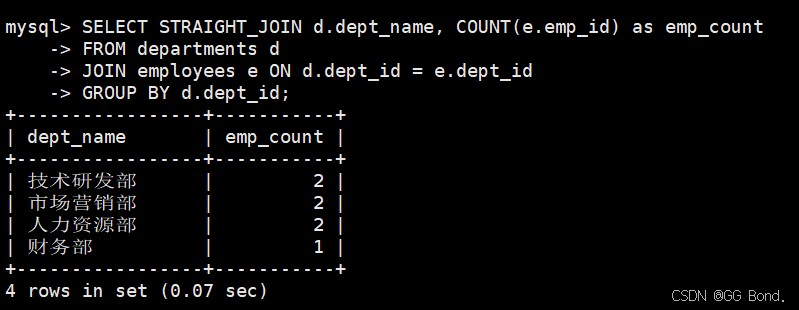
使用straight_join强制连接顺序
select straight_join d.dept_name, count(e.emp_id) as emp_count
from departments d
join employees e on d.dept_id = e.dept_id
group by d.dept_id;
五、union查询高级应用
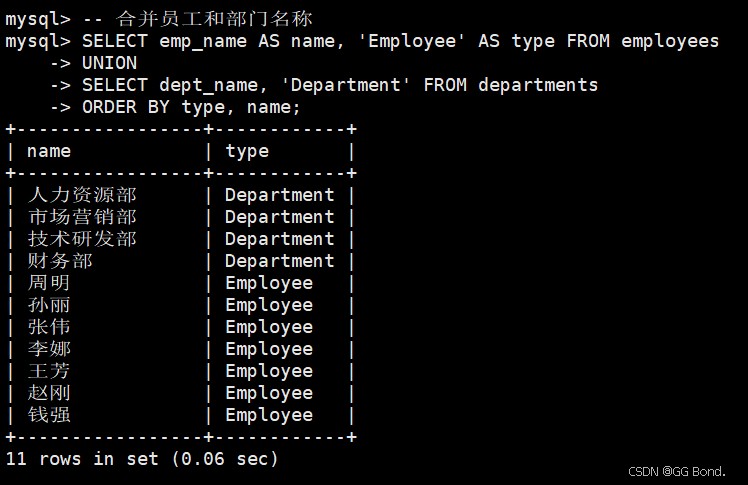
5.1 union基础用法
-- 合并员工和部门名称
select emp_name as name, 'employee' as type from employees
union
select dept_name, 'department' from departments
order by type, name;
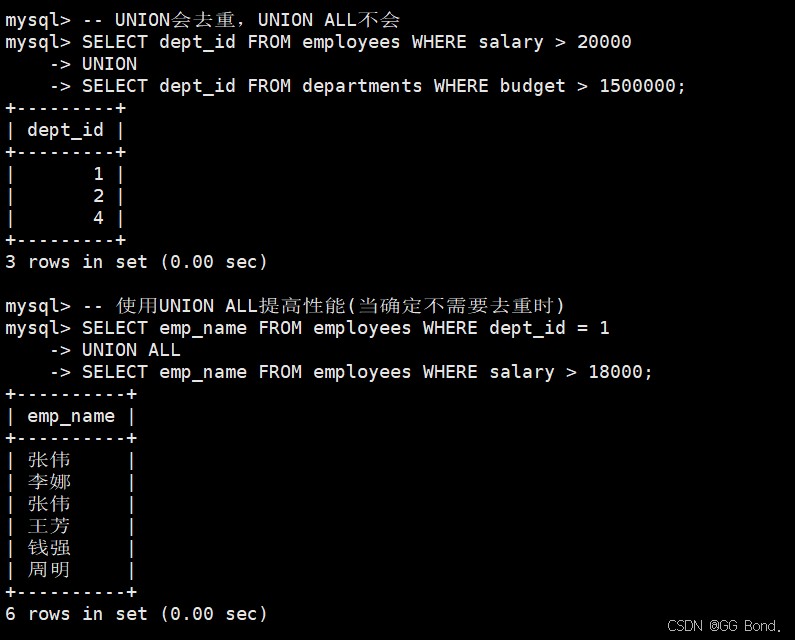
5.2 union all与union的区别
-- union会去重,union all不会
select dept_id from employees where salary > 20000
union
select dept_id from departments where budget > 1500000;

-- 使用union all提高性能(当确定不需要去重时)
select emp_name from employees where dept_id = 1
union all
select emp_name from employees where salary > 18000;
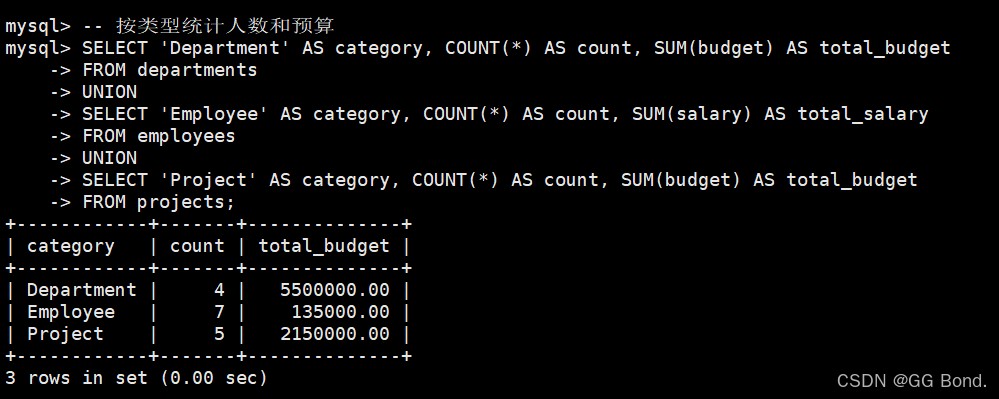
5.3 复杂union查询示例
-- 按类型统计人数和预算
select 'department' as category, count(*) as count, sum(budget) as total_budget
from departments
union
select 'employee' as category, count(*) as count, sum(salary) as total_salary
from employees
union
select 'project' as category, count(*) as count, sum(budget) as total_budget
from projects;
六、派生表与cte高级用法
6.1 派生表(mysql 5.7+)
-- 计算各部门薪资统计信息
select d.dept_name,
       stats.emp_count,
       stats.avg_salary,
       stats.max_salary
from departments d
join (
    select dept_id,
           count(*) as emp_count,
           avg(salary) as avg_salary,
           max(salary) as max_salary
    from employees
    group by dept_id
) stats on d.dept_id = stats.dept_id;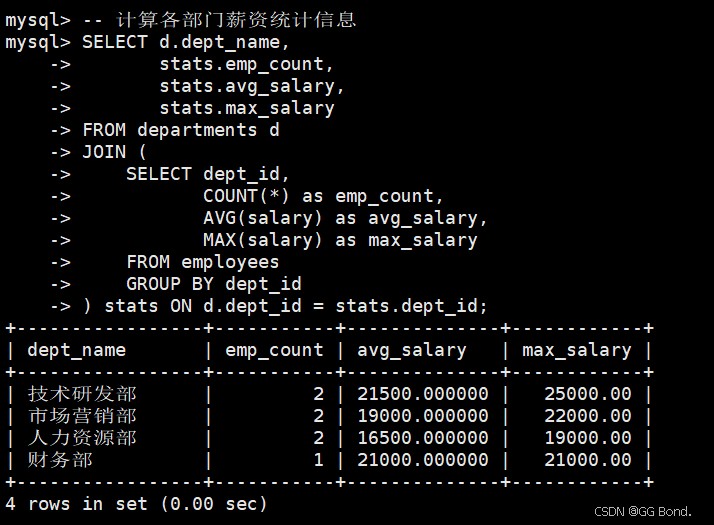
6.2 公用表表达式(cte, mysql 8.0+)
6.2.1 基本cte
-- 查询参与项目的员工信息
with project_emps as (
    select distinct emp_id from emp_projects
)
select e.emp_name, e.salary
from employees e
join project_emps pe on e.emp_id = pe.emp_id;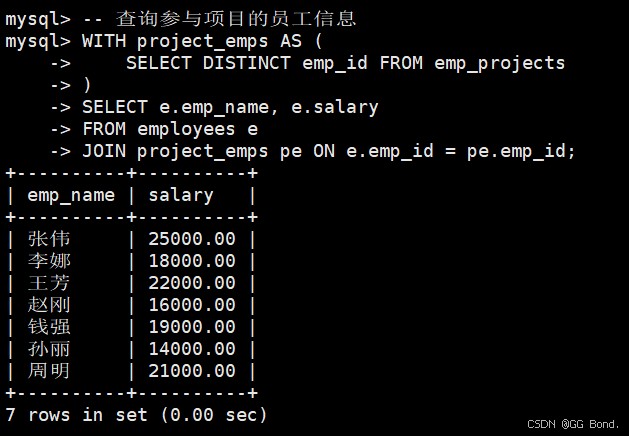
6.2.2 递归cte
-- 组织结构层级查询
with recursive org_hierarchy as (
    -- 基础查询:找出所有没有经理的员工(顶层管理者)
    select emp_id, emp_name, manager_id, 1 as level
    from employees
    where manager_id is null
    union all
    -- 递归查询:找出每个员工的下属
    select e.emp_id, e.emp_name, e.manager_id, oh.level + 1
    from employees e
    join org_hierarchy oh on e.manager_id = oh.emp_id
)
select emp_id, emp_name, level
from org_hierarchy
order by level, emp_name;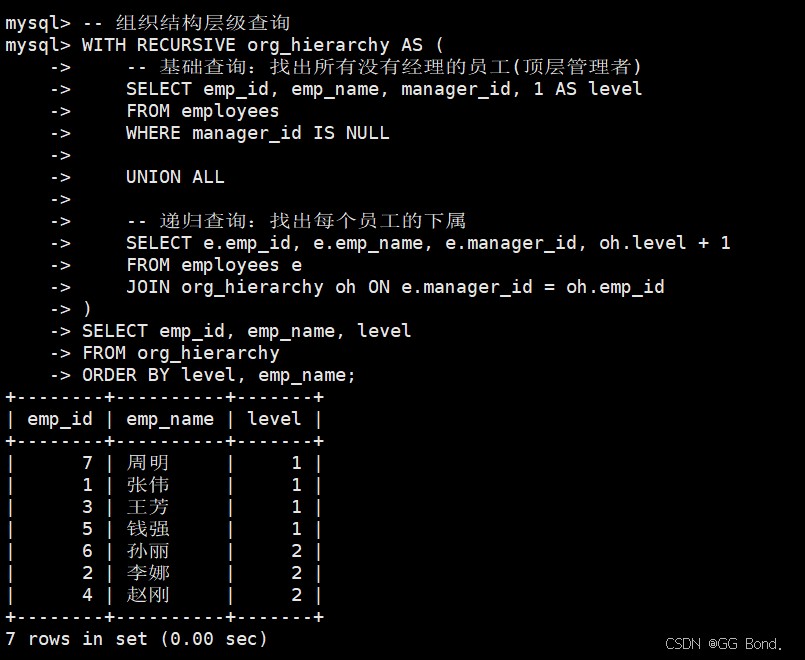
七、复合查询实战案例
7.1 多层级数据分析
-- 分析各部门项目参与情况
with dept_stats as (
    select d.dept_id, d.dept_name,
           count(distinct e.emp_id) as total_emps,
           count(distinct ep.emp_id) as project_emps,
           count(distinct p.project_id) as project_count
    from departments d
    left join employees e on d.dept_id = e.dept_id
    left join emp_projects ep on e.emp_id = ep.emp_id
    left join projects p on d.dept_id = p.dept_id
    group by d.dept_id, d.dept_name
)
select dept_name,
       total_emps,
       project_emps,
       project_count,
       concat(round(project_emps/total_emps*100, 2), '%') as participation_rate
from dept_stats
order by participation_rate desc;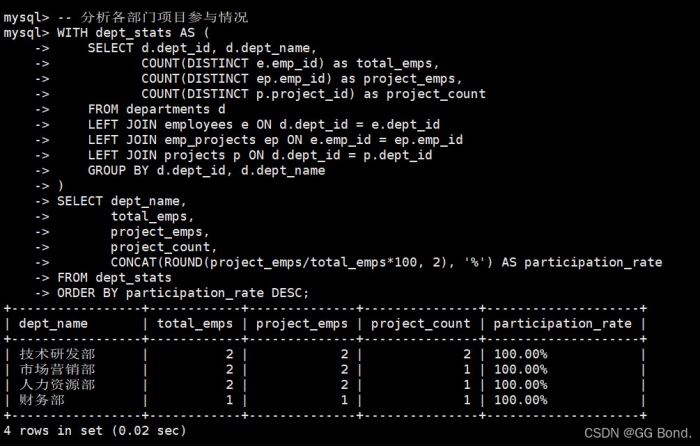
7.2 复杂业务逻辑实现
-- 找出每个部门薪资高于部门平均且参与项目的员工
with dept_avg_salary as (
    select dept_id, avg(salary) as avg_salary
    from employees
    group by dept_id
),
project_employees as (
    select distinct emp_id
    from emp_projects
)
select e.emp_name, e.salary, d.dept_name, das.avg_salary
from employees e
join departments d on e.dept_id = d.dept_id
join dept_avg_salary das on e.dept_id = das.dept_id
join project_employees pe on e.emp_id = pe.emp_id
where e.salary > das.avg_salary
order by e.dept_id, e.salary desc;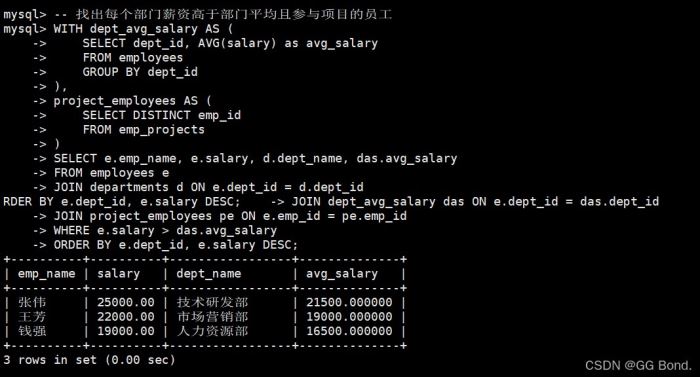
八、性能优化与最佳实践
8.1 复合查询性能优化
explain分析工具
explain
select e.emp_name, d.dept_name
from employees e
join departments d on e.dept_id = d.dept_id
where e.salary > 15000;

- 索引优化建议
- 为所有连接条件创建索引
- 为where子句中的条件列创建索引
- 考虑复合索引的顺序
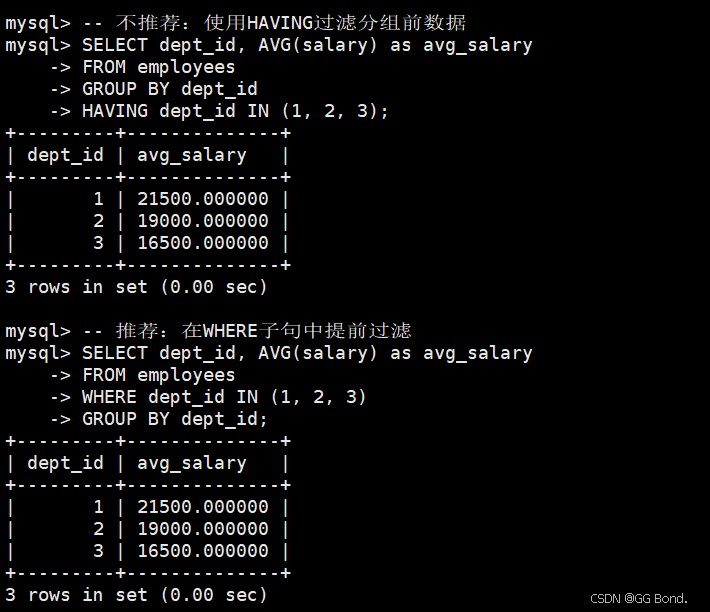
查询重写技巧
-- 不推荐:使用having过滤分组前数据
select dept_id, avg(salary) as avg_salary
from employees
group by dept_id
having dept_id in (1, 2, 3);
-- 推荐:在where子句中提前过滤
select dept_id, avg(salary) as avg_salary
from employees
where dept_id in (1, 2, 3)
group by dept_id;
8.2 复合查询最佳实践
- 保持查询简洁:避免过度复杂的嵌套
- 合理使用注释:解释复杂查询的逻辑
- 分步构建查询:先测试子查询再组合
- 考虑使用视图:对常用复杂查询创建视图
create view dept_project_stats as
select d.dept_id, d.dept_name,
       count(distinct e.emp_id) as emp_count,
       count(distinct p.project_id) as project_count
from departments d
left join employees e on d.dept_id = e.dept_id
left join projects p on d.dept_id = p.dept_id
group by d.dept_id, d.dept_name;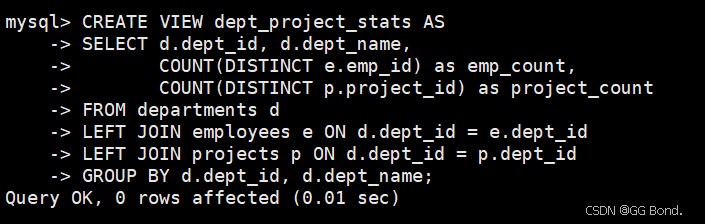
九、常见问题与解决方案
9.1 性能问题排查
问题:复合查询执行缓慢
解决方案:
- 使用explain分析执行计划
- 检查是否使用了适当的索引
- 考虑将复杂查询拆分为多个简单查询
- 评估是否可以使用临时表存储中间结果
9.2 结果不符合预期
问题:查询返回的行数多于或少于预期
解决方案:
- 检查连接条件是否正确
- 确认使用正确的join类型(inner/left/right)
- 验证where条件逻辑
- 检查null值的处理方式
9.3 语法错误处理
常见错误:
- 子查询返回多行但使用了比较运算符
- 在group by或having中引用了不存在的列
- union查询的列数或类型不匹配
解决方案:
-- 错误示例:子查询返回多行
select emp_name from employees
where salary = (select salary from employees where dept_id = 1);
-- 正确修改:
select emp_name from employees
where salary in (select salary from employees where dept_id = 1);
十、总结与进阶学习建议
10.1 复合查询核心要点总结
- 子查询适合解决分步查询问题,但要注意性能
- 连接查询是处理表关系的强大工具
- union提供了垂直合并结果集的能力
- cte提高了复杂查询的可读性和可维护性
10.2 进阶学习建议
- 深入学习执行计划:掌握explain输出解读
- 了解查询优化器原理:学习mysql如何优化查询
- 研究分区表查询:大数据量下的查询优化
- 学习窗口函数:mysql 8.0+的高级分析功能
以上就是关于mysql查询中的所有相关知识点,除了前面常用的外,后面的有些时候并不一定能用到,但都是有必要掌握的,由于篇幅原因,有些问题并不能全面刨析到,建议大家看到不理解的地方可以再去找一些教学视频看一下




发表评论