
 我要评论
我要评论说明:本文介绍在使用代码生成 pdf 文件的基础上,如何给生成的的 pdf 文件增加背景图。生成 pdf 文件参看下面这篇博客。
思路
思路是在生成后的 pdf 文件基础上操作,不是在生成 pdf 的模板文件上实现。
如下,是前文中生成的 pdf 文件。

将下面这张图作为文件背景放入到 pdf 文件中

实现一
如下,在原生成 pdf 文件的基础上,增加设置背景的代码
    @postmapping("/pdf")
    public byte[] pdf() throws ioexception {
        // 构建响应头
        string filename = "example.pdf";
        string encodedfilename = urlencoder.encode(filename, standardcharsets.utf_8);
        httpheaders headers = new httpheaders();
        headers.setcontenttype(mediatype.application_octet_stream);
        headers.setcontentdispositionformdata("attachment", encodedfilename);

        // 生成pdf文件
        byte[] pdf = pdfservice.pdf();
        // pdf文件
        file pdffile = fileutil.createtempfile("demo", ".pdf", null, true);
        fileutil.writebytes(pdf, pdffile);
        // 背景图片
        classpathresource resource = new classpathresource("template/picture.jpg");
        file picturefile = fileutil.createtempfile("picture", ".jpg", null, true);
        fileutil.writebytes(resource.getinputstream().readallbytes(), picturefile);
        // 添加背景图片,获取添加背景后的pdf文件
        byte[] bytes = addbackground1(pdffile, picturefile);

        // 返回
        return responseentity.ok()
                .headers(headers)
                .body(bytes).getbody();
    }
其中,添加背景图片方法代码如下:
    /**
     * 添加背景图片
     *
     * @param pdffile     pdf文件
     * @param picturefile 背景图片
     * @return 添加背景后的pdf文件
     */
    private byte[] addbackground1(file pdffile, file picturefile) {
        // 定义输出流,存添加完背景的pdf文件
        bytearrayoutputstream outputstream = new bytearrayoutputstream();
        // 透明度设置为0.2
        float transparency = 0.2f;

        // 加载pdf文件
        try (pddocument document = pddocument.load(pdffile)) {
            // 加背景图片
            pdimagexobject backgroundimage = pdimagexobject.createfromfilebyextension(picturefile, document);

            // 创建透明度配置
            pdextendedgraphicsstate graphicsstate = new pdextendedgraphicsstate();
            graphicsstate.setnonstrokingalphaconstant(transparency);

            // 遍历每一页
            for (pdpage page : document.getpages()) {
                // 获取页面尺寸(单位:点,1点=1/72英寸)
                float pagewidth = page.getmediabox().getwidth();
                float pageheight = page.getmediabox().getheight();

                // 创建内容流(追加模式,放在最底层)
                try (pdpagecontentstream contentstream = new pdpagecontentstream(
                        document, page, pdpagecontentstream.appendmode.prepend, true)) {
                    // 应用透明度配置
                    contentstream.setgraphicsstateparameters(graphicsstate);
                    // 绘制背景图(铺满整个页面)
                    contentstream.drawimage(backgroundimage, 0, 0, pagewidth, pageheight);
                }
            }

            // 保存修改后的pdf
            document.save(outputstream);
            // 以字节数组的形式返回加完背景的pdf文件
            return outputstream.tobytearray();
        } catch (ioexception e) {
            e.printstacktrace();
        }
        return new byte[0];
    }
这种方式所需下面这个依赖
<dependency>
	<groupid>org.apache.pdfbox</groupid>
	<artifactid>pdfbox</artifactid>
	<version>2.0.27</version>
</dependency>
实现二
还可以用下面这段代码
    /**
     * 添加背景图片
     *
     * @param pdffile     pdf文件
     * @param picturefile 背景图片
     * @return 添加背景后的pdf文件
     */
    private byte[] addbackground2(file pdffile, file picturefile) throws documentexception, ioexception {
        // 定义输出流,存添加完背景的pdf文件
        bytearrayoutputstream outputstream = new bytearrayoutputstream();
        // 透明度设置为0.2
        float transparency = 0.2f;

        pdfreader reader = null;
        pdfstamper stamper = null;
        try {
            reader = new pdfreader(fileutil.readbytes(pdffile));
            stamper = new pdfstamper(reader, outputstream);
            image backgroundimage = image.getinstance(fileutil.readbytes(picturefile));

            // 创建透明度配置对象
            pdfgstate gstate = new pdfgstate();
            gstate.setfillopacity(transparency);

            int totalpages = reader.getnumberofpages();
            for (int i = 1; i <= totalpages; i++) {
                // 直接通过pdfreader获取页面尺寸
                rectangle pagesize = reader.getpagesize(i);
                float pagewidth = pagesize.getwidth();
                float pageheight = pagesize.getheight();

                backgroundimage.scaletofit(pagewidth, pageheight);
                backgroundimage.setabsoluteposition(0, 0);

                pdfcontentbyte content = stamper.getundercontent(i);
                // 应用透明度设置
                content.setgstate(gstate);
                content.addimage(backgroundimage);
            }
            stamper.close();
            reader.close();

            return outputstream.tobytearray();
        } catch (ioexception | documentexception e) {
            e.printstacktrace();
        } finally {
            if (stamper != null) {
                stamper.close();
            }
            if (reader != null) {
                reader.close();
            }
        }
        return new byte[0];
    }
这段代码所需下面这个依赖
<dependency>
	<groupid>com.itextpdf</groupid>
	<artifactid>itextpdf</artifactid>
	<version>5.5.13.3</version>
</dependency>
效果
两种方式,实现的效果如下:
(实现一)
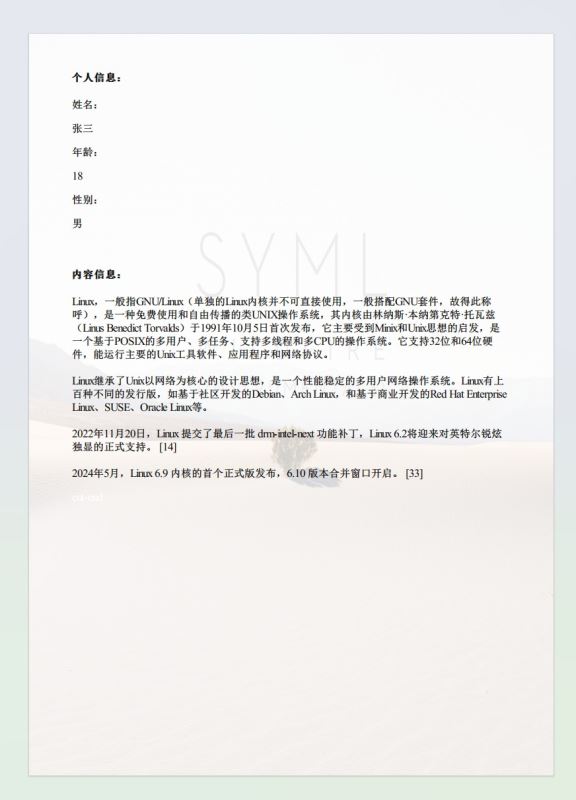
(实现二)
一个自适应了 pdf 文件的尺寸,一个没有,如果添加的背景图片(版权标识、企业 logo)尺寸合适的话,这两种实现方式没有大的区别。
作为开发者,可以根据当前项目中是否已引入上面哪个依赖,来选择使用哪种实现方式。
到此这篇关于java实现给pdf文件增加背景图的操作指南的文章就介绍到这了,更多相关java pdf文件增加背景图内容请搜索代码网以前的文章或继续浏览下面的相关文章希望大家以后多多支持代码网!





发表评论