
 我要评论
我要评论1.jdk中的httpurlconnection
使用jdk 1.8中自带的rt.jar包中的java.net中的httpurlconnection
public static void posttest() throws exception{
 // 1.请求url
   string posturl = "";
   // 2.请求参数json格式
   map<string, string> parammap = new hashmap<>();;
   string json = json.tojsonstring(map);
   // 3.创建连接与设置连接参数
   url urlobj = new url(posturl);
   httpurlconnection httpconn = (httpurlconnection) urlobj.openconnection();
   httpconn.setrequestmethod("post");
   httpconn.setrequestproperty("charset", "utf-8");
   // post请求且json数据,必须设置
   httpconn.setrequestproperty("content-type", "application/json");
   // 打开输出流,默认是false
   httpconn.setdooutput(true);
   // 打开输入流,默认是true,可省略
   httpconn.setdoinput(true);
   // 4.从httpurlconnection获取输出流和写数据
   outputstream ostream = httpconn.getoutputstream();
   ostream.write(json.getbytes());
   ostream.flush();
   // 5.发起http调用(getinputstream触发http请求)
   if (httpconn.getresponsecode() != 200) {
       throw new exception("调用服务端异常.");
   }
   // 6.从httpurlconnection获取输入流和读数据
   bufferedreader br = new bufferedreader(
           new inputstreamreader(httpconn.getinputstream()));
   string resultdata = br.readline();
   system.out.println("从服务端返回结果: " + resultdata);
   // 7.关闭httpurlconnection连接
   httpconn.disconnect();
 }
2.commons-httpclient中的httpclient
引入依赖
<dependency>
  <groupid>commons-httpclient</groupid>
  <artifactid>commons-httpclient</artifactid>
</dependency>
public static void posttest() throws exception {
  // 1.请求url
  string posturl = "";
  // 2.请求参数
  map<string, string> parammap = new hashmap<>();
  string json = json.tojsonstring(parammap);
  // 3.创建连接与设置连接参数
  httpclient httpclient = new httpclient();
  postmethod postmethod = new postmethod(posturl);
  postmethod.addrequestheader("content-type", "application/json");
  requestentity entity = new stringrequestentity(json, "application/json", "utf-8");
  postmethod.setrequestentity(entity);
  //解决返回值中文乱码
  postmethod.getparams().setparameter(httpmethodparams.http_content_charset, "utf-8");
  string resultdata = "";
  // 4.发起请求
  int code = httpclient.executemethod(postmethod);
  if (code != 200) {
      throw new exception("调用服务端异常.");
  }
  // 5.接收返回值
  resultdata = postmethod.getresponsebodyasstring();
  system.out.println("从服务端返回结果: " + resultdata);
  // 6.关闭连接
  postmethod.releaseconnection();
 }
3.httpclient中的httpclientbuilder
httpclient:是apache httpclient包下的,代码复杂,需要资源回收。
引入依赖
<dependency>
  <groupid>org.apache.httpcomponents</groupid>
  <artifactid>httpclient</artifactid>
</dependency>
public static void posttest() throws exception {
   // 1.请求url
   string posturl = "";
   // 2.请求参数
   map<string, string> parammap = new hashmap<>();
   string json = json.tojsonstring(parammap);
   // 3.创建连接与设置连接参数
   closeablehttpclient httpclient = httpclientbuilder.create().build();
   httppost httppost = new httppost(posturl);
   stringentity entity = new stringentity(json);
   entity.setcontentencoding("utf-8");
   entity.setcontenttype("application/json");
   httppost.setentity(entity);
   // 4.发起请求与接收返回值
   httpresponse response = httpclient.execute(httppost);
   if (response.getstatusline().getstatuscode() != 200) {
       throw new exception("调用服务端异常.");
   }
   httpentity res = response.getentity();
   string resultdata = entityutils.tostring(res);
   system.out.println("从服务端返回结果: " + resultdata);
   // 5.关闭连接
   httpclient.close();
 }
4.okhttp中的okhttpclient
引入依赖
<dependency>
  <groupid>com.squareup.okhttp3</groupid>
  <artifactid>okhttp</artifactid>
  <exclusions>
    <exclusion>
      <groupid>com.google.android</groupid>
      <artifactid>android</artifactid>
    </exclusion>
  </exclusions>
</dependency>
public static void posttest() throws exception {
// 1.请求url
string posturl = "";
// 2.请求参数
map<string, string> parammap = new hashmap<>();
string json = json.tojsonstring(parammap);
// 3.创建连接与设置连接参数
mediatype mediatype = mediatype.parse("application/json; charset=utf-8");
requestbody requestbody = requestbody.companion.create(json, mediatype);
request request = new request.builder().url(posturl).post(requestbody).build();
okhttpclient okhttpclient = new okhttpclient.builder().build();
// 4.发起请求与接收返回值
response response = okhttpclient.newcall(request).execute();
string resultdata = response.body().string();
system.out.println("从服务端返回结果: " + resultdata);
}5.restclient
官网解释: synchronous client with a fluent api.
5.resttemplate(webmvc推荐)
resttemplate:resttemplate 是 spring 提供的一个经典同步 http 客户端工具,可以用于调用 restful 风格的外部接口,代码简单,默认依赖jdk的http连接工具,它是一个同步阻塞型客户端,官网解释:synchronous client with template method api.
resttemplate resttemplate = new resttemplate();

string url = "http://api.example.com/user/{id}";
map<string, string> params = new hashmap<>();
params.put("id", "123");

user user = resttemplate.getforobject(url, user.class, params);
使用 resttemplate并发调用:
public class resttemplateconcurrentexample {

    private resttemplate resttemplate = new resttemplate();

    public void fetchmultipleusers(string[] userids) {
        executorservice executor = executors.newfixedthreadpool(userids.length);
        for (string userid : userids) {
            executor.submit(() -> {
                string url = "https://api.example.com/users/" + userid;
                string response = resttemplate.getforobject(url, string.class);
                system.out.println(response);
            });
        }
        executor.shutdown();
    }
}
6.webclient(webflux推荐)
webclient 是 spring 5 引入的一种非阻塞式、响应式的 http 客户端工具,它提供了一套简洁的 api 来发送 http 请求并处理响应。webclient 基于 reactor 提供了对响应式编程的支持,可以实现高性能的异步操作,官网解释:non-blocking, reactive client with fluent api。
1.简单使用
webclient webclient = webclient.create();

string url = "http://api.example.com/user/{id}";
map<string, string> params = new hashmap<>();
params.put("id", "123");

mono<user> result = webclient.get()
        .uri(uribuilder -> uribuilder.path(url).build(params))
        .retrieve()
        .bodytomono(user.class);

result.subscribe(user -> {

    // 处理响应结果
});
webclient并发调用:
public class webclientconcurrentexample {

    private webclient webclient = webclient.create();

    public flux<string> fetchmultipleusers(string[] userids) {
        return flux.fromarray(userids)
               .flatmap(userid -> webclient.get()
                       .uri("https://api.example.com/users/" + userid)
                       .retrieve()
                       .bodytomono(string.class));
    }
}
2.高级使用
1.配置连接池
/**
webclient连接池
**/
@configuration
public class webclientconfig {

    @bean
    public webclient webclient() {
        // 配置http连接池
        connectionprovider provider = connectionprovider.builder("custom")
                .maxconnections(500)
                .maxidletime(duration.ofseconds(20))
                .build();

        // 配置http客户端
        httpclient httpclient = httpclient.create(provider)
                .option(channeloption.connect_timeout_millis, 5000)
                .responsetimeout(duration.ofseconds(5))
                .doonconnected(conn ->
                        conn.addhandlerlast(new readtimeouthandler(5))
                                .addhandlerlast(new writetimeouthandler(5)));

        // 构建webclient实例
        return webclient.builder()
                .clientconnector(new reactorclienthttpconnector(httpclient))
                .baseurl("https://echo.apifox.com")
                .defaultheader(httpheaders.content_type, mediatype.application_json_value)
                .defaultheader(httpheaders.accept, mediatype.application_json_value)
                // 添加请求日志记录功能
                .filter(exchangefilterfunction.ofrequestprocessor(
                        clientrequest -> {
                            log.debug("request: {} {}",
                                    clientrequest.method(),
                                    clientrequest.url());
                            return mono.just(clientrequest);
                        }
                ))
                // 添加响应日志记录功能
                .filter(exchangefilterfunction.ofresponseprocessor(
                        clientresponse -> {
                            log.debug("response status: {}",
                                    clientresponse.statuscode());
                            return mono.just(clientresponse);
                        }
                ))
                .build();
    }
}
2. retrieve()和exchange()区别
retrieve()
- 用途:retrieve() 方法用于简化响应处理,特别是当你只需要响应体时。
- 自动错误处理:retrieve() 会自动处理 http 错误状态码(例如 4xx 和 5xx),并抛出 webclientresponseexception 及其子类。
- 返回值:通常用于直接获取响应体,例如 bodytomono(string.class) 或 bodytoflux(string.class)。
- 适用场景:适用于大多数常见的请求处理场景,特别是当你不需要手动处理响应状态码时。
public mono<jsonobject> get(string q1) {
    return webclient.get()
            .uri(uribuilder -> uribuilder
                    .path("/get")
                    .queryparam("q1", q1)
                    .build())
            .accept(mediatype.application_json)
            .retrieve()
            .bodytomono(jsonobject.class);
}
exchange()
- 用途:exchange() 方法提供了更底层的控制,允许你手动处理响应,包括响应状态码和响应头。
- 手动错误处理:exchange() 不会自动处理 http 错误状态码,你需要手动检查响应状态码并进行相应的处理。
- 返回值:返回 clientresponse 对象,你可以从中提取响应状态码、响应头和响应体。
- 适用场景:适用于需要手动处理响应状态码或响应头的复杂场景。
public mono<jsonobject> get(string q1) {
    return webclient.get()
            .uri(uribuilder -> uribuilder
                    .path("/get")
                    .queryparam("q1", q1)
                    .build())
            .accept(mediatype.application_json)
            .exchangetomono(response -> {
                if (response.statuscode().is2xxsuccessful()) {
                    return response.bodytomono(jsonobject.class);
                } else {
                    return mono.error(new runtimeexception("request failed with status code: " + response.statuscode()));
                }
            });
}
3. get,post,put,delete请求
@service
public class apiservice {

    @resource
    private webclient webclient;

    // get请求
    public mono<jsonobject> get(string q1) {
        return webclient.get()
                .uri(uribuilder -> uribuilder
                        .path("/get")
                        .queryparam("q1", q1)
                        .build())
                .accept(mediatype.application_json)
                .retrieve()
                .bodytomono(jsonobject.class);
    }

    // post请求
    public mono<jsonobject> post(jsonobject body) {
        return webclient.post()
                .uri("/post")
                .bodyvalue(body)
                .retrieve()
                .bodytomono(jsonobject.class);
    }

    // put请求
    public mono<jsonobject> put(string q1, jsonobject jsonobject) {
        return webclient.put()
                .uri(uribuilder -> uribuilder
                        .path("/put")
                        .queryparam("q1", q1)
                        .build())
                .bodyvalue(jsonobject)
                .retrieve()
                .bodytomono(jsonobject.class);
    }

    // delete请求
    public mono<jsonobject> delete(string q1) {
        return webclient.delete()
                .uri(uribuilder -> uribuilder
                        .path("/delete")
                        .queryparam("q1", q1)
                        .build())
                .retrieve()
                .bodytomono(jsonobject.class);
    }
}
3.mono和flux
mono用于表示包含 0 个或 1 个元素的异步数据流(如单个用户信息查询结果);flux用于表示包含 0 个或多个元素的异步数据流(如列表查询结果)。
4. 创建型操作符(just)
1. mono和flux
just操作可直接通过传入的元素创建一个响应式流。其中,flux 可接收多个元素(0 个或多个),mono 则仅能接收单个元素(若传入多个会报错,示例中mono.just("a", "b", "c")为错误示范,正确应为mono.just("a"))。
// 创建包含3个元素的flux流(可正常运行)
flux<string> flux = flux.just("a", "b", "c");
// 正确示例:创建仅包含1个元素的mono流
mono<string> mono = mono.just("a");
2. fromiterable(iterable<t>)
fromiterable、fromarray则分别将已有的iterable类型集合(如list、set),和数组转换为响应式流,自动遍历集合中的元素并发送到流中。适合需要处理已有数据集合的场景,避免手动逐个添加元素。
// fromiterable
list<integer> list = arrays.aslist(1, 2, 3);
flux<integer> flux = flux.fromiterable(list);
// fromarray
integer[] arr = {10, 20, 30};
flux<integer> flux = flux.fromarray(arr);
flux.subscribe(system.out::println);
3. range(int start, int count)
range则适用于快速生成一段连续的整数流来构建测试用例。其中,第一个参数为起始值,第二个参数为元素个数。
flux.range(1, 5).subscribe(system.out::println); // 输出 1~5
4. create(fluxsink<t>)
通过fluxsink对象可手动发送元素(next)、结束信号(complete)或错误信号(error),灵活控制流的产生过程。
该api适合用于从异步回调、事件监听中获取数据等场景。
// 手动创建流,通过sink发送元素并结束
flux.create(sink -> {
    sink.next("hello"); // 发送第一个元素
    sink.next("webflux"); // 发送第二个元素
    sink.complete(); // 标记流结束(不再发送元素)
}).subscribe(system.out::println); // 输出:hello webflux


        mono<integer> mono = mono.create(monosink -> {
            // 成功的信号
            //monosink.success(111);
            // 异常的信号
            monosink.error(new exception("this is error"));
        });
        mono.onerrorresume(exception.class, ex -> {
            system.out.println("error:" + ex);
            return mono.just(12345);
        }).subscribe(rr -> {
            system.out.println("result:" + rr);
        });
5. 转换型操作符(map)
1. map(function<t, r>)
map的操作则主要对流中的每个元素执行指定的转换操作。即输入一个元素,输出一个转换后的元素,保持流的元素数量不变。适合简单的同步转换场景。
// 对流中每个字符串执行"转大写"操作
flux<string> flux = flux.just("apple", "banana")
    .map(string::touppercase); // 调用string的touppercase()方法
flux.subscribe(system.out::println); // 输出:apple banana
2. flatmap(function<t, publisher<r>>)
与map不同,flatmap 则接收一个元素t,返回一个新的响应式流publisher<r>(如flux<r>或mono<r>)。 即整个过程是 "元素→流" 的映射,会将子流 "扁平化" 合并为一个新流,输出流的元素数量可能比输入流多(或少)。
// 将每个字符串按字符拆分,转换为包含单个字符的子流,再合并
flux<string> flux = flux.just("hello", "world")
    .flatmap(s -> flux.fromarray(s.split(""))); // 拆分后子流为 ["h","e","l","l","o"] 和 ["w","o","r","l","d"]
flux.subscribe(system.out::println);
// 可能输出:h w e o l r l l d(顺序不固定,因两个子流并行处理)
举个更实际的例子,如 "一个订单包含多个商品,需要根据订单 id 查询所有商品" 的场景(1 个订单→多个商品组成的流),或需要在转换中调用异步操作可使用flatmap来进行操作。
// 模拟"根据用户id查询多个订单"的异步操作
flux.just(1001, 1002) // 用户id流
    .flatmap(userid -> orderservice.findordersbyuserid(userid)) // 每个用户id→订单流
    .subscribe(order -> system.out.println("订单:" + order));
3. concatmap(function<t, publisher<r>>)
与flatmap类似,concatmap则是将每个元素转换为子流后合并,但严格按照原元素的顺序处理子流(前一个子流完全处理完才会处理下一个),因此最终流的元素顺序与原元素对应的子流顺序一致。适合需要保证顺序的场景(如按顺序处理批量任务)。
// 同样拆分字符串为字符子流,但按原顺序合并
flux<string> flux = flux.just("hello", "world")
    .concatmap(s -> flux.fromarray(s.split(""))); // 先处理"hello"的子流,再处理"world"的子流
flux.subscribe(system.out::println);
// 固定输出:h e l l o w o r l d(严格遵循原元素顺序)
6 过滤型操作符
1. filter(predicate<t>)
flux<integer> flux = flux.range(1, 10).filter(i -> i % 2 == 0);
flux.subscribe(system.out::println);
2. distinct()
对流中所有元素进行去重处理,保留首次出现的元素,后续重复元素会被过滤。
flux.just(1, 2, 2, 3).distinct().subscribe(system.out::println);
3. limitrate(int rate)
控制流从上游数据源获取元素的速率,每次向上游请求 rate 个元素,处理完后再请求下一批,避免一次性加载过多数据导致内存压力(类似 “分批拉取”)。常用于流中元素数量极大的场景(如处理百万级数据),平衡内存占用与处理效率。
// 生成1~100的整数流,每次从上游获取10个元素后再继续请求
flux.range(1, 100)
.limitrate(10).subscribe(system.out::println);
// 内部过程:先请求1~10,处理完后再请求11~20,直到所有元素处理完毕
7.异常处理
- onstatus:用于处理http响应状态码,允许根据不同状态码执行特定逻辑。例如,当收到404状态码时重定向到错误页面,或根据200状态码正常处理数据。
- onerrorresume:用于处理异常情况(如超时、连接失败等),切换到一个备用的publisher。。例如,当请求超时时返回默认数据或重试请求。
- onerrorreturn:当发生错误时,返回一个默认值。
- onerrormap:将发生的错误转换为另一种类型的错误。
- doonerror:在发生错误时执行一些操作,但不改变流本身。
核心差异:
- 触发时机:onstatus在响应阶段触发,onerrorresume在请求阶段触发。
- 处理范围:onstatus仅处理http状态码异常,onerrorresume处理所有请求异常(包括网络问题、超时等)。
- 链式操作:onerrorresume支持链式调用(如重试、返回默认值等),onstatus通常仅用于分支处理。
    // 处理错误响应
    public mono<jsonobject> getuserwitherrorhandling(long id) {
        return webclient.get()
                .uri("/users/{id}", id)
                .retrieve()
                .onstatus(httpstatuscode::is4xxclienterror, clientresponse -> mono.error(new runtimeexception("客户端错误")))
                .onstatus(httpstatuscode::is5xxservererror, clientresponse -> mono.error(new runtimeexception("服务器错误")))
                .bodytomono(jsonobject.class);
    }
mono<responseentity<string>> mono = webclient.create().get().uri("http://")
.retrieve()
.toentity(string.class)
.onerrorresume(webclientresponseexception.class, e -> {
if (e.getstatuscode().is4xxclienterror()) {
return mono.error(new httpclienterrorexception(e.getstatuscode(), e.getresponsebodyasstring()));
}
return mono.error(e);
});8. 时间控制操作符
1. delayelements(duration duration)
delayelements主要让流中的每个元素都延迟指定时间后再发射,相当于给每个元素的发送增加一个统一的 “等待期”。
// 生成1~3的整数流,每个元素延迟1秒后发送
flux.range(1, 3).delayelements(duration.ofseconds(1))
    .subscribe(system.out::println); // 依次间隔1秒输出:1、2、3
thread.sleep(5000); // 主线程休眠5秒,防止程序提前退出(否则看不到完整输出)
2. timeout(duration timeout)
timeout主要为流设置超时阈值,若流在指定时间内没有发射新元素(或未完成),则会触发超时错误(timeoutexception)。适合需要限制操作响应时间的场景(如接口调用超时控制)。
// 生成1~3的整数流,每个元素延迟500毫秒发送,同时设置超时时间为300毫秒
flux.range(1, 3)
    .delayelements(duration.ofmillis(500)) // 元素发送间隔500ms
    .timeout(duration.ofmillis(300)) // 超过300ms未收到新元素则超时
    .subscribe(
        system.out::println, // 正常元素处理(此处第一个元素就会超时,不会执行)
        throwable::printstacktrace // 捕获并打印超时异常
    );
thread.sleep(2000); // 主线程休眠,确保异常能被捕获
// 输出:timeoutexception(因第一个元素需500ms发送,超过300ms超时阈值)
9 订阅操作符
1. subscribe(consumer<t>)
mono的subscribe方法用于触发异步操作链的执行,其核心机制涉及发布-订阅关系链的构建与执行。
mono.just("hello")
   .filter(t -> t.startswith("h"))
   .map(string::touppercase)
   .subscribe(system.out::println);

#此代码通过subscribe触发处理链,依次执行过滤、转换操作。
2. doonnext(consumer<t>)
在流中的每个元素被发射到订阅者之前,触发指定的消费函数(如日志记录、数据预处理等),但不会改变元素本身或流的结构。
// 生成1~3的整数流,发射前打印提示,再将元素发送给订阅者
flux.range(1, 3)
    .doonnext(i -> system.out.println("before emit: " + i)) // 发射前执行:打印提示
    .subscribe(system.out::println); // 订阅者接收并打印元素
// 输出:
// before emit: 1 → 发射前操作
// 1 → 订阅者处理
// before emit: 2
// 2
// before emit: 3
// 3
3. dooncomplete(runnable)
流正常结束(所有元素发射完毕且无错误)时,触发指定的无参任务(runnable),可用于执行流结束后的收尾操作(如释放资源、打印完成日志等)。
// 创建包含1、2的流,完成时打印"done",并订阅(无需处理元素,仅触发完成回调)
flux.just(1, 2)
    .dooncomplete(() -> system.out.println("done")) // 流正常结束时执行
    .subscribe(); // 订阅启动流
// 输出:done(当1和2都发射完毕后,触发完成回调)
10 多个mono的处理
1. 合并多个mono
如果你有多个独立的mono实例,并希望它们在同一个上下文中执行(例如,并行执行后合并结果),你可以使用mono.zip、mono.when或mono.merge等方法。
#使用mono.zip
mono<string> mono1 = webclient.get()
    .uri("http://example.com/api/data1")
    .retrieve()
    .bodytomono(string.class);

mono<integer> mono2 = webclient.get()
    .uri("http://example.com/api/data2")
    .retrieve()
    .bodytomono(integer.class);

mono<tuple2<string, integer>> combined = mono.zip(mono1, mono2);


#使用mono.when
mono<void> mono1 = webclient.get()
    .uri("http://example.com/api/data1")
    .retrieve()
    .bodytomono(string.class)
    .then(); // 转换为void mono

mono<void> mono2 = webclient.get()
    .uri("http://example.com/api/data2")
    .retrieve()
    .bodytomono(integer.class)
    .then(); // 转换为void mono

mono<void> combined = mono.when(mono1, mono2);
2 顺序执行多个mono
如果你需要按顺序执行多个mono,可以使用.then或mono.concat。
#使用mono.flatmap
mono<string> mono1 = webclient.get()
    .uri("http://example.com/api/data1")
    .retrieve()
    .bodytomono(string.class);

mono<integer> mono2 = mono1 // 从mono1的结果继续执行
    .flatmap(result -> webclient.get()
        .uri("http://example.com/api/data2?param=" + result)
        .retrieve()
        .bodytomono(integer.class));

#使用mono.concat
flux<object> fluxofmonos = flux.just(
    webclient.get().uri("http://example.com/api/data1").retrieve().bodytomono(string.class),
    webclient.get().uri("http://example.com/api/data2").retrieve().bodytomono(integer.class)
);

flux<object> result = flux.concat(fluxofmonos); // 注意:这会按顺序合并结果,但保持它们为monos,而非合并成一个结果。
3 转换多个mono为列表或其他集合类型
如果你想要将多个mono的结果收集到一个列表或其他集合中,可以使用flux.fromarray或flux.fromiterable与.collectlist()或.collectmap()等操作。
flux<object> fluxofmonos = flux.fromarray(new object[]{
    webclient.get().uri("http://example.com/api/data1").retrieve().bodytomono(string.class),
    webclient.get().uri("http://example.com/api/data2").retrieve().bodytomono(integer.class)
});

mono<list<object>> resultlist = fluxofmonos.collectlist(); // 收集为list
11. block()/blockfirst()/blocklast()
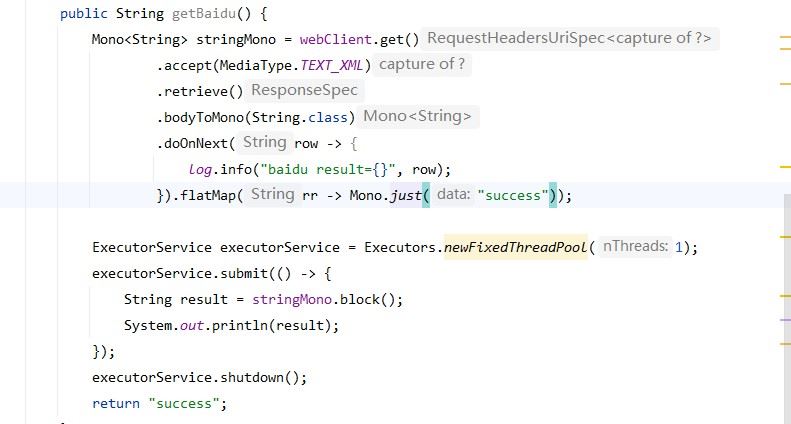
因为block是阻塞操作,所以不能在webflux框架中阻塞任务结果,因为reactor-netty属于异步非阻塞框架。在异步非阻塞中的线程中阻塞结果会报错。

正确的做法新建一个线程阻塞结果
12. 使用mono后台执行
在java中,特别是在使用spring框架时,我们经常需要异步执行代码以避免阻塞主线程。spring 5引入了project reactor,它提供了mono和flux等反应式类型,使得编写非阻塞代码变得非常方便。
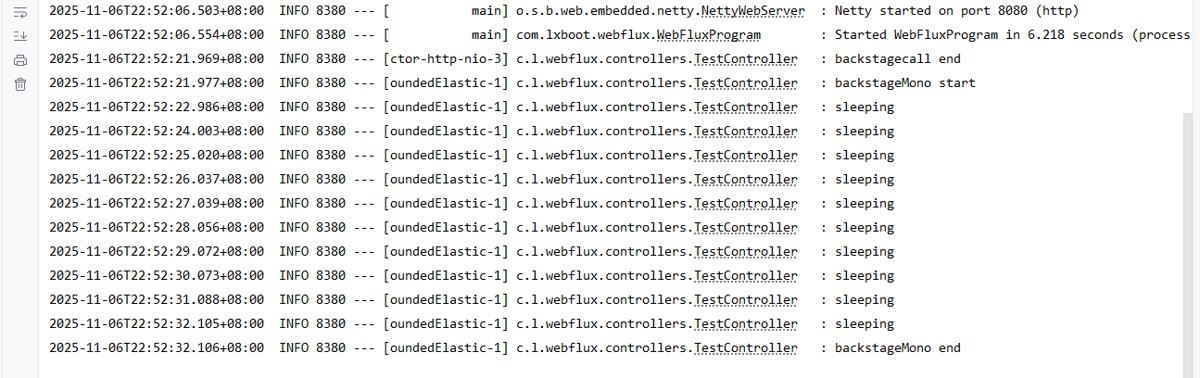
1. mono.fromrunnable
    @getmapping("/backstagecall")
    public mono<string> backstagecall() {
        mono<string> reulst = mono.just("backgraudcall call");
//        方法1:使用mono.fromrunnable
        mono.fromrunnable(() -> {
                    log.info("backstagemono start ");
                    // 耗时的代码
                    mysleep(10);
                    log.info("backstagemono end ");
                }).subscribeon(schedulers.boundedelastic()) // 在后台执行
                .subscribe();
        log.info("backstagecall end");
        return reulst;
    }
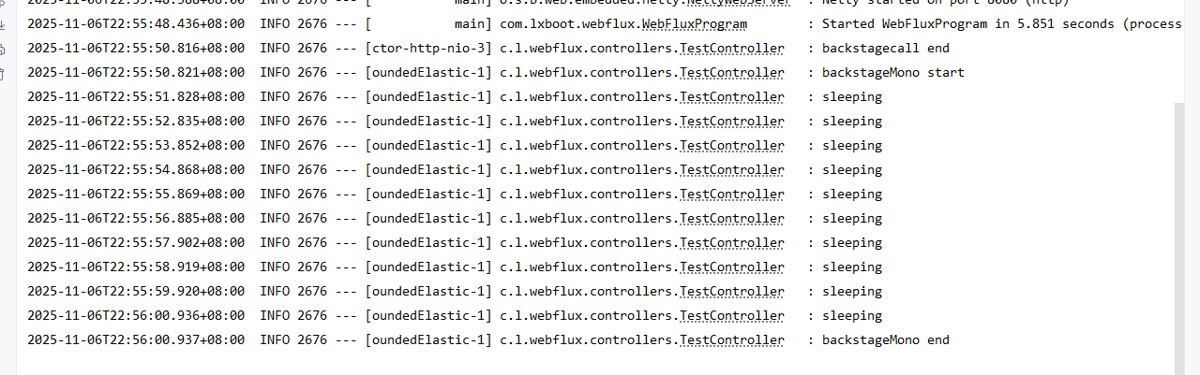
2. mono.defer+schedulers
    @getmapping("/backstagecall")
    public mono<string> backstagecall() {
        mono<string> reulst = mono.just("backgraudcall call");
        //        方法2:使用mono.defer+schedulers
        mono.defer(() -> {
                    log.info("backstagemono start ");
                    mysleep(10);
                    log.info("backstagemono end ");
                    return mono.empty();
                }).subscribeon(schedulers.boundedelastic())  // 在后台执行
                .subscribe();
        log.info("backstagecall end");
        return reulst;
    }
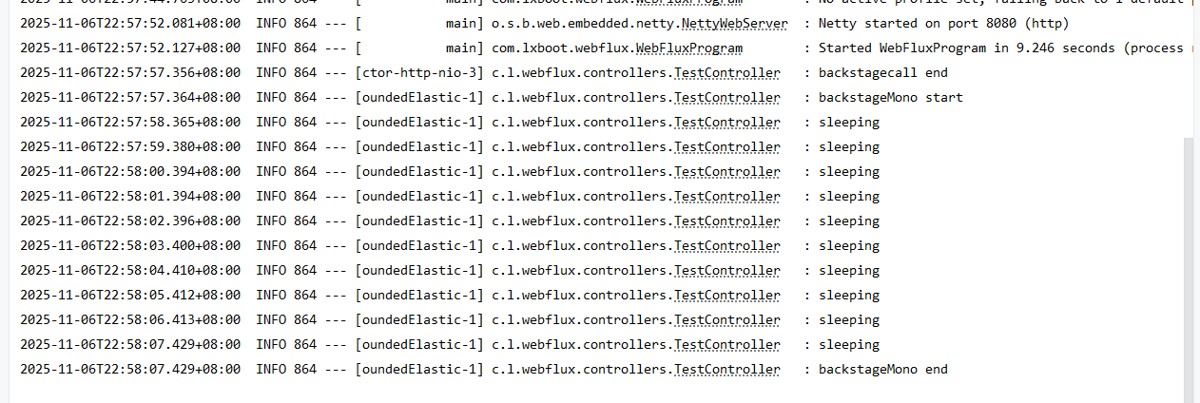
3. mono.create
    @getmapping("/backstagecall")
    public mono<string> backstagecall() {
        mono<string> reulst = mono.just("backgraudcall call");
//        方法3:使用mono.create
        mono.create(sink -> {
            schedulers.boundedelastic().schedule(() -> {
                log.info("backstagemono start ");
                mysleep(10);
                log.info("backstagemono end ");
                // 完成信号
                sink.success("111");
            });
        }).subscribe();

        log.info("backstagecall end");
        return reulst;
    }
7.openfeign或者feign
feign 是 spring cloud 提供的一个声明式的 http 客户端工具,它基于注解和接口定义的方式,简化了外部接口调用的流程。feign 集成了 ribbon 负载均衡和 hystrix 熔断器等功能,使得接口调用更加灵活可靠。
@feignclient(name = "user-service", url = "http://api.example.com")
public interface userfeignclient {


    @getmapping("/user/{id}")
    user getuser(@pathvariable("id") string id);
}
总结
webclient与resttemplate对比
特性 | webclient | resttemplate |
|---|---|---|
编程模型 |
|
|
性能 | 更好 | 一般 |
资源利用 | 更高效 | 一般 |
学习曲线 | 较陡 | 平缓 |
适用场景 | 高并发、响应式系统 | 简单应用、传统系统 |
以上为个人经验,希望能给大家一个参考,也希望大家多多支持代码网。



发表评论