
 我要评论
我要评论01.表的操作
1.1表操作概览
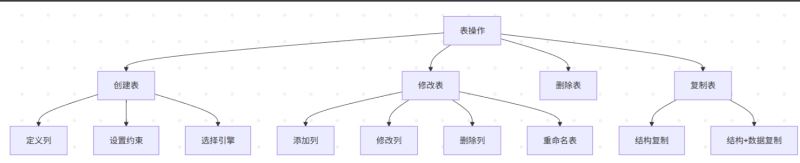
1.2创建表
语法: 语句以;结尾。
#  []表示里面内容可选,使用时不带[]本身
create table [if not exists] table_name (
    column1 datatype [constraints],
    column2 datatype [constraints],
    ...
    [table_constraints]
) [engine=storage_engine] [default charset=charset];
数据类型:
- 数值类型:int、bigint、float、double、decimal(10,2)
- 字符串类型:varchar(255)、text、char(10)
- 日期时间:date、time、datetime、timestamp
- 其他类型:
- boolean
- enum (’
opt1’,’opt2’)只能存储定义时指定的值之一,单选 - set (’
opt1’,’opt2’,’opt3’),多选
列约束:
- not null`:该字段不能为空
unique:该字段值必须唯一default:设置默认值auto_increment:自增主键(通常用于 id 字段)
表约束: 主外键
primary key (列1, ...),
foreign key (字段名) references 主表(列),
创建主表: 主键时表的身份证,唯一,可由多个字段组成。
create table myclass(
	id int primary key,
	name varchar(30)not null comment'班级名'
);
创建从表: 外键是与其他表的关系纽带。
create table stu(
	id int primary key,
	name varchar(30) not nu1l comment'学生名',
    class_id int ,
	foreign key(class_id) references myclass(id)
	);   #插入数据过程省略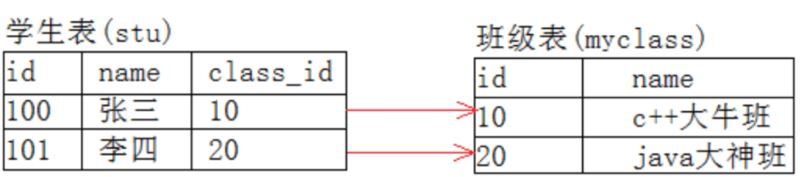
创建表代码示例:
-- 1:创建数据库
create database sql_stu;
-- 2:使用数据库
use sql_stu;
-- 3:创建表
create table if not exists table_stu (
    id int primary key auto_increment,
    username varchar(50) not null unique,
    age int default 18,
    create_time timestamp default current_timestamp
);
-- 使用 describe 表名 或 show create table 表名 查看表
describe table_name;-- 或简写为:desc table_name;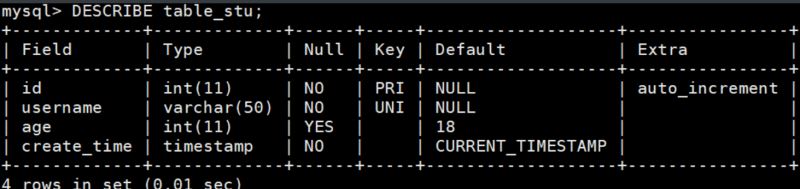
1.3修改表
语法:
alter table 表名
    操作1,
    ...;
修改表的操作:
alter table employees
#添加列
add column 列名 数据类型 after 某个列;
#修改列数据类型与重命名
modify column 列名 数据类型;
change column 老列名 新列名 数据类型;
#删除列
drop column 列名;
#添加约束
add primary key (emp_id);
---
外键?
#删约束
drop foreign key 外键名;
drop primary key;
1.4复制表
#仅复制结构
create table 新表 like 源表;
#复制结构+数据
create table 新表 as
select * from 源表;
#选择复制结构+数据
create table 新表 as
select 列1,列2,列3
from 源表
where 条件;
-- 创建表
create table stuinfo (
    stuid int primary key,
    stuname varchar(20) unique not null,
    stugender char(1) default '男',
    email varchar(20) not null,
    age int,
    majorid int,
    constraint fk_stuinfo_major foreign key (majorid) references major(id)
);
-- 修改表结构
alter table stuinfo rename to stuinfo1;  -- 重命名表
alter table stuinfo1 add column borndate timestamp not null;  -- 添加列
alter table stuinfo1 change column borndate birthday datetime;  -- 修改列名
alter table stuinfo1 modify column birthday date;  -- 修改数据类型
alter table stuinfo1 drop column age;  -- 删除列
-- 复制表
create table newtable like stuinfo;  -- 仅复制结构
create table emp_copy select * from employees;  -- 复制结构和数据
02.基本查询操作
基础结构:
select [distinct] 列1, 列2, ...  --选择需要显示的列
from 表名    				     --首先确定数据来源
[where 条件]     	 		      --对原始数据进行筛选
[group by 分组列]   			 --对筛选后的数据分组
[having 分组条件]   		    --对分组后的数据进行筛选
[order by 排序列 [asc|desc]]     --对结果进行排序
[limit [偏移量,] 行数];          --限制返回结果数量
执行顺序 :from → where → group by → having → select → order by → limit
2.1 select选择列
-- 查询所有列
select * from users;
-- 查询指定列
select id, ... from users;
-- 列别名
select id as user_id, username as name from users;--(as可省略)
-- 去重查询(distinct)
select distinct country from customers;
-- 连接字段 concat
select concat(last_name, first_name) as 姓名 from employees;
2.2 from指定表
-- 单表查询
select * from products;
-- 多表连接查询(内连接)
select *
from orders
inner join users on orders.user_id = users.id;
select ifnull(commission_pct, 0.00) as 奖金, commission_pct
from employees;
2.3 where条件过滤
–> 在分组前过滤行
2.3.1 基本条件表达式
/* 语法结构:
   select 查询列表
   from 表名
   where 筛选条件   */
-- 比较运算符:> < = != <> >= <=
select * from employees where salary > 12000;
-- 逻辑运算符:and or not
select last_name, salary
from employees
where salary >= 10000 and salary <= 20000;
-- 范围查询 between and,或者使用 salary > 10000 and salary < 20000
select *
from employees
where salary between 10000 and 20000;
2.3.2 特殊条件查询
-- in 查询,in ()任意一个返回true(1)
select last_name, job_id
from employees
where job_id in ('ad_pres', 'it_prog', 'pu_clerk');
-- 是 null 值判断
select last_name, commission_pct
from employees
where commission_pct is null;  -- is not null
-- 安全等于 <=> (可判断null和普通值)
select last_name, commission_pct
from employees
where commission_pct <=> null;
2.3.3 模糊查询 like
使用% 匹配任意个字符, _ 匹配单个字符,使用 \ 转义。
-- 基本通配符:% 匹配任意个字符, _ 匹配单个字符
select last_name
from employees
where last_name like '_a_%' escape 'a';  -- 第二个字符为_
-- 使用 \ 转义
...同上
where last_name like '_\_%';  -- 使用 \ 转义
2.4 group by分组
-- 统计每个部门的员工数
select department, count(*) as employee_count
from employees
group by department;
-- 分组后过滤(having)
select category, avg(price) as avg_price
from products
group by category
having avg_price > 200;  -- 只返回平均价格>200的分组
2.5 order by排序
-- 基本排序
select * from employees order by salary desc;  --asc 升序(默认), desc (drop降序)
-- 多字段排序
select *
from employees
order by salary desc, employee_id asc;
-- 按表达式和函数结果多字段排序
select
    length(last_name)  字符长度,
    salary * 12 * (1 + ifnull(commission_pct, 0))  年薪
from employees
order by 年薪 desc, 字符长度 desc;  -- 按年薪和字符长度排序
2.6 having 分组后过滤
–> 分组后过滤组
select department, avg(salary) as avg_salary
from employees
group by department
having avg(salary) > 6000;
2.7 limit分页
-- 提取第2页,每页10条           偏移量 每页行数
 select  *  from  products limit 10  ,  10;  -- 等价于 offset 10 limit 10
-- 带排序的分页
select *
from employees
order by salary desc
limit 20, 10;  -- 第3页
03. 函数
3.1 聚合函数
| 函数 | 描述 |
|---|---|
sum(expr) | 求和 |
avg(expr) | 平均值 |
max(expr) | 最大值 |
min(expr) | 最小值 |
count(expr) | 计数 |
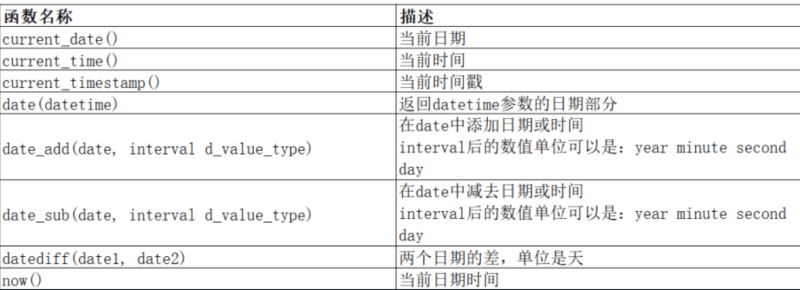
3.2 日期函数
sql 标准函数
3.3 字符串函数
| 语法 | 功能描述 |
|---|---|
charset(str) | 返回字符串的字符集 |
concat(str1, str2, ...) | 连接多个字符串 |
instr(str, substr) | 返回子串在字符串中的位置(从1开始),未找到返回0 |
ucase(str) 或 upper(str) | 串转换为大写 |
lcase(str) 或 lower(str) | 串转换为小写 |
left(str, length) | 从字符串左侧截取指定长度的子串 |
length(str) | 返回字符串的字节长度(非字符数) |
replace(str, from_str, to_str) | 替换字符串中的指定子串 |
strcmp(str1, str2) | 逐字符比较两字符串大小(返回-1,0,1) |
substring(str, pos, len) | 从指定位置截取子串(pos从1开始) |
trim(str) ltrim(str) rtrim(str) | 去除字符串前或后面空格 |
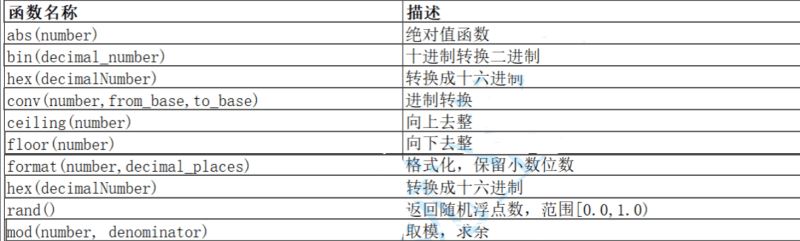
3.4 数学函数
04.复合查询
笛卡尔积: 将两个表穷举的结果
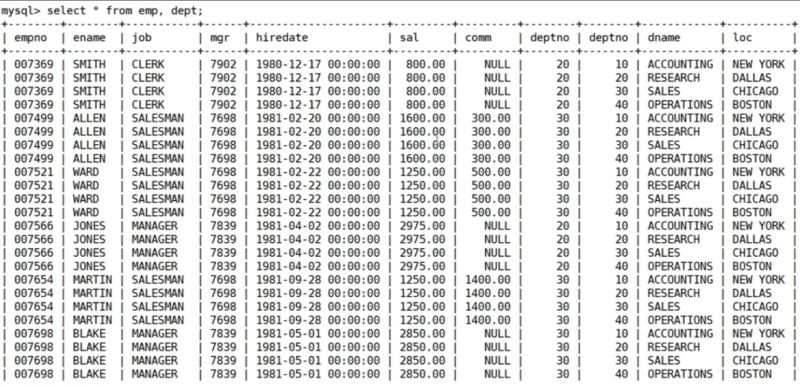
4.1 多表查询
单行子查询是指子查询只返回单列,单行数据;多行子查询是指返回单列多行数据,都是针对单列而言的,而多列子查询则是指查询返回多个列数据的子查询语句。
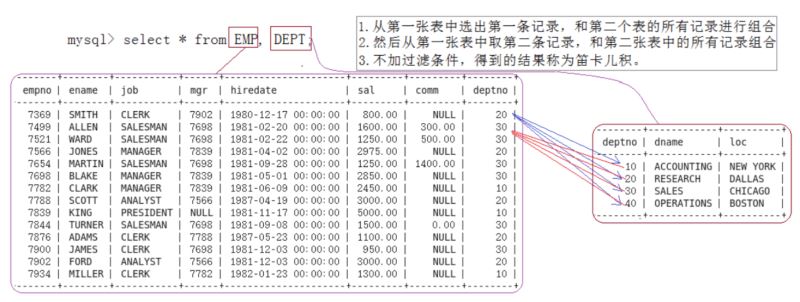
通过将两个表直接笛卡尔积组成一个新表,但是引入了许多无关数据,这时对其进行去除不正确数据后再筛选即可得到
显示部门号为10的部门名,员工名和工资
select ename, sal,dname from emp, dept where emp.deptno=dept.deptno anddept.deptno = 10;
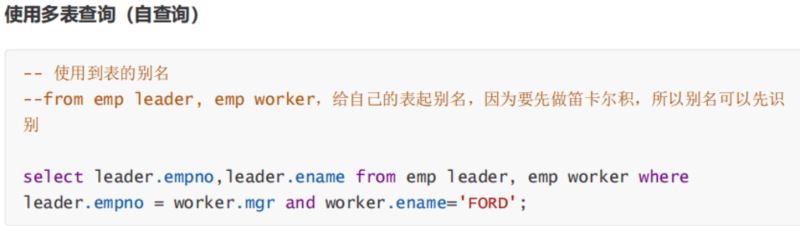
4.2 自连接
自连接是指在同一张表连接查询
4.3 子查询
子查询是指嵌入在其他sql语句中的select语句,也叫嵌套查询。
4.3.1 单行子查询
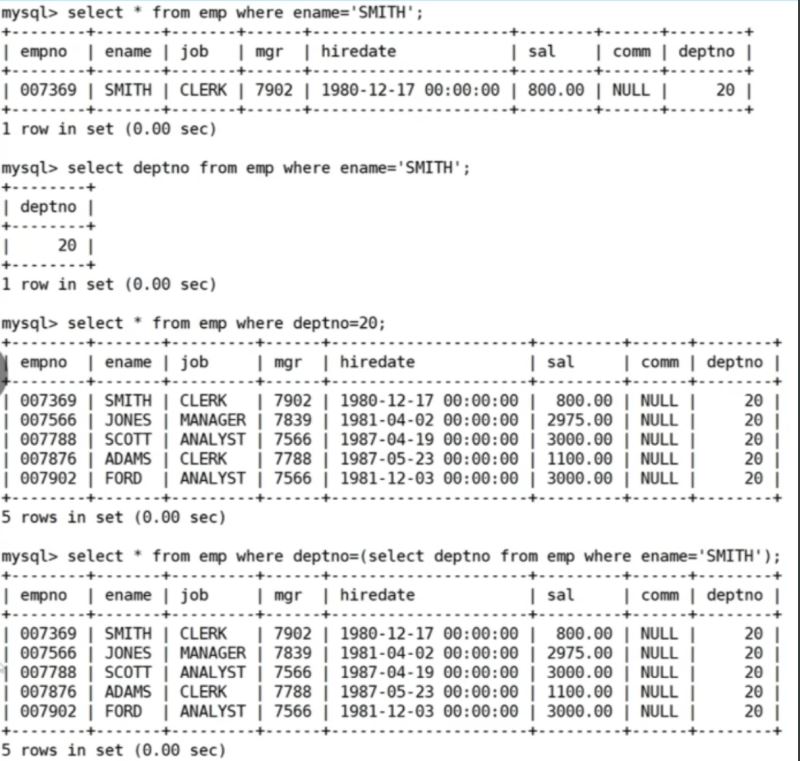
案例: 查询和smith的部门和岗位完全相同的所有雇员。下面这个案例返回了多行,视情况而定
4.3.2 多行子查询
- in/not in 检查值是否在于子查询结果中
- any 与子查询返回的任一值比较
- all 与子查询返回的所有值比较
- exists 检查存在性
示例:
select *
from products
where (category, price) in (select category, price from products where category = 'electronics');
4.3.3 from子句子查询
-- from子查询 (返回临时表)
select dep_ag.department_id, dep_ag.ag, j.grade_level
from (
    select avg(salary) ag, department_id
    from employees
    group by department_id
) as dep_ag
inner join job_grades j on dep_ag.ag between j.lowest_sal and j.highest_sal;
4.3.4 合并查询
联合查询 :
- union :并集<-- 该操作符用于取得两个结果集的并集。当使用该操作符时,会自动去掉结果集中的重复行。
- union all :该操作符用于取得两个结果集的并集。当使用该操作符时,不会去掉结果集中的重复行。
-- 基本联合
select employee_id from employees where salary > 15000
union
select employee_id from employees where commission_pct > 0.2;
-- union all (保留重复记录)
select department_id from employees
union all
select department_id from departments;
05. 内外连接
5.1内连接
内连接实际上就是利用where子句对两种表形成的笛卡儿积进行筛选。
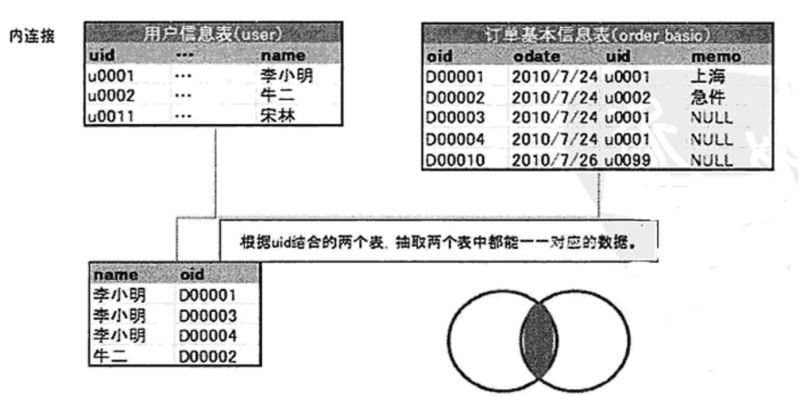
语法:
select 字段 from 表1 inner join 表2 on 连接条件 and 其他条件;
示例:
--用前面的写法
select ename,dname from emp, dept where emp.deptno=dept.deptno andename='smith'
--用标准的内连接写法
select ename, dname from emp inner join dept on emp.deptno=dept.deptno andename='smith':
5.2 外连接
保留左侧表或者右侧表数据
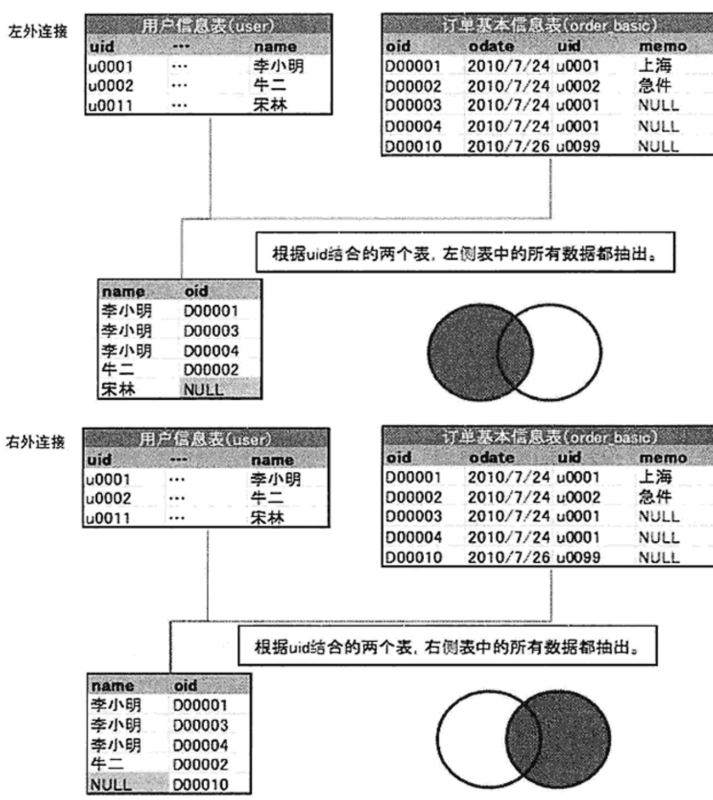
多表内连接耶可以
到此这篇关于mysql表操作与查询的文章就介绍到这了,更多相关mysql表操作与查询内容请搜索代码网以前的文章或继续浏览下面的相关文章希望大家以后多多支持代码网!



发表评论