
 我要评论
我要评论在 android studio 中将 aar 包发布到 maven 本地仓库,通常涉及以下几个步骤,环境如下:
distributionurl=https\://services.gradle.org/distributions/gradle-8.10.2-all.zip

classpath 'com.android.tools.build:gradle:8.7.0'
1. 配置 build.gradle.kts(或 build.gradle)
在 library 模块的 build.gradle.kts(或 build.gradle)中,添加以下 maven 发布插件:
plugins {
    id 'com.android.library'//打lib包
    id 'maven-publish'
}
对于 build.gradle(groovy 版本),可以这样添加:
apply plugin: 'maven-publish'
2. 配置 publishing 任务
在 build.gradle.kts 文件中,添加以下 publishing 配置:
publishing {
    publications {
        create<mavenpublication>("release") {
            from(components["release"])
            groupid = "com.shuaici.lib"
            artifactid = "scc"
            version = "1.0.0"
        }
    }
}
对于 build.gradle(groovy),使用:
publishing {
    publications {
        release(mavenpublication) {
            from components.release
            groupid = 'com.shuaici.lib'
            artifactid = 'scc'
            version = '1.0.0'
        }
    }
}
3. 发布到本地 maven 仓库
运行以下代码:
./gradlew publishtomavenlocal

这将在 ~/.m2/repository/com/yourcompany/library/your-library/1.0.0/ 目录下生成 aar 文件。例如我刚才打包的地址为~/.m2/repository/com/shuaici/lib/scc/1.0.0/,这个是隐藏文件夹。
这个地址是可以自定义的,但是不推荐修改。
这里容易遇到问题,没遇到还好,遇到了那就需要解决一下了。
3.1 could not find method publications() for arguments...
说明 publications {} 这个部分在 android {} 里面不被识别。
解决方案:移动 publications {} 代码到 afterevaluate {} 里
在 com.android.library 插件的 gradle 7.0+ 版本中,publications {} 不能直接放在 android {} 代码块里,需要在 afterevaluate {} 里定义:
plugins {
    id 'com.android.library'
    id 'maven-publish'
}

android {
    namespace 'com.shuaici.lib'
    。。。。。。
}

// 这里用 `afterevaluate`,避免 `publications {}` 出错
afterevaluate {
    publishing {
        publications {
            release(mavenpublication) {
                from components.release
                groupid = 'com.shuaici.lib'
                artifactid = 'scc'
                version = '1.0.0'
            }
        }
    }
}
为什么要用 afterevaluate?
publications {}需要components.release,但android {}还没完全加载时,components.release可能为空,导致 gradle 解析失败。afterevaluate {}确保android {}配置完成后再执行publications {},避免components.release为空的问题。
3.2 bash: ./gradlew: permission denied
这表示 gradlew 脚本没有执行权限。可以按照以下方法解决:
1. 运行 chmod +x gradlew
2. ./gradlew publishtomavenlocal
3. 如果还是报错,尝试使用 sh ./gradlew publishtomavenlocal
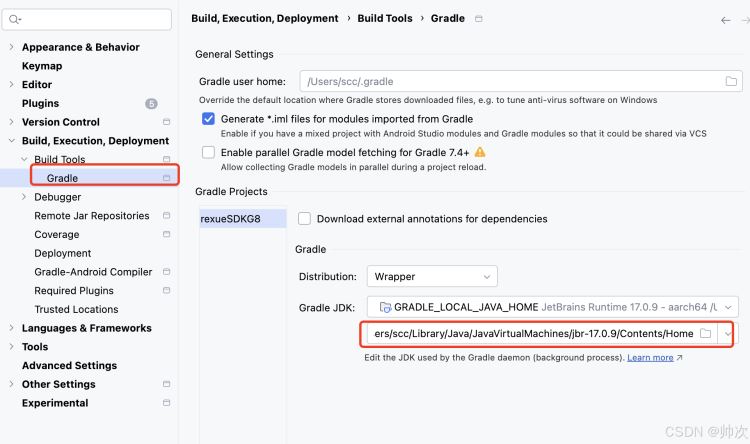
3.3 android gradle plugin requires java 17 to run. you are currently using java 11.
解决方案:
1. 临时切换 java 版本 ;
2. 永久修改 java 版本;
3. 在 gradle.properties 指定 java 版本:
org.gradle.java.home=/library/java/javavirtualmachines/jdk-17.0.9.jdk/contents/home
如果不清楚自己放的位置,可通过以下方式找到。
4. 使用发布的 aar 依赖
如果你想在 另一个项目 中使用这个 aar,编辑 build.gradle:
repositories {
    mavenlocal()  // 让 gradle 从本地 maven 仓库查找依赖
    mavencentral()  // 远程 maven 仓库(如果本地找不到,会去这里找)
}

dependencies {
    implementation 'com.shuaici.lib:scc:1.0.0'  // 依赖本地仓库发布的 aar
}
然后你就正常调用sdk中的内容就行了。
以上就是android studio将aar包发布到maven本地仓库的流程步骤的详细内容,更多关于android studio aar包发布到maven的资料请关注代码网其它相关文章!





发表评论