
 我要评论
我要评论一、什么是 ajax ?
ajax = 异步 javascript 和 xml。ajax 是一种用于创建快速动态网页的技术。
通过在后台与服务器进行少量数据交换,ajax 可以使网页实现异步更新。这意味着可以在不重新加载整个网页的情况下,对网页的某部分进行更新。传统的网页(不使用 ajax)如果需要更新内容,必需重载整个网页面。
有很多使用 ajax 的应用程序案例:新浪微博、google 地图、开心网等等。
1、ajax是基于现有的internet标准
ajax是基于现有的internet标准,并且联合使用它们:
- xmlhttprequest 对象 (异步的与服务器交换数据)
- javascript/dom (信息显示/交互)
- css (给数据定义样式)
- xml (作为转换数据的格式)
注意:ajax应用程序与浏览器和平台无关的!
2、ajax 工作原理
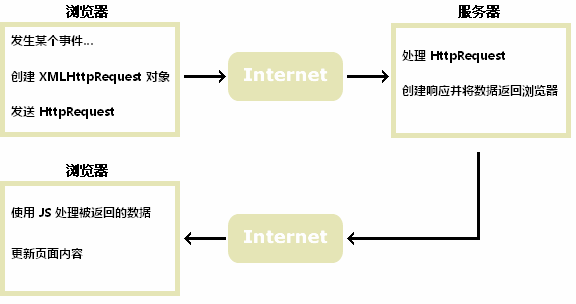
二、ajax - 创建 xmlhttprequest 对象
1、xmlhttprequest 对象
xmlhttprequest 是 ajax 的基础。所有现代浏览器均支持 xmlhttprequest 对象(ie5 和 ie6 使用 activexobject)。
xmlhttprequest 用于在后台与服务器交换数据。这意味着可以在不重新加载整个网页的情况下,对网页的某部分进行更新。
2、创建 xmlhttprequest 对象
所有现代浏览器(ie7+、firefox、chrome、safari 以及 opera)均内建 xmlhttprequest 对象。
创建 xmlhttprequest 对象的语法:
variable=new xmlhttprequest();
老版本的 internet explorer (ie5 和 ie6)使用 activex 对象:
variable=new activexobject("microsoft.xmlhttp");为了应对所有的现代浏览器,包括 ie5 和 ie6,请检查浏览器是否支持 xmlhttprequest 对象。如果支持,则创建 xmlhttprequest 对象。如果不支持,则创建 activexobject :
var xmlhttp;
if (window.xmlhttprequest)
{
    //  ie7+, firefox, chrome, opera, safari 浏览器执行代码
    xmlhttp=new xmlhttprequest();
}
else
{
    // ie6, ie5 浏览器执行代码
    xmlhttp=new activexobject("microsoft.xmlhttp");
}
三、向服务器发送请求请求
1、向服务器发送请求
xmlhttprequest 对象用于和服务器交换数据。
如需将请求发送到服务器,我们使用 xmlhttprequest 对象的 open() 和 send() 方法:
xmlhttp.open("get","ajax_info.txt",true);
xmlhttp.send();
方法:
open(method,url,async):规定请求的类型、url 以及是否异步处理请求。
- method:请求的类型;get 或 post
- url:文件在服务器上的位置
- async:true(异步)或 false(同步)
send(string):将请求发送到服务器。string:仅用于 post 请求
注意:open() 方法的 url 参数是服务器上文件的地址:
xmlhttp.open("get","ajax_test.html",true);该文件可以是任何类型的文件,比如 .txt 和 .xml,或者服务器脚本文件,比如 .asp 和 .php (在传回响应之前,能够在服务器上执行任务)。
2、get 还是 post?
与 post 相比,get 更简单也更快,并且在大部分情况下都能用。
然而,在以下情况中,请使用 post 请求:
- 无法使用缓存文件(更新服务器上的文件或数据库)
- 向服务器发送大量数据(post 没有数据量限制)
- 发送包含未知字符的用户输入时,post 比 get 更稳定也更可靠
3、get 请求
一个简单的 get 请求:
xmlhttp.open("get","/try/ajax/demo_get.php",true);
xmlhttp.send();
在上面的例子中,您可能得到的是缓存的结果。
为了避免这种情况,请向 url 添加一个唯一的 id:
xmlhttp.open("get","/try/ajax/demo_get.php?t=" + math.random(),true);
xmlhttp.send();
如果您希望通过 get 方法发送信息,请向 url 添加信息:
xmlhttp.open("get","/try/ajax/demo_get2.php?fname=henry&lname=ford",true);
xmlhttp.send();
4、post 请求
一个简单 post 请求:
xmlhttp.open("post","/try/ajax/demo_post.php",true);
xmlhttp.send();
如果需要像 html 表单那样 post 数据,请使用 setrequestheader() 来添加 http 头。然后在 send() 方法中规定您希望发送的数据:
xmlhttp.open("post","/try/ajax/demo_post2.php",true);
xmlhttp.setrequestheader("content-type","application/x-www-form-urlencoded");
xmlhttp.send("fname=henry&lname=ford");
5、异步 - true 或 false?
ajax 指的是异步 javascript 和 xml(asynchronous javascript and xml)。
xmlhttprequest 对象如果要用于 ajax 的话,其 open() 方法的 async 参数必须设置为 true:
xmlhttp.open("get","ajax_test.html",true);对于 web 开发人员来说,发送异步请求是一个巨大的进步。很多在服务器执行的任务都相当费时。ajax 出现之前,这可能会引起应用程序挂起或停止。
通过 ajax,javascript 无需等待服务器的响应,而是:
- 在等待服务器响应时执行其他脚本
- 当响应就绪后对响应进行处理
当使用 async=true 时,请规定在响应处于 onreadystatechange 事件中的就绪状态时执行的函数:
xmlhttp.onreadystatechange=function()
{
    if (xmlhttp.readystate==4 && xmlhttp.status==200)
    {
        document.getelementbyid("mydiv").innerhtml=xmlhttp.responsetext;
    }
}
xmlhttp.open("get","/try/ajax/ajax_info.txt",true);
xmlhttp.send();
注意:当您使用 async=false 时,请不要编写 onreadystatechange 函数 - 把代码放到 send() 语句后面即可:
xmlhttp.open("get","/try/ajax/ajax_info.txt",false);
xmlhttp.send();
document.getelementbyid("mydiv").innerhtml=xmlhttp.responsetext;
四、ajax - 服务器 响应
如需获得来自服务器的响应,请使用 xmlhttprequest 对象的 responsetext 或 responsexml 属性。
- responsetext:获得字符串形式的响应数据。
- responsexml:获得 xml 形式的响应数据。
1、responsetext 属性
如果来自服务器的响应并非 xml,请使用 responsetext 属性。
responsetext 属性返回字符串形式的响应,因此您可以这样使用:
document.getelementbyid("mydiv").innerhtml=xmlhttp.responsetext;2、responsexml 属性
如果来自服务器的响应是 xml,而且需要作为 xml 对象进行解析,请使用 responsexml 属性:
xmldoc=xmlhttp.responsexml;
txt="";
x=xmldoc.getelementsbytagname("artist");
for (i=0;i<x.length;i++)
{
    txt=txt + x[i].childnodes[0].nodevalue + "<br>";
}
document.getelementbyid("mydiv").innerhtml=txt;
五、ajax - onreadystatechange 事件
当请求被发送到服务器时,我们需要执行一些基于响应的任务。
每当 readystate 改变时,就会触发 onreadystatechange 事件。
readystate 属性存有 xmlhttprequest 的状态信息。
1、xmlhttprequest 对象的三个重要的属性:
1、onreadystatechange:存储函数(或函数名),每当 readystate 属性改变时,就会调用该函数。
2、readystate:存有 xmlhttprequest 的状态。从 0 到 4 发生变化。
- 0: 请求未初始化
- 1: 服务器连接已建立
- 2: 请求已接收
- 3: 请求处理中
- 4: 请求已完成,且响应已就绪
3、status:状态。200: "ok";404: 未找到页面
在 onreadystatechange 事件中,我们规定当服务器响应已做好被处理的准备时所执行的任务。
当 readystate 等于 4 且状态为 200 时,表示响应已就绪:
xmlhttp.onreadystatechange=function()
{
    if (xmlhttp.readystate==4 && xmlhttp.status==200)
    {
        document.getelementbyid("mydiv").innerhtml=xmlhttp.responsetext;
    }
}
注意: onreadystatechange 事件被触发 4 次(0 - 4), 分别是: 0-1、1-2、2-3、3-4,对应着 readystate 的每个变化。
2、使用回调函数
回调函数是一种以参数形式传递给另一个函数的函数。
如果您的网站上存在多个 ajax 任务,那么您应该为创建 xmlhttprequest 对象编写一个标准的函数,并为每个 ajax 任务调用该函数。
该函数调用应该包含 url 以及发生 onreadystatechange 事件时执行的任务(每次调用可能不尽相同):
function myfunction()
{
    loadxmldoc("/try/ajax/ajax_info.txt",function()
    {
        if (xmlhttp.readystate==4 && xmlhttp.status==200)
        {
            document.getelementbyid("mydiv").innerhtml=xmlhttp.responsetext;
        }
    });
}
六、javascript 脚本化的http----ajax的基石
1、建xmlhttprequest对象
// this is a list of xmlhttprequest-creation factory functions to try
http._factories = [
    function() { return new xmlhttprequest(); },
    function() { return new activexobject("msxml2.xmlhttp"); },
    function() { return new activexobject("microsoft.xmlhttp"); }
];

// when we find a factory that works, store it here.
http._factory = null;

// create and return a new xmlhttprequest object.
//
// the first time we're called, try the list of factory functions until
// we find one that returns a non-null value and does not throw an
// exception. once we find a working factory, remember it for later use.
//
http.newrequest = function() {
    if (http._factory != null) return http._factory();

    for(var i = 0; i < http._factories.length; i++) {
        try {
            var factory = http._factories[i];
            var request = factory();
            if (request != null) {
                http._factory = factory;
                return request;
            }
        }
        catch(e) {
            continue;
        }
    }
    // if we get here, none of the factory candidates succeeded,
    // so throw an exception now and for all future calls.
    http._factory
 = function() {
        throw new error("xmlhttprequest not supported");
    }
    http._factory(); // throw an error
}
2、get请求
http.get = function(url, callback, options) {
    var request = http.newrequest();
    var n = 0;
    var timer;
    if (options.timeout)
        timer = settimeout(function() {
                               request.abort();
                               if (options.timeouthandler)
                                   options.timeouthandler(url);
                           },
                           options.timeout);

    request.onreadystatechange = function() {
        if (request.readystate == 4) {
            if (timer) cleartimeout(timer);
            if (request.status == 200) {
                callback(http._getresponse(request));
            }
            else {
                if (options.errorhandler)
                    options.errorhandler(request.status,
                                         request.statustext);
                else callback(null);
            }
        }
        else if (options.progresshandler) {
            options.progresshandler(++n);
        }
    }

    var target = url;
    if (options.parameters)
        target += "?" + http.encodeformdata(options.parameters)
    request.open("get", target);
    request.send(null);
};
1、get工具
//gettext()工具
http.gettext = function(url, callback) {
var request = http.newrequest();
request.onreadystatechange = function() {
if(request.readystate == 4 && request.status == 200) {
callback(request.responsetext);
}
}


request.open("get", url);
request.send(null);
}


//getxml()工具
http.getxml = function(url, callback) {
var request = http.newrequest();
request.onreadystatechange = function() {
if(request.readystate == 4 && request.status == 200) {
callback(request.responsexml);
}
}


request.open("get", url);
request.send(null);
}
3、post请求
/**
 * send an http post request to the specified url, using the names and values
 * of the properties of the values object as the body of the request.
 * parse the server's response according to its content type and pass
 * the resulting value to the callback function. if an http error occurs,
 * call the specified errorhandler function, or pass null to the callback
 * if no error handler is specified.
 **/
http.post = function(url, values, callback, errorhandler) {
    var request = http.newrequest();
    request.onreadystatechange = function() {
        if (request.readystate == 4) {
            if (request.status == 200) {
                callback(http._getresponse(request));
            }
            else {
                if (errorhandler) errorhandler(request.status,
                                               request.statustext);
                else callback(null);
            }
        }
    }

    request.open("post", url);
    // this header tells the server how to interpret the body of the request.
    request.setrequestheader("content-type",
                             "application/x-www-form-urlencoded");
    // encode the properties of the values object and send them as
    // the body of the request.
    request.send(http.encodeformdata(values));
};
4、获取http头(包括解析头部数据)
http.getheaders = function(url, callback, errorhandler) {
    var request = http.newrequest();
    request.onreadystatechange = function() {
        if (request.readystate == 4) {
            if (request.status == 200) {
                callback(http.parseheaders(request));
            }
            else {
                if (errorhandler) errorhandler(request.status,
                                               request.statustext);
                else callback(null);
            }
        }
    }
    request.open("head", url);
    request.send(null);
};

// parse the response headers from an xmlhttprequest object and return
// the header names and values as property names and values of a new object.
http.parseheaders = function(request) {
    var headertext = request.getallresponseheaders();  // text from the server
    var headers = {}; // this will be our return value
    var ls = /^"s*/;  // leading space regular expression
    var ts = /"s*$/;  // trailing space regular expression

    // break the headers into lines
    var lines = headertext.split(""n");
    // loop through the lines
    for(var i = 0; i < lines.length; i++) {
        var line = lines[i];
        if (line.length == 0) continue;  // skip empty lines
        // split each line at first colon, and trim whitespace away
        var pos = line.indexof(':');
        var name = line.substring(0, pos).replace(ls, "").replace(ts, "");
        var value = line.substring(pos+1).replace(ls, "").replace(ts, "");
        // store the header name/value pair in a javascript object
        headers[name] = value;
    }
    return headers;
};
5、私有方法
1、获取表单数据:
/**
 * encode the property name/value pairs of an object as if they were from
 * an html form, using application/x-www-form-urlencoded format
 */
http.encodeformdata = function(data) {
    var pairs = [];
    var regexp = /%20/g; // a regular expression to match an encoded space

    for(var name in data) {
        var value = data[name].tostring();
        // create a name/value pair, but encode name and value first
        // the global function encodeuricomponent does almost what we want,
        // but it encodes spaces as %20 instead of as "+". we have to
        // fix that with string.replace()
        var pair = encodeuricomponent(name).replace(regexp,"+") + '=' +
            encodeuricomponent(value).replace(regexp,"+");
        pairs.push(pair);
    }

    // concatenate all the name/value pairs, separating them with &
    return pairs.join('&');
};
2、获取响应:
http._getresponse = function(request) {
switch(request.getresponseheader("content-type")) {
case "text/xml":
return request.responsexml;

case "text/json":
case "text/javascript":
case "application/javascript":
case "application/x-javascript":
return eval(request.responsetext);

default:
return request.responsetext;
}
}
6、使用:
//提交表单,调用post方法
var uname = document.getelementbyid("username");
var usex = document.getelementbyid("sex");
var formdata = {'username':'tom','sex':'男'};
    http.post("./test.php",formdata, dofun, errorfun);
//请求获取指定的url的headers
 http.getheaders("./a.html", dofun, errorfun);
到此这篇关于javascript实现异步ajax的文章就介绍到这了。希望对大家的学习有所帮助,也希望大家多多支持代码网。





发表评论