
 我要评论
我要评论前言
webservice是一种基于网络的技术,它允许不同的应用程序在互联网上相互通信。要进行webservice对接,以下是一些关键步骤和注意事项:
一、理解webservice的基本概念
- 定义:webservice是一种基于标准化协议和格式的应用程序接口(api),它使用xml和http来进行通信。
- 特点:可以跨平台、跨语言进行数据传输和应用程序集成。
二、获取wsdl文件
- wsdl定义:wsdl是web服务描述语言(web services description language)的缩写,是一种基于xml的语言,用于描述web服务的接口、方法和数据类型。
- 获取方式:通常,可以通过访问webservice的wsdl地址来获取wsdl文件。wsdl地址通常以“.wsdl”结尾,例如:http://localhost:8082/web/services/weather?wsdl。
- idea的操作过程,
首先建立一个webservice文件夹在项目中
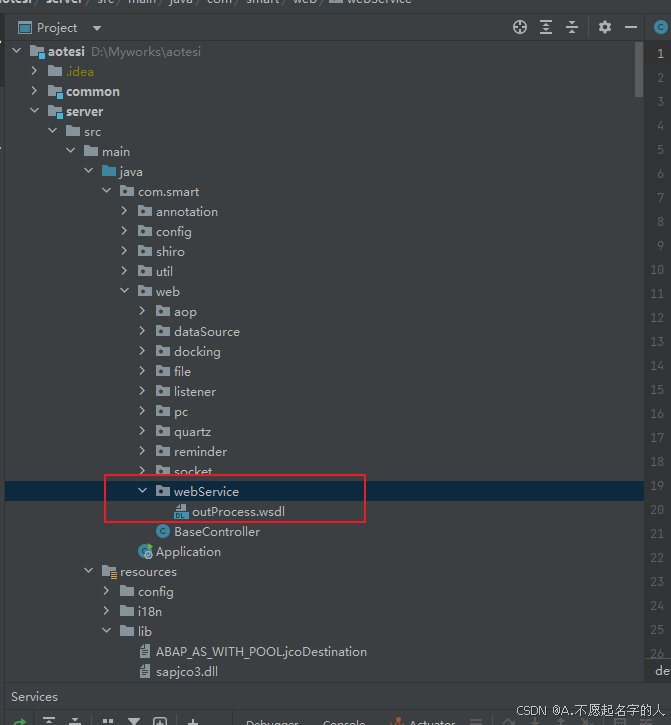
选择此文件夹,点击tools中的xml webservice,选择generate
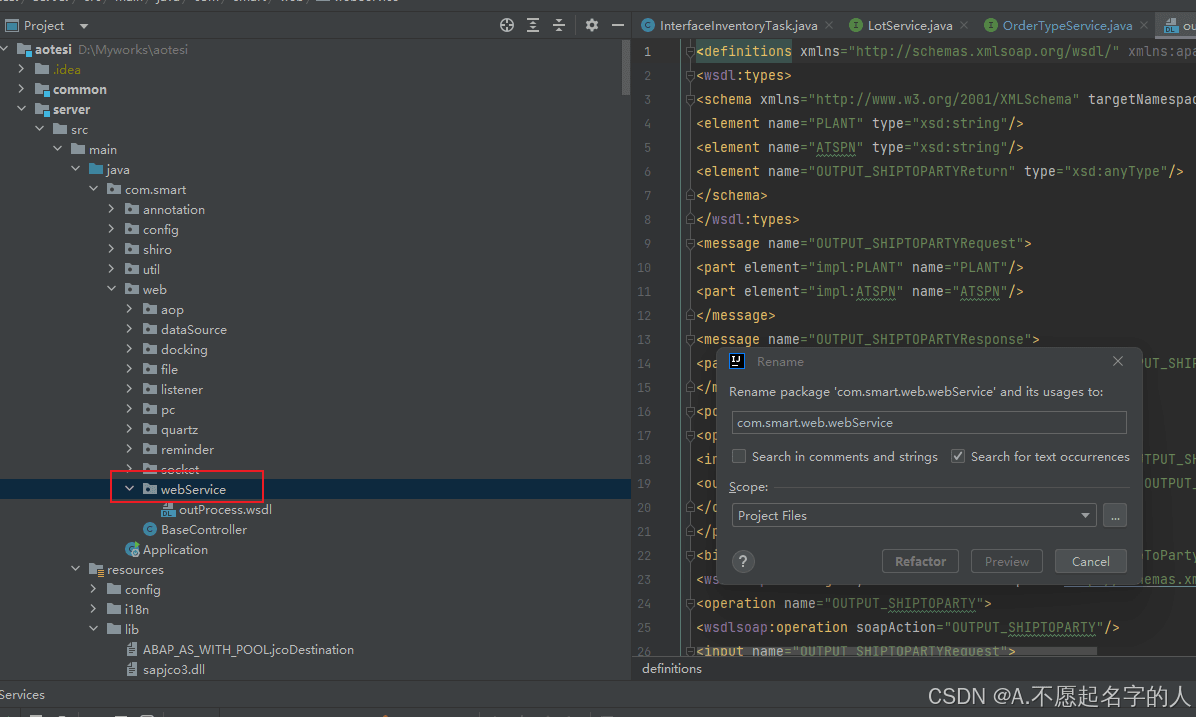
输入地址点击确定就行
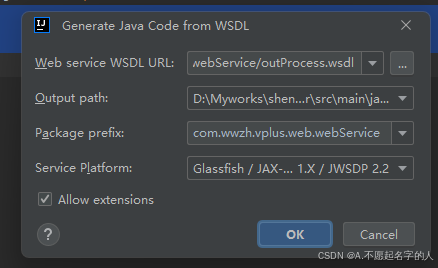
会生成多个类和方法名就直接可以调用
三、阅读和理解wsdl文件
- 服务定义:wsdl文件包含一个或多个服务定义,每个服务定义描述了一个或多个相关的操作,以及它们接受和返回的消息的格式。
- 命名空间:wsdl中的命名空间用于唯一标识wsdl中包含的类型、元素和消息。
- 操作和方法:wsdl文件还描述了web服务的地址、协议和传输机制等信息,以及具体的操作和方法。
四、选择对接测试工具或方式
- soap ui:一个流行的webservice测试工具,可以用于查看webservice的接口信息、发送请求和接收响应。
- postman:另一个常用的api测试工具,同样可以用于webservice的对接测试。
- 编程方式:在代码中,可以通过发送http请求来调用webservice,请求参数需要按照wsdl文件中定义的格式封装成xml格式。
五、发送请求和接收响应
- 请求格式:根据wsdl文件中的定义,构造符合要求的soap请求报文。请求报文通常包含envelope(信封)、header(头部)和body(正文)等部分。
- 发送请求:使用选择的对接工具或方式发送请求到webservice的服务端点。
- 接收响应:服务端点接收到请求后,会进行解析并调用相应的web服务方法,然后将结果封装成http响应返回。响应报文同样遵循soap协议,并包含envelope、header和body等部分。
六、直接通过xml和http请求访问
1. 引用包
        <!--
             使用apache的httpclient发送http,需要引入httpclient依赖;
             使用omelement需要引入axis2-transport-http依赖;改以来本身带有httpclient依赖,所以
                 我们不在需要单独引入httpclient依赖了
         -->
        <dependency>
            <groupid>org.apache.axis2</groupid>
            <artifactid>axis2-transport-http</artifactid>
            <version>1.7.8</version>
</dependency> 2.
package com.smart.util;

import org.apache.axiom.om.omelement;
import org.apache.axiom.om.omxmlbuilderfactory;
import org.apache.http.client.clientprotocolexception;
import org.apache.http.client.methods.closeablehttpresponse;
import org.apache.http.client.methods.httppost;
import org.apache.http.entity.stringentity;
import org.apache.http.impl.client.closeablehttpclient;
import org.apache.http.impl.client.httpclientbuilder;
import org.apache.http.util.entityutils;
import org.junit.runner.runwith;
import org.springframework.boot.test.context.springboottest;
import org.springframework.http.httpheaders;
import org.springframework.http.converter.httpmessageconverter;
import org.springframework.http.converter.stringhttpmessageconverter;
import org.springframework.test.context.junit4.springrunner;
import org.springframework.web.client.resttemplate;
import org.w3c.dom.document;
import org.w3c.dom.element;
import org.w3c.dom.node;
import org.w3c.dom.nodelist;
import org.xml.sax.inputsource;
import org.xml.sax.saxexception;

import javax.xml.parsers.documentbuilder;
import javax.xml.parsers.documentbuilderfactory;
import javax.xml.parsers.parserconfigurationexception;
import javax.xml.stream.xmlstreamexception;
import javax.xml.xpath.xpath;
import javax.xml.xpath.xpathexpressionexception;
import javax.xml.xpath.xpathfactory;
import java.io.bytearrayinputstream;
import java.io.ioexception;
import java.io.inputstream;
import java.io.stringreader;
import java.nio.charset.standardcharsets;
import java.util.list;

@runwith(springrunner.class)
@springboottest
public class abcaxis2demoapplicationutils {
	public static string dopost(string partno) throws  ioexception {
		// webservice的wsdl地址
		final string wsdlurl = ""
		// 设置编码。(因为是直接传的xml,所以我们设置为text/xml;charset=utf8)
		final string contenttype = "text/xml;charset=utf8";
		/// 拼接要传递的xml数据(注意:此xml数据的模板我们根据wsdlurl从soapui中获得,只需要修改对应的变量值即可)
		stringbuffer xmlcontent = new stringbuffer("");
		xmlcontent.append("<soapenv:envelope xmlns:soapenv=\"http://schemas.xmlsoap.org/soap/envelope/\" xmlns:urn=\"urn:defaultnamespace\">\n");
		xmlcontent.append("   <soapenv:header/>\n");
		xmlcontent.append("   <soapenv:body>\n");
		xmlcontent.append("     <urn:字段1>shanghai</urn:字段1>\n");
		xmlcontent.append("     <urn:字段2>" + "tan2921" + "</urn:字段2>\n");
		xmlcontent.append("   </soapenv:body>\n");
		xmlcontent.append("</soapenv:envelope>");

		// 调用工具类方法发送http请求
		string responsexml = httpsendutil.dohttppostbyhttpclient(wsdlurl, contenttype, xmlcontent.tostring());
		// 当然我们也可以调用这个工具类方法发送http请求
		// string responsexml = httpsendutil.dohttppostbyresttemplate(wsdlurl, contenttype, xmlcontent.tostring());

		// 利用axis2的omelement,将xml数据转换为omelement
		omelement omelement = omxmlbuilderfactory
				.createombuilder(new bytearrayinputstream(responsexml.getbytes()), "utf-8").getdocumentelement();
		try {
			documentbuilderfactory factory = documentbuilderfactory.newinstance();
			factory.setnamespaceaware(true); // 设置为true以处理命名空间
			documentbuilder builder = factory.newdocumentbuilder();
			inputsource inputsource = new inputsource(new stringreader(responsexml));
			document document = builder.parse(inputsource);

			// 获取所有名为"output_shiptopartyreturn"的元素,并考虑命名空间
			nodelist nodelist = document.getelementsbytagnamens("urn:defaultnamespace", "output_shiptopartyreturn");

			for (int i = 0; i < nodelist.getlength(); i++) {
				element element = (element) nodelist.item(i);
				// 检查元素是否有文本内容(即非空且非自闭合标签)
				if (element.haschildnodes() && element.getfirstchild().getnodetype() == node.text_node) {
					string textcontent = element.gettextcontent();
					system.out.println("extracted value: " + textcontent);
					return textcontent;
				}
			}

		} catch (parserconfigurationexception | saxexception | ioexception e) {
			e.printstacktrace();
		}

		return null;
	}

	public static string getnodevalue(document document, string nodepaht) {
		xpathfactory xpfactory = xpathfactory.newinstance();
		xpath path = xpfactory.newxpath();
		string servinitrbrch = "";
		try {
			servinitrbrch = path.evaluate(nodepaht, document);
		} catch (xpathexpressionexception e) {
			e.printstacktrace();
		}
		return servinitrbrch;
	}


	public static document stringtoxml(string str) {

		stringbuilder sxml = new stringbuilder();
		sxml.append(str);
		documentbuilderfactory dbf = documentbuilderfactory.newinstance();
		document doc = null;
		try {
			inputstream is = new bytearrayinputstream(sxml.tostring().getbytes("utf-8"));
			doc = dbf.newdocumentbuilder().parse(is);
			is.close();
		} catch (exception e) {
			e.printstacktrace();
		}
		return doc;
	}
}
/**
 * http工具类
 *
 * @author justrydeng
 * @date 2018年9月22日 下午10:29:08
 */
class httpsendutil {

	/**
	 * 使用apache的httpclient发送http
	 *
	 * @param wsdlurl
	 *            请求url
	 * @param contenttype
	 *            如:application/json;charset=utf8
	 * @param content
	 *            数据内容
	 * @date 2018年9月22日 下午10:29:17
	 */
	static string dohttppostbyhttpclient(final string wsdlurl, final string contenttype, final string content)
			throws clientprotocolexception, ioexception {
		// 获得http客户端(可以理解为:你得先有一个浏览器;注意:实际上httpclient与浏览器是不一样的)
		closeablehttpclient httpclient = httpclientbuilder.create().build();
		// 创建post请求
		httppost httppost = new httppost(wsdlurl);
		stringentity entity = new stringentity(content.tostring(), "utf-8");
		// 将数据放入entity中
		httppost.setentity(entity);
		httppost.setheader("content-type", contenttype);
		// 响应模型
		closeablehttpresponse response = null;
		string result = null;
		try {
			// 由客户端执行(发送)post请求
			response = httpclient.execute(httppost);
			// 从响应模型中获取响应实体
			// 注意:和dohttppostbyresttemplate方法用的不是同一个httpentity
			org.apache.http.httpentity responseentity = response.getentity();
			system.out.println("响应contenttype为:" + responseentity.getcontenttype());
			system.out.println("响应状态为:" + response.getstatusline());
			if (responseentity != null) {
				result = entityutils.tostring(responseentity);
				system.out.println("响应内容为:" + result);
			}
		} finally {
			// 释放资源
			if (httpclient != null) {
				httpclient.close();
			}
			if (response != null) {
				response.close();
			}
		}
		return result;
	}

	/**
	 * 使用springframework的resttemplate发送http
	 *
	 * @param wsdlurl
	 *            请求url
	 * @param contenttype
	 *            如:application/json;charset=utf8
	 * @param content
	 *            数据内容
	 * @date 2018年9月22日 下午10:30:48
	 */
	static string dohttppostbyresttemplate(final string wsdlurl, final string contenttype, final string content) {
		// http使用无参构造;https需要使用有参构造
		resttemplate resttemplate = new resttemplate();
		// 解决中文乱码
		list<httpmessageconverter<?>> converterlist = resttemplate.getmessageconverters();
		converterlist.remove(1);
		httpmessageconverter<?> converter = new stringhttpmessageconverter(standardcharsets.utf_8);
		converterlist.add(1, converter);
		resttemplate.setmessageconverters(converterlist);
		// 设置content-type
		httpheaders headers = new httpheaders();
		headers.remove("content-type");
		headers.add("content-type", contenttype);
		// 数据信息封装
		// 注意:和dohttppostbyhttpclient方法用的不是同一个httpentity
		org.springframework.http.httpentity<string> formentity = new org.springframework.http.httpentity<string>(
				content, headers);
		string result = resttemplate.postforobject(wsdlurl, formentity, string.class);
		return result;
	}
}
七、处理响应结果
- 解析响应:将接收到的响应报文进行解析,提取出需要的数据。这通常涉及到对xml格式的响应报文进行解析和处理。
- 错误处理:在对接过程中,可能会遇到各种错误和异常情况。因此,需要添加适当的错误处理逻辑来应对这些情况。
总结
到此这篇关于idea调用webservice的关键步骤和注意事项的文章就介绍到这了,更多相关idea调用webservice内容请搜索代码网以前的文章或继续浏览下面的相关文章希望大家以后多多支持代码网!


发表评论